پیژندنه
This manual provides comprehensive instructions for the installation, operation, maintenance, and troubleshooting of your RESTMO Sprinkler Timer. Please read this manual carefully before use to ensure proper function and longevity of your device.

انځور: مخکینۍ برخه view of the RESTMO 2-Zone Sprinkler Timer, displaying its large LCD screen, control dial, and brass connections.
محصول پای ته ورسیدview
کلیدي ځانګړتیاوې
- Reliable & Leak-Proof Design: Features pure brass inlet and outlet metal threads for enhanced durability and high working pressure (max. 120psi) to prevent water leakage. Weatherproof construction with UV-resistant material.
- Dual Independent Zones: Two independent outlets, each capable of setting up to 3 separate watering programs.
- د پروګرام کولو ډیری انتخابونه: Each zone supports 3 distinct programs (P1, P2, P3) for a total of 6 customizable schedules.
- Flexible Watering Schedules: Watering frequency from 1-23 hours or 1-30 days. Watering duration from 1 minute to 299 minutes.
- د کاروونکي دوستانه انٹرفیس: Large 3.2-inch LCD display for easy readability. Oversized dial for setting clock, start time, duration, and frequency.
- Manual & Rain Delay Functions: Manual watering without interrupting preset programs. Long press delay button to pause programs for 0, 24, 48, or 72 hours during rainy conditions.
اجزا

Image: Detailed diagram illustrating the components of the RESTMO Sprinkler Timer, including the LCD screen, control dial, buttons, and brass inlet/outlet dimensions.
- Brass Inlet: Connects to faucet (3/4" NH thread).
- Brass Outlets (x2): Connects to hoses (3/4" NH thread).
- LCD سکرین: Displays time, program settings, and zone status.
- کنټرول ډایلډ: Used to navigate through settings (SET CLOCK, START TIME, HOW LONG, HOW OFTEN, ON/OFF).
- د OK تtonۍ: انتخابونه تاییدوي.
- +/- تڼۍ: Adjust values and activate Delay function.
- ZN/P Button: Switches between zones (Left/Right) and selects programs (P1/P2/P3).
- MANUAL Button: Activates manual watering.
- د بیټرۍ کڅوړه: Located on the back, requires 2 AA alkaline batteries.
چمتو کول
1. د بیټرۍ نصب کول
- د ټایمر په شا کې د بیټرۍ کڅوړه ومومئ.
- د بیټرۍ پوښ بند کړئ.
- Insert two (2) new AA alkaline batteries (not included), ensuring correct polarity (+/-).
- د بیټرۍ پوښ په خوندي ډول بدل کړئ.

انځور: View of the open battery compartment, showing the correct placement of two AA batteries.
2. Connecting the Timer
- ډاډ ترلاسه کړئ چې نل بند دی.
- Thread the brass inlet of the timer onto your outdoor faucet. Hand-tighten until secure. The 360° swivel brass inlet allows for easy positioning.
- Connect your garden hoses or drip irrigation lines to the brass outlets at the bottom of the timer. Ensure a tight, leak-proof connection.
- Turn on the faucet fully. The timer is designed to withstand high pressure, but ensure there are no leaks at the connections.

Image: The sprinkler timer connected to a faucet, with close-ups of the pure brass inlet thread and pure brass outlet, emphasizing durability and leak-proof design.
عملیاتي لارښوونې
1. د ساعت تنظیم کول
- Rotate the control dial to ساعت ترتیب کړئ.
- د ساعت شمېرې به ځلیږي. وکاروئ +/- د ساعت تنظیم کولو لپاره تڼۍ.
- مطبوعاتي OK to confirm the hour. The minute digits will flash.
- د کارولو +/- د دقیقو تنظیم کولو لپاره تڼۍ.
- مطبوعاتي OK to confirm the minutes. The day of the week will flash.
- د کارولو +/- buttons to select the current day (e.g., MO for Monday).
- مطبوعاتي OK to save the clock settings.
2. Programming Watering Schedules (P1, P2, P3)
Each zone (Left and Right) can have up to three independent programs (P1, P2, P3). You can switch between zones using the ZN/P تڼۍ

انځور: نږدې انځور view of the LCD screen, illustrating the display of program settings (P1, P2, P3) and current time.
- زون غوره کړئ: لنډ فشار ورکړئ ZN/P button to switch between ZONE L (Left) and ZONE R (Right).
- برنامه غوره کړئ: اوږد فشار ورکړئ ZN/P button to cycle through P1, P2, P3. Select the program you wish to set.
- د پیل وخت ټاکل:
- ډایل ته وګرځوئ د پیل وخت.
- کارول +/- to set the desired start hour and minute.
- مطبوعاتي OK تصدیق کول.
- څومره موده (موده) وټاکئ:
- ډایل ته وګرځوئ څومره اوږد.
- کارول +/- to set the watering duration from 1 minute to 299 minutes.
- مطبوعاتي OK تصدیق کول.
- څو ځله (فریکونسی) تنظیم کړئ:
- ډایل ته وګرځوئ څو ځله.
- کارول +/- to set the watering frequency:
- هر ۵۰۰-۱۰۰۰ ساعته.
- Every 1-30 days.
- Specific days of the week (e.g., MO, TU, WE...).
- مطبوعاتي OK تصدیق کول.
- پروګرام فعال کړئ: ډایل ته وګرځوئ ON. The timer will now run according to your programmed schedules. To turn off all programs, rotate the dial to بند.

Image: Visual representation of setting up three distinct watering programs (P1, P2, P3) with different start times, durations, and frequencies.
۵.۵. لاسي اوبه ورکول
The manual watering function allows for immediate watering without affecting your preset programs.
- ډاډ ترلاسه کړئ چې ډایل په دې ټاکل شوی دی ON.
- اوږد فشار ورکړئ لارښود button. The display will show a flashing duration.
- د کارولو +/- buttons to set the desired manual watering duration (1 to 299 minutes).
- مطبوعاتي OK په لاسي اوبه ورکول پیل کړئ.
- To stop manual watering, long press the لارښود button again, or rotate the dial to بند او بیا بیرته ته ON.

Image: Instructions for activating manual watering by long-pressing the MANUAL button, and for activating rain delay by long-pressing the DELAY button.
۵.۳. د باران ځنډ فعالیت
The rain delay function temporarily pauses your watering programs to conserve water during rainy periods.
- ډاډ ترلاسه کړئ چې ډایل په دې ټاکل شوی دی ON.
- اوږد فشار ورکړئ ځنډول button. The display will show "0h".
- د کارولو +/- buttons to select the desired delay duration: 24 hours, 48 hours, or 72 hours.
- مطبوعاتي OK to activate the rain delay. The timer will resume its programmed schedule after the selected delay period.
- To cancel the rain delay, long press the ځنډول button again until "0h" is displayed, then press OK.

Image: The timer displaying the rain delay function, showing options to delay watering for 0, 24, 48, or 72 hours.
5. Zone Selection
The RESTMO Sprinkler Timer features two independent zones (Left and Right) that can be controlled separately.
- لنډ فشار ورکړئ ZN/P button to toggle between ZONE L (Left) and ZONE R (Right).
- When setting programs, ensure you are in the correct zone (L or R) for which you intend to create or modify a schedule.
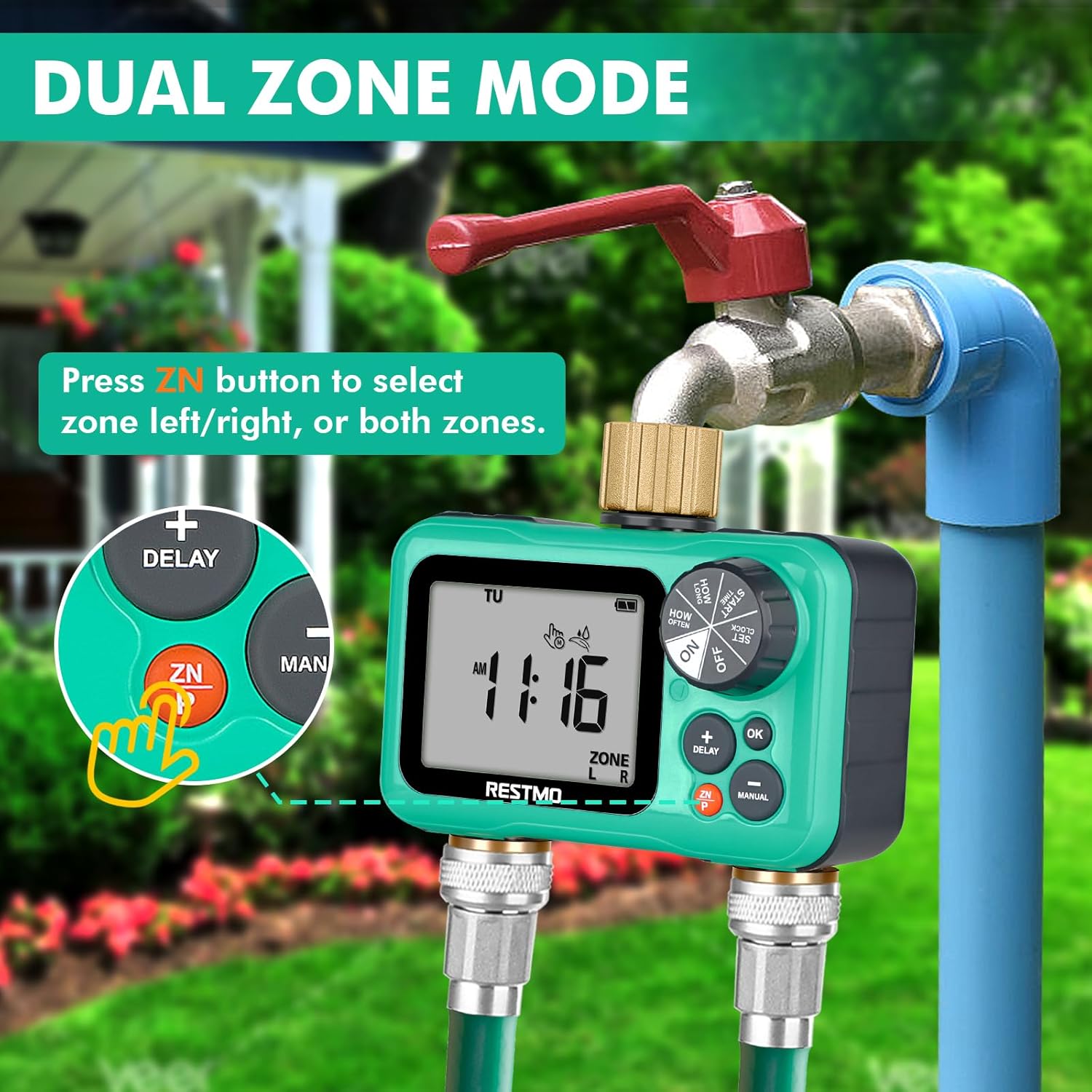
Image: The timer displaying "ZONE L" and "ZONE R", with an arrow pointing to the ZN button, indicating how to switch between the left and right watering zones.
ساتنه
- د بیټرۍ بدلول: Replace batteries annually or when the low battery indicator appears on the LCD screen. Always use new AA alkaline batteries.
- پاکول: Clean the timer's exterior with a soft, damp ټوکر د کثافاتو پاکوونکي یا محلول مه کاروئ.
- د فلټر سکرین: Periodically check the filter screen inside the brass inlet for debris. If clogged, remove and rinse it under running water.
- ژمی کول: Before freezing temperatures, disconnect the timer from the faucet and hoses. Remove batteries. Store the timer indoors in a dry, frost-free location. Failure to do so may result in damage not covered by warranty.
- د لیکو مخنیوی: Ensure all connections are hand-tightened. If leaks occur, check for worn washers and replace if necessary.
د ستونزو حل کول
| ستونزه | احتمالي لامل | د حل لاره |
|---|---|---|
| Timer not turning on/LCD blank. | مړه یا په غلط ډول نصب شوي بیټرۍ. | Replace batteries with new AA alkaline batteries. Ensure correct polarity. |
| Water not flowing. | Faucet is off; timer is set to OFF; low water pressure; clogged filter; program not set correctly. | Turn on faucet. Rotate dial to ON. Check water pressure (8-120 psi required). Clean inlet filter. Verify program settings. |
| Timer leaks at connections. | Loose connections; worn washers; damaged threads. | Tighten connections. Replace rubber washers if worn. Inspect threads for damage. |
| Programs not running at scheduled times. | Timer set to OFF; incorrect clock setting; rain delay active; program deleted or incorrectly set. | Ensure dial is ON. Reset clock. Check if rain delay is active. Re-program schedules. |
| LCD screen is faded or unreadable. | Exposure to direct, intense sunlight/heat; low battery. | Relocate timer to a shaded area if possible. Replace batteries. If problem persists, contact customer support. |
مشخصات
- ماډل: O-HT-2
- Inlet/Outlet Thread: 3/4" NH (pure brass)
- Independent Zones: 2
- Independent Programs: Up to 3 per zone (P1, P2, P3)
- کاري فشار: 8 - 120 PSI (0.5 - 8 Bar)
- د جریان اعظمي حد: 10 GPM (35 LPM)
- د کار د حرارت درجه: ۴۱ - ۱۰۰.۴ درجی فارنهایټ (۵ - ۳۸ درجی سانتی ګراد)
- د اوبو ورکولو فریکونسی: 1-23 hours or 1-30 days
- د اوبو ورکولو موده: له 1 دقیقې څخه تر 299 دقیقو
- د بریښنا سرچینه: ۲ x AA الکلین بیټرۍ (شامل نه دي)
- د سکرین اندازه: ۷۸۷ انچه
- ابعاد: ۲"D x ۲.۷۵"W x ۱.۵"H (تقریبا)
- وزن: ۶ پونډه (۳ کیلو ګرامه)
- مواد: Brass, UV-resistant plastic
تضمین او ملاتړ
Restmo is committed to providing reliable and intelligent watering solutions. For any questions, concerns, or technical assistance regarding your sprinkler timer, please contact Restmo Customer Service.
While specific warranty details are not provided in this manual, Restmo aims to ensure customer satisfaction. Please retain your proof of purchase for any warranty claims.
For further support, visit the official Restmo store or contact their customer service channels as provided with your product packaging or on their official webسایټ

Image: The official Restmo brand logo.


