۱.۱. د خوندیتوب مهم معلومات
To ensure safe operation and prevent damage to the projector, observe the following precautions:
- د بریښنا رسول: Use only the power cord and adapter specified for this projector. Ensure the power outlet matches the projector's voltage اړتیاوې.
- وینټیلیشن: د هوا د جریان لارې مه بندوئ. د پروجیکټر شاوخوا کافي ځای ډاډمن کړئ ترڅو د ډیر تودوخې مخه ونیول شي.
- مایع او رطوبت: Keep the projector away from water or other liquids. Do not operate in high humidity environments.
- بهرني شیان: Do not insert any objects into the projector's openings.
- Lens Warning: کله چې l وي، مستقیم د پروجیکټر لینز ته مه ګورئamp فعال دی، ځکه چې روښانه رڼا کولی شي سترګو ته زیان ورسوي.
- پاکول: د پاکولو دمخه د بریښنا تار جلا کړئ. نرم او وچ ټوکر وکاروئ. د مایع یا ایروسول پاکوونکو څخه ډډه وکړئ.
- خدمت: د پروجیکټر د خدمت کولو هڅه مه کوئ. ټولې خدمتونه وړ خدماتو پرسونل ته راجع کړئ.
2. محصول ختم شوview
Familiarize yourself with the various parts and controls of your Casio XJ-A155V projector.
2.1 مخ View

The front of the projector features the projection lens and front ventilation grilles. The lens is where the image is projected from.
2.2 شاته View او اتصال

The rear panel provides all the necessary ports for connecting external devices.

Ports include:
- ای وی: For composite video and audio input.
- COMPUTER/YCbCr/YPbPr: VGA port for computer connection, also supports component video.
- HDMI: د ډیجیټل ویډیو او آډیو ان پټ لپاره د لوړ تعریف ملټي میډیا انٹرفیس.
- USB: د USB وسیلو د نښلولو لپاره.
- سریال: For control and service connections.
۴.۳ د پورتنۍ پینل کنټرولونه

په پورتنۍ پینل کې د پروجیکټر د چلولو لپاره اصلي کنټرول تڼۍ شتون لري.
- ځواک / تمځای: پروجیکټر چالان یا بند کړئ.
- پیژندنه: Selects the input source (HDMI, Computer, AV, etc.).
- اتو: Automatically adjusts the image.
- زوم: د عکس اندازه تنظیموي.
- فوکس: Adjusts the image clarity.
- مینو: Opens the on-screen display (OSD) menu.
- ننوتل: په مینو کې انتخابونه تاییدوي.
- ESC: د اوسني مینو یا فعالیت څخه وځي.
- Arrow Keys (< ^ v >): د مینو انتخابونو له لارې حرکت وکړئ او تنظیمات تنظیم کړئ.
2.4 لاندې View and Product Label

The bottom of the projector includes adjustable feet for tilt and stability, along with the product information label.
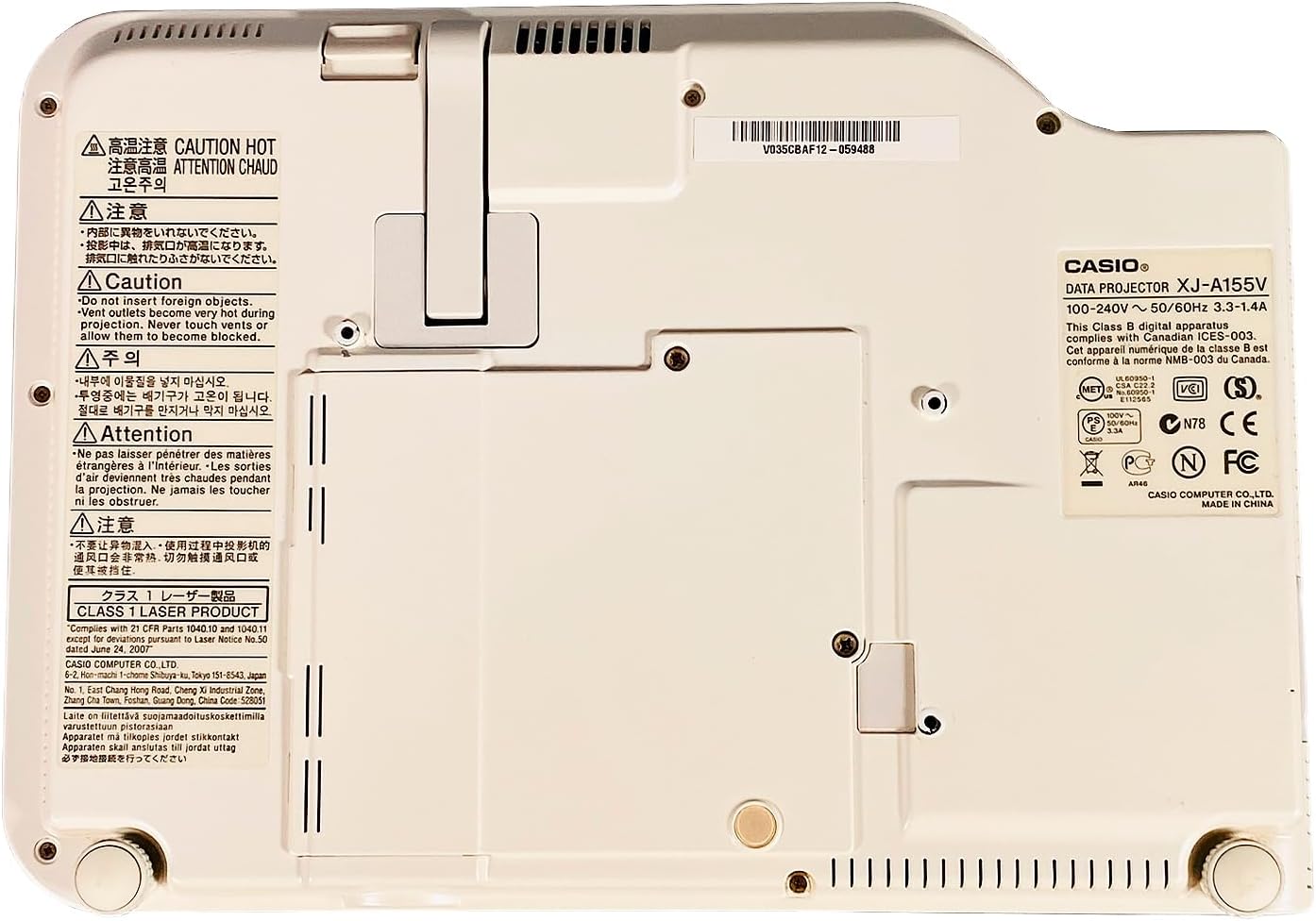
The product label provides important details such as the model number (XJ-A155V), power requirements (100-240V ~ 50/60Hz), and various compliance certifications.
3. ترتیب کول
3.1 پیک کول
Carefully remove the projector and all accessories from the packaging. Retain the packaging for future transport or storage.
3.2 ځای پرځای کول
Place the projector on a stable, level surface. Ensure there is sufficient space around the projector for ventilation. Adjust the projector's feet to achieve the desired projection angle and image alignment.
3.3 د نښلولو بریښنا
- د بریښنا کیبل د پروجیکټر د بریښنا ان پټ پورټ سره وصل کړئ.
- د بریښنا کیبل بله پای په مناسب بریښنایی پلورنځي کې ولګوئ.
۱.۳ د ننوتلو سرچینو نښلول
Connect your desired video and audio sources to the appropriate ports on the rear of the projector.
- HDMI: For high-quality digital video and audio from devices like Blu-ray players, laptops, or gaming consoles.
- COMPUTER (VGA): For connecting to a computer's VGA output.
- ای وی: For standard definition video and stereo audio from devices like DVD players or older video sources.
- USB: For connecting USB storage devices or for certain control functions.
۴. د پروجیکټر چلول
۸ پاور آن/بند
- د فعالولو لپاره: فشار ورکړئ بریښنا / سټینډبای button on the top panel or remote control. The power indicator light will illuminate.
- د بریښنا بندولو لپاره: فشار ورکړئ بریښنا / سټینډبای button again. Confirm power off if prompted. The projector will enter a cool-down cycle before fully shutting down.
4.2 د ننوتلو انتخاب
فشار ورکړئ INPUT button on the top panel or remote control to cycle through available input sources (HDMI, Computer, AV, etc.) until your desired source is displayed.
۴.۲ د تمرکز او زوم تنظیم کول
- تمرکز: د کارولو فوکس buttons (or corresponding controls on the remote) to sharpen the image until it is clear.
- زوم: د کارولو زوم buttons (or corresponding controls on the remote) to adjust the size of the projected image.
4.4 د مینو نیویګیشن
فشار ورکړئ مینو button to open the On-Screen Display (OSD) menu. Use the arrow keys to navigate through options and ننوتل غوره کول. مطبوعاتي ESC د مینو څخه د وتلو لپاره.
۵.۴ د انځور سمونونه
Within the OSD menu, you can adjust various image settings such as Brightness, Contrast, Color, Aspect Ratio, and Keystone Correction to optimize your viewتجربه
5. ساتنه
۴.۱ د پروجیکټر پاکول
- لینز: لینز په نرمۍ سره د نرم، لینټ نه پاک ټوکر سره پاک کړئ چې په ځانګړي ډول د نظري سطحو لپاره ډیزاین شوی. د کثافاتو پاکونکو څخه کار مه اخلئ.
- Casing: پروجیکټر پاک کړئ casing with a soft, dry cloth. For stubborn dirt, dampen the cloth slightly with water, then wipe dry.
- د وینټیلیشن ګریلونه: Use a soft brush or a vacuum cleaner with a brush attachment to remove dust from the ventilation grilles.
5.2 د هوا فلټر ساتنه
Regularly check and clean the air filter (if accessible) to maintain optimal cooling and projector performance. Refer to the on-screen prompts or specific model documentation for filter location and cleaning instructions.
6. ستونزه حل کول
که تاسو د خپل پروجیکټر سره ستونزې سره مخ شئ، لاندې عامې ستونزې او حل لارې وګورئ:
- نه انځور:
- ډاډ ترلاسه کړئ چې پروجیکټر فعال دی او د بریښنا شاخص روښانه دی.
- Verify the input source is correctly selected and the source device is on.
- Check all cable connections (HDMI, VGA, etc.) are secure.
- خړ انځور:
- Adjust the focus using the فوکس تڼۍ
- Ensure the projection surface is flat and the projector is at an appropriate distance.
- غږ نشته:
- په پروجیکټر او سرچینې وسیله دواړو کې د حجم ترتیبات وګورئ.
- Ensure audio cables are correctly connected (if not using HDMI for audio).
- ریموټ کنټرول کار نه کوي:
- بیټرۍ په ریموټ کنټرول کې ځای په ځای کړئ.
- ډاډ ترلاسه کړئ چې د ریموټ او پروجیکټر د IR ریسیور ترمنځ هیڅ خنډ شتون نلري.
7. مشخصات
Key technical specifications for the Casio XJ-A155V DLP Projector:
| فیچر | مشخصات |
|---|---|
| برانډ | کاسیو |
| ماډل | XJ-A155V |
| روښانتیا | 3,000 د ANSI Lumens |
| قرارداد | 1024x768 (XGA) |
| د تناسب تناسب | 1800:1 |
| د ښودلو ډول | DLP |
| د رڼا سرچینه | Laser/LED Hybrid |
| د ارتباط ټیکنالوژي | HDMI, USB, VGA, AV, Serial |
| ځانګړی ځانګړنه | د پورټ وړ |
| د محصول ابعاد | 8 x 11.7 x 1.7 انچه |
8. تضمین او ملاتړ
د تضمین معلوماتو او تخنیکي ملاتړ لپاره، مهرباني وکړئ د خپل پیرود سره چمتو شوي اسنادو ته مراجعه وکړئ یا د پرچون پلورونکي سره اړیکه ونیسئ. د تضمین ادعاوو لپاره د پیرود ثبوت وساتئ.