پیژندنه
This manual provides detailed instructions for the operation and maintenance of your Casio WS-1400H Series digital watch. Please read this manual carefully to ensure proper use and to fully utilize all features of your watch.
The Casio WS-1400H is designed for active individuals, featuring a 60-lap memory stopwatch, 100-meter water resistance, and a long-lasting 10-year battery.
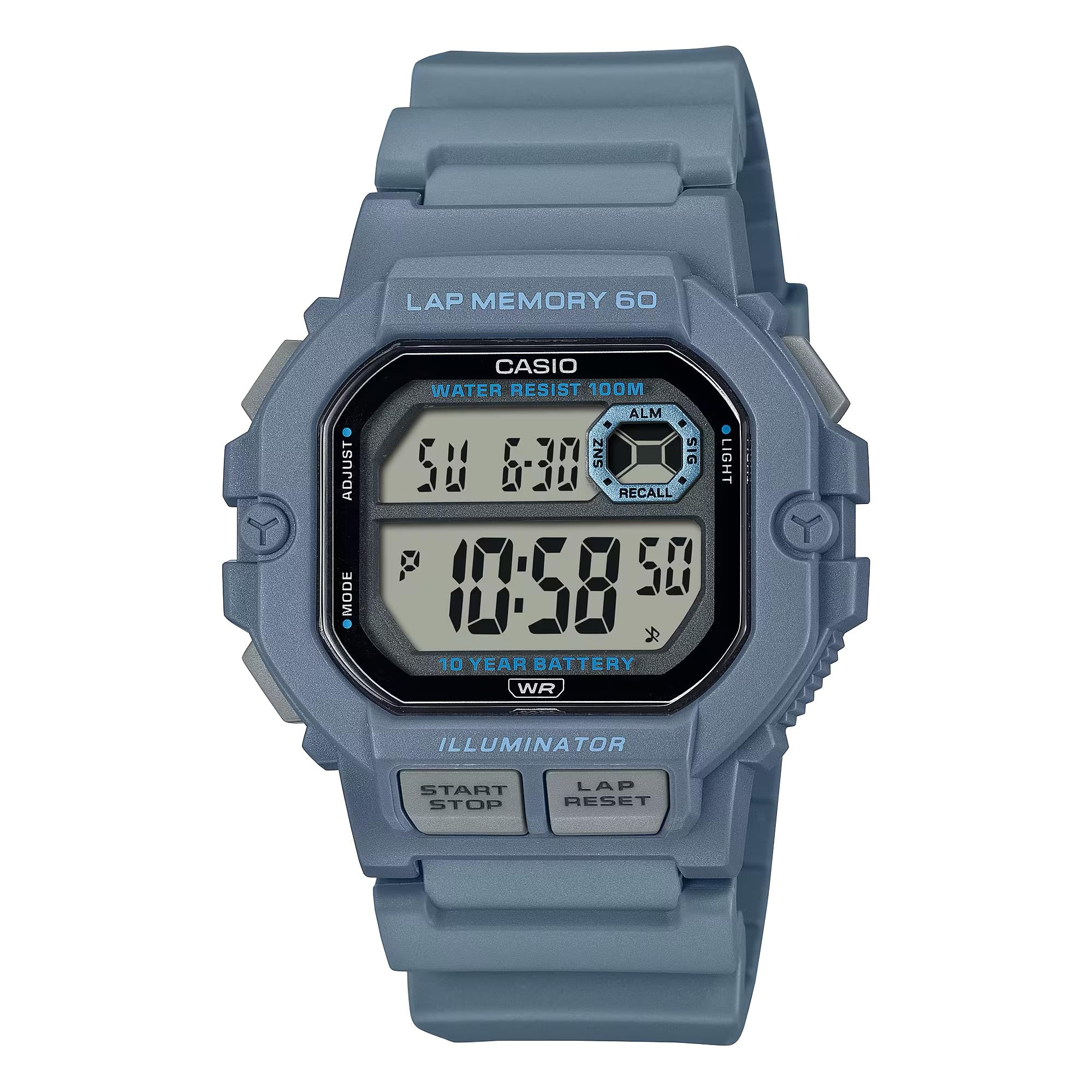
Image: Casio WS-1400H Series Digital Watch, showcasing its design and digital display.
چمتو کول
د لومړني وخت او نیټې ترتیب
- د وخت ساتلو حالت کې، فشار ورکړئ او ونیسئ سمون button (usually top-left) until the seconds begin to flash, indicating the setting screen.
- فشار ورکړئ موډ button (usually bottom-left) to cycle through the settings: Seconds → Hour → Minute → Year → Month → Day.
- د کارولو پیل / ودرول button (usually top-right) to increase the flashing value, or the LAP/RESET button (usually bottom-right) to decrease it.
- کله چې ټول ترتیبات سم شي، فشار ورکړئ سمون د ترتیب سکرین څخه د وتلو لپاره تڼۍ.
د بیټرۍ معلومات
Your Casio WS-1400H watch is powered by a CR2025 battery, providing approximately 10 years of operation. When the display becomes dim or functions become unreliable, it is time to replace the battery. It is recommended to have battery replacement performed by a qualified watch technician to ensure proper sealing and water resistance.
عملیاتي طریقې
The watch features several modes accessible by pressing the موډ تڼۍ
د وخت ساتلو طریقه
Displays the current time (hour, minute, second), day of the week, and date. This is the default mode.
د تمځیو حالت
The stopwatch measures elapsed time, split times, and two finishes. It has a 60-lap memory function.
- To enter Stopwatch Mode: Press the موډ button until 'STW' or 'STOPWATCH' appears.
- To start/stop: Press the پیل / ودرول button (front button).
- To record a lap/split time: Press the LAP/RESET button while the stopwatch is running.
- To reset: With the stopwatch stopped, press the LAP/RESET تڼۍ
- ته view lap memory: In Stopwatch Mode, press the سمون button to cycle through recorded lap times.
د شمېرنې شمېرل شوی وخت
The countdown timer can be set for a specific duration and will alert you when the time expires.
- To enter Timer Mode: Press the موډ button until 'TMR' or 'TIMER' appears.
- To set the timer: Press and hold the سمون button until the hour/minute digits flash. Use پیل / ودرول او LAP/RESET to adjust values, and موډ to move between hours and minutes. Press سمون تصدیق کول.
- To start/stop the timer: Press the پیل / ودرول تڼۍ
- To reset the timer: With the timer stopped, press the LAP/RESET تڼۍ
د الارم حالت
The watch features multiple daily alarms and an hourlد وخت سیګنال.
- To enter Alarm Mode: Press the موډ تڼۍ تر هغه وخته پورې چې 'ALM' یا 'ALARM' ښکاره شي.
- To set an alarm: Press and hold the سمون button until the hour digits flash. Use پیل / ودرول او LAP/RESET to adjust values, and موډ to move between hours and minutes. Press سمون تصدیق کول.
- To turn alarms ON/OFF: In Alarm Mode, press the پیل / ودرول button to toggle through alarms and the hourlد وخت سیګنال.
دوه ګونی وخت حالت
Allows you to keep track of a second time zone.
- To enter Dual Time Mode: Press the موډ button until 'DT' or 'DUAL TIME' appears.
- To set dual time: Press and hold the سمون button until the hour digits flash. Use پیل / ودرول او LAP/RESET to adjust values, and موډ to move between hours and minutes. Press سمون تصدیق کول.
د LED backlight
The watch features an LED backlight for illumination in low-light conditions.
- To activate: Press the رڼا button (usually top-right or a dedicated button).
- Afterglow duration: The backlight can be set to illuminate for 1.5 seconds or 3 seconds. This setting is typically adjusted in Timekeeping Mode's setting screen, cycling through options with the موډ button after setting time.
ساتنه
د اوبو مقاومت
Your watch is rated for 100-meter water resistance. This means it is suitable for swimming, showering, and snorkeling. However, it is not suitable for scuba diving. کله چې ساعت لوند یا ډوب وي، تڼۍ مه چلوئ.
پاکول
Wipe the watch regularly with a soft, dry cloth to remove dirt and moisture. For stubborn dirt, use a soft cloth dampened with water and a mild neutral detergent, then wipe dry.
د بیټرۍ بدلول
As mentioned, the CR2025 battery has a 10-year life. When replacement is needed, it is strongly recommended to take the watch to an authorized Casio service center or a professional watch repair shop. This ensures the watch's water resistance is maintained after the battery compartment is opened.
د ستونزو حل کول
- ښودنه خالي یا تیاره ده: بیټرۍ ممکن ټیټه یا خالي وي. بیټرۍ بدله کړئ.
- وخت غلط دی: Re-adjust the time and date settings as described in the Setup section. Ensure the correct AM/PM setting is selected.
- تڼۍ بې ځوابه دي: Ensure the watch is not in a frozen state due to extreme cold. If the issue persists, a battery reset (AC reset) might be required by a professional.
- د ساعت دننه اوبه: ساعت سمدلاسه یو مجاز خدمت مرکز ته یوسئ. هڅه مه کوئ چې ساعت پخپله خلاص کړئ.
مشخصات
| د ماډل شمیره | د WS-1400H-2AVCF معرفي کول |
| جوړونکی | کاسیو |
| د محصول ابعاد | 5 x 7 x 5 انچه؛ 5.26 اونس |
| بیټرۍ | 1 LR44 battery (CR2025 equivalent), included |
| د اوبو مقاومت | ۳۰ متره (۳ ATM) |
| د بیټرۍ ژوند | تقریبا 10 کاله |
| Stopwatch Memory | 60 لپاس |
تضمین او ملاتړ
For warranty information, service, and support, please refer to the official Casio website or contact Casio customer service directly. Keep your proof of purchase for warranty claims.
رسمي کیسیو Webسایټ: www.casio.com