1. پیژندنه
Welcome to the instruction manual for your SONICAKE Sonic Cube II USB Audio Interface Mixer. This device is designed to provide high-quality audio recording, streaming, and podcasting capabilities for musicians, producers, and content creators. It features dual-channel analog preamps, 48V phantom power, and integrates with powerful computer software for digital modeling and DSP effects. This manual will guide you through the setup, operation, and maintenance of your Sonic Cube II, ensuring optimal performance and longevity.

Image 1.1: The SONICAKE Sonic Cube II USB Audio Interface Mixer.
2. محصول ختم شوview
2.1 کلیدي ځانګړتیاوې
- High-Performance Converters: Supports recording and mixing at up to 24-bit/48kHz for high-quality audio reproduction with low noise.
- Dual-Channel Analog Preamps: Equipped with high-quality analog preamps for excellent dynamic range and low distortion, suitable for various instruments and microphones.
- +48V فینټم پاور: Provides power for condenser microphones, ensuring compatibility with a wide range of professional audio equipment.
- Digital Modeling & DSP Effects: Includes powerful computer software with built-in digital modeling for guitar amplifiers and various DSP effects, enhancing creative possibilities.
- "ON AIR" Function: Simplifies live streaming with a dedicated function for ease of use.
- پراخه مطابقت: Compatible with most recording software (DAWs) on Mac and Windows operating systems, including ProTools, Reaper, and Ableton.
- د USB نښلول: Connects via USB-C/USB-A, offering reliable power and data transmission.

Image 2.1: The Sonic Cube II highlighting its high-quality analog preamps for superior sound.
2.2 کنټرولونه او ارتباطات

Image 2.2: Front and rear panel diagram of the Sonic Cube II, illustrating all controls and connections.
- د MIC 1 داخلول: XLR input for connecting a microphone.
- LINE/INST 2 Input: 1/4" (6.35mm) TRS input for connecting line-level instruments or high-impedance instruments like guitars.
- EFX / +48V Switch: Activates DSP effects or +48V phantom power for MIC 1.
- GAIN 1 Knob: Adjusts the input gain level for MIC 1.
- GAIN 2 Knob: Adjusts the input gain level for LINE/INST 2.
- RVB / HI-Z Switch: Activates reverb effect or sets LINE/INST 2 input to high impedance (HI-Z) for instruments.
- د وتلو نوب: Controls the overall output volume to balanced outputs and headphones.
- ON AIR / MONITOR Button: Engages direct monitoring for real-time input sound or activates the "ON AIR" function for streaming.
- د هیډفون محصول: 1/4" (6.35mm) TRS stereo output for connecting headphones.
- د USB پورټ (ډول-سي): Connects the device to a computer for power and data transfer.
- AUTO OUTPUT Switch: Toggles automatic output routing.
- OTG Port (Type-C): For connecting to mobile devices (e.g., smartphones, tablets) for recording or streaming.
- BALANCED OUTPUT (L/R): 1/4" (6.35mm) TRS outputs for connecting to studio monitors or other audio equipment.
3. د تنظیم کولو لارښود
3.1 د سیسټم اړتیاوې
- عملیاتي سیسټم: Windows, macOS.
- مطابقت لرونکي وسایل: Personal Computer, Digital Audio Workstation (DAW).
- ملاتړ شوی سافټویر: ProTools, Reaper, Ableton, and other standard DAW software.
3.2 د هارډویر اتصال
- Connect the Sonic Cube II to your computer using a USB cable. The device is bus-powered, meaning it draws power directly from your computer via the USB connection.
- Connect your microphone to the MIC 1 XLR input.
- Connect your instrument (e.g., guitar, bass, keyboard) to the LINE/INST 2 1/4" input.
- Connect your headphones to the Headphone Output for monitoring.
- Connect your studio monitors to the BALANCED OUTPUT (L/R) using 1/4" TRS cables.

Image 3.1: Connecting the Sonic Cube II to a computer via USB for power and data.
۲.۵ د سافټویر او ډرایور نصبول
For optimal performance, it is recommended to install the dedicated drivers and software for the Sonic Cube II. While the device may function as a generic USB audio device, proprietary drivers often provide lower latency and access to advanced features.
- د وینډوز کاروونکي: Search online for "Sonic Cube II Software & Firmware Download". Download and install both the "Sonic Mix Setup" and the "Sonicake USB ASIO Driver". This is crucial for proper device recognition and low-latency performance with DAWs.
- د macOS کاروونکي: The device is generally plug-and-play with macOS. If specific drivers or software are available, they can be found on the official SONICAKE support webسایټ
After installation, restart your computer and ensure the Sonic Cube II is selected as your audio input and output device in your operating system's sound settings and your preferred Digital Audio Workstation (DAW).
4. عملیاتي لارښوونې
4.1 بریښنا کول / بندول
The Sonic Cube II is USB bus-powered. It powers on automatically when connected to a powered USB port on your computer or mobile device. To power off, simply disconnect the USB cable.
4.2 Input Level Adjustment
- د کارولو ګین 1 knob to adjust the input level for the microphone connected to MIC 1.
- د کارولو ګین 2 knob to adjust the input level for the instrument or line-level device connected to LINE/INST 2.
- Monitor the input levels in your DAW to avoid clipping (distortion). Aim for levels that peak around -6dB to -3dB.
۴.۳ فینټم پاور (+۴۸ وولټ)
If you are using a condenser microphone with the MIC 1 input, you will need to activate +48V phantom power. Press the EFX / +48V switch to engage phantom power. Ensure your microphone requires phantom power before activating it. Dynamic microphones typically do not require phantom power.
4.4 Direct Monitoring and "ON AIR" Function
د ON AIR / MONITOR button allows for direct monitoring, enabling you to hear your input signal in real-time through your headphones or studio monitors without latency. This is essential for recording and live performance.
- فشار ورکړئ ON AIR / MONITOR button to activate direct monitoring.
- When engaged, the button's indicator light will illuminate.
- This function also serves as an "ON AIR" mode for streamlined live streaming, routing your audio directly.

Image 4.1: The Sonic Cube II highlighting the "One-Click Monitoring" feature via the ON AIR / MONITOR button.
4.5 Output Level Adjustment
لوی استعمال کړئ OUTPUT knob to control the overall volume of the balanced outputs (L/R) and the headphone output. Adjust this to a comfortable listening level. The headphone output volume is linked to the main output knob.
5. Software and DSP Effects
The Sonic Cube II includes powerful computer software that expands its capabilities with digital modeling and DSP effects. This software allows you to access a variety of guitar amplifier models, cabinet simulations, and other digital signal processing effects directly on your computer.
- Install the "Sonic Mix Setup" software as described in Section 3.3.
- Launch the software to access the digital modeling and DSP effects interface.
- د مختلفو سره تجربه وکړئ amp models and effects to shape your sound for recording or live streaming.
- Ensure the software is correctly configured to use the Sonic Cube II as its audio input and output device.
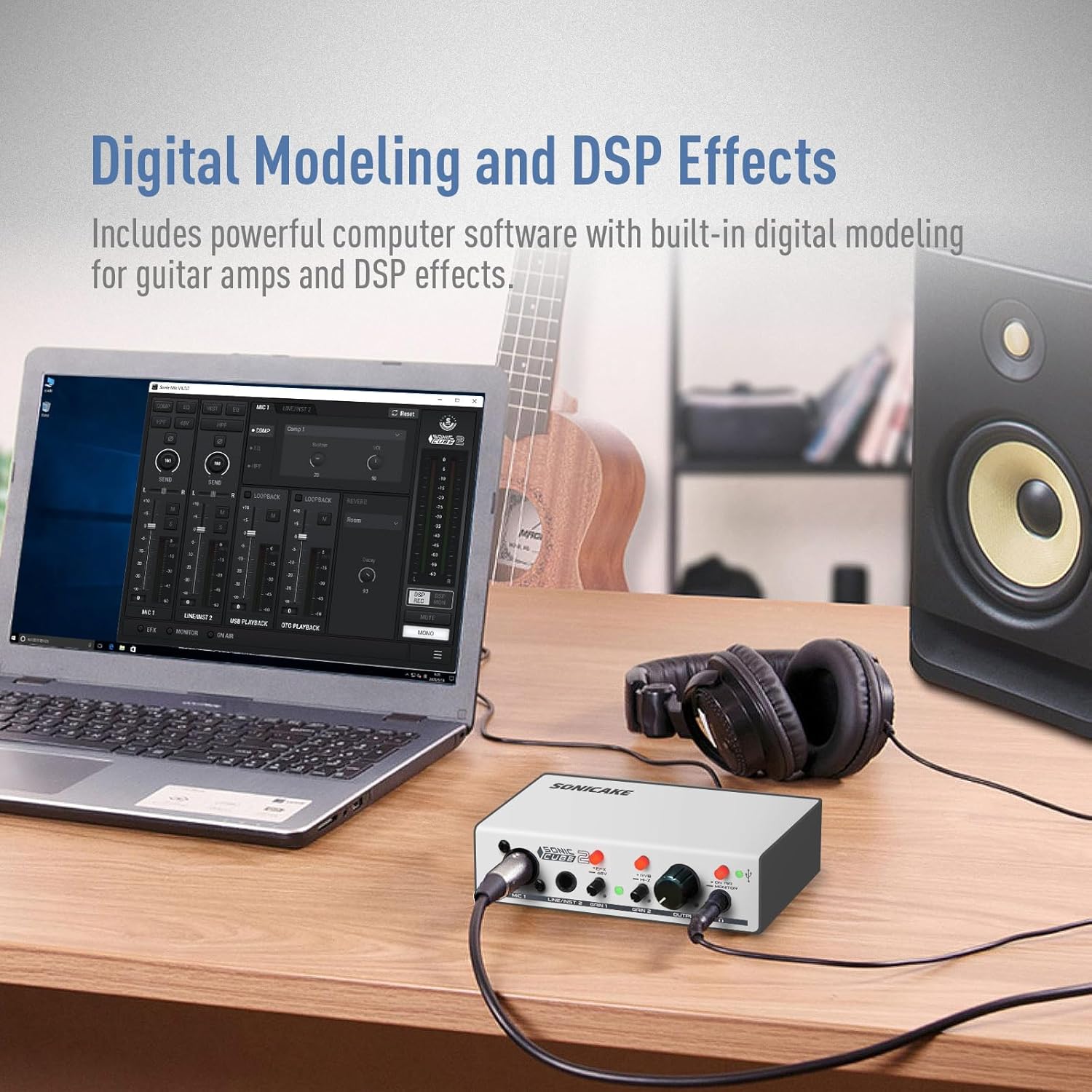
Image 5.1: The Sonic Cube II integrated with computer software for digital modeling and DSP effects.
6. ساتنه
- پاکول: د وسیلې بهرنۍ برخه پاکولو لپاره نرم، وچ ټوکر وکاروئ. د مایع پاکوونکو یا محلولونو کارولو څخه ډډه وکړئ، ځکه چې دوی ممکن پای یا داخلي برخو ته زیان ورسوي.
- ذخیره کول: Store the Sonic Cube II in a cool, dry place away from direct sunlight, extreme temperatures, and high humidity.
- سمبالول: وسیله په احتیاط سره اداره کړئ. د غورځولو یا قوي ټکانونو سره مخ کیدو څخه ډډه وکړئ.
- اړیکې: Periodically check all cable connections for wear and tear. Ensure cables are securely plugged in to prevent signal loss or intermittent issues.
7. ستونزه حل کول
If you encounter issues with your Sonic Cube II, refer to the following troubleshooting tips:
- د غږ محصول نشته:
- Ensure the Sonic Cube II is properly connected to your computer via USB and powered on.
- Check that the OUTPUT knob is turned up to an audible level.
- Verify that the Sonic Cube II is selected as the default audio output device in your computer's sound settings and your DAW.
- Check headphone and monitor connections.
- No Input Signal / Low Input Volume:
- Ensure your microphone or instrument is correctly connected to the appropriate input (MIC 1 or LINE/INST 2).
- تنظیم کړئ ګین 1 or ګین 2 knobs to increase the input level.
- If using a condenser microphone, ensure +48V phantom power is activated via the EFX / +48V سویچ
- Verify that the Sonic Cube II is selected as the default audio input device in your computer's sound settings and your DAW.
- Check microphone/instrument cables for damage.
- د موټر چلوونکي ستونزې (وینډوز):
- If the device is not recognized or experiencing high latency, ensure you have installed both the "Sonic Mix Setup" and "Sonicake USB ASIO Driver" as described in Section 3.3.
- Try uninstalling and reinstalling the drivers.
- وسیله په خپل کمپیوټر کې یو بل USB پورټ سره وصل کړئ.
- تحریف شوی آډیو:
- کم کړئ ګین 1 or ګین 2 knobs to prevent input clipping.
- ښکته OUTPUT knob if the distortion occurs at the output stage.
- د خرابو کیبلونو یا اتصالونو لپاره وګورئ.
8. مشخصات
| فیچر | مشخصات |
|---|---|
| برانډ | سونیکیک |
| د ماډل شمیره | QAI-23 |
| د توکي وزن | 15.5 اونس |
| د کڅوړې ابعاد | 8.03 x 5.43 x 3.23 انچه |
| د ارتباط ټیکنالوژي | USB, XLR, 6.35mm TRS |
| د چینلونو شمیر | 2 |
| مطابقت لرونکې وسیلې | DAW, Personal Computer |
| ملاتړ شوی سافټویر | ProTools, Reaper, Ableton (versions not specified) |
| عملیاتي سیسټم | وینډوز، macOS |
| د پرینټ ځواک | +48V |
| ماکس ایسampد نرخ / بټ ژوروالی | 48kHz / 24-bit |
9. تضمین او ملاتړ
For warranty information and technical support, please refer to the documentation included with your product or visit the official SONICAKE website. Keep your proof of purchase for warranty claims. If you encounter issues not covered in this manual, contacting SONICAKE customer support is recommended for further assistance.


