1. محصول ختم شوview
The Mastech MS850D is a 6000-count True RMS auto-ranging digital multimeter designed for precise electrical measurements. It is suitable for professionals, technicians, and enthusiasts, offering a wide range of functions for various electrical applications.

شکل 1: مخکی view of the Mastech MS850D Digital Multimeter, displaying a measurement of 198.7 mV.
کلیدي ځانګړتیاوې:
- 6000 Counts Auto Ranging: Provides precise measurements across various ranges automatically.
- ریښتینی RMS: Ensures accurate readings for non-sinusoidal AC waveforms.
- Comprehensive Measurement Capabilities: اندازه کول AC/DC حجمtage, AC/DC Current, Resistance, Capacitance, Frequency, and Temperature.
- د خوندیتوب تصدیق شوی: CAT III 600V rating for safe use in electrical testing environments.
- د کاروونکي دوستانه دندې: Includes Buzzer/Continuity, Diode Test, Transistor Test (optional), MAX/MIN, REL, Non-Contact Voltage (NCV) Detection, Live Wire Recognition, Data Hold, Flashlight, and Auto Power Off.
- تړون ډیزاین: Ergonomic dimensions (150mm x 75mm x 47mm) and lightweight (284g) for easy handling.
2. د بسته محتويات
ډاډ ترلاسه کړئ چې لاندې ټول توکي ستاسو په بسته کې شامل دي:
- 1 x Mastech MS850D-6000 Counts True RMS Auto Ranging Digital Multimeter
- 1 x Temperature probe
- 1 x Pair of Test leads
- 2 x Batteries (AAA type, 1.5V)
- 1 x د کارونکي لارښود
3. د خوندیتوب معلومات
خبرداری: To avoid electric shock or personal injury, read all safety information before using this product. Use the multimeter only as specified in this manual; otherwise, the protection provided by the multimeter may be impaired.
- تل ډاډ ترلاسه کړئ چې ملټي میټر د کارولو دمخه په ښه کاري حالت کې دی.
- د ټاکل شوي حجم څخه ډیر مه پلي کوئtage, as marked on the multimeter, between the terminals or between any terminal and earth ground. The MS850D is rated for کیټ III 600V.
- د حجم سره کار کولو پر مهال له احتیاط څخه کار واخلئtagد 30V AC RMS، 42V چوکۍ، یا 60V DC څخه پورته. دا حجمونهtagد شاک خطر رامنځته کوي.
- Do not use the multimeter if the test leads are damaged or if the meter appears damaged.
- Ensure the rotary switch is in the correct position for the measurement you intend to make.
- هیڅکله د ازموینې سره وصل مه کوئ د حجم سرهtage source when the rotary switch is set to current, resistance, or continuity mode.
- Replace the battery and fuses only with the specified type and rating.
- ملټي میټر په چاودیدونکي ګاز، بخار یا دوړو ډک چاپیریال کې مه چلوئ.
- د اندازه کولو پرمهال ګوتې د ازموینې پروبونو کې د ګوتو ساتونکو شاته وساتئ.
4. ترتیب کول
4.1 د بیټرۍ نصب کول
The MS850D multimeter requires two 1.5V AAA batteries for operation. To install or replace batteries:
- ډاډ ترلاسه کړئ چې ملټي میټر بند دی او د ازموینې ټولې لیډونه منقطع کړئ.
- د ملټي میټر په شا کې د بیټرۍ د برخې پوښ ومومئ.
- د بیټرۍ پوښ خوندي کولو لپاره د سکرو ډرایور څخه کار واخلئ.
- Remove the cover and insert the two AAA batteries, observing the correct polarity (+ and -).
- د بیټرۍ پوښ بدل کړئ او پیچ پیچ کړئ.
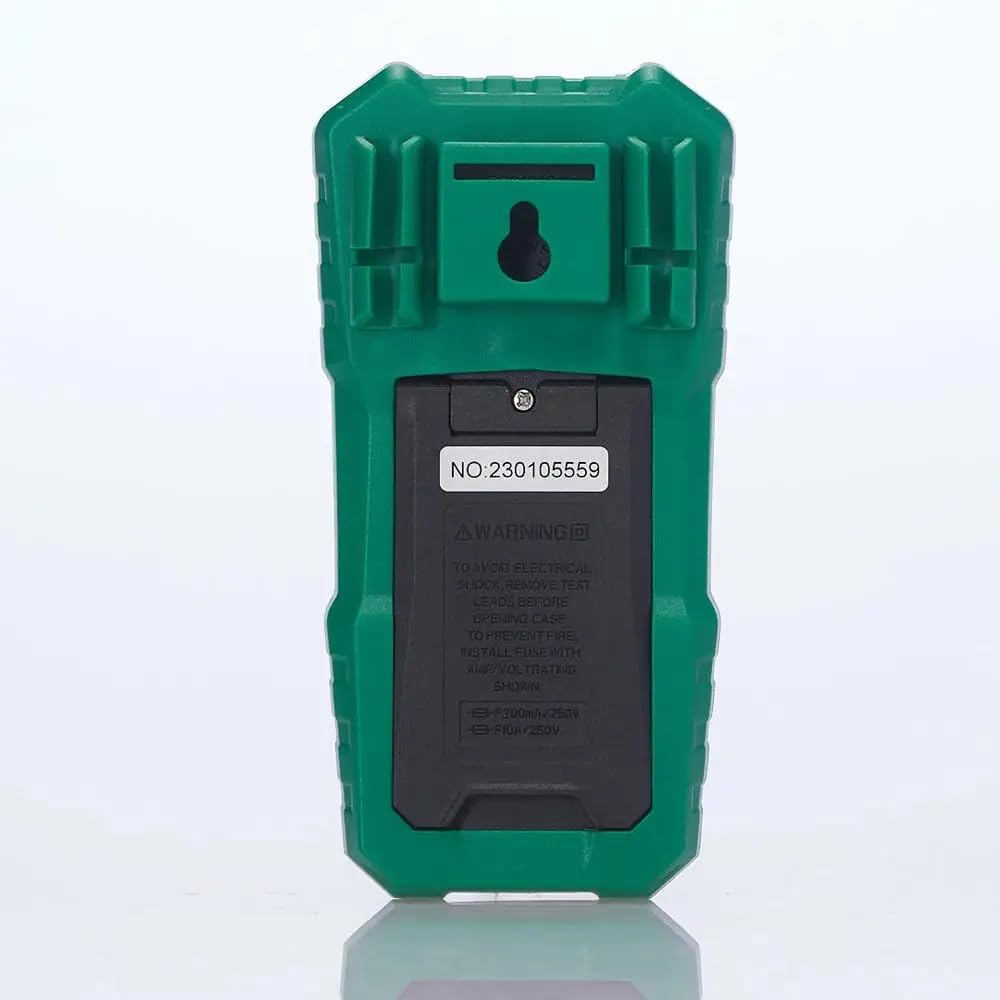
شکل 2: شاته view of the multimeter, illustrating the battery compartment and safety warnings.
۶.۲ د ټیسټ لیډونو نښلول
د دقیق او خوندي اندازه کولو لپاره د ازموینې لیډونو مناسب اړیکه اړینه ده.
- د تور ټیسټ لیډ دننه کړئ COM (عام) ان پټ جیک.
- د ډیری برخې لپارهtage, resistance, continuity, capacitance, frequency, and temperature measurements, insert the red test lead into the VΩmA داخل جیک
- For current measurements up to 600mA, insert the red test lead into the VΩmA داخل جیک
- For current measurements between 600mA and 10A, insert the red test lead into the 10A MAX داخل جیک

شکل ۳: زاویه لرونکی view of the multimeter, highlighting the input jacks for test leads.
5. عملیاتي لارښوونې
This section details how to use the Mastech MS850D for various measurements.
5.1 بریښنا کول / بندول
Rotate the central dial from the "OFF" position to any desired measurement function to power on the multimeter. To power off, rotate the dial back to the "OFF" position.
۴.۱ د روټري سویچ دندې
The rotary switch selects the primary measurement function:
- V~ (AC والیومtage): د متناوب جریان حجم اندازه کويtage.
- V- (DC Voltage): د مستقیم جریان حجم اندازه کويtage.
- Hz/% (Frequency/Duty Cycle): فریکونسي او د دندې دوره اندازه کوي.
- Ω (مقاومت): د برېښنا مقاومت اندازه کوي.
- Continuity/Diode: Checks for circuit continuity and tests diodes.
- NCV/Live: غیر تماس والیtage detection and Live Wire recognition.
- °C/°F (تودوخه): د شامل شوي پروب په کارولو سره د تودوخې اندازه کوي.
- hFE (ټرانزیسټر ازموینه): Measures transistor gain (requires optional socket).
- μA~ / μA- (AC/DC Microampساعته): Measures microampاوس مهال.
- mA~ / mA- (AC/DC Milliampساعته): ملی اندازه کويampاوس مهال.
- A~ / A- (AC/DC Ampساعته): اقدامات ampere current (up to 10A).
5.3 د تڼۍ دندې
- SEL (Select): د یو واحد روټري سویچ موقعیت کې د مختلفو دندو ترمنځ ټګل کوي (د مثال په توګه، AC/DC والیومtage, continuity/diode, °C/°F).
- هولډ: په ښودنه کې اوسنی لوستل کنګل کوي. د خوشې کولو لپاره بیا فشار ورکړئ.
- MIN/MAX/REL:
- Press once to enter MIN/MAX mode. The multimeter will record the minimum and maximum values. Press again to cycle between MIN, MAX, and current reading.
- Long press to activate REL (Relative) mode. This subtracts the current reading from all subsequent readings, useful for measuring changes.
- Flashlight Button (often combined with backlight): Activates the built-in flashlight for illuminating the measurement area.
5.4 Specific Measurement Procedures
5.4.1 ټوکtagد e اندازه کول (AC/DC)
- د څرخى سويچ ته وټاکئ V~ د AC حجم لپارهtage یا V- د DC حجم لپارهtage. Use the SEL button to switch between AC and DC if the position combines them.
- د تور ټیسټ مشرتابه ته COM جیک او سور ټیسټ د VΩmA جیک
- د ازموینې پروبونه د سرکټ یا برخې په اوږدو کې په موازي ډول وصل کړئ ترڅو اندازه شي.
- ټوک ولولئtage ارزښت په نندارتون کې.
۶.۲ د اوسني اندازه کول (AC/DC)
احتیاط: هیڅکله ملټي میټر د حجم سره موازي مه نښلوئ.tage source when measuring current. Always connect in series with the load.
- Determine if the current is AC or DC.
- Set the rotary switch to the appropriate current range (μA, mA, or A). Use the SEL button to switch between AC and DC.
- د تور ټیسټ مشرتابه ته COM جیک
- د 600mA پورې د جریانونو لپاره، سور ټیسټ لیډ د VΩmA جیک. د 10A پورې د جریانونو لپاره، سور ټیسټ لیډ سره وصل کړئ 10A MAX جیک
- Open the circuit where the current is to be measured and connect the multimeter in series.
- په ښودنه کې اوسنی ارزښت ولولئ.
5.4.3 د مقاومت اندازه کول
- ته د څرخېدو سویچ وټاکئ Ω موقعیت
- د تور ټیسټ مشرتابه ته COM جیک او سور ټیسټ د VΩmA جیک
- د مقاومت اندازه کولو دمخه ډاډ ترلاسه کړئ چې سرکټ یا برخه غیر انرژي شوې ده.
- د ازموینې پروبونه د برخې په اوږدو کې وصل کړئ.
- په ښودنه کې د مقاومت ارزښت ولولئ.
5.4.4 د دوام ازموینه
- ته د څرخېدو سویچ وټاکئ دوام/ډایډ position. Use SEL to select continuity mode (usually indicated by a speaker icon).
- د تور ټیسټ مشرتابه ته COM جیک او سور ټیسټ د VΩmA جیک
- د ازموینې پروبونه د سرکټ یا برخې په اوږدو کې وصل کړئ.
- که چیرې مقاومت تقریبا 50Ω څخه کم وي، نو بزر به غږ وکړي، چې دوام ښیي.
5.4.5 د ډایډ ټیسټ
- ته د څرخېدو سویچ وټاکئ دوام/ډایډ position. Use SEL to select diode mode (usually indicated by a diode symbol).
- د تور ټیسټ مشرتابه ته COM جیک او سور ټیسټ د VΩmA جیک
- سور پروب د انود سره او تور پروب د ډایډ کیتوډ سره وصل کړئ. ښودنه به د مخکینۍ حجم وښييtage غورځول.
- پروبونه برعکس کړئ. ښودنه باید د ښه ډایډ لپاره "OL" (خلاص لوپ) وښيي.
5.4.6 د ظرفیت اندازه کول
- ته د څرخېدو سویچ وټاکئ ظرفیت position (often combined with Hz/% or other functions, use SEL to select).
- د تور ټیسټ مشرتابه ته COM جیک او سور ټیسټ د VΩmA جیک
- ډاډ ترلاسه کړئ چې د اندازه کولو دمخه کپیسیټر په بشپړ ډول خارج شوی ترڅو ملټي میټر ته زیان ونه رسوي.
- د ازموینې پروبونه د کپیسیټر ترمینلونو په اوږدو کې وصل کړئ.
- په ښودنه کې د ظرفیت ارزښت ولولئ.
5.4.7 د فریکونسی اندازه کول
- ته د څرخېدو سویچ وټاکئ هرز /٪ position. Use SEL to select frequency mode.
- د تور ټیسټ مشرتابه ته COM جیک او سور ټیسټ د VΩmA جیک
- د سیګنال سرچینې په اوږدو کې د ازموینې پروبونه وصل کړئ.
- په ښودنه کې د فریکونسۍ ارزښت ولولئ.
5.4.8 دحرارت اندازه کول
- ته د څرخېدو سویچ وټاکئ ° سي / ° ف position. Use SEL to switch between Celsius and Fahrenheit.
- د تودوخې پروب سره وصل کړئ COM او VΩmA jacks, observing polarity if specified by the probe.
- د تودوخې د معاینې څوکه په هغه شی یا هغه ته نږدې کېږدئ چې تودوخه یې اندازه کیږي.
- په نندارتون کې د تودوخې ارزښت ولولئ.
5.4.9 غیر اړیکه والیومtage (NCV) کشف
- ته د څرخېدو سویچ وټاکئ NCV/ژوند موقعیت
- Move the top front part of the multimeter close to the conductor or outlet.
- The multimeter will emit an audible beep and the NCV indicator light will flash if AC voltage is detected, with the frequency of beeps and flashes increasing د حجم سرهtagځواک.
6. ساتنه
مناسب ساتنه ستاسو د ملټي میټر اوږد عمر او دقت تضمینوي.
6.1 پاکول
- قضیه د اعلان سره پاک کړئamp ټوکر او نرم صابون. د کثافاتو او محلولونو څخه کار مه اخلئ.
- د ننوتلو ټرمینلونه له خاورې او رطوبت څخه پاک وساتئ.
6.2 د بیټرۍ بدلول
Refer to Section 4.1 for detailed instructions on battery replacement. Replace batteries when the low battery indicator appears on the display.
6.3 د فیوز بدلول
If the current measurement function fails, the fuse may need replacement. The MS850D uses two fuses:
- F1: F300mA/250V (for mA/μA range)
- F2: F10A/250V (for 10A range)
To replace fuses:
- ډاډ ترلاسه کړئ چې ملټي میټر بند دی او د ازموینې ټولې لیډونه منقطع کړئ.
- د بیټرۍ د برخې پوښ خلاص کړئ (برخې 4.1 ته مراجعه وکړئ).
- Carefully remove the old fuse(s) and replace with new fuses of the exact same type and rating.
- د بیټرۍ پوښ بدل کړئ او پیچ پیچ کړئ.
7. ستونزه حل کول
If you encounter issues with your Mastech MS850D, refer to the following common problems and solutions:
| ستونزه | احتمالي لامل | د حل لاره |
|---|---|---|
| هیڅ ښودنه نشته یا تیاره ښودنه نشته | ټیټ یا مړه بیټرۍ | بیټرۍ بدل کړئ (۴.۱ برخې ته مراجعه وکړئ). |
| غلط لوستل | Incorrect function selected; Loose test leads; Damaged test leads; Out of range measurement | Verify rotary switch position; Ensure test leads are securely connected; Inspect test leads for damage; Check if the measurement is within the multimeter's specified range. |
| اوسنی اندازه کول کار نه کوي | فلج شوی فیوز | Replace the appropriate fuse (refer to Section 6.3). |
| "OL" (اوورلوډ) ښودل شوی | Measurement exceeds the selected range or multimeter's maximum capacity | Select a higher range if available, or confirm the measurement is within the multimeter's limits. |
8. مشخصات
Detailed technical specifications for the Mastech MS850D Digital Multimeter:

Figure 4: Detailed specifications and packaging information for the Mastech MS850D.
| اندازه کول | رینج | دقت |
|---|---|---|
| DC Voltage | 600mV, 6V, 60V, 600V | ±(0.8%+5) |
| AC Voltage | 600mV, 6V, 60V, 600V | ±(1.0%+10) |
| DC اوسنی | 600μA, 6000μA, 60mA, 600mA, 6A, 10A | ±(2.0%+5) (μA/mA), ±(3.0%+5) (A) |
| AC اوسنی | 600mA, 6A, 10A | ±(2.5%+5) (mA), ±(3.0%+5) (A) |
| مقاومت | 600Ω، 6KΩ، 60KΩ، 600KΩ، 6MΩ، 60MΩ | ±(1.0%+5) (600Ω-6MΩ), ±(1.2%+5) (60MΩ) |
| ظرفیت | 60nF, 600nF, 6μF, 60μF, 600μF, 6mF, 60mF, 100mF | ±(4.0%+25) (60nF-600μF), ±(5.0%+25) (6mF-100mF) |
| فریکونسی | ۱۰ هرټز، ۱۰۰ هرټز، ۱ کلو هرټز، ۱۰ کلو هرټز، ۱۰۰ کلو هرټز، ۱ میګاهرتز، ۱۰ میګاهرتز | ±(0.5%+4) |
| د حرارت درجه | -20°C to 0°C, 0°C to 400°C, 400°C to 1000°C | ±(4°C), ±(3.0%+3), ±(2.0%+3) |
| ښودل | د 6000 شمیره | |
| د خوندیتوب درجه | کیټ III 600V | |
| د بریښنا سرچینه | 2 x 1.5V AAA بیټرۍ | |
| ابعاد (L x W x H) | 150mm x 75mm x 47mm (نږدې) | |
| وزن | 284 ګرامه (تقریبا) | |
9. تضمین او ملاتړ
The Mastech MS850D Digital Multimeter is manufactured by Mastech and imported by REES52. For warranty information, technical support, or service inquiries, please refer to the warranty card included with your product or contact the seller/manufacturer directly.
مهرباني وکړئ د تضمین ادعاګانو لپاره د پیرود ثبوت وساتئ.
- جوړونکی: ماسټیک
- واردونکي: REES52
- د ماډل شمیره: MS850D


