پیژندنه
This manual provides essential information for the safe and efficient operation, maintenance, and troubleshooting of your Leitz IQ Slim Paper Shredder. Please read this manual thoroughly before using the shredder and retain it for future reference.
The Leitz IQ Slim Paper Shredder is designed for home and home office use, offering P4 cross-cut security for confidential documents. It features a compact design, quiet operation, and anti-jam technology to ensure a smooth shredding experience.
د خوندیتوب معلومات
خبرداری: د دې خوندیتوب لارښوونو په تعقیب کې پاتې راتلل ممکن د اور، بریښنا شاک، یا ټپي کیدو لامل شي.
- لاسونه، ویښتان او خلاصې جامې د کاغذ د ننوتلو له ځای څخه لرې وساتئ.
- ماشومان او حیوانات له شریډر څخه لرې وساتئ.
- شریډر کله چې په استعمال کې نه وي یا د کثافاتو د ډبې د لیږدولو، پاکولو یا خالي کولو دمخه خلاص کړئ.
- Do not shred metal objects, adhesive labels, or wet paper.
- که چیرې د بریښنا تار خراب شوی وي، شریډر مه چلوئ.
- د شریډر د خدمت کولو هڅه مه کوئ. ټولې خدمتونه وړ خدماتو پرسونل ته راجع کړئ.
- ډاډ ترلاسه کړئ چې شریډر په یوه مستحکم او هموار سطحه کې ځای پر ځای شوی دی.
چمتو کول
- بسته بندي کول: Carefully remove the shredder from its packaging. Ensure all components are present, including the shredder head, waste bin, and power cord.
- ځای په ځای کول: Position the shredder on a flat, stable surface in your desired home or office location. Ensure there is adequate space around the unit for ventilation and access to the power outlet.
- Bin Installation: Place the waste bin securely into the shredder base. The shredder head should sit firmly on top of the bin. The unit will not operate if the head is not correctly seated.
- د بریښنا پیوستون: د بریښنا تار په معیاري بریښنایی پلورنځی کې ولګوه.

شکل 1: مخکی view of the Leitz IQ Slim Paper Shredder, illustrating its compact design suitable for home or office environments.
عملیاتي لارښوونې
د کنټرول پینل ختم شوview
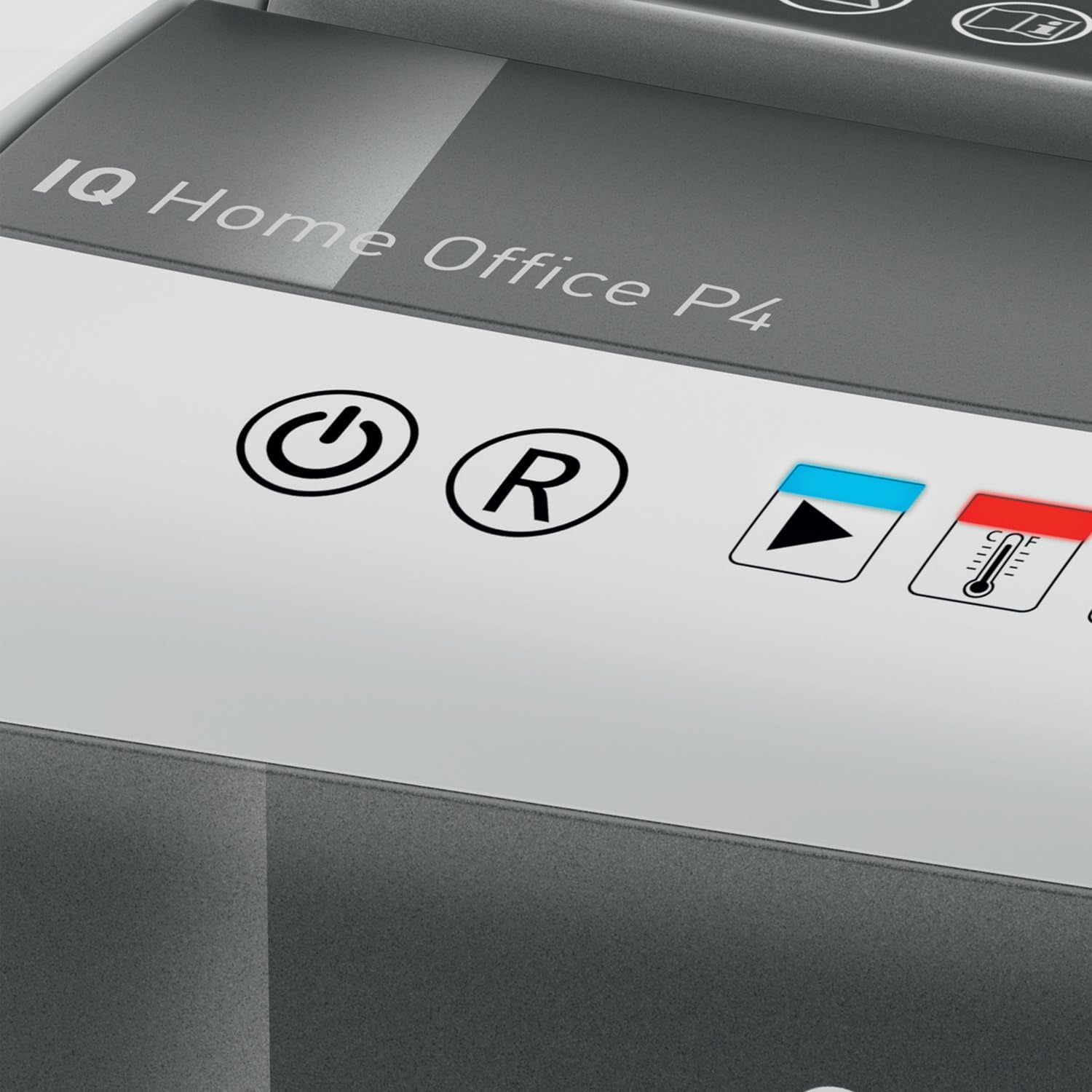
شکل 2: Close-up of the shredder's touch control panel, showing the power, reverse, and status indicators.
The shredder features intuitive touch controls for easy operation.
- Power Button (⌛): Press to turn the shredder ON or OFF.
- Reverse Button (R): Press to reverse the shredding mechanism, useful for clearing minor paper jams.
- Overload Indicator (Red LED): Illuminates if too much paper is inserted, indicating a potential jam.
- Overheat Indicator (Red LED with Thermometer): Illuminates when the shredder has reached its maximum continuous run time and needs to cool down.
د اسنادو ټوټه کول
- Ensure the shredder is plugged in and powered ON.
- Insert up to 10 پاڼې of letter-size (8.5" x 11") paper into the paper entry slot. The shredder will automatically begin shredding.
- The shredder can also process staples and small paper clips.
- د غوره فعالیت او د جامو مخنیوي لپاره، د شیټ اعظمي ظرفیت څخه د تیریدو څخه ډډه وکړئ.

شکل 3: The shredder in operation, demonstrating the secure cross-cut shredding of a confidential document.

شکل 4: Visual representation of the shredder's capacity, capable of shredding up to 10 letter-size sheets simultaneously.
Continuous Run Time and Cool Down
The shredder has a continuous run time of approximately 6 دقيقو. After this period, the overheat indicator LED will illuminate, and the shredder will automatically shut off to prevent damage. Allow the shredder to cool down for at least 30 minutes before resuming operation. This helps prolong the life of the motor.
ساتنه
د کثافاتو کڅوړه خالي کول
په منظمه توګه خالي کړئ 6-gallon (225 sheet capacity) waste bin to prevent paper jams and maintain optimal shredder performance. The transparent window on the bin allows for easy monitoring of the shredded paper level.
- Ensure the shredder is turned OFF and unplugged from the power outlet.
- Carefully lift the shredder head off the waste bin.
- Empty the shredded paper into a suitable recycling container.
- د شریډر سر په خوندي ډول د کثافاتو په ډنډ کې ځای په ځای کړئ.

شکل 5: The shredder head lifted from the waste bin, revealing the shredded paper inside and demonstrating the bin's capacity.
پاکول
To clean the exterior of the shredder, wipe it with a soft, dry cloth. Do not use abrasive cleaners or solvents. For optimal performance, consider using shredder oil sheets periodically to lubricate the cutting blades. Follow the instructions provided with the shredder oil sheets.
د ستونزو حل کول
| ستونزه | احتمالي لامل | د حل لاره |
|---|---|---|
| شریډر نه پیل کیږي. | Not plugged in; shredder head not properly seated; power switch off. | Ensure power cord is securely plugged in. Re-seat the shredder head firmly onto the waste bin. Turn the power switch ON. |
| د کاغذ جام. | Too much paper inserted; paper folded or crumpled. | فشار ورکړئ ریورس (ر) button to clear the paper. If necessary, unplug the shredder, carefully remove the shredder head, and manually clear the paper. Do not force paper. |
| Shredder stops during operation and Overheat LED is on. | Exceeded continuous run time. | Allow the shredder to cool down for at least 30 minutes. The LED will turn off when it is ready for use again. |
| شریډر شور کوي. | Blades require lubrication; waste bin is full. | Use shredder oil sheets to lubricate the blades. Empty the waste bin. |
مشخصات
| فیچر | مشخصات |
|---|---|
| د ماډل شمیره | 170004 |
| د ټوټې ډول | کراس کټ |
| د امنیت کچه | DIN P4 |
| د شیټ ظرفیت | Up to 10 sheets (8.5" x 11" paper) |
| د بن ظرفیت | 6 Gallons (approx. 225 sheets) |
| د دوامداره چلولو وخت | 6 دقيقو |
| د یخولو وخت | نږدې 30 دقیقې |
| د ټوټې سرعت | په یوه دقیقه کې 6 فوټ |
| شارډونه | Paper, staples, paper clips |
| د جام ضد ټیکنالوژي | Automatic stop and reverse |
| کنټرولونه | د ټچ کنټرولونه |
| د محصول اندازه کول (W x H x D) | 10 x 14.7 x 14.5 انچه |
| د توکي وزن | ۲.۴۵ پونډه |
| جوړونکی | د ACCO برانډونه |
تضمین او ملاتړ
محدود تضمین
Your Leitz IQ Slim Paper Shredder is covered by a محدود 2 کلن تضمین from the date of purchase. This warranty covers defects in materials and workmanship under normal use. It does not cover damage resulting from misuse, abuse, accident, unauthorized service, or normal wear and tear.
مهرباني وکړئ د تضمین ادعاګانو لپاره د پیرود ثبوت وساتئ.
د پیرودونکي ملاتړ
For technical assistance, warranty inquiries, or to order replacement parts, please contact Leitz customer support. Refer to the contact information provided on the official Leitz webسایټ یا ستاسو د محصول بسته بندي.
Online resources and FAQs may also be available on the Leitz brand webسایټ: Visit the Leitz Store on Amazon


