د خوندیتوب مهم معلومات
Please read all instructions carefully before using this monitor. Keep this manual for future reference.
- د اور یا شاک خطرونو څخه د مخنیوي لپاره مانیټر باران یا رطوبت ته مه ښکاره کوئ.
- مانیټر مه خلاصوئ casinج. دننه د کارونکي لپاره د خدمت وړ برخې نشته. ټولې خدمتونه وړ پرسونل ته راجع کړئ.
- د مانیټر شاوخوا مناسب هوا ورکول ډاډمن کړئ. د هوا د بهیدو لارې مه بندوئ.
- یوازې د تولید کونکي لخوا چمتو شوي بریښنا اډاپټر او کیبلونه وکاروئ.
- که چیرې مانیټر د اوږدې مودې لپاره ونه کارول شي، نو د بریښنا پلګ له ساکټ څخه جلا کړئ.
د بسته محتويات
ډاډ ترلاسه کړئ چې ټول توکي ستاسو په کڅوړه کې شتون لري:
- GIGABYTE MO32U Monitor
- د بریښنا کیبل
- HDMI 2.1 کیبل
- ډي پي کیبل (ډیسپلی پورټ کیبل)
- USB cable (USB Type-A to Type-B upstream cable)
- د چټک پیل لارښود / د کارونکي لارښود (دا سند)
چمتو کول
1. ولاړ مجلس
Carefully remove the monitor and stand components from the packaging. Attach the stand neck to the monitor panel, ensuring it clicks securely into place. Then, attach the base to the stand neck and tighten the screws if necessary. The stand allows for height adjustment (up to 130mm) and tilt (-5° to +21°).
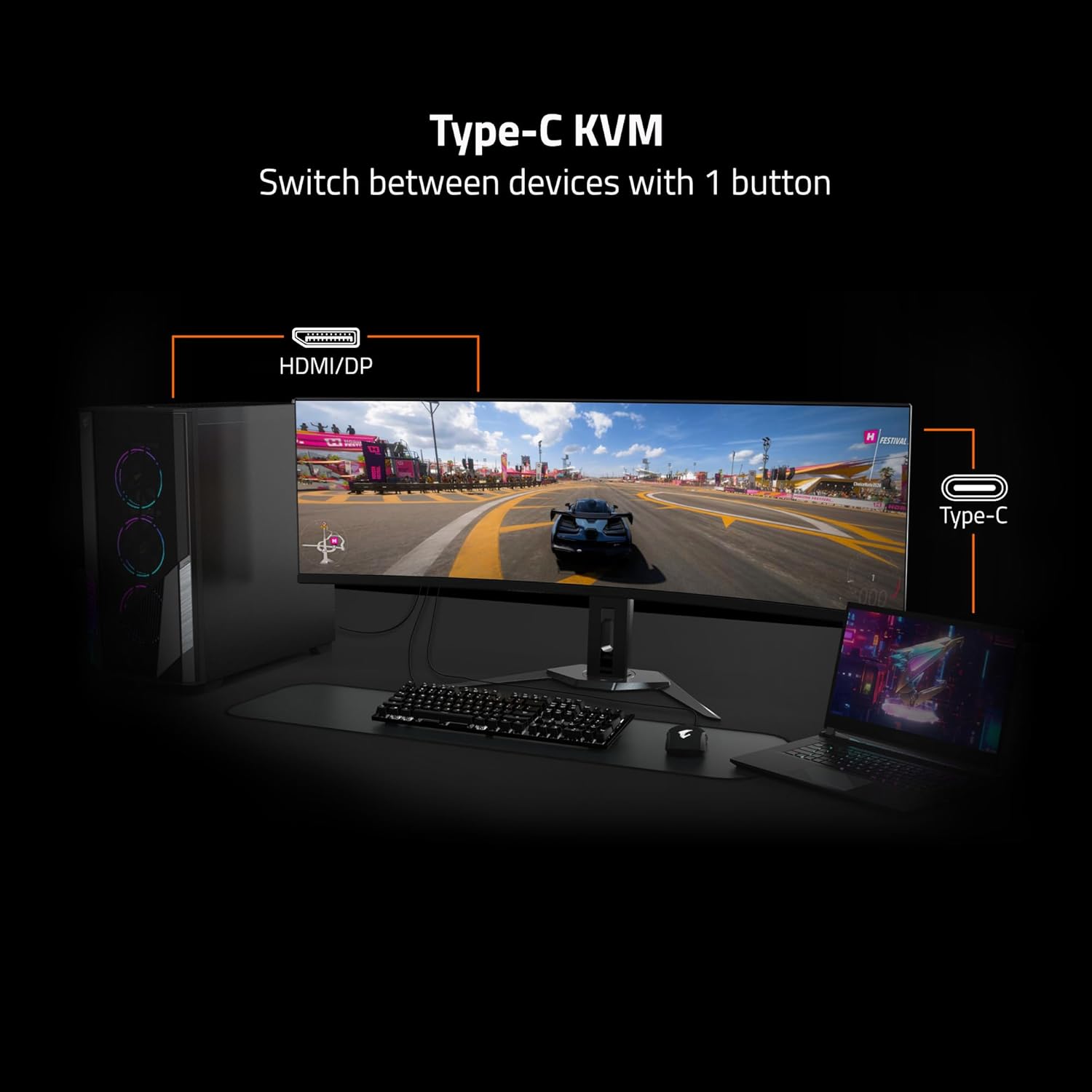
Image: Adjustable Stand and VESA Wall Mount points.
۳.۲. د VESA دیوال نصب کول
The monitor supports VESA 100x100mm mounting. If using a VESA compatible wall mount or arm, remove the stand from the monitor. Secure the VESA mount to the monitor using appropriate screws (not included) according to the mount manufacturer's instructions. Refer to the image above for VESA mount point location.
۴.۲. ستاسو د مانیټر سره نښلول
Connect the necessary cables to the corresponding ports on the back of the monitor and to your computer or other devices. Ensure all connections are secure.
- ځواک: د بریښنا کیبل د مانیټر او بریښنا سایټ سره وصل کړئ.
- د ویډیو انټرنېټ Use the provided HDMI 2.1 or DisplayPort 1.4 cables to connect to your graphics card. The monitor also supports USB Type-C for video input.
- د USB اپ سټریم: Connect the USB upstream cable (USB Type-A to Type-B) from your computer to the monitor's USB 3.0 Upstream port to enable the monitor's USB downstream ports and KVM functionality.
- د USB ښکته جریان: Connect USB devices (keyboard, mouse, USB drives) to the USB 3.0 Downstream ports.
- د ایرفون جیک: د هیډفونونو یا بهرني ویناوو سره وصل شئ.

Image: I/O Ports diagram on the back of the monitor.
ستاسو د څارنې چلول
1. بریښنا فعال/بند
Press the power button, usually located on the back or bottom of the monitor, to turn the monitor on or off. The power indicator light will illuminate when the monitor is on.
۳. د KVM فعالیت
The GIGABYTE MO32U features a built-in KVM (Keyboard, Video, Mouse) switch, allowing you to control multiple devices (e.g., a desktop PC and a laptop) with a single set of keyboard and mouse connected to the monitor. To use KVM, ensure both devices are connected to the monitor via video inputs (HDMI/DP and Type-C) and the USB upstream cable is connected to the primary device. You can switch between devices using a dedicated KVM button or through the OSD menu.

Image: Type-C KVM setup for switching between devices.
۲. د ښودلو ترتیبات او ځانګړتیاوې
The MO32U monitor offers advanced display features for an optimized viewتجربه:
- د حل او تازه کولو نرخ: Enjoy a 4K UHD (3840x2160) resolution with a 165Hz refresh rate for smooth visuals.
- د ځواب وخت: Experience ultra-fast 0.03ms GTG (Gray-to-Gray) response time, minimizing motion blur.
- د AMD FreeSync پریمیم پرو: د مانیټر د ریفریش نرخ ستاسو د GPU د فریم نرخ سره همغږي کوي ترڅو د سکرین څرخیدل او ټکان له منځه یوسي.
- QD-OLED Panel: Delivers vibrant colors, deep blacks, and high contrast (1.5M:1) with 99% DCI-P3 color gamut and 10-bit color depth.
- VESA DisplayHDR ریښتیني تور 400: Provides enhanced contrast and color accuracy for HDR content.
- VESA ClearMR 9000: Ensures high motion clarity.
- د سترګو پاملرنې ځانګړتیاوې: Includes Flicker-Free and Low Blue Light technologies, certified by Eyesafe, to reduce eye strain during prolonged use.

Image: Key display features and certifications.

Image: Visual comparison of 0.03ms/165Hz performance versus 5ms/60Hz.
5. GIGABYTE OLED Care
The monitor incorporates GIGABYTE OLED Care, an AI-based algorithm designed to minimize the risk of OLED burn-in issues. This suite of technologies operates in the background with minimal user interference. OLED Care includes various adjustable settings within the OSD menu to help protect the panel and extend its lifespan.
ساتنه
مناسب ساتنه ستاسو د مانیټر اوږد عمر او غوره فعالیت تضمینوي.
- د سکرین پاکول: په نرمۍ سره سکرین د نرم، لینټ نه پاک ټوکر سره پاک کړئ. د سختو نښو لپاره، په نرمۍ سرهampen the cloth with water or a non-abrasive screen cleaner. Do not spray liquid directly onto the screen.
- د سي پاکولasing: د مانیټر د پاکولو لپاره نرم، وچ ټوکر وکاروئ casinج. د قوي صابونونو یا د کثافاتو پاکوونکو کارولو څخه ډډه وکړئ.
- د OLED پاملرنه: Allow the monitor to perform its automatic OLED Care functions. Avoid prolonged display of static images at high brightness settings.
د ستونزو حل کول
که تاسو د خپل مانیټر سره ستونزې سره مخ شئ، لاندې عام حلونو ته مراجعه وکړئ:
- ځواک نشته: ډاډ ترلاسه کړئ چې د بریښنا کیبل په خوندي ډول د مانیټر او کار کونکي بریښنا سایټ دواړو سره وصل دی. وګورئ چې د بریښنا شاخص څراغ فعال دی که نه.
- هیڅ سیګنال نشته: Verify that the video cables (HDMI, DisplayPort, USB-C) are correctly connected to both the monitor and your source device. Ensure the correct input source is selected in the monitor's OSD menu.
- ځلیدونکی یا تحریف شوی انځور: Check cable connections. Ensure your graphics card drivers are up to date. Try adjusting the refresh rate in your operating system's display settings.
- د انځور ساتل/سوځول: While OLED Care minimizes this risk, prolonged static images can contribute. Utilize OLED Care features and avoid displaying static content for extended periods.
- KVM نه بدلیږي: Ensure the USB upstream cable is connected to the active source device and that the KVM function is properly configured in the OSD menu.
If the problem persists after trying these steps, contact GIGABYTE customer support.
مشخصات
| فیچر | تفصیل |
|---|---|
| برانډ | ګیګابایټ |
| د ماډل شمیره | MO32U |
| د سکرین اندازه | ۷۸۷ انچه |
| د ښودلو ډول | QD OLED |
| قرارداد | 4K UHD (3840 x 2160) |
| د تازه کولو نرخ | 165 Hz |
| د غبرګون وخت | 0.03 Milliseconds GTG |
| د اړخ نسبت | 16:9 |
| د تناسب تناسب | 1.5M:1 |
| روښانتیا | 1000 Candela per Square Meter (Peak) |
| رنګ Gamut | 99٪ DCI-P3 |
| Viewزاویه | 178 درجې |
| ارتباط | 2x HDMI 2.1, 1x DisplayPort 1.4, 1x USB Type-C, 1x USB 3.0 Upstream, 3x USB 3.0 Downstream, 1x Earphone Jack |
| د تطبیق وړ همغږي | د AMD FreeSync پریمیم پرو |
| د HDR ملاتړ | د VESA DisplayHDR ریښتینی تور 400 |
| KVM | هو، د ټایپ-سي KVM |
| د نصب کولو ډول | VESA 100x100mm, Height Adjustable Stand |
| د بریښنا مصرف | 54 واټ |
| رنګ | تور |
د تضمین معلومات
This GIGABYTE MO32U monitor comes with a د جوړونکي دوه کاله تضمین. For detailed terms and conditions, please refer to the warranty card included in your product packaging or visit the official GIGABYTE webسایټ
ملاتړ
For technical assistance, troubleshooting beyond this manual, or warranty claims, please contact GIGABYTE customer support. You can find contact information and additional resources on the official GIGABYTE webسایټ
آنلاین سرچینې: Visit the GIGABYTE support page for drivers, FAQs, and further documentation.


