1. پیژندنه
This manual provides detailed instructions for the setup, operation, and maintenance of the GODIYMODULES AD9851 DDS Signal Generator Module. This module is designed for generating precise sine and square waveforms, suitable for various electronic projects and testing applications.
2. محصول ختم شوview
The AD9851 DDS Signal Generator Module is a compact and versatile device capable of producing high-frequency sine waves up to 70MHz and square waves up to 1MHz. It features both parallel and serial data input options, selectable via a jumper, offering flexibility for integration into different systems. The module incorporates the AD9851 chip, known for its direct digital synthesis capabilities and a clock frequency up to 180MHz.

شکل 2.1: پورته view of the AD9851 DDS Signal Generator Module, showing the main chip and components.
3. تنظیم او پیوستون
Proper connection of the module is crucial for its functionality. Refer to the pinout diagram below for detailed connection points.
3.1 د بریښنا رسول
- VCC: Connect to your positive power supply (e.g., +5V).
- GND: Connect to the ground of your power supply.
- Ensure the power supply is stable and within the module's specified voltage لړ.
3.2 د معلوماتو داخلول
The module supports both parallel and serial data input. A jumper on the board allows selection between these modes.
- Parallel Data Pins (D0-D7): Used for parallel communication with a microcontroller.
- Serial Data Pins (W_CLK, FU_UD, DATA): د مسلسل اړیکو لپاره کارول کیږي.
- بیا تنظیم کړئ: Reset pin for the AD9851 chip.
3.3 Waveform Outputs
- QOUT1, QOUT2: Square wave outputs.
- ZOUT1, ZOUT2: Sine wave outputs.
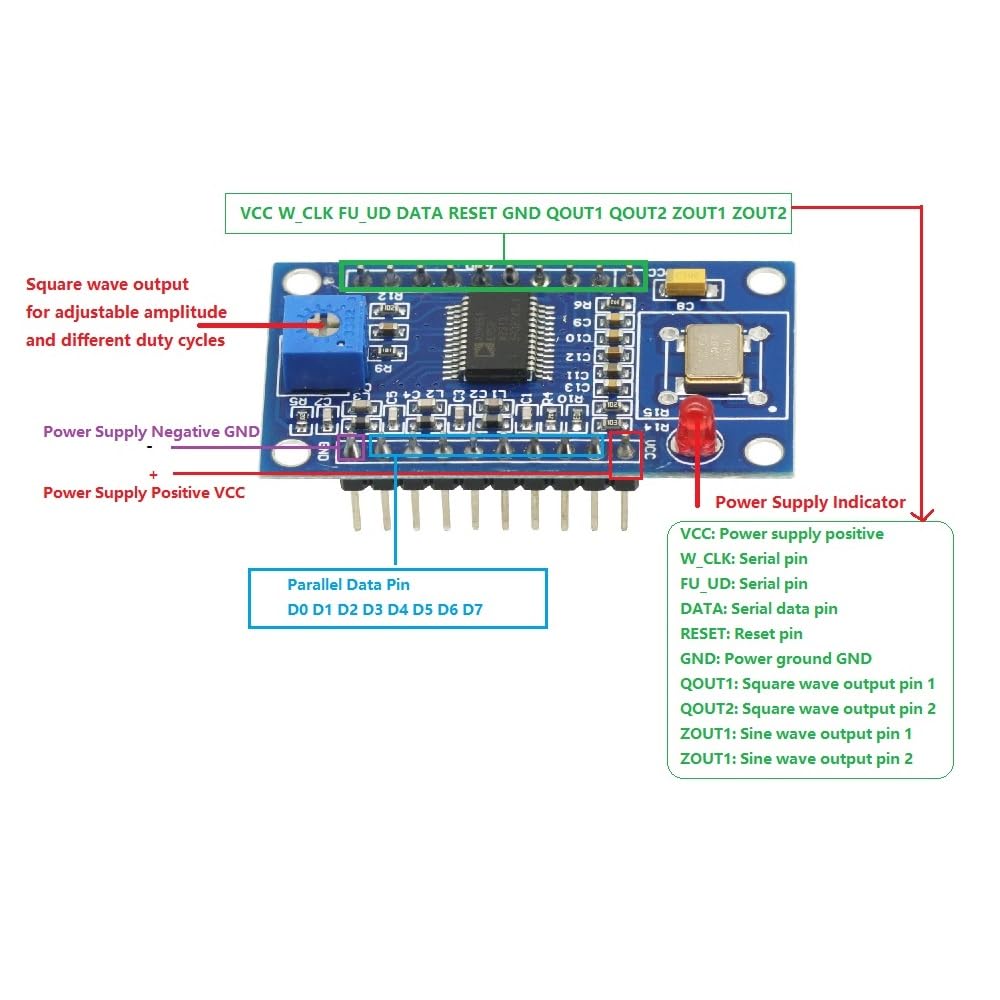
Figure 3.1: Pinout diagram of the AD9851 module with descriptions for power, data, and output pins.
4. عملیاتي لارښوونې
The AD9851 module generates waveforms based on digital input signals. Programming the AD9851 chip is typically done via a microcontroller (e.g., Arduino, ESP32) using either parallel or serial communication protocols.
4.1 Sine Wave Generation
- The module can generate sine waves from 0Hz up to 70MHz.
- Frequency is controlled by sending appropriate frequency tuning words to the AD9851 chip via the selected data input method.
- The output sine waves are available on the ZOUT1 and ZOUT2 pins.
4.2 Square Wave Generation
- Square waves can be generated from 0Hz up to 1MHz.
- The square wave outputs are available on the QOUT1 and QOUT2 pins.
- An onboard potentiometer allows for adjustment of the square wave's amplitude and duty cycle.
4.3 Data Input Selection
A jumper on the module allows you to select between parallel and serial data input modes. Ensure the correct mode is selected to match your microcontroller's communication method.
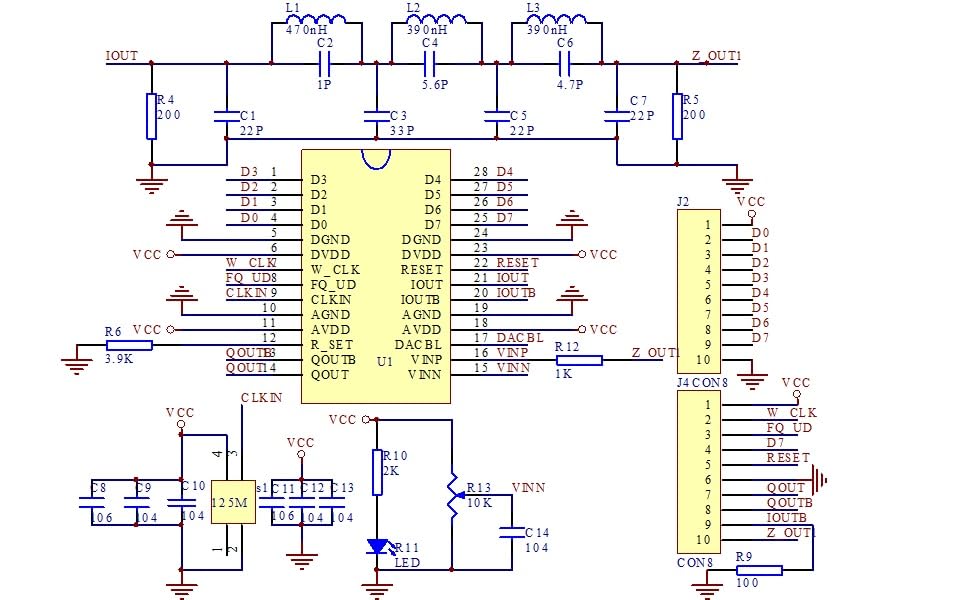
Figure 4.1: Schematic diagram illustrating the internal connections and components of the AD9851 module.
5. مشخصات
| پیرامیټر | ارزښت |
|---|---|
| DDS Chip | AD9851 |
| د سینې څپې فریکونسي رینج | ۸۷.۵ - ۱۰۸.۰ میګاهرتز |
| د مربع څپې فریکونسي حد | ۸۷.۵ - ۱۰۸.۰ میګاهرتز |
| د ساعت فریکونسۍ | تر 180 MHz پورې |
| Data Input Modes | Parallel and Serial (jumper selectable) |
| د محصول څپې | 2 Sine Wave, 2 Square Wave |
| د کڅوړې ابعاد | 3.94 x 1.98 x 0.79 انچه |
| د توکي وزن | 0.704 اونس |
6. ساتنه
To ensure the longevity and optimal performance of your AD9851 DDS Signal Generator Module, follow these maintenance guidelines:
- پاک ساتل: Regularly clean the module with a soft, dry cloth. Avoid using liquids or abrasive cleaners.
- د جامد خارجیدو څخه مخنیوی وکړئ: Handle the module with care, especially in environments prone to static electricity. Use anti-static precautions when necessary.
- مناسب ذخیره کول: Store the module in a dry, dust-free environment, away from extreme temperatures and direct sunlight.
- اړیکې معاینه کړئ: Periodically check all connections for looseness or corrosion.
7. ستونزه حل کول
If you encounter issues with your AD9851 DDS Signal Generator Module, consider the following troubleshooting steps:
- د محصول سیګنال نشته:
- Verify that the module is receiving proper power (VCC and GND).
- Check all data input connections (parallel or serial) and ensure your microcontroller is sending correct commands.
- Confirm the jumper for data input mode is correctly set.
- Ensure the RESET pin is not held low.
- Incorrect Frequency/Waveform:
- Double-check your programming code for the AD9851 chip, especially frequency tuning words.
- Ensure the clock frequency setting in your code matches the module's crystal oscillator.
- For square waves, adjust the onboard potentiometer to see if it affects the output.
- ماډل ځواب نه ورکوي:
- ماډل ته د بریښنا سایکل ورکړئ.
- ډاډ ترلاسه کړئ چې ټولې اړیکې خوندي دي او له شارټس څخه پاکې دي.
8. د تضمین معلومات
This GODIYMODULES product is covered by a limited warranty against defects in materials and workmanship. The warranty period typically extends for 30 days from the date of purchase. This warranty does not cover damage caused by misuse, accident, unauthorized modification, or improper installation. Please retain your proof of purchase for any warranty claims.
9. ملاتړ
For technical assistance, further inquiries, or to report issues not covered in this manual, please contact GODIYMODULES customer support. Refer to the product packaging or the retailer's webد ځانګړو اړیکو معلوماتو لپاره سایټ.
