1. پیژندنه
Thank you for choosing the ELISWEEN Wireless PC Gaming Controller. This controller is designed to provide a superior gaming experience across multiple platforms, including PC, Nintendo Switch, Android, and iOS devices. Featuring advanced Hall Effect joysticks, programmable back buttons, and customizable vibration, this manual will guide you through its setup, operation, and maintenance to ensure optimal performance.
2. د بسته محتويات
- ELISWEEN Wireless PC Gaming Controller
- د USB-C چارج کیبل (1.5m)
- 2.4GHz USB Dongle
- د کارن لارښود
3. محصول ختم شوview
Familiarize yourself with the controller's components:
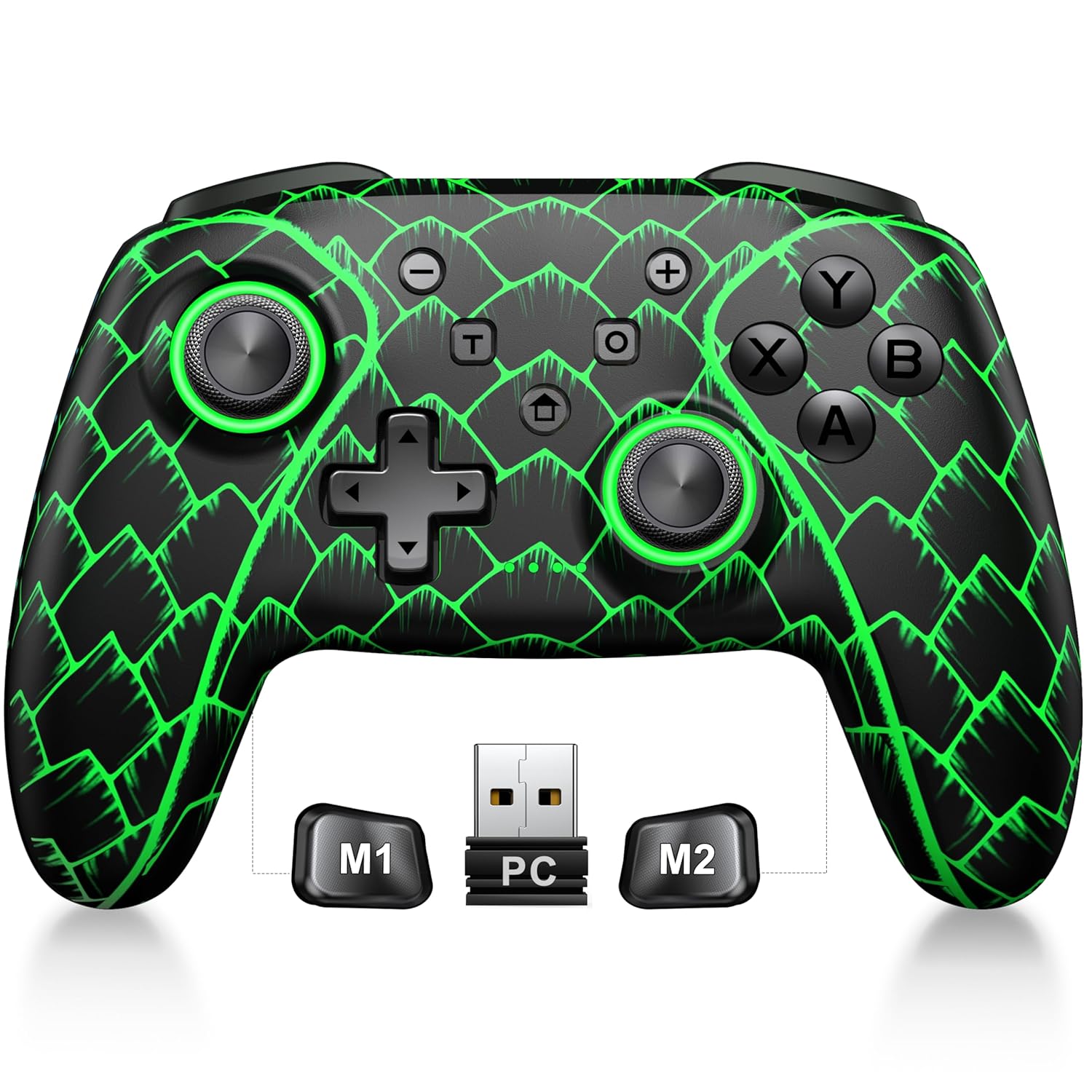
Figure 3.1: ELISWEEN Wireless PC Gaming Controller with its 2.4GHz USB dongle and highlighted M1/M2 programmable buttons.
- کیڼ/ښي انلاګ سټیکونه: Hall Effect joysticks for precise movement.
- D-pad: لارښوونه.
- د عمل تڼۍ (A/B/X/Y): Standard gaming input buttons.
- د اوږو تڼۍ (L/R): پورته نصب شوي تڼۍ.
- Trigger Buttons (ZL/ZR): Hall Effect analog triggers.
- M1/M2 تڼۍ: د پروګرام وړ شاته تڼۍ.
- د کور تڼۍ: Powers on/off and returns to system home screen.
- +/- تڼۍ: System navigation/menu buttons.
- د سکرین شاټ تڼۍ: سکرین شاټونه نیسي.
- د توربو تڼۍ: Activates/deactivates turbo function.
- د USB-C پورټ: د چارج کولو او تار لرونکي اتصال لپاره.
4. تنظیم او پیوستون
4.1 د کنټرولر چارج کول
Before first use, fully charge the controller. Connect the USB-C cable to the controller's USB-C port and the other end to a USB power source (e.g., PC, USB wall adapter). The charging indicator will show status and turn off when fully charged. A full charge takes approximately 3 hours.
4.2 Connecting to PC (Wireless 2.4GHz)

Figure 4.1: Multi-platform compatibility of the ELISWEEN controller, including PC, Switch, Android, and iOS.
- Insert the 2.4GHz USB dongle into an available USB port on your PC.
- د کنټرولر د فعالولو لپاره د کور تڼۍ کېکاږئ.
- The controller will automatically connect to the dongle. The indicator lights will stabilize once connected.
4.3 Connecting to PC (Wired USB-C)
- Connect the USB-C cable to the controller and the other end to your PC.
- The controller will be recognized as a plug-and-play device.
۴.۳ د نینټینډو سویچ سره نښلول
- په خپل نینټینډو سویچ کې، د سیسټم ترتیبات> کنټرولرونه او سینسرونه> کنټرولرونه منقطع کړئ ته لاړ شئ.
- Then, go to Controllers and Sensors > Change Grip/Order.
- Press and hold the Home button on the ELISWEEN controller until the indicator lights begin to flash rapidly.
- Once paired, the indicator light(s) corresponding to the player number will remain solid.
4.5 Connecting to Android/iOS (Bluetooth)
- ډاډ ترلاسه کړئ چې ستاسو په Android یا iOS وسیله کې بلوتوټ فعال دی.
- On the controller, press and hold the X + Home buttons simultaneously until the indicator lights flash rapidly, indicating pairing mode.
- On your device, search for Bluetooth devices and select "STK-7040RG" (or similar) to pair.
- Once connected, the indicator light will stabilize. Supports iOS 13+ MFi titles.
5. عملیاتي لارښوونې
۴.۱ د هال اغیزې جوی سټیکونه
The controller features precision Hall Effect joysticks and triggers, designed to prevent stick drift and provide accurate, responsive control. These magnetic, contactless sensors ensure long-term durability and precision.

شکل 5.1: داخلي view of Hall Effect joystick technology, highlighting its magnetic, contactless design for enhanced accuracy and durability.
Zero Deadzone Mode: For competitive gaming, activate a temporary 0 deadzone mode by holding the T تڼۍ + R3 (right stick click) or L3 (left stick click). A green light confirms activation. To revert to default calibration, press the same combo (blue light indicator). The controller automatically resets to factory default settings upon restart for consistent anti-drift performance.
۴.۲ د پروګرام وړ شاته تڼۍ (M1/M2)
The M1 and M2 back buttons can be programmed to map up to 21 different key combinations, allowing for quick execution of complex actions.

Figure 5.2: The M1 and M2 programmable back buttons, capable of mapping up to 21 different actions for enhanced control.
Refer to the Keylinker App (search "NC300") for detailed instructions on programming and customizing these buttons.
۷.۹ ټربو فعالیت
The controller supports Turbo fire functionality for 10 action buttons with adjustable speeds (5, 12, or 20 presses per second).
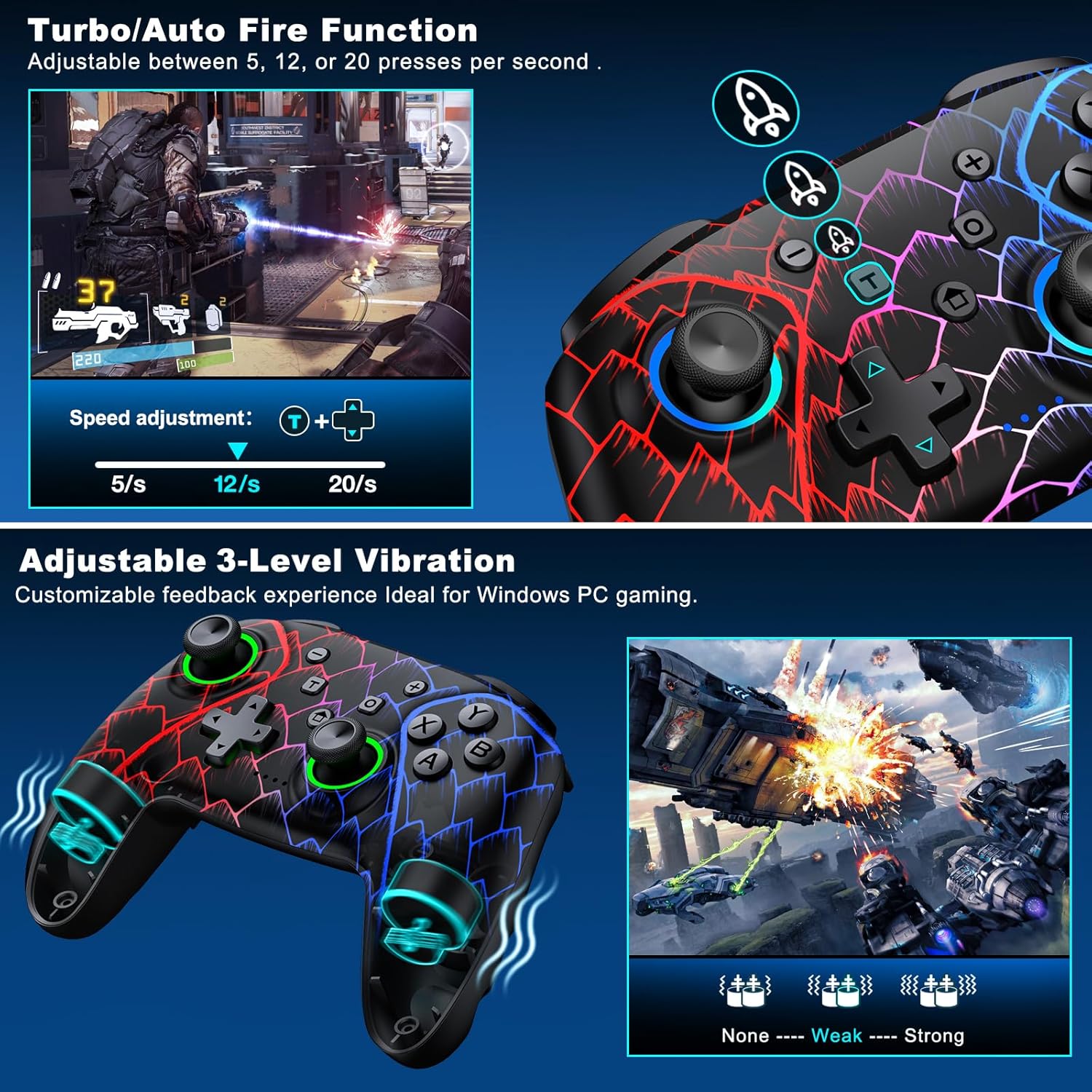
Figure 5.3: Visual representation of the Turbo/Auto Fire function and the adjustable 3-level vibration feature.
- ټربو فعال کړئ: فشار ورکړئ توربو button + the desired action button.
- سرعت تنظیم کړئ: مطبوعاتي توربو + Up arrow (increase) or ښکته arrow (decrease) on the D-pad.
- روښانه توربو: نیول منفي تڼۍ + ښکته arrow on the D-pad to instantly clear all Turbo binds.
5.4 د وایبریشن تنظیم کول
Experience immersive feedback with dual vibration motors offering 3 intensity levels.
- Adjust intensity by pressing L + R + ZL + ZR simultaneously. Cycle through levels: None, Weak, Strong.
- Note: Vibration is disabled on mobile platforms. Gyro functionality works only with Nintendo systems.
۵.۲ د ویښتو ټریګر قلفونه
Shorten trigger pulls for faster response times in games requiring quick inputs, such as first-person shooters.
۴.۶ د بیټرۍ د ژوند مدیریت
The controller is equipped with a 1000mAh battery, providing over 20 hours of continuous gameplay on a single charge. Charging takes approximately 3 hours via USB-C.

Figure 5.4: The ELISWEEN controller's 1000mAh battery provides extended playtime with quick charging capabilities.
5.7 Dynamic Lighting Effects
Customize the controller's lighting effects via the Keylinker App (search "NC300").
۴.۳ اتوماتیک بریښنا بندول
To conserve battery, the controller will automatically power off after 20 minutes of inactivity.
6. ساتنه
- پاکول: Use a soft, dry cloth to clean the controller. Do not use abrasive cleaners or solvents.
- ذخیره کول: کنټرولر په یخ او وچ ځای کې د مستقیم لمر وړانګو او سختې تودوخې څخه لرې وساتئ.
- د بیټرۍ پاملرنه: Avoid fully discharging the battery frequently. Charge it regularly to prolong its lifespan.
7. ستونزه حل کول
- کنټرولر نه نښلي:
- ډاډ ترلاسه کړئ چې کنټرولر چارج شوی.
- Verify the correct connection method for your device (2.4GHz dongle for PC, Bluetooth for mobile, pairing for Switch).
- Try restarting the controller and the device you are connecting to.
- For PC, try a different USB port for the dongle or wired connection.
- Stick drift or inaccurate input:
- Activate the 0 deadzone mode (T + R3/L3) to recalibrate.
- Ensure the controller firmware is up to date via the Keylinker App.
- تڼۍ ځواب نه ورکوي:
- وګورئ که کنټرولر په سمه توګه وصل دی.
- ډاډ ترلاسه کړئ چې د تڼیو لاندې هیڅ کثافات نه وي.
- Perform a factory reset if issues persist (refer to Keylinker App or contact support).
- د چارج کولو مسلې:
- یو بل USB-C کیبل او د بریښنا سرچینه هڅه وکړئ.
- Ensure the USB-C port on the controller is clean and free of obstructions.
8. مشخصات
| ارتباط | بلوتوث ۵.۰، ۲.۴GHz بېسیم، USB-C وایرډ |
| مطابقت | PC, Nintendo Switch, Android, iOS (iOS 13+ MFi) |
| د بیټرۍ ظرفیت | 1000mAh |
| د لوبې وخت | 20+ ساعته (نږدې.) |
| د چارج کولو وخت | 3 ساعته (نږدې) |
| جویسټکس | Hall Effect (Drift-Proof) |
| د پروګرام وړ تڼۍ | 4 Back Buttons (M1/M2) |
| وایبریشن | دوه ګونی موټرې، ۴ د تنظیم وړ کچې |
| ابعاد | 6.38 x 4.72 x 2.64 انچه |
| وزن | ۷.۳۷ اونس (تقریبا ۲۰۹ ګرامه) |
| جوړونکی | کیکسون ټیک |
| د اصلي هیواد | چین |
9. تضمین او ملاتړ
The ELISWEEN Wireless PC Gaming Controller comes with a standard manufacturer's warranty. For specific warranty terms and conditions, please refer to the product packaging or contact our customer support.
For any technical assistance, troubleshooting, or inquiries, our 24/7 Expert Support team is available to help. Please refer to the contact information provided on the product packaging or our official webسایټ


