1. پیژندنه
Thank you for choosing the ILIFE A30 Pro Robot Vacuum Cleaner. This manual provides essential information for the safe and efficient operation, maintenance, and troubleshooting of your device. Please read it thoroughly before first use and retain it for future reference.

Image: The ILIFE A30 Pro robot vacuum, its self-emptying base, a remote control, and various cleaning accessories including brushes and dust bags.
2. د خوندیتوب مهمې لارښوونې
To reduce the risk of injury or damage, read these safety instructions carefully and keep them accessible during the product's lifespan.
- دا وسیله د 8 کالو او پورته ماشومانو لخوا کارول کیدی شي او هغه کسان چې فزیکي، حسي یا ذهني وړتیاوې یې کمې وي یا د تجربې او پوهې نشتوالی لري که چیرې دوی ته په خوندي ډول د وسیلې کارولو په اړه نظارت یا لارښوونې ورکړل شوي وي او د خطرونو په اړه پوهیږي. .
- ماشومان باید څارنه وشي ترڅو ډاډ ترلاسه شي چې دوی د وسایلو سره لوبې نه کوي.
- پاکول او د کارونکي ساتنه باید د ماشومانو لخوا پرته له نظارت څخه ترسره نشي.
- Use only the original power adapter provided by the manufacturer.
- روبوټ په هغو سیمو کې مه چلوئ چې پرانیستې اورونه یا نازک شیان ولري.
- Ensure the charging dock is placed against a wall on a level surface, with adequate clear space around it.
- Before cleaning, remove loose cables, small objects, and any items that could entangle the robot.
- روبوټ یا چارجینګ ډاک اوبو یا رطوبت ته مه ښکاره کوئ.
3. د تنظیم کولو لارښود
۲.۱ د بکس خلاصول او لومړنی ځای پرځای کول
Carefully remove all components from the packaging. Place the self-emptying station against a wall in an open area, ensuring there are no obstacles within 1 meter (3 feet) to the front and 0.5 meters (1.5 feet) to the sides. Connect the power adapter to the station and plug it into a wall outlet.

Image: The ILIFE A30 Pro self-emptying station with its lid open, showing a full dust bag inside and a stack of new dust bags next to it.
۲.۵ د روبوټ چارج کول
Place the robot onto the charging contacts of the self-emptying station. Ensure the contacts align. The robot will begin charging automatically. For first use, fully charge the robot, which may take several hours.
3.3 App Connection (ILIFEClean App)
- Download the 'ILIFEClean' app from your mobile device's app store.
- یو حساب راجستر کړئ او لاګ ان شئ.
- Follow the in-app instructions to add your ILIFE A30 Pro. Ensure your Wi-Fi network is 2.4GHz, as the robot is only compatible with this frequency.

Image: A person sitting on a couch, controlling the ILIFE A30 Pro robot vacuum and its self-emptying station using the ILIFEClean mobile application.
4. عملیاتي لارښوونې
4.1 Initial Mapping and Navigation
The ILIFE A30 Pro utilizes LiDAR navigation and SLAM algorithms to create a detailed map of your home. For the first cleaning cycle, allow the robot to complete a full scan of your home without interruption to ensure accurate mapping and optimal cleaning routes.

Image: The ILIFE A30 Pro robot vacuum operating in a living room, with blue laser lines illustrating its LiDAR navigation and mapping capabilities.
4.2 Cleaning Modes and Suction Power
The robot offers four adaptable cleaning modes:
- خاموش: 500 Pa suction for quiet operation.
- معیاري: 1000 Pa suction for daily cleaning.
- قوي: 1800 Pa suction for more demanding tasks.
- اعظمي: 5000 Pa suction for deep cleaning, especially on carpets.
These modes can be selected via the ILIFEClean app or the remote control.

Image: The ILIFE A30 Pro robot vacuum cleaning a carpet, illustrating its powerful 5000 Pa suction capability with a rotating brush.
4.3 3-in-1 Functionality: Vacuum, Sweep, and Mop
The ILIFE A30 Pro features a 2-in-1 tank (200ml for dust, 200ml for water) allowing it to vacuum, sweep, and mop simultaneously. To use the mopping function, fill the water tank and attach the mop pad. If you only wish to vacuum, remove the mop pad holder.

Image: The ILIFE A30 Pro robot vacuum next to its self-emptying station, with an exploded view of its 2-in-1 dust and water tank and mop attachment, illustrating its 3-in-1 cleaning capability.
۵.۳ د سمارټ کنټرول ځانګړتیاوې
Using the ILIFEClean app, you can:
- Set forbidden zones and virtual walls to restrict cleaning areas.
- د پاکولو وختونه تنظیم کړئ.
- د پاکولو لپاره ځانګړي خونې غوره کړئ.
- Adjust suction power and water level for mopping.
The robot also supports voice control via Amazon Alexa and Google Home, and can be operated with the included remote control.

Image: The ILIFE A30 Pro robot vacuum operating near a cat tree, with a visual representation of a 'forbidden zone' (red shaded area) and a 'virtual wall' (blue shaded area) to restrict its movement.
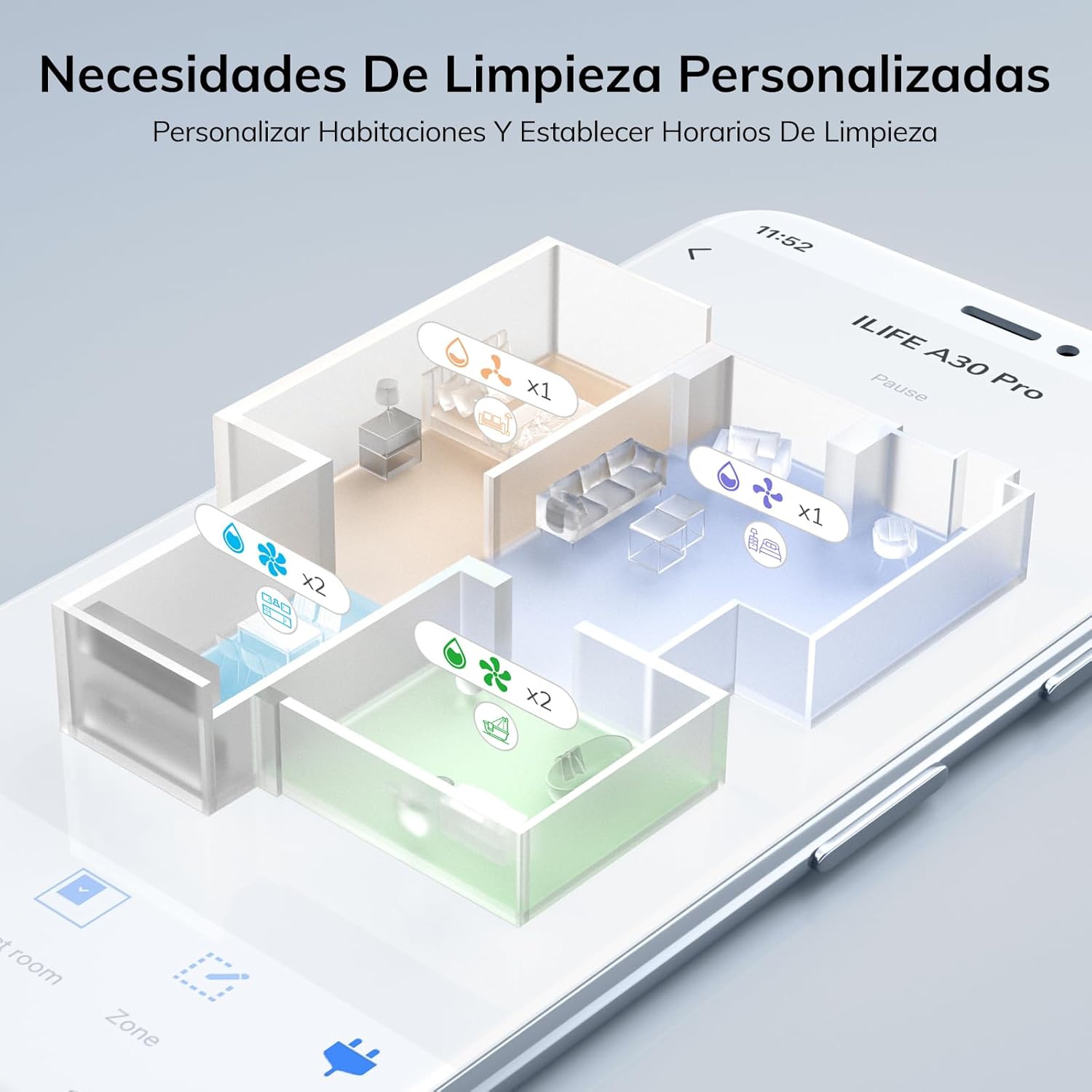
Image: A smartphone screen displaying the ILIFEClean app interface, showing a detailed map of a house with different rooms highlighted for personalized cleaning settings, including suction and water levels.

Image: The ILIFE A30 Pro robot vacuum, its self-emptying station, a smartphone displaying the control app, a remote control, and a smart speaker, illustrating multiple control options including app, voice, and remote.
5. ساتنه
Regular maintenance ensures optimal performance and extends the lifespan of your ILIFE A30 Pro.
5.1 Self-Emptying Station and Dust Bag
The self-emptying station automatically transfers dust from the robot's dustbin into a larger 2.5L dust bag. Each dust bag can hold up to 8 weeks of debris, providing up to 280 days of hands-free cleaning with the included 5 bags. Replace the dust bag when the indicator light on the station signals it is full.
۷.۳ د اصلي برش او اړخ برشونو پاکول
- روبوټ واړوئ او د برش اصلي پوښ لرې کړئ.
- Lift out the main brush and use the cleaning tool to remove hair and debris.
- Carefully pull off the side brushes and clean any entangled hair or dust. Reattach them securely.
5.3 Cleaning the 2-in-1 Dust/Water Tank
- Remove the 2-in-1 tank from the robot.
- Empty the dust compartment and rinse it with water. Ensure it is completely dry before reinserting.
- Empty any remaining water from the water tank and rinse. Allow it to air dry.
- Clean the filter inside the dust compartment regularly.
۶.۴ د سینسرونو او چارج کولو اړیکو پاکول
Wipe the cliff sensors, wall sensors, and charging contacts on both the robot and the charging station with a clean, dry cloth to ensure proper function.
6. ستونزه حل کول
If you encounter issues with your ILIFE A30 Pro, refer to the following common problems and solutions:
- روبوټ چارج نه کوي: Ensure the charging contacts on both the robot and the station are clean and free of debris. Verify the power adapter is securely plugged into the wall outlet and the station.
- روبوټ ډېر ځله بند پاتې کېږي: Clear obstacles, loose cables, and thick rugs from the cleaning path. Use the app to set forbidden zones for problematic areas.
- د پاکولو ضعیف فعالیت: Check if the dustbin is full or the dust bag in the station needs replacement. Clean the main brush, side brushes, and filters. Increase suction power via the app.
- د اپلیکیشن د اتصال ستونزې: Ensure your Wi-Fi network is 2.4GHz. Restart your router, the robot, and your mobile device. Try re-pairing the robot with the app.
- Robot makes unusual noises: Check for foreign objects or entangled hair in the main brush, side brushes, or wheels.
که ستونزه دوام ومومي، مهرباني وکړئ د پیرودونکو ملاتړ سره اړیکه ونیسئ.
7. مشخصات
| فیچر | مشخصات |
|---|---|
| برانډ | iLife |
| د ماډل نوم | A30 Pro |
| سکشن ځواک | Up to 5000 Pa (Max Mode) |
| د نیویګیشن ډول | LiDAR Precision Navigation |
| د بیټرۍ چلولو وخت | تر 2 ساعتونو 30 دقیقو پورې |
| د کثافاتو د ډبې ظرفیت (روباټ) | 200 ml (integrated with water tank) |
| د اوبو ټانک ظرفیت (روباټ) | 200 ml (integrated with dust bin) |
| د دوړو د ځان خالي کولو کڅوړې ظرفیت | ۴ ل |
| ارتباط | 2.4GHz WiFi, ILIFEClean App, Remote Control, Alexa, Google Home |
| وړاندیز شوي سطحې | Wood, Tile, Laminate, Vinyl, Concrete, Marble |
| وزن | 6.7 kg (approximate product weight) |
8. د تضمین معلومات
For detailed warranty information, please refer to the warranty card included with your product packaging or contact your point of purchase. Warranty terms and conditions may vary by region and retailer.
9. د پیرودونکي ملاتړ
If you have any questions or require further assistance with your ILIFE A30 Pro, please contact ILIFE customer support through the official webسایټ یا ستاسو د محصول اسنادو کې چمتو شوي د اړیکو معلومات.


