1. پیژندنه
This manual provides detailed instructions for the installation, operation, and maintenance of your WEILAILIFE 4K 8MP PoE PTZ Security Camera System. Please read this manual thoroughly before using the product to ensure proper functionality and safety. Keep this manual for future reference.
2. محصول ختم شوview
2.1. د بسته محتويات
- 4K 8MP 8-Channel Network Video Recorder (NVR) with 1TB HDD: x 1
- 4K 8MP PTZ Camera: x 4
- LAN Cable for Camera (18.2 meters): x 4
- Instruction Manual: x 1
- Warning Label: x 1
- Camera Mounting Screws Pack: x 4
- NVR Power Supply (48V2A): x 1
- ریموټ کنټرول: x 1
- USB Mouse: x 1
- HDMI Cable (1 meter): x 1
- LAN Cable (1 meter): x 1
2.2. کلیدي ځانګړتیاوې
- 4K 8MP Ultra High Resolution: Captures video at 3264 x 2488 pixels for clear surveillance.
- د PTZ کنټرول: Pan 355° horizontally and Tilt 90° vertically for comprehensive area coverage.
- اتومات تعقیب: Automatically detects and follows human movement, ensuring critical events are recorded.
- دوه طرفه آډیو: Enables real-time communication through the camera via the mobile application.
- د PIR او AI دوه ګونی کشف: Advanced human detection technology reduces false alarms by distinguishing people from other moving objects.
- ۱۳۰ درجې الټرا وایډ زاویه لینز: پراخه ساحه وړاندې کوي view د ړندو ځایونو کمولو لپاره.
- H.265 کمپریشن: Efficient video compression saves storage space and bandwidth while maintaining video quality.
- IP66 د هوا ضد: Designed for both indoor and outdoor use, resistant to dust and water.
- PoE (په ایترنیټ باندې بریښنا): د یو واحد ایترنیټ کیبل له لارې د بریښنا او معلوماتو چمتو کولو سره نصب کول ساده کوي.
- وړیا موبایل اپلیکیشن: ژوندی لاسرسی view and recordings without monthly fees using the 'Honestview' or 'Eseecloud' app.

انځور 2.1: اوورview of the WEILAILIFE 4K 8MP PoE PTZ Security Camera System, including the NVR, four cameras, 1TB HDD, and remote control.
3. د تنظیم کولو لارښود
۱. لومړنۍ اړیکه
- NVR له بریښنا سره وصل کړئ: Plug the NVR power adapter (48V2A) into the NVR and a power outlet.
- NVR له مانیټر سره وصل کړئ: Use the provided HDMI cable to connect the NVR to a monitor or TV.
- د USB موږک سره وصل کړئ: د نیویګیشن لپاره د NVR په USB پورټ کې د USB موږک ولګوئ.
- کیمرې وصل کړئ: Connect each camera to an available PoE port on the NVR using the provided LAN cables. The cameras will power on automatically.
- Connect NVR to Internet (Optional for Remote Access): Connect the NVR's LAN port to your router using an Ethernet cable.

Image 3.1: Illustration showing the simple connection of a camera to the NVR using a single LAN cable for both power and data, supporting up to 200 meters of transmission distance.
۳.۲. د موبایل اپلیکیشن تنظیم کول
- اپلیکیشن ډاونلوډ کړئ: لټون 'Honestview' or 'Eseecloud' in your smartphone's App Store (iOS) or Play Store (Android) and install it.
- حساب ثبت کړئ: اپلیکیشن پرانیزئ او د نوي حساب راجستر کولو لپاره په سکرین کې لارښوونې تعقیب کړئ.
- وسیله اضافه کړئ: On the NVR's monitor, locate the device ID (usually found in the system settings or on a label). In the app, select 'Add Device' and scan the QR code or manually enter the device ID.
- ژوندی View: یوځل چې اضافه شي، تاسو باید وکولی شئ view ژوندی اوسیtage from your cameras and access NVR settings remotely.

Image 3.2: The system supports remote monitoring from various devices including smartphones, tablets, laptops, and desktop computers.
4. عملیاتي لارښوونې
4.1. ژوندی View او پلې بیک
- په مانیټر کې: Use the USB mouse to navigate the NVR interface. Click on camera feeds to view them in full screen. Access playback options from the main menu.
- په موبایل اپلیکیشن کې: Select a camera from the device list to view its live feed. Use the playback function to review ثبت شوی footage stored on the NVR.
4.2. د PTZ کنټرول
The PTZ (Pan-Tilt-Zoom) cameras can be controlled remotely via the mobile app or NVR interface.
- پین/ټیټ: په ژوندۍ بڼه view, use the directional controls to rotate the camera horizontally (355°) and vertically (90°).
- ډیجیټل زوم: Use the zoom controls to digitally magnify the image up to 5x.
- اتومات تعقیب: Enable auto-tracking in the camera settings. The camera will automatically follow detected human movement within its field of view.

Image 4.1: Demonstrates PTZ control (355° pan, 90° tilt) and 10x digital zoom functionality managed through a smartphone application.

Image 4.2: Visual representation of the automatic tracking feature, where the camera follows a person's movement.
۴.۲. دوه اړخیزه آډیو
The cameras are equipped with a microphone and speaker for two-way communication.
- فعالول: In the mobile app's live view, tap the microphone icon to speak through the camera. Tap the speaker icon to hear audio from the camera's location.
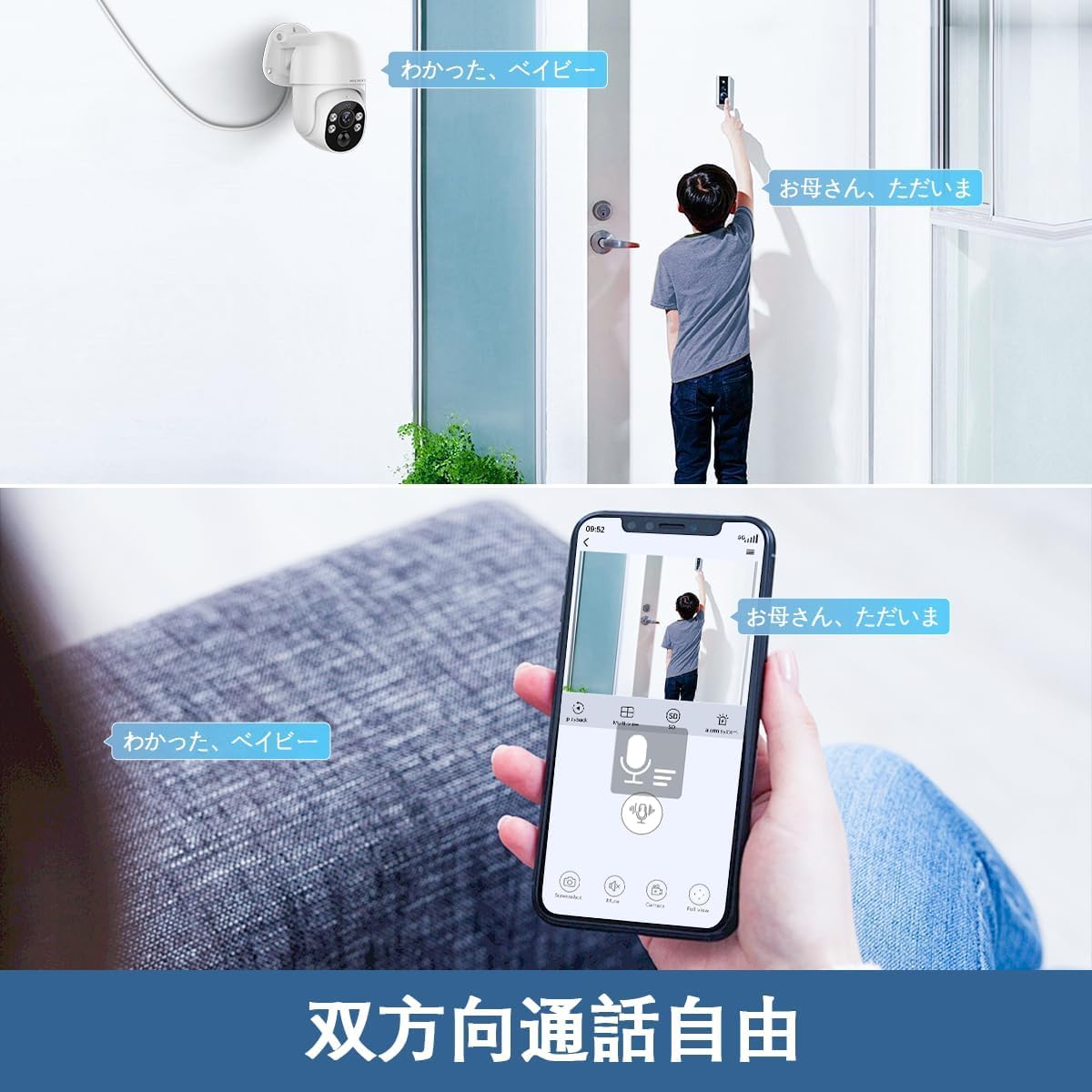
Image 4.3: A user communicating through the camera's two-way audio feature using a smartphone app, allowing interaction with someone at the door.
۳.۳. د حرکت کشف او خبرتیاوې
The system uses PIR and AI dual detection to accurately identify human movement and send alerts.
- د کشف زونونه تنظیم کړئ: In the NVR or app settings, you can define specific areas for motion detection to avoid unnecessary alerts.
- د خبرتیا خبرتیا: When motion is detected, the system can send real-time notifications to your smartphone, email alerts, or trigger a siren.

Image 4.4: Visual explanation of PIR and AI dual detection, highlighting how the system differentiates human movement from other objects like cars to reduce false alarms.

انځور ۲.۲: یو پخوانیample of a real-time alert notification displayed on a smartphone when an intruder is detected by the security camera.

Image 4.6: Diagram illustrating how users can define specific motion detection areas to focus surveillance on critical zones and ignore irrelevant movements outside the designated area.
5. ساتنه
- منظم پاکول: په دوره یي ډول د کیمرې لینزونه د نرم، ډamp ټوکر د روښانه انځور کیفیت ډاډمن کولو لپاره. سخت کیمیاوي مواد مه کاروئ.
- د فرم ویئر تازه معلومات: Check the WEILAILIFE website or app for available firmware updates to ensure optimal performance and security.
- د کیبل معاینه: په منظم ډول ټول کیبلونه د اغوستلو یا زیان د نښو لپاره معاینه کړئ، په ځانګړې توګه د بیروني تاسیساتو لپاره.
- د ذخیرې مدیریت: ۲ ټې بي هارډ ډرایو وړاندې کوي ampد ذخیره کولو وخت په وخت بیاview او مهم foo بیک اپ کړئtage. The H.265 compression helps maximize storage efficiency.

Image 5.1: The camera is designed to withstand various weather conditions, operating effectively between -10°C and 50°C, and is IP66 waterproof.

Image 5.2: Detail of the waterproof connector design, ensuring the LAN connection remains protected from rain and moisture when installed outdoors.
6. ستونزه حل کول
| ستونزه | احتمالي لامل | د حل لاره |
|---|---|---|
| د کیمرې څخه هیڅ عکس نشته | Power issue, loose cable, NVR port issue | Check power supply to NVR and camera. Ensure LAN cable is securely connected. Try a different NVR port. |
| د اپلیکیشن سره نښلول کیدی نشي | NVR not connected to internet, incorrect device ID, app issues | Verify NVR internet connection. Double-check device ID. Restart app or NVR. |
| د عکس ضعیف کیفیت | خراب لینز، ټیټ رڼا، د شبکې بینډ ویت | Clean camera lens. Ensure adequate lighting or check night vision settings. Verify network speed. |
| False motion alarms | Incorrect detection zone, sensitivity too high | Adjust motion detection zones to exclude irrelevant areas. Lower sensitivity settings. |
| د PTZ کنټرول غیر ځواب ورکوونکی | Network delay, camera malfunction | Check network connection. Restart camera/NVR. If issue persists, contact support. |
7. مشخصات
- د ویډیو نیول حل: 4K 2160P, 800 million pixels (3264×2488)
- رنګ: سپین
- د توکو شمیر: ۱ (سیسټم)
- د چینلونو شمیر: 8
- د فورم فکتور: گنبد
- د ډګر View: 130 درجې
- د شپې لید رینج: 20 متره
- د چوکاټ نرخ: 15 fps
- مواد: المونیم
- والیtage: 110 وولټ (AC)
- واټtage: 60 W
- د محصول ابعاد (LxWxH): 28 x 16 x 31 سانتي متره
- د اوبو د مقاومت کچه: IP66 (د اوبو او دوړو ضد)
- امیجنگ سینسر: CMOS
- Zoom Ratio (Digital): 5:1
- د لینز ترتیب: پراخه زاویه
- د موټرو ډول: ډیجیټل زوم
- د محصول ماډل شمیره: WL-POE-PTZ80041T
- وړاندیز شوی کارول: داخلي امنیت، بهرنی امنیت
- د ارتباط ټیکنالوژي: تار لرونکی (PoE)
- ځانګړتیاوې: 130° Ultra-Wide Angle, H.265 Compression, PIR & AI Dual Detection, Two-Way Audio, Free APP & No Monthly Fees
- د کور دننه او بهر کارول: دننه، بهر
- مطابقت لرونکي وسایل: کیمره، سمارټ فون، ټابلیټ، تلویزیون، ډیسکټاپ
- د بریښنا سرچینه: د بریښنا تار شوی
- د پیوستون پروتوکول: ONVIF
- د کنټرول ډول: د اپلیکیشن کنټرول، ریموټ کنټرول
- د نصب کولو ډول: دیوال غر
8. تضمین او ملاتړ
8.1. د تضمین معلومات
WEILAILIFE provides a د 12 میاشتو کیفیت تضمین for this product. This warranty covers manufacturing defects and ensures stable, high-quality performance. Please retain your proof of purchase for warranty claims.
8.2. د پیرودونکي ملاتړ
For any questions, concerns, or technical assistance regarding your WEILAILIFE security camera system, please contact our support team:
- د بریښنالیک ملاتړ: info-jp@weilailifetech.com (24-hour response time)
- رسمي Webسایټ: jp.weilailifetech.com
- د لاین خدمت: For quick support, add us on LINE: https://lin.ee/EqPKtnq

Image 8.1: Details on the 12-month warranty, official website, and email support for WEILAILIFE products.


