1. پیژندنه
This manual provides comprehensive instructions for the installation, operation, maintenance, and troubleshooting of your NIVIAN Professional WiFi SuperHD Surveillance Camera Kit. This system is designed to provide reliable and efficient security monitoring for your home or business.
Please read this manual carefully before using the product to ensure proper setup and optimal performance. Keep this manual for future reference.
2. محصول ختم شوview
The NIVIAN CCTV Kit is a professional 2K SuperHD WiFi surveillance system featuring 6 IP cameras and a 10-channel Network Video Recorder (NVR) with a pre-installed 1TB hard drive. Key features include:
- 2K SuperHD Image Resolution: روښانه او مفصل ویډیو foo چمتو کويtage (3MP).
- د انسان د AI کشف: Intelligent motion detection to reduce false alarms.
- دوه طرفه آډیو: د ریښتیني وخت اړیکو لپاره جوړ شوی مایکروفون او سپیکر.
- Dual Night Vision: Infrared mode for discreet monitoring and white LED mode for full-color night vision activated by motion.
- WiFi-6 Long Range Connectivity: Stable wireless connection up to 250 meters with repeater function.
- IP66 د هوا ضد کیمرې: دوامداره فلزات جasing suitable for outdoor use.
- مسلکي ثبت کول: Continuous or event-based recording to the included 1TB hard drive.
- د HDMI محصول: Connect to a monitor or TV for live viewing.
- EseeCloud App: Remote access and control from mobile devices.
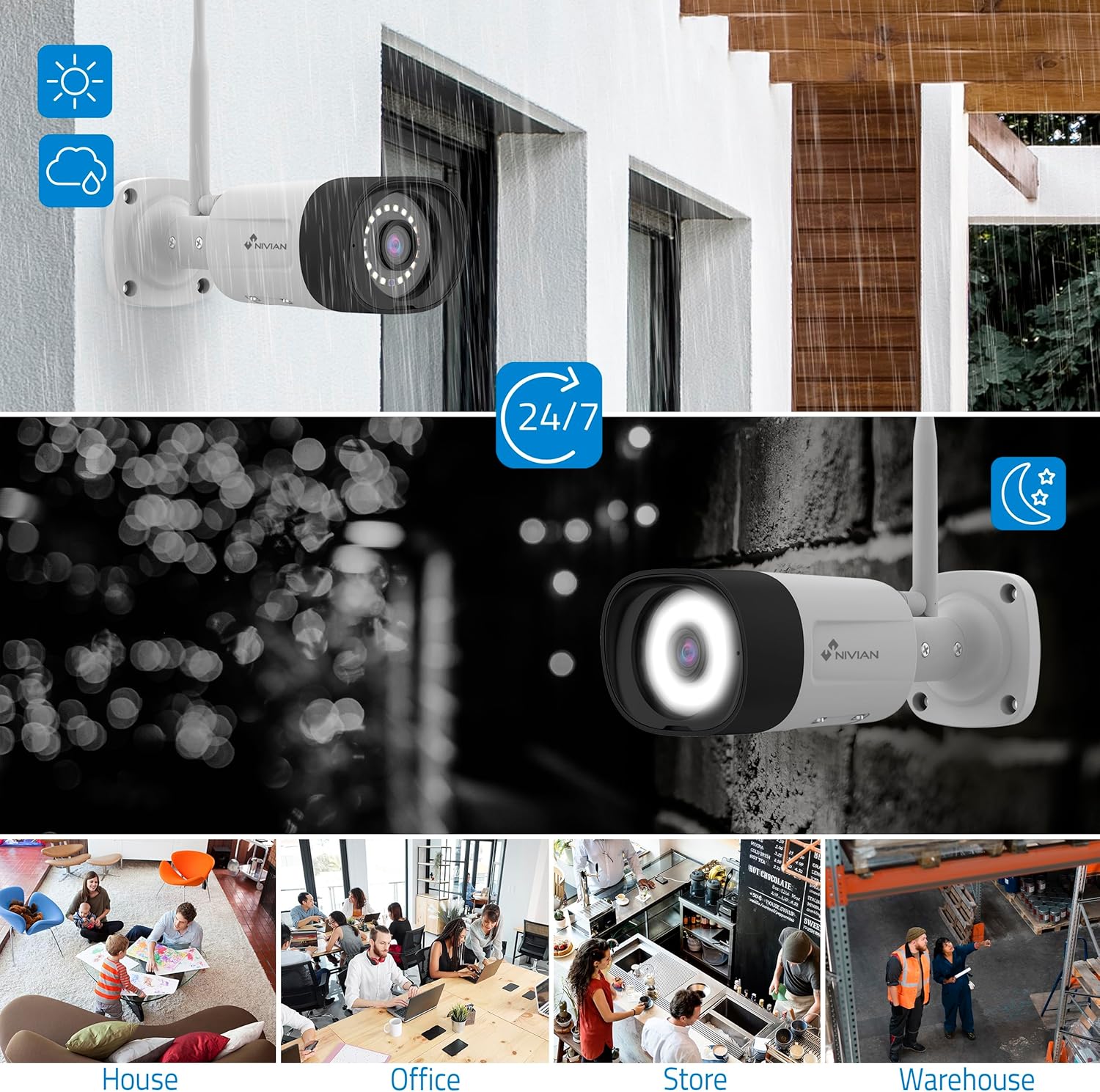
Image: NIVIAN CCTV Camera with day and night vision capabilities, showing weatherproof design and application in various environments like house, office, store, and warehouse.

Image: Comparison of 1080p Full HD video quality versus 2K Super HD video quality, demonstrating enhanced detail with 2K resolution.
3. د بسته محتويات
ډاډ ترلاسه کړئ چې ټول توکي ستاسو په کڅوړه کې شتون لري:
- 1x 10-Channel NVR (Network Video Recorder) with 1TB Hard Drive
- 6x NIVIAN 2K SuperHD WiFi IP Cameras
- د NVR او کیمرې لپاره د بریښنا اډاپټرونه
- USB ماؤس
- ایترنیټ کیبل
- د سکرو او پلګونو نصب کول
- د چټک پیل لارښود (د تفصیلي لارښوونو لپاره دې لارښود ته مراجعه وکړئ)
4. ترتیب کول
۱. د NVR نصب کول
- NVR سره وصل کړئ:
- د چمتو شوي بریښنا اډاپټر په کارولو سره NVR د بریښنا آوټ لیټ سره وصل کړئ.
- Connect the NVR to a monitor or TV via the HDMI port for local viewing.
- د USB موږک د NVR USB پورټ سره وصل کړئ.
- For internet access, connect the NVR to your router using the Ethernet cable.
- پاور آن: Turn on the NVR. Follow the on-screen prompts for initial setup, including language selection and network configuration.
4.2. د کیمرې نصب کول
- د نصبولو ځای: د خپلو کیمرونو لپاره مناسب ځایونه غوره کړئ، ډاډ ترلاسه کړئ چې دوی یو روښانه ساحه لري view and are within range of the NVR's WiFi signal. The IP66 rating allows for outdoor installation.
- کیمرې فعال کړئ: Connect each camera to a power outlet using its dedicated power adapter.
- جوړه کول (اتوماتیک): The cameras are pre-paired with the NVR. Once powered on, they should automatically connect to the NVR's WiFi network. You will see the camera feeds appear on the connected monitor.
- Signal Repetition Function: If a camera is too far from the NVR, you can use another camera as a repeater to extend the WiFi range up to 250m. Refer to the NVR's on-screen menu for configuring this feature.

Image: Diagram illustrating various connection options for the NIVIAN CCTV system, including direct WiFi-6 connection to NVR, HDMI output to a monitor, and NVR connection to a router via LAN for remote access via Eseecloud app. Also shows signal repetition function.
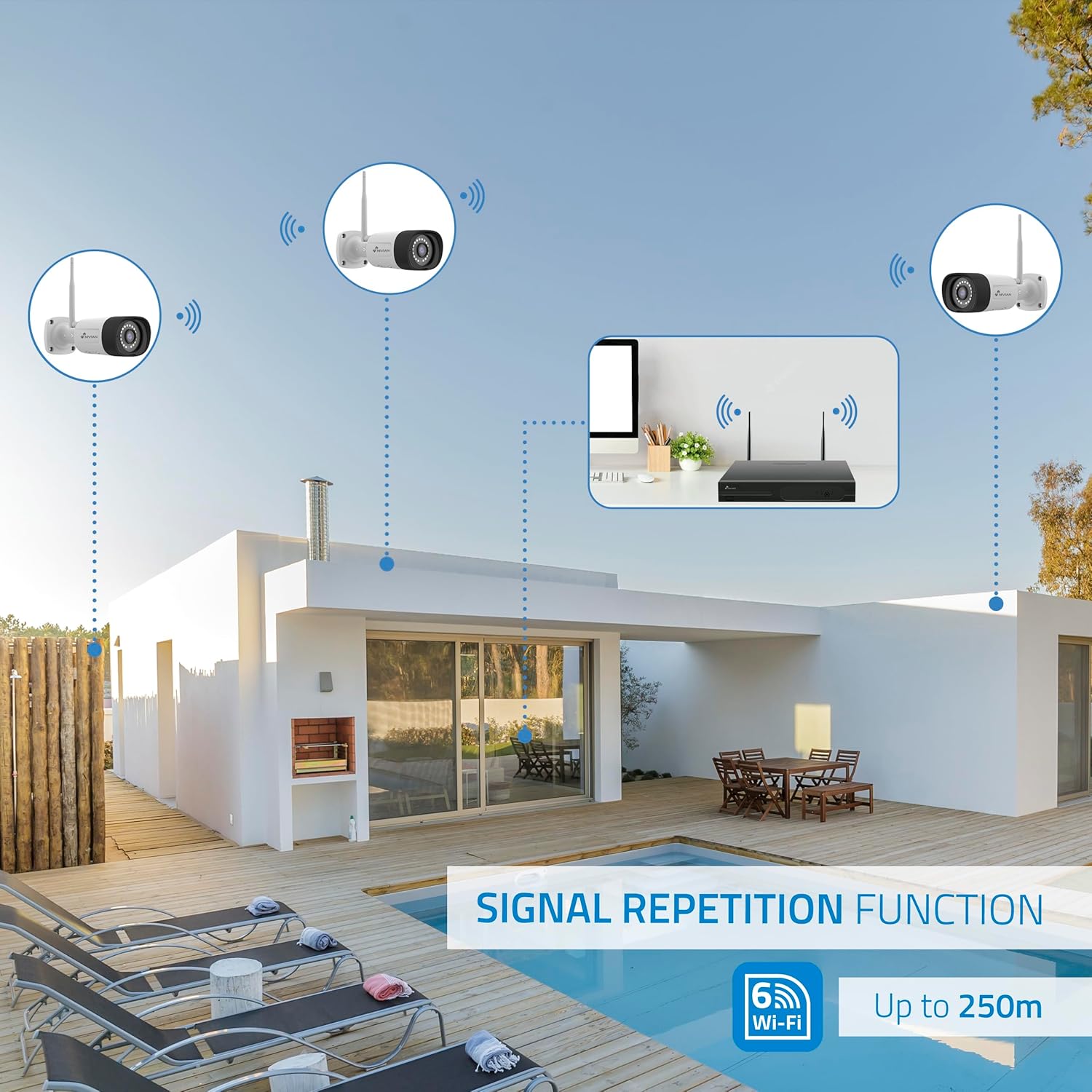
Image: Diagram showing the signal repetition function of the NIVIAN WiFi CCTV system, where cameras can extend the WiFi range up to 250 meters from the NVR.
4.3. EseeCloud App Setup
- اپلیکیشن ډاونلوډ کړئ: Download the "EseeCloud" app from your mobile device's app store (available for iOS, Android).
- حساب ثبت کړئ: اپلیکیشن پرانیزئ او یو نوی حساب راجستر کړئ یا که تاسو دمخه یو حساب لرئ نو ننوتل وکړئ.
- وسیله اضافه کړئ: د خپل NVR سیسټم اضافه کولو لپاره د اپلیکیشن دننه لارښوونې تعقیب کړئ. پدې کې معمولا د NVR په مانیټر کې ښودل شوي QR کوډ سکین کول یا په لاسي ډول د وسیلې ID داخلول شامل دي.
- لرې Viewing: یوځل چې اضافه شي، تاسو کولی شئ view live feeds, access recordings, and configure settings remotely.

Image: Smartphone screen displaying the EseeCloud app interface for managing the security system, showing live camera feeds and control options, with NIVIAN cameras and a laptop in the background.
5. عملیاتي لارښوونې
5.1. ژوندی View
Access live camera feeds through the NVR connected to a monitor or via the EseeCloud mobile app. The NVR interface allows you to switch between single-camera view او څو کیمرې گرډ view.
5.2. ثبتول
- دوامداره ثبت کول: The system is configured for continuous recording by default to the 1TB hard drive.
- د حرکت موندنې ثبتول: Configure cameras to record only when motion is detected. This can be scheduled via the NVR settings or EseeCloud app.
- H.265+ Codec: The system uses H.265+ video compression to optimize storage space while maintaining video quality.
5.3. پلې بیک
ثبت شوي foo ته لاسرسیtage through the NVR's playback menu or the EseeCloud app. You can search recordings by date, time, and event type (e.g., motion detection).
5.4. AI Human Detection
The cameras feature advanced AI human detection to differentiate human movement from other objects, significantly reducing false alarms. When human motion is detected, the system can trigger recordings, send notifications, and activate the white LED night vision for color footage.

Image: NIVIAN camera detecting a person at night, with the white LED light activated for color night vision, and a mobile notification indicating motion detection.
۴.۲. دوه اړخیزه آډیو
Use the EseeCloud app to utilize the two-way audio feature. This allows you to listen to audio from the camera's location and speak through the camera's built-in speaker.
۳. د شپې لید طریقې
- انفراریډ (IR) حالت: Provides black and white video in low-light conditions for discreet surveillance.
- White LED Mode: When motion is detected in low light, the camera's white LEDs activate, providing full-color video and acting as a deterrent.
6. ساتنه
- د کیمرې پاکول: د کیمرې لینزونه په منظم ډول د نرم، ډamp ټوکر د روښانه انځور کیفیت ډاډمن کولو لپاره. سخت کیمیاوي مواد مه کاروئ.
- د فرم ویئر تازه معلومات: Check for firmware updates for the NVR and cameras through the EseeCloud app or NVR settings. Keep your system updated for optimal performance and security.
- د هارډ ډرایو مدیریت: The 1TB hard drive will automatically overwrite the oldest recordings when full. If you need to preserve specific footage, back it up to an external device.
- د بریښنا رسولو چک: ډاډ ترلاسه کړئ چې ټول بریښنا اډاپټرونه په خوندي ډول وصل دي او له زیان څخه پاک دي.
7. ستونزه حل کول
7.1. No Camera Feed
- ځواک چیک کړئ: Ensure the camera is powered on and its adapter is working.
- د وای فای سیګنال: Verify the camera is within the NVR's WiFi range. Use the signal repetition function if necessary.
- کیمره بیا جوړه کړئ: If issues persist, try re-pairing the camera with the NVR through the NVR's menu.
۶.۵. د انځور کمزوری کیفیت
- د لینز پاکول: د کیمرې لینز د هر ډول خاورې یا داغونو لپاره پاک کړئ.
- روښنايي: Ensure adequate lighting for optimal image quality, especially at night.
- د وای فای مداخله: Reduce potential WiFi interference by moving the camera or NVR, or by using the signal repetition function.
7.3. Remote Access Issues (EseeCloud App)
- د انټرنیټ پیوستون: Ensure both your NVR and mobile device have a stable internet connection.
- NVR Network Settings: Verify the NVR is correctly connected to your router and has internet access.
- د اپلیکیشن نسخه: Ensure your EseeCloud app is updated to the latest version.
7.4. Hard Drive Full / Recording Issues
- د ذخیره کولو ځای وګورئ: Verify the hard drive status in the NVR settings.
- د ثبت کولو مهالویش: ډاډ ترلاسه کړئ چې د ثبت مهالویشونه په سمه توګه تنظیم شوي دي.
- د هارډ ډرایو روغتیا: If issues persist, the hard drive may need to be checked or replaced.
8. مشخصات
| برانډ | NIVIAN |
| د ماډل شمیره | NV-KIT830W-8CAM |
| د محصول ابعاد (L x W x H) | 23 x 12 x 8 سانتي متره؛ 6.2 کیلوګرامه |
| د ارتباط ټیکنالوژي | Wireless (WiFi-6) |
| د ویډیو ثبتولو حل | 2K (3MP) |
| د چینلونو شمیر | ۸ (NVR) |
| د کیمرونو شمېر | 6 |
| د ذخیره کولو ظرفیت | 1 TB Hard Drive (included) |
| د کیمرې ځانګړتیاوې | IP Cameras SuperHD with PTZ, Night Vision, AI Human Detection, Two-Way Audio |
| د چوکاټ نرخ | 15 fps، 24 fps، 30 fps |
| مطابقت لرونکې وسیلې | Television (via HDMI) |
| د بریښنا پلګ ډول | دیوال غر |
| اصلي هیواد | چین |
9. تضمین او ملاتړ
NIVIAN offers technical support to all customers. If you have any questions, suggestions, or encounter any issues with your WiFi surveillance camera kit, please do not hesitate to contact us.
You can reach us through Amazon messages or via any official NIVIAN brand channel. Please refer to your purchase documentation for specific warranty terms and contact details.


