محصول پای ته ورسیدview
The RadioShack Transparent Wired RGB Gaming Mouse is designed for enhanced control and precision in gaming and multitasking. Featuring a durable braided cable, advanced 7D buttons, and customizable RGB lighting, this mouse offers responsive performance and extended durability.

Image: The transparent design of the RadioShack Wired RGB Gaming Mouse showcasinد هغې داخلي برخې او متحرک RGB رڼا.
کلیدي ځانګړتیاوې:
- دوامدار ګنډل شوی کیبل: Equipped with a resistant white braided USB cable of 1.5 meters for long-lasting use.
- Advanced 7D Buttons: Features 7 programmable buttons for enhanced control and precision.
- د اصلاح وړ RGB رڼا: Offers 14 modes of RGB light to personalize your gaming setup.
- لوړ فعالیت: Built with an Instant 725F chipset and a polling rate of 125Hz for smooth and responsive performance.
- تمدید شوی عمر: Designed with a keystroke life of up to 5 million clicks for reliable and enduring use.
د تنظیم کولو لارښوونې
To begin using your RadioShack Transparent Wired RGB Gaming Mouse, follow these simple steps:
- د USB کیبل سره وصل کړئ: Plug the 1.5-meter braided USB cable directly into an available USB port on your personal computer.
- د ډرایور نصب کول: Your operating system (Windows) should automatically detect and install the necessary drivers. Allow a few moments for this process to complete.
- پیوستون تایید کړئ: Once drivers are installed, the mouse's RGB lighting should illuminate, indicating a successful connection.
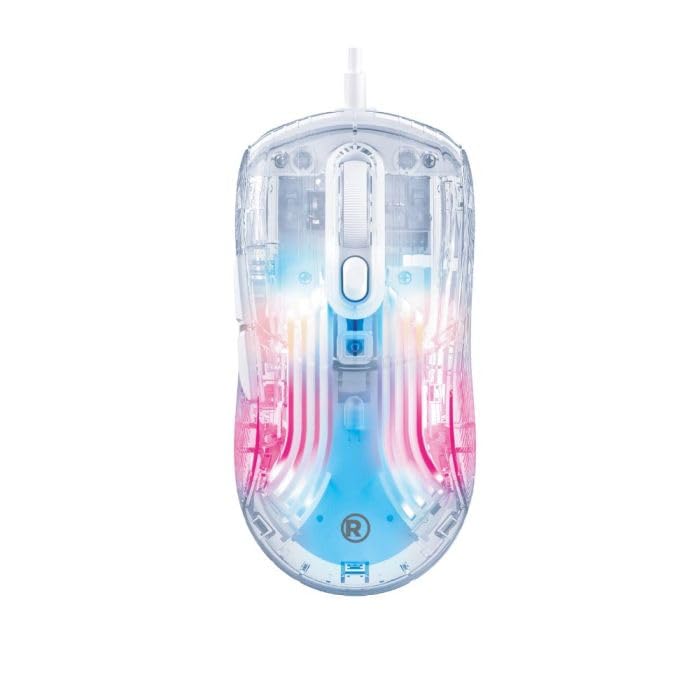
Image: The transparent gaming mouse with its braided USB cable, ready for connection to a computer.
عملیاتي لارښوونې
The RadioShack Transparent Wired RGB Gaming Mouse features 7 programmable buttons and customizable RGB lighting to enhance your user experience.
د تڼۍ دندې:
- د کیڼ کلیک تڼۍ: Standard primary function.
- د ښي کلیک تڼۍ: Standard secondary function.
- سکرول ویل: پورته/ښکته سکرول کړئ، او د منځني کلیک فعالیت لپاره د کلیک کولو وړ.
- د DPI تنظیم کولو تڼۍ: Typically located near the scroll wheel, these buttons allow you to cycle through different DPI (dots per inch) settings to adjust cursor sensitivity.
- د مخ/شاته تڼۍ: Located on the side, these buttons are commonly used for navigation in web براوزرونه یا file سپړونکي
- د RGB حالت تڼۍ: A dedicated button (often on the bottom or top) to cycle through 14 different RGB lighting modes.
Customizing RGB Lighting:
Press the dedicated RGB mode button to switch between the 14 available lighting effects. Some models may also feature a button to select specific colors.
Video: A demonstration of the transparent gaming mouse showcasing its various RGB lighting effects and sleek design.
ساتنه
To ensure the longevity and optimal performance of your gaming mouse, regular maintenance is recommended:
- پاکول: Use a soft, dry cloth to wipe down the mouse surface. For stubborn dirt, a slightly damp ټوکر کارول کیدی شي، ډاډ ترلاسه شي چې رطوبت داخلي برخو ته ننوځي.
- د کیبل پاملرنه: د زیان څخه د مخنیوي لپاره د ګنډل شوي USB کیبل کې د تیزو کږو یا ډیر کشولو څخه ډډه وکړئ.
- ذخیره کول: موږک په پاک او وچ چاپیریال کې وساتئ، کله چې کارول نه وي، د سختې تودوخې او مستقیم لمر وړانګو څخه لرې وساتئ.
د ستونزو حل کول
If you encounter any issues with your RadioShack Transparent Wired RGB Gaming Mouse, please refer to the following common solutions:
- موږک ځواب نه ورکوي: Ensure the USB cable is securely plugged into a functional USB port. Try a different USB port or restart your computer.
- د RGB څراغونه کار نه کوي: Check if the RGB mode button has been pressed to activate lighting effects. Ensure the mouse is properly connected.
- د کرسر حرکت مسلې: Clean the optical sensor on the bottom of the mouse. Ensure you are using the mouse on a suitable surface (e.g., a mouse pad). Adjust DPI settings using the dedicated buttons.
مشخصات
| فیچر | تفصیل |
|---|---|
| برانډ | رادیو شاک |
| د ماډل شمیره | 2607149 |
| رنګ | شفاف |
| د ارتباط ټیکنالوژي | USB (ویر شوی) |
| ځانګړی ځانګړنه | RGB Lights (14 modes) |
| د حرکت کشف ټیکنالوژي | Optical (Instant 725F chipset) |
| د رای ورکولو کچه | 125Hz |
| د تڼۍ مقدار | د 7D تڼۍ |
| د لاس لارښوونه | سمه ده |
| مطابقت لرونکې وسیلې | شخصي کمپیوټر |
| عملیاتي سیسټم | وینډوز |
| د کیبل اوږدوالی | 1.5 متره |
| د کیلي سټروک عمر | تر 5 ملیون کلیکونو پورې |
| د توکي وزن | 1.5 پونډه |
| د تړلو موادو | پلاستیک |
تضمین او ملاتړ
This product does not include a specific warranty description as per available information. For technical support or further assistance, please refer to the official RadioShack customer service channels or visit their webسایټ


