1. پیژندنه
This manual provides essential information for the safe and effective operation of your ION Audio Retro Glow Boombox. This device combines classic audio playback with modern connectivity, featuring an AM/FM radio, cassette player/recorder, Bluetooth 5.3, USB, and SD card playback capabilities. Please read this manual thoroughly before use and retain it for future reference.
2. د خوندیتوب معلومات
- واحد د اوبو یا رطوبت سره مخ مه کوئ.
- د تودوخې سرچینو ته نږدې یا مستقیم لمر وړانګو کې د واحد له ایښودلو څخه ډډه وکړئ.
- د هوا مناسبه هوا ورکول ډاډمن کړئ؛ د هوا د بهېدو هیڅ لاره مه بندوئ.
- یوازې د جوړونکي لخوا مشخص شوي ضمیمې / لوازم وکاروئ.
- د برښنا د طوفان په وخت کې یا کله چې د اوږدې مودې لپاره نه کارول کیږي یونټ خلاص کړئ.
- ټول خدمتونه وړ خدمت پرسونل ته راجع کړئ.
۳. څه پکې شامل دي
د خلاصولو پر مهال، ډاډ ترلاسه کړئ چې لاندې لیست شوي ټول توکي شتون لري او په ښه حالت کې دي:
- ION Audio Retro Glow Boombox
- د بریښنا کیبل
- د چټک پیل لارښود
4. محصول ختم شوview
The Retro Glow Boombox features a translucent housing with multi-colored LED lights that synchronize with music. It includes dual full-range speakers for robust audio output.
مخکینۍ پینل

شکل 1: مخکی view of the Retro Glow Boombox, showcasing the cassette deck, radio tuner, and illuminated dual speakers.
لوړ کنټرولونه

شکل 2: مفصل view of the top panel, including volume, bass, treble controls, cassette function buttons (Pause, Stop/Eject, F.FWD, REW, Play, REC), and mode selectors (Tape, Aux, Radio, Bluetooth/USB/SD).
Side Panel and Rear
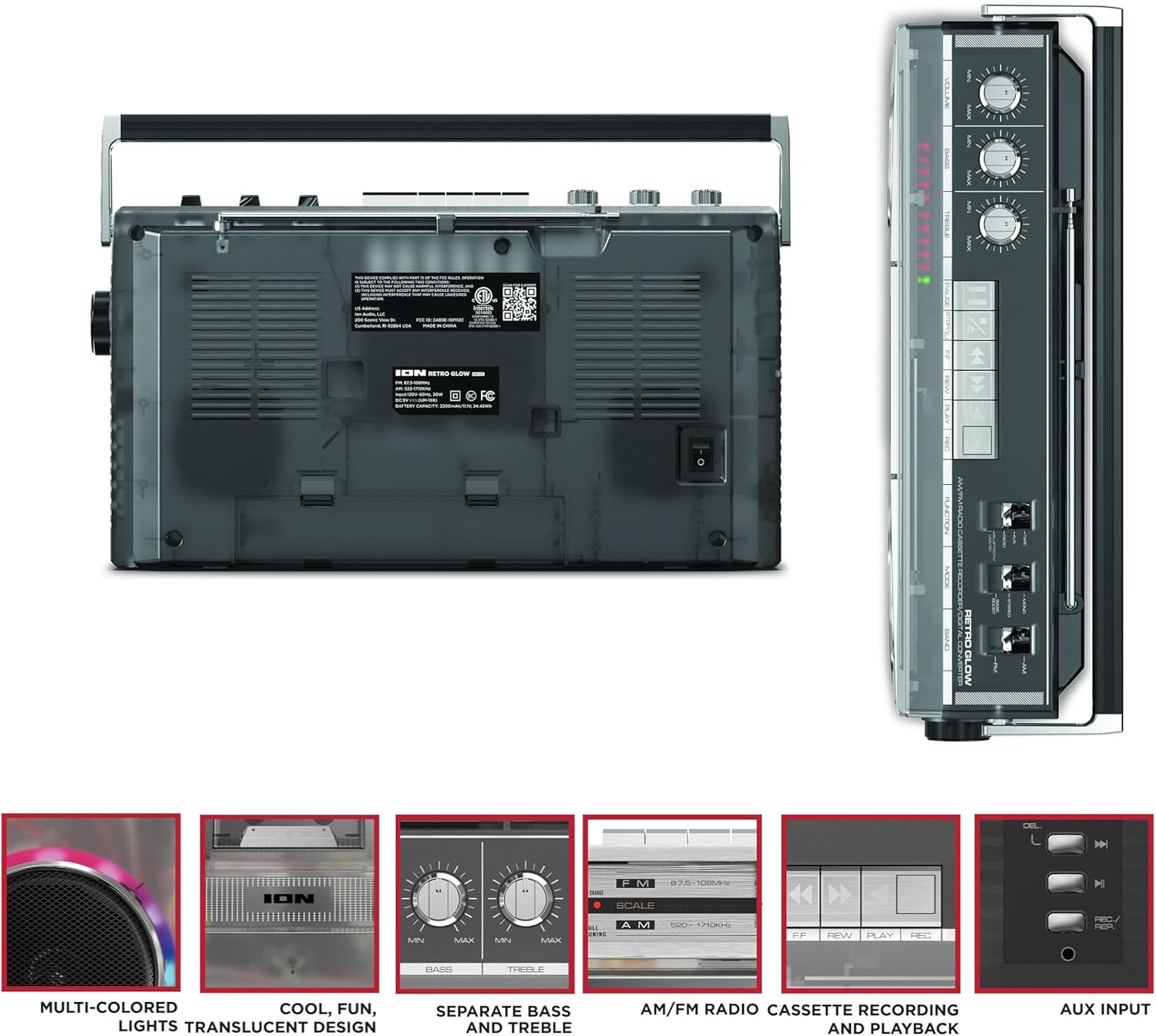
Figure 3: Side panel illustrating the USB port, SD card slot, and playback control buttons. The rear panel includes the power input and battery compartment.
5. ترتیب کول
Powering the Boombox
The Retro Glow Boombox can be powered via the included AC power cable or by batteries for portable use.
- د AC بریښنا: Connect the power cable to the AC input on the rear of the unit and then to a wall outlet.
- د بیټرۍ ځواک: Open the battery compartment on the rear and insert the required batteries (type and quantity specified in specifications).

شکل 4: شاته view of the boombox, highlighting the power input and the battery compartment for portable operation.
6. عملیاتي لارښوونې
عمومي عملیات
- پاور آن/بند: Use the power switch to turn the unit on or off.
- د حجم کنټرول: Adjust the 'VOLUME' knob on the top panel to increase or decrease the sound level.
- د ټون کنټرول: Use the 'BASS' and 'TREBLE' knobs to customize the audio output to your preference.
- LED څراغونه: The multi-colored LED lights around the speakers dance in sync with the music. Refer to the Quickstart Guide for specific controls to change light modes or turn them off.
د راډیو فعالیت
- Switch the 'FUNCTION' selector to 'RADIO'.
- Select 'AM' or 'FM' using the 'BAND' switch.
- د غوره FM استقبال لپاره ټیلسکوپیک انټینا پراخه کړئ. د AM لپاره، د غوره استقبال لپاره واحد وګرځوئ.
- Use the 'TUNING' knob to scan for stations.
د کیسیټ غږونکی/ریکارډر
- پلې بیک: Press the 'STOP/EJ' button to open the cassette door. Insert a cassette tape and close the door. Press 'PLAY' to begin playback.
- ثبتول: To record from the radio, built-in microphone, or an external source (via Aux input), ensure a blank cassette is inserted. Select the desired source using the 'FUNCTION' switch. Press the 'REC' button (often simultaneously with 'PLAY') to start recording.
- ګړندی مخکی / بیرته راګرځول: Use the 'F.FWD' and 'REW' buttons for tape navigation.
د بلوتوټ ارتباط
- Switch the 'FUNCTION' selector to 'BLUETOOTH/USB/SD'. The unit will enter pairing mode.
- On your Bluetooth-enabled device, search for 'Retro Glow Boombox' and select it to pair.
- Once paired, you can stream audio wirelessly to the boombox.
د USB او SD کارت پلے بیک
- Insert a USB drive or SD card into the respective slot on the side panel.
- Switch the 'FUNCTION' selector to 'BLUETOOTH/USB/SD'. The unit should automatically detect and begin playing audio fileد داخل شوي رسنیو څخه.
- Use the playback control buttons (play/pause, skip forward/backward) on the side panel to manage your audio.
مرستندویه معلومات
- Connect an external audio device (e.g., smartphone, MP3 player) to the 'AUX' input using a 3.5mm audio cable (not included).
- Switch the 'FUNCTION' selector to 'AUX'. Audio from your external device will play through the boombox speakers.
7. ساتنه
- پاکول: د واحد بهرنۍ برخه پاکولو لپاره نرم، وچ ټوکر وکاروئ. د کثافاتو پاکوونکي یا محلولونه مه کاروئ.
- د کیسټ ډیک پاملرنه: Regularly clean the tape heads and pinch rollers with a cotton swab lightly dampد ایزوپروپیل الکول سره پوښل شوی ترڅو د غږ غوره کیفیت ډاډمن کړي او د ټیپ زیان مخه ونیسي.
- ذخیره کول: When not in use, store the boombox in a cool, dry place away from direct sunlight and extreme temperatures.
8. ستونزه حل کول
هیڅ ځواک نشته
- ډاډ ترلاسه کړئ چې د بریښنا کیبل په خوندي ډول د واحد او کاري بریښنا سایټ دواړو سره وصل دی.
- که چیرې بیټرۍ کاروئ، وګورئ چې ایا دوی په سمه توګه داخل شوي او خالي شوي ندي.
نه غږ
- Check the volume level on the boombox and the connected audio source (if applicable).
- Ensure the correct function mode (Radio, Tape, Bluetooth, USB/SD, Aux) is selected.
- For cassette playback, verify the tape is inserted correctly and the heads are clean.
د بلوتوټ جوړه کولو مسلې
- Make sure the boombox is in Bluetooth pairing mode.
- Ensure your Bluetooth device is within range (typically 30 feet or 10 meters).
- د وسیلې د جلا کولو او بیا جوړولو هڅه وکړئ.
9. مشخصات
| د محصول ابعاد | 9.25 x 16.25 x 5.25 انچه |
| د توکي وزن | ۲.۴۵ پونډه |
| د ارتباط ټیکنالوژي | Bluetooth 5.3, USB, SD Card, Aux Input |
| د سپیکر ډول | Stereo, Full-Range |
| د بریښنا سرچینه | AC Power Cable, Rechargeable Battery (approx. 10-hour life) |
| ځانګړي ځانګړتیاوې | AM/FM Radio, Cassette Player/Recorder, Multi-colored LED Lights, Retro VU Meters, Separate Bass and Treble Controls |
10. تضمین او ملاتړ
For warranty information or technical support, please refer to the Quickstart Guide included with your product or visit the official ION Audio webسایټ. د پیرود رسید وساتئ ځکه چې د تضمین ادعاوو لپاره ممکن د پیرود ثبوت اړین وي.


