1. پیژندنه
The BOTSLAB 4K Dash Cam G980H is a high-performance front and rear dash camera system designed to enhance your driving safety and vehicle security. Featuring true 4K resolution for the front camera and 1080P for the rear, it captures clear footage day and night. Equipped with advanced features like 24/7 parking monitoring, ADAS (Advanced Driver-Assistance Systems), and built-in GPS, this dash cam provides comprehensive protection and real-time alerts.
کلیدي ځانګړتیاوې:
- True 4K Quality: Front camera with IMX 415 Sensor and 1080P rear camera for sharp, detailed footage.
- 360° Swivel Rear Cam: Adjustable rear camera to monitor both the road behind and the vehicle's interior.
- 24/7 Parking Mode: Continuous surveillance even when the engine is off, with included hardwired kit for theft and vandalism protection.
- ADAS Driving Safety: AI-powered alerts for pedestrian collision, front vehicle movement, lane deviation, and vehicle distance, plus fatigue monitoring.
- 5G/2.4G WiFi & GPS: Ultra-fast data transfer and stable connection for APP viewing, accurate recording of driving track and real-time speed.
- WDR & Night Vision: Optimizes image quality in complex lighting conditions, ensuring clear recordings in low light.
- سوپر Capacitor: Enhanced durability and reliable operation in extreme temperatures (-20°C to 70°C).
۲. په بکس کې څه دي؟
مهرباني وکړئ د بسته بندۍ محتويات وګورئ ترڅو ډاډ ترلاسه کړئ چې ټول توکي شتون لري:
- مخکینۍ کیمره (اصلي واحد)
- شاته کیمره
- د USB بریښنا مزي
- د موټر چارجر
- Installation Pry Bar
- 64GB مایکرو ایس ډی کارت
- Type C Hardwired Kit
- الیکټروسټاټیک فلم (x2)
- د کارن لارښود
- د چټک پیل لارښود
- د خبرتیا کارت

Image: Contents of the BOTSLAB 4K Dash Cam G980H package, including the main unit, rear camera, cables, and accessories.
۱. تنظیم او نصب کول
3.1 د مخکینۍ کیمرې نصب کول
- د کړکۍ شیشه پاکه کړئ: Ensure the mounting area on the windshield is clean and free of dust or grease for secure attachment.
- Apply Static Sticker: Place the static sticker on the cleaned windshield area, right below the rearview mirror and away from any tinted sections.
- د ډش کیم نصبول: Mount the dash cam to the static sticker using its 3M adhesive pad. Press firmly to ensure a strong bond.
- د بریښنا کیبل وصل کړئ: Link the front camera to its power source using the provided car charger or hardwired kit.
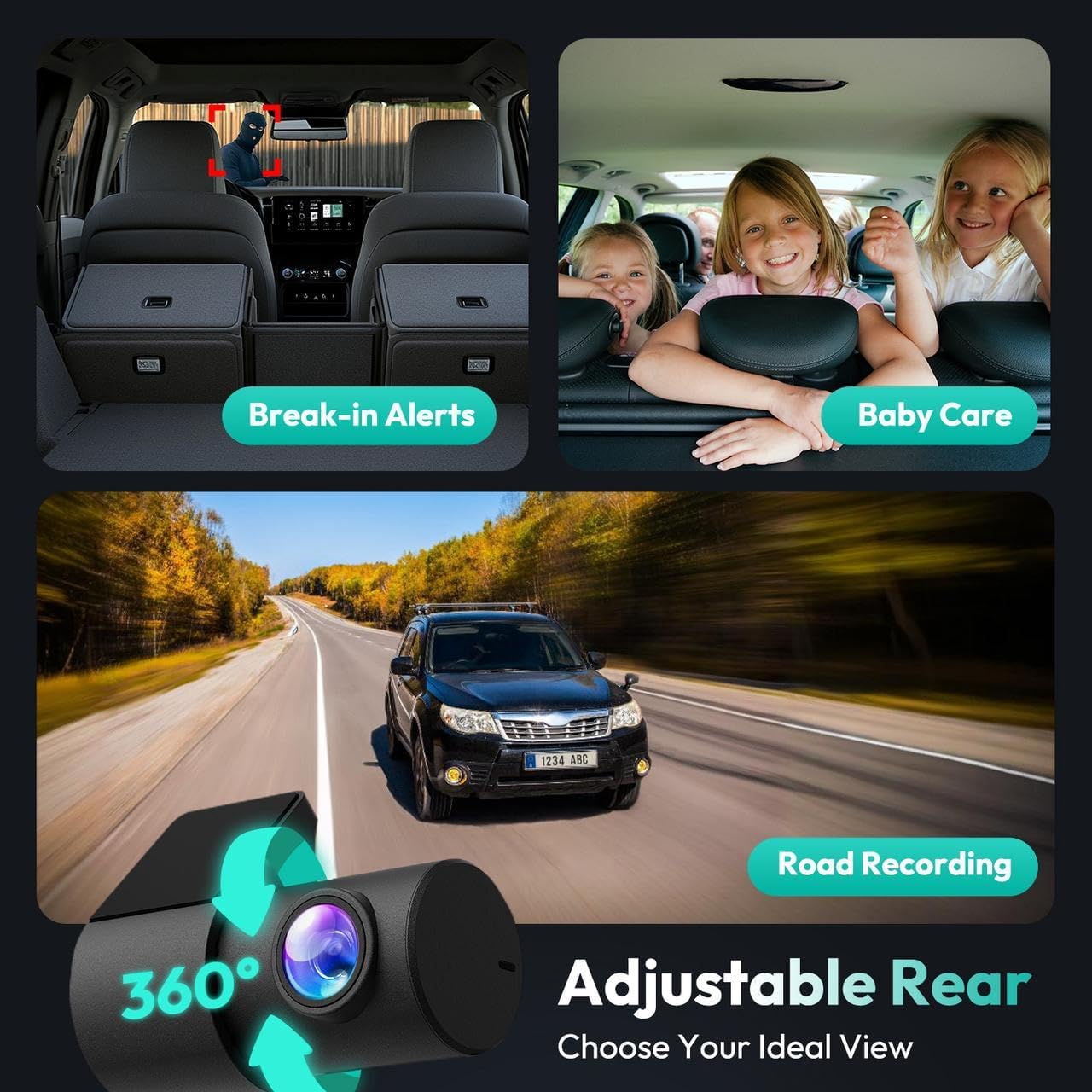
Image: The main dash cam unit installed on the vehicle's front windshield.
3.2 د شا کیمرې نصب کول
- Connect Rear Camera Cable: Attach the rear camera's cable to the main unit.
- د شا کیمره نصب کول: Position the rear camera at the back of your car, ensuring the glass is clean for optimal adhesion. Tighten the screws to ensure the camera's image remains clear and stable.
- د کیبل مدیریت: Use the pry tool to neatly route the power cable along the headliner and vehicle trim, avoiding any loose areas. Excess cable can be routed along the interior edge of the car's rear or coiled for tidy installation.

Image: Illustration of the front and rear dash cam installation process, showing cable routing.
3.3 Hardwired Kit Installation (for 24/7 Parking Mode)
The hardwired kit is included for continuous 24/7 parking surveillance. Professional installation is recommended.
- Locate the Fuse Box: Refer to your vehicle's manual to find the fuse box, typically located on the lower left or right side of the steering wheel.
- Test Power Sources: With a multimeter, check for a 12V constant power source (provides power even when the car is off) and an ACC power source (live only when the car is on) in your fuse box.
- تارونه وصل کړئ: Connect the Yellow Wire (ACC) to the ACC power source, the Red Wire (VCC+) to the constant power source, and attach the Black Wire (GND-) to a suitable grounding point.
- Connect to the Dash Cam: Attach the kit's Type-C connector to your dash cam.
Video: Detailed guide on how to install the BOTSLAB Hardwired Kit for continuous power.
Video: Step-by-step instructions for installing the BOTSLAB 4K Dash Camera.
4. عملیاتي لارښوونې
4.1 بنسټیز عملیات
- پاور آن/بند: The dash cam will automatically power on and begin recording when your vehicle starts, and power off when the engine is turned off (if hardwired).
- ثبتول: The camera automatically records in a continuous loop. Older footage is overwritten by new recordings once the memory card is full. Emergency recordings triggered by the G-sensor are protected from being overwritten.
- د سکرین ښودنه: The integrated screen displays live footage from the front and rear cameras, along with recording status and settings.
4.2 Smartphone App & Connectivity
Download the BOTSLAB app from your device's app store to access advanced features and manage your recordings.
- د وای فای اتصال: The dash cam supports 5G/2.4G WiFi for ultra-fast transmission speed and stable connection to your smartphone.
- ژوندی View & غږول: View ژوندی اوسیtage, replay recorded videos, and download files directly to your phone via the app.
- د GPS تعقیب: The built-in GPS accurately records your driving track and real-time speed. Use compatible DV playback software on your computer to review complete trip routes.
- د ترتیباتو سمون: Adjust various settings such as recording resolution, parking monitoring sensitivity, ADAS features, and more directly from the app.

Image: The BOTSLAB app displaying GPS tracking and route information.
۳.۴ پرمختللي موټر چلوونکي مرستې سیسټمونه (ADAS)
The G980H dash cam is equipped with a 1.5TOPS AI NPU chip and BOTSLAB's AI algorithms to provide real-time warnings for potential hazards:
- Pedestrian Collision Warning: Alerts you to pedestrians in the vicinity.
- Front Vehicle Movement: Notifies you when the vehicle in front starts moving.
- Lane Deviation Warning: Alerts if your vehicle drifts from its lane.
- Vehicle Distance Warning: Warns if you are too close to the vehicle ahead.
- Fatigue Monitoring: Reminds you to take a break after continuous driving.

Image: Visual representation of the ADAS features provided by the dash cam.
4.4 د پارکینګ څارنه
With the hardwired kit installed, the dash cam provides 24/7 parking monitoring:
- د وخت تیريدو ثبتول: Records 1 frame per second for up to 24 hours, compressing long periods into short videos.
- Collision-Detected Recording: Automatically activates and records 1 minute of emergency footage د ټکر په موندلو سره.

Image: Parking monitoring features, including time-lapse and collision-detected recording.
Video: Demonstration of the True 4K capabilities of the G980H dash cam.
ویډیو: پایview of the Botslab G980H Set Dash Cam features and operation.
5. ساتنه
۴.۲ د حافظې کارت مدیریت
The included 64GB MicroSD card is pre-installed. For optimal performance, it is recommended to format the memory card periodically (e.g., once a month) using the dash cam's settings or the BOTSLAB app. This helps maintain recording quality and prevents data corruption.
5.2 د فرم ویئر تازه معلومات
Regular firmware updates ensure your dash cam has the latest features and bug fixes. Check for updates via the BOTSLAB app.
Video: Instructions on how to update the dash cam's firmware using the app.
6. ستونزه حل کول
If you encounter any issues with your BOTSLAB Dash Cam, please refer to the following common problems and solutions:
- ډش کیم نه فعالیږي: Ensure the power cable is securely connected to both the dash cam and the power source (car charger or hardwired kit). Check the vehicle's cigarette lighter socket or fuse box for power.
- د ثبت کولو مسلې: Format the MicroSD card. Ensure the card is inserted correctly. If issues persist, try a different compatible MicroSD card.
- د اپلیکیشن اتصال ستونزې: Ensure Wi-Fi is enabled on both the dash cam and your smartphone. Restart both devices and try reconnecting. Check that the BOTSLAB app is updated to the latest version.
- د ویډیو خراب کیفیت: Clean the camera lenses. Ensure the dash cam is securely mounted and not vibrating. Check the recording resolution settings in the app.
- ADAS Warnings Not Functioning: Ensure ADAS features are enabled in the app settings. Verify the camera is correctly aligned according to the on-screen indicators.
For further assistance, please contact BOTSLAB customer support.
7. مشخصات
| مشخصات | تفصیل |
|---|---|
| د محصول ابعاد | 1.6 x 4.5 x 2.6 انچه |
| د توکي وزن | ۲.۴۵ پونډه |
| د ویډیو نیول حل | 4K (Front), 1080P (Rear) |
| د ارتباط ټیکنالوژي | Bluetooth, Wi-Fi (5G/2.4G) |
| د نصب کولو ډول | د وینشیلډ ماینټ |
| د عملیاتي حرارت درجه | له 20 درجو څخه تر 70 درجو پورې |
| سینسر | IMX 415 |
| ځانګړي ځانګړتیاوې | 24/7 Parking Monitor, ADAS, Night Vision, WDR, Loop Recording, GPS, Super Capacitor |
Image: The super capacitor, providing enhanced durability and stable operation in various temperatures.
8. تضمین او ملاتړ
BOTSLAB is a global tech company dedicated to creating top-tier AI-Vision security products. We are committed to enhancing home safety and providing reliable products.
د پیرودونکي ملاتړ:
- ۲۴ ساعته ژوندۍ خبرې اترې: د بوټسلاب اپلیکیشن ډاونلوډ کړئ، راجستر کړئ او لاسلیک وکړئ، بیا ما > ملاتړ > ژوندۍ خبرې اترې ته لاړ شئ.
- Webسایټ: لیدنه global.botslab.com په اړه
- بریښنالیک: خدمت@botslab.com
- ټولنیزې رسنۍ: په فیسبوک کې د بوټسلاب کاروونکو ګروپ سره یوځای شئ.

Image: Botslab support channels including app live chat, website, email, and social media.
د تضمین معلومات:
- د 365 ورځو کیفیت تضمین: Your product is covered by a quality guarantee for 365 days from the date of purchase.
- د ژوند لپاره تخنیکي مرسته: Receive ongoing technical support for the lifespan of your product.
- د ۳۰ ورځو وړیا بیرته ستنیدل: د پیرودلو په 30 ورځو کې د وړیا بیرته راستنیدو څخه خوند واخلئ.
- 48 Hours Fast Support: Expect prompt responses to your support inquiries within 48 hours.

Image: Botslab Care benefits, including quality guarantee, technical help, and return policy.


