1. پیژندنه
This manual provides detailed instructions for the LinYuvo KS10 Wireless Controller. It covers setup, operation, and maintenance to ensure optimal performance and an enhanced gaming experience across various platforms, including Nintendo Switch, Windows, SteamOS, and iOS devices.
2. محصول ختم شوview
The LinYuvo KS10 is a versatile wireless controller designed for a comfortable and responsive gaming experience. It features a transparent design showcasing internal components, enhanced joysticks, and customizable functions.

شکل 2.1: مخکی view of the LinYuvo KS10 Wireless Controller, showing its transparent casing and button layout.
کلیدي ځانګړتیاوې:
- Metal Mushroom Head & Honeycomb Design Joysticks: Provides improved operational feedback and anti-slip functionality for precise control.
- Three-Speed Continuous Firing (Turbo): Offers flexible operation for rapid input in games.
- Integrated Six-Axis Gyroscope: Enables immersive motion sensing for compatible games.
- Adjustable Vibration Level: Dual motors provide haptic feedback that can be customized.
- د رنګارنګ رڼا اغیزې: Features RGB lighting with various patterns to enhance the gaming atmosphere.
- Back-Key Macro Programming: Allows for personalized macro programming and multi-step combined key output.
- ارګونومیک ډیزاین: Shaped for comfortable grip during extended gaming sessions.
- د ویښیدو دنده: Ability to wake up the connected console.

Figure 2.2: Close-up of the metal rocker and honeycomb joystick design, highlighting enhanced detection and anti-slip features.
3. ترتیب کول
3.1. د کنټرولر چارج کول
Before initial use, fully charge the controller using the provided USB-C cable. Connect the cable to the controller's charging port and a compatible USB power source (e.g., a computer USB port or a USB wall adapter). The charging indicator will show the charging status and turn off when fully charged.
۱. د نینټینډو سویچ سره جوړه کول
- ستاسو د نینټینډو سویچ کنسول کې، د کور مینو ته لاړ شئ.
- وټاکئ "کنټرولرونه"، بیا "گرفت/نظم بدل کړئ".
- فشار ورکړئ او ونیسئ د جوړه کولو تڼۍ on the top of the LinYuvo KS10 controller for a few seconds until the indicator lights start flashing rapidly.
- Once paired, the controller will appear on the Switch screen, and the indicator light(s) on the controller will remain solid.
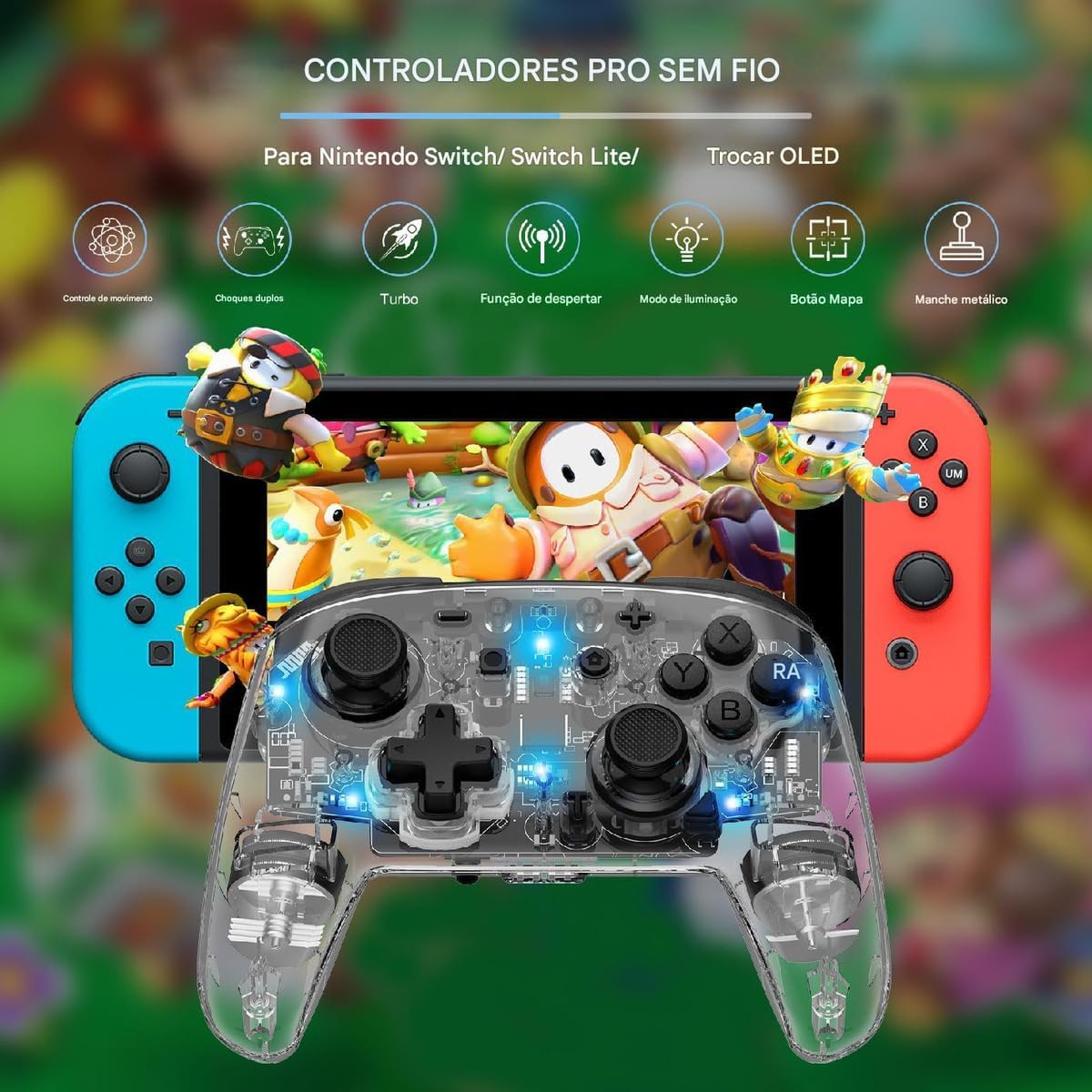
Figure 3.1: The LinYuvo KS10 controller shown alongside a Nintendo Switch console, illustrating its compatibility.
3.3. Pairing with Windows/SteamOS
- Ensure your Windows PC or SteamOS device has Bluetooth enabled.
- په خپل وسیله د بلوتوټ ترتیباتو ته لاړ شئ او غوره کړئ "Add Bluetooth or other device".
- فشار ورکړئ او ونیسئ د جوړه کولو تڼۍ on the LinYuvo KS10 controller until the indicator lights flash rapidly.
- Select the controller from the list of available devices to complete pairing.
۲.۲. د iOS وسیلو سره جوړه کول
- ستاسو په iOS وسیله کې، لاړ شئ ترتیبات> بلوتوټ او ډاډ ترلاسه کړئ چې بلوتوټ فعال دی.
- فشار ورکړئ او ونیسئ د جوړه کولو تڼۍ on the LinYuvo KS10 controller until the indicator lights flash rapidly.
- Look for the controller in the "Other Devices" list and tap to connect.
3.5. Wake-up Function
To activate a connected Switch console from sleep mode, simply press and hold the "HOME" button on the controller for approximately 3 seconds.

Figure 3.2: The controller's ergonomic design and the instruction to hold the HOME button for 3 seconds to wake up the Switch console.
4. عملیاتي لارښوونې
۶.۱. اساسي کنټرولونه
The LinYuvo KS10 controller features standard button layouts including A, B, X, Y buttons, D-pad, Left/Right joysticks, L/R and ZL/ZR shoulder buttons, HOME, SELECT, START, and screenshot buttons. Refer to in-game instructions for specific button functions.
۲. د ټربو فعالیت
The Turbo function allows for rapid, continuous input of a selected button. It has three adjustable speeds: 5 shots/second, 12 shots/second, and 20 shots/second.
- د ټربو فعالولو لپاره: فشار ورکړئ او ونیسئ د توربو تڼۍ (T), then press the desired action button (e.g., A, B, X, Y, L, R, ZL, ZR). The button will now continuously fire when held down.
- د ټربو سرعت تنظیمولو لپاره: د ساتلو په وخت کې د توربو تڼۍ (T)، فشار ورکړئ منفي (-) button to decrease speed or the جمع (+) button to increase speed. The corresponding light will flash slowly, medium, or fast to indicate the speed level.
- د ټربو غیر فعالولو لپاره: فشار ورکړئ او ونیسئ د توربو تڼۍ (T), then press the action button again.

Figure 4.1: Visual representation of the adjustable Turbo function with three speed settings (5/s, 12/s, 20/s) and instructions for adjustment.
4.3. Gyroscope Motion Control
The integrated six-axis gyroscope provides motion control capabilities for games that support it. This allows for immersive gameplay where tilting and moving the controller translates into in-game actions.

Figure 4.2: A user demonstrating gyroscope motion control with the LinYuvo KS10 controller in a racing game scenario.
4.4. Adjustable Vibration Feedback
The controller features dual motors for haptic feedback. The vibration intensity can be adjusted to suit personal preference.
- To adjust vibration: فشار ورکړئ او ونیسئ Vibration button (UM)، بیا یې وکاروئ پورته/ ښکته directional buttons on the D-pad to increase or decrease intensity.
- Available levels typically include 0%, 30%, 50%, 75%, and 100%.

Figure 4.3: Illustration of the adjustable vibration feedback levels (0%, 30%, 50%, 75%, 100%) provided by the integrated dual motors.
4.5. Colorful Lighting Effects
The controller includes customizable RGB lighting to enhance the gaming ambiance. There are various lighting modes and colors.
- To change lighting mode/color: فشار ورکړئ Lighting button (often represented by a lightbulb icon or a specific combination) to cycle through different colors (Blue, Red, Yellow, Green, Orange, Purple, Pink) or breathing patterns (e.g., rainbow breathing).
- د روښانتیا تنظیمولو لپاره: فشار ورکړئ او ونیسئ د رڼا تڼۍ او وکاروئ Y تڼۍ د روښانتیا کچه تنظیمولو لپاره.
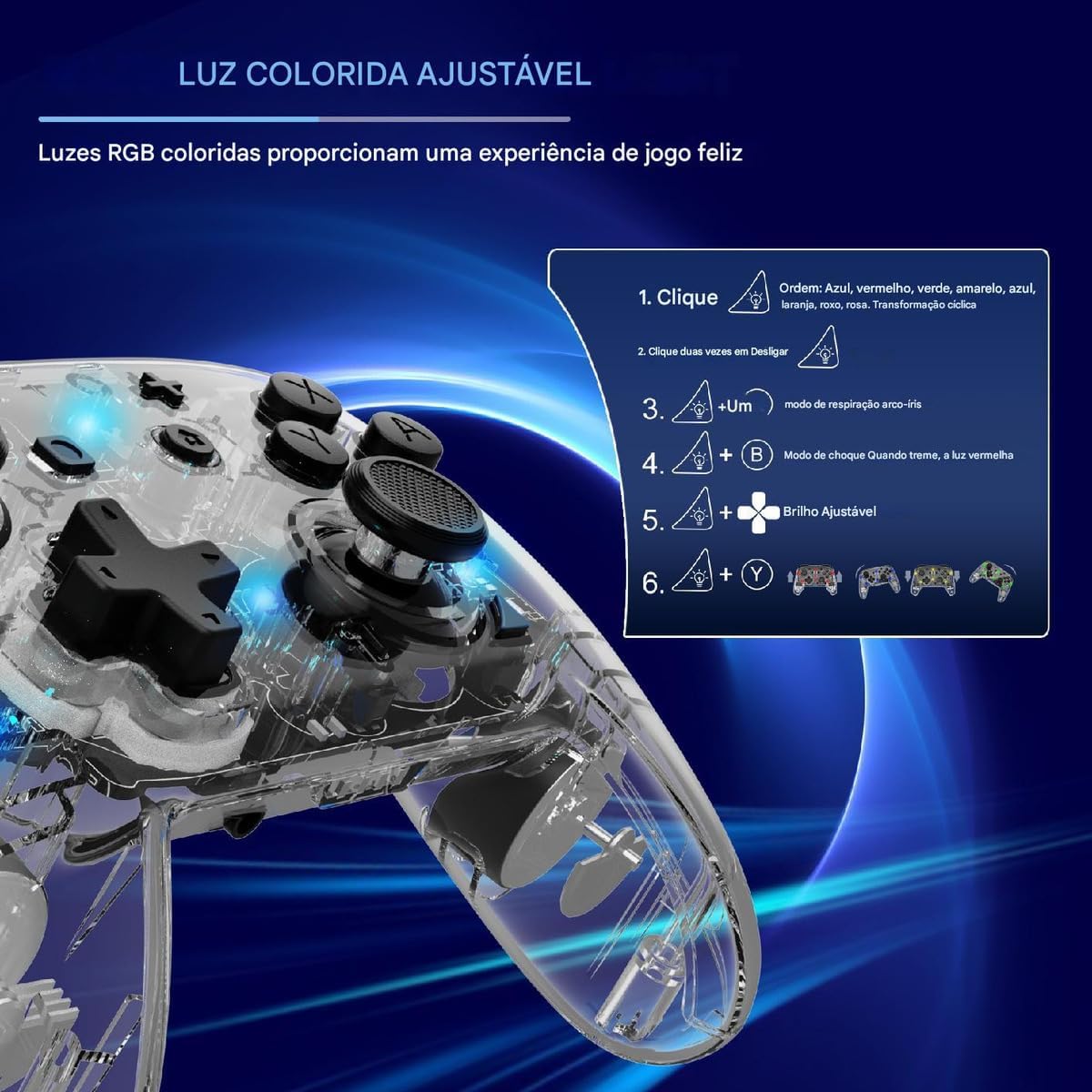
Figure 4.4: Diagram illustrating how to adjust the colorful RGB lighting, including color order and brightness settings.
4.6. Macro Programming (Back-Keys)
The back-keys on the controller can be programmed with custom macros, allowing for complex button sequences to be executed with a single press.
- To enter Macro Programming Mode: Refer to the specific instructions provided with your controller for the exact button combination (e.g., a dedicated Macro button + the back-key you wish to program).
- To record a Macro: While in programming mode, press the sequence of buttons you want to record.
- To save the Macro: Press the Macro button again to save the sequence to the selected back-key.
- To use a Macro: Press the programmed back-key to execute the recorded sequence.
Note: Detailed macro programming steps may vary. Consult the included quick start guide or manufacturer's website for precise instructions.
5. ساتنه
- پاکول: د کنټرولر پاکولو لپاره نرم، وچ ټوکر وکاروئ. سخت کیمیاوي مواد یا کثافات مه کاروئ.
- ذخیره کول: کنټرولر په یخ او وچ ځای کې د مستقیم لمر وړانګو او سختې تودوخې څخه لرې وساتئ.
- د بیټرۍ پاملرنه: د بیټرۍ د بشپړ چارج کولو څخه ډډه وکړئ. کنټرولر په منظم ډول چارج کړئ، حتی که د اوږدې مودې لپاره نه کارول کیږي، د بیټرۍ روغتیا ساتلو لپاره.
- له څاڅکو ډډه وکړئ: کنټرولر د څاڅکو او اغیزو څخه خوندي کړئ، کوم چې کولی شي داخلي برخو ته زیان ورسوي.
6. ستونزه حل کول
| ستونزه | احتمالي لامل | د حل لاره |
|---|---|---|
| کنټرولر نه چالانېږي. | ټیټ بیټرۍ. | Charge the controller for at least 30 minutes. |
| د وسیلې سره جوړه نشي کولی. | Bluetooth not enabled; controller not in pairing mode; interference. | Ensure Bluetooth is on. Put controller in pairing mode (flashing lights). Move closer to the device. Restart both devices. |
| د ننوتلو ځنډ یا قطع کیدل. | Low battery; too far from device; wireless interference. | Charge controller. Move closer to device. Reduce other wireless activity. |
| تڼۍ یا جویسټیکونه بې ځوابه دي. | د سافټویر خرابوالی؛ فزیکي زیان. | Restart the controller and the connected device. If problem persists, contact support. |
| وایبریشن کار نه کوي. | Vibration level set to 0%; game does not support vibration. | Adjust vibration intensity (Section 4.4). Check game settings. |
7. مشخصات
- ماډل: KS10
- ارتباط: بې سیم (بلوتوث)
- مطابقت: Nintendo Switch, Windows, SteamOS, iOS
- ځانګړي ځانګړتیاوې: Six-axis gyroscope, adjustable vibration, customizable RGB lighting, Turbo function, macro programming back-keys, metal joysticks.
- د بریښنا سرچینه: د چارج وړ داخلي بیټرۍ
- د چارج کولو بندر: USB-C
- د اصلي هیواد: چین
- ASIN: B0F18PLLLF
8. تضمین او ملاتړ
For warranty information and technical support, please refer to the documentation included with your purchase or contact the retailer. Keep your proof of purchase for any warranty claims.
This product is not an official Nintendo product but is compatible with the Nintendo Switch console.


