1. پیژندنه
This manual provides detailed instructions for the installation, setup, and operation of your ASD 20-Inch Smart RGBW Flush Mount Ceiling Light. This LED lighting fixture combines a modern design with advanced smart features, offering a versatile lighting solution for various indoor spaces. It features RGBW color-changing capabilities, dimming, and control via a remote or a smartphone app, with compatibility for Alexa and Google Assistant.
2. د خوندیتوب معلومات
مهرباني وکړئ د نصبولو او کارولو دمخه ټولې لارښوونې په دقت سره ولولئ. دا لارښود د راتلونکي حوالې لپاره وساتئ.
- بریښنایی خوندیتوب: Always turn off power at the circuit breaker before installing, servicing, or cleaning the fixture. Consult a qualified electrician if you are unsure about electrical wiring.
- لګول: Ensure the mounting surface can support the weight of the fixture. Follow all local electrical codes and ordinances.
- سمبالول: Do not handle the fixture with wet hands. Avoid direct eye exposure to the light source when illuminated.
- چاپیریال: دا فکسچر د d لپاره درجه بندي شوی دیamp locations but is intended for indoor use only. Do not expose to direct water spray or submersion.
- پاکول: د پاکولو لپاره نرم، وچ ټوکر وکاروئ. سخت کیمیاوي مواد یا د کثافاتو پاکوونکي مه کاروئ.
3. د بسته محتويات
د نصبولو پیل کولو دمخه ډاډ ترلاسه کړئ چې ټولې برخې شتون لري:
- ASD 20-Inch Smart RGBW Flush Mount Ceiling Light Fixture (2 units)
- ریموټ کنټرول (1 واحد)
- د نصبولو هارډویر (پیچونه، د تار مغز)
- د لارښوونې لارښود
4. د محصول مشخصات
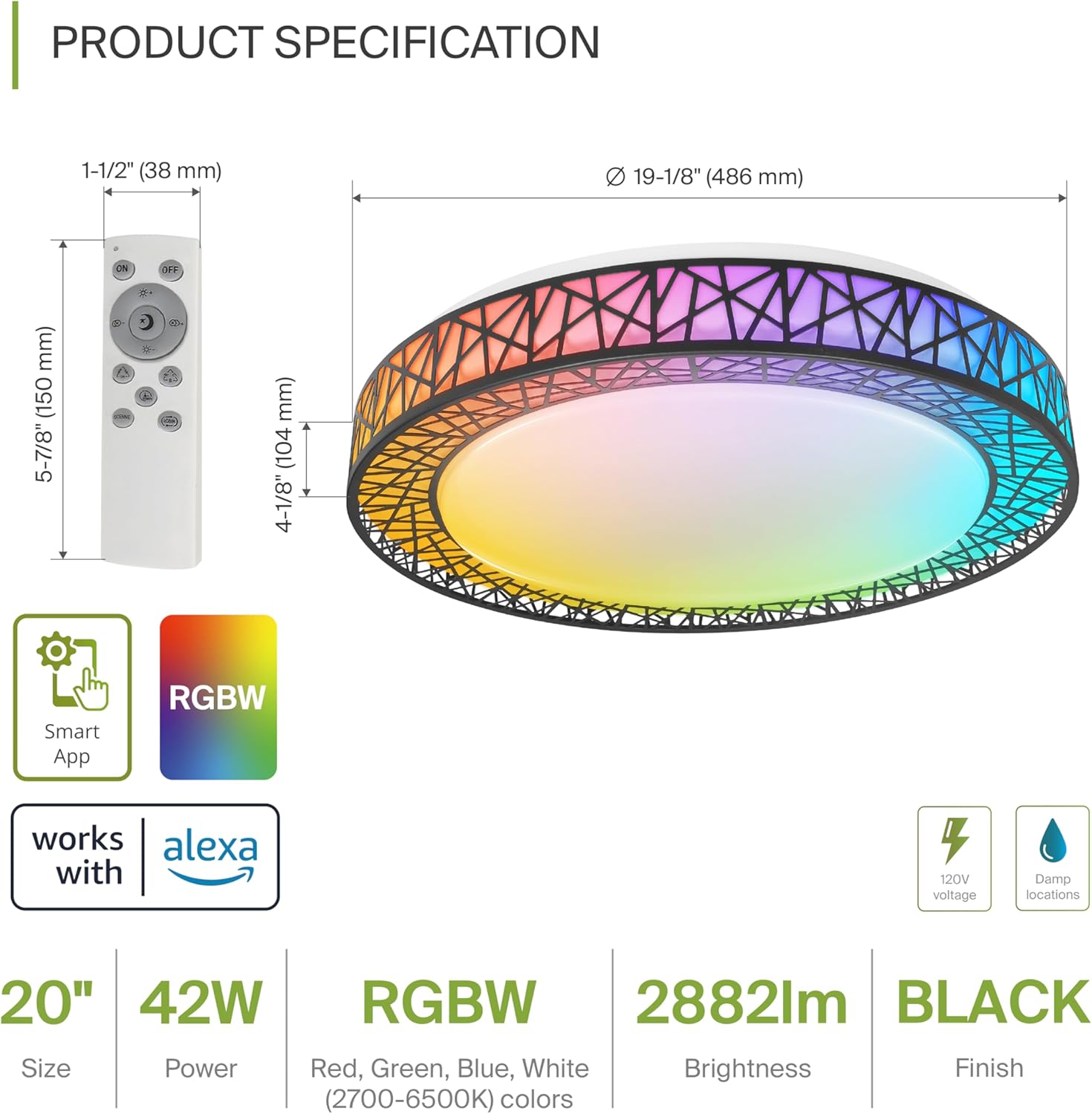
Product Specification Diagram: Dimensions, remote control, and key features.
| فیچر | تفصیل |
|---|---|
| برانډ | ASD |
| د ماډل نوم | LOFT |
| د ماډل شمیره | A-LFM20D42SRGBW-B-2p |
| رنګ | 20" | Black | RGBW |
| مواد | Acrylic, Alloy Steel |
| د محصول ابعاد | ۷۱"لیتر x ۲۳.۶"واټه x ۲۴.۴"هوا |
| د بریښنا سرچینه | هارډوارډ |
| واټtage | ۴۵ واټه |
| والیtage | 120 ولټه |
| روښانتیا | 2579 lumen (max) |
| د رنګ د حرارت درجه | 2700-6500K (CCT د تعدیل وړ) |
| ځانګړي ځانګړتیاوې | RGBW, Remote Control, Smart App, Dimmable |
| د کنټرول طریقه | Remote, Voice (Alexa, Google Assistant) |
| د کور دننه / بهر کارول | دننه |
| د اوبو د مقاومت کچه | د اوبو مقاومت (د)amp Locations Rated) |
| اوسط ژوند | 50,000 ساعته |
| تصدیق | ETL لیست شوی |
5. د نصبولو لارښوونې
Before starting, ensure the power is turned off at the circuit breaker.

Installation Diagram: Visual guide for mounting the light fixture.
- فکسچر چمتو کړئ: Remove the lens from the light fixture by rotating it clockwise.
- بریکٹ نصب کړئ: Attach the two screws to the outlet box on your ceiling.
- د تار نښلول: Connect the wires: Black to Black, White to White, and Ground to Ground. Secure these connections with wire nuts.
- فکسچر خوندي کړئ: Carefully tuck all wires back into the outlet box. Attach the light fixture to the mounting bracket.
- Reattach the Lens: Rotate the lens counter-clockwise to secure it to the fixture.
Once installed, restore power at the circuit breaker.
6. Smart Feature Setup
6.1. ASD SMART App Control
The ASD Smart RGBW Flush Mount Ceiling Light can be controlled via the ASD SMART App on your smartphone (Wi-Fi internet connection required).
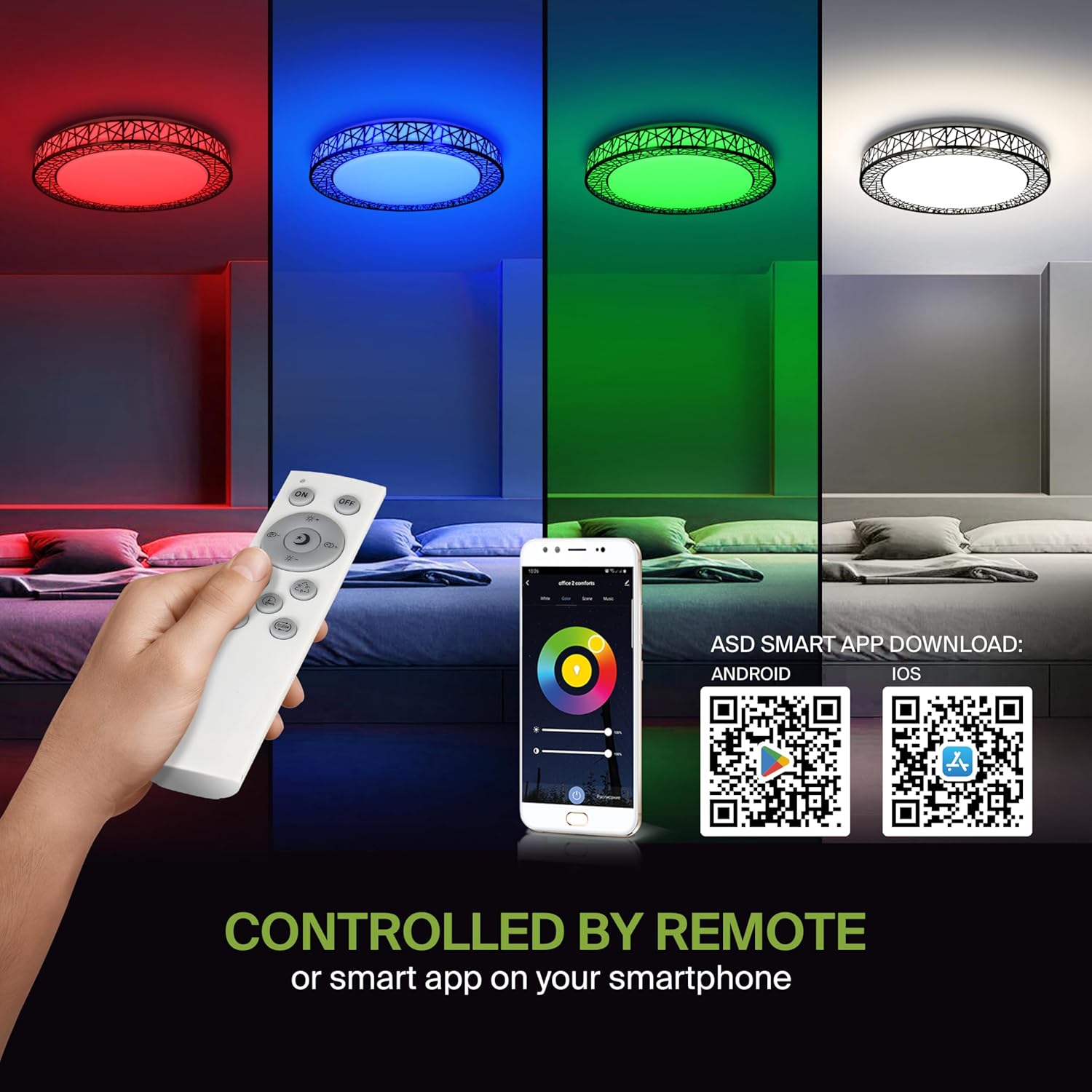
Remote control and ASD SMART App interface with QR codes for download.
- اپلیکیشن ډاونلوډ کړئ: Scan the QR code provided in the product images or search for "ASD SMART" in the د ایپل اپل پلورنځی (د iOS لپاره) یا د ګوګل پلی پلورنځي (د Android لپاره).
- نوم لیکنه/ننوتل: د حساب جوړولو یا ننوتلو لپاره د اپلیکیشن دننه لارښوونې تعقیب کړئ.
- وسیله اضافه کړئ: In the app, select the option to add a new device. Follow the pairing instructions to connect your ceiling light to the app via Wi-Fi.
۵.۲. د غږ کنټرول (الیکسا او ګوګل اسسټنټ)
The fixture is compatible with Amazon Alexa and Google Assistant for convenient voice control.

Voice control compatibility with Alexa and Google Assistant.
- د حساب لینک: Open your Alexa or Google Home app. Navigate to the 'Skills' or 'Works with Google' section.
- لټون ASD SMART: لټون the "ASD SMART" skill/service and enable it.
- نښلول: Link your ASD SMART account with your Alexa or Google Home account.
- وسایل کشف کړئ: Ask Alexa or Google Assistant to discover new devices, or manually initiate device discovery in their respective apps.
7. عملیاتي لارښوونې
7.1. د ریموټ کنټرول عملیات
Use the included remote control to manage your light fixture's functions.
Remote control for easy access to light functions.
- پاور آن/بند: د بریښنا تڼۍ فشار ورکړئ ترڅو رڼا واچوي یا بنده کړي.
- د روښانتیا سمون: Use the brightness buttons to increase or decrease the light intensity (smoothly dimmable).
- Color Selection (RGBW): Press the dedicated color buttons (Red, Green, Blue, White) or use the color wheel/mode buttons to cycle through 16.7 million colors.
- د رنګ تودوخې (CCT): Adjust the white light color temperature between 2700K (warm white) and 6500K (cool white).
- د صحنې طریقې: Select pre-programmed lighting patterns or scenes.
۵.۲. د اپلیکیشن کنټرول عملیات
The ASD SMART App offers comprehensive control over your light fixture.
- بشپړ رنګین سپیکٹرم: Access the full 16.7 million RGBW color palette.
- Precise Dimming: Adjust brightness levels with fine control.
- مهالویش: Set schedules for the light to turn on/off or change modes at specific times.
- ډله کول: Group multiple ASD smart lights to control them simultaneously.
- دودیز صحنې: Create and save your own custom lighting scenes.
7.3. Voice Command Examples
After linking your device to Alexa or Google Assistant, use commands such as:
- "الیکسا، [د رڼا نوم] چالان کړه."
- "سلام ګوګل، [د رڼا نوم] په نیلي رنګ بدل کړه."
- "Alexa, dim the [Light Name] to 50%."
- "Hey Google, make the [Light Name] warmer."
8. ساتنه
To ensure the longevity and optimal performance of your ASD Smart RGBW Flush Mount Ceiling Light, follow these maintenance guidelines:
- پاکول: د پاکولو دمخه، ډاډ ترلاسه کړئ چې د فکسچر بریښنا بنده ده. نرم، وچ، یا لږ څه d وکاروئamp cloth to wipe the surface. Avoid using abrasive cleaners, solvents, or harsh chemicals, as these can damage the finish or electrical components.
- معاینه: Periodically check the fixture for any signs of damage, loose connections, or wear. If any issues are found, turn off the power and consult a qualified electrician.
- د بلب بدلول: This fixture uses integrated LED technology and does not require bulb replacement. The LEDs are designed for a long lifespan.
9. ستونزه حل کول
If you encounter issues with your ASD Smart RGBW Flush Mount Ceiling Light, refer to the following common solutions:
| ستونزه | احتمالي لامل | د حل لاره |
|---|---|---|
| رڼا نه راځی | برېښنا نشته، تارونه خلاص دي، سویچ خراب دی | د سرکټ ماتونکی وګورئ. ډاډ ترلاسه کړئ چې د تار ټولې اړیکې خوندي دي. د دیوال سویچ ازموینه وکړئ. |
| ریموټ کنټرول کار نه کوي | Dead batteries, remote out of range, pairing issue | Replace remote batteries. Ensure remote is within operating range. Re-pair the remote with the light (refer to app instructions for pairing). |
| د اپلیکیشن کنټرول کار نه کوي | No Wi-Fi connection, incorrect app pairing, outdated app | Verify Wi-Fi connectivity. Ensure the light is correctly paired in the ASD SMART App. Update the app to the latest version. |
| د غږ کنټرول ځواب نه ورکوي | Account not linked, device not discovered, incorrect commands | Ensure ASD SMART account is linked to Alexa/Google Assistant. Redo device discovery. Use correct voice commands. |
| په غیر متوقع ډول د رڼا څراغونه یا کمیږي | Unstable power supply, loose wiring, incompatible dimmer (if applicable) | Check power supply stability. Verify wiring. This light is dimmable via remote/app; external dimmers may cause issues. |
10. د تضمین معلومات
ASD چمتو کوي a د 5 کلن محدود تضمین for this product. This warranty covers defects in materials and workmanship under normal use. Please retain your proof of purchase for warranty claims. For detailed warranty terms and conditions, please refer to the official ASD webسایټ یا د پیرودونکي ملاتړ سره اړیکه ونیسئ.
11. د پیرودونکي ملاتړ
If you have any questions, require technical assistance, or need to make a warranty claim, please contact ASD customer support through the following channels:
- Webسایټ: Visit the official ASD Lighting webد FAQs او ملاتړ سرچینو لپاره سایټ.
- بریښنالیک: Refer to your product packaging or the ASD webد پیرودونکو خدماتو بریښنالیک پتې لپاره سایټ.
- تلیفون: Refer to your product packaging or the ASD webد پیرودونکو خدماتو د تلیفون شمیرو لپاره سایټ.
Please have your model number (A-LFM20D42SRGBW-B-2p) and purchase date ready when contacting support.


