1. پیژندنه
Thank you for choosing the ASD 12 Inch Smart RGBW Flush Mount Ceiling Light. This fixture combines a stylish minimalist design with efficient, versatile lighting solutions. Featuring multicolor RGBW capabilities, smart app control, and remote operation, it offers a wide range of lighting effects for your space. This manual provides essential information for safe installation, effective operation, and proper maintenance of your new lighting fixture.

Figure 1.1: ASD 12 Inch Smart RGBW Flush Mount Ceiling Light with accessories.
3. د بسته محتويات
د نصبولو پیل کولو دمخه ډاډ ترلاسه کړئ چې ټولې برخې شتون لري:
- ASD 12 Inch Smart RGBW Flush Mount Ceiling Light Fixture (4 units)
- ریموټ کنټرول
- د نصبولو هارډویر (پیچونه، د تار مغز)
- د لارښوونې لارښود
4. مشخصات
| فیچر | تفصیل |
|---|
| برانډ | ASD |
| د ماډل نوم | LOFT |
| برخه شمیره | A-LFM12D20SRGBW-N-4p |
| رنګ | 12" | Nickel | RGBW |
| مواد | د الیاژ فولاد، اکریلیک |
| سټایل | عصري |
| د محصول ابعاد | ۷۱"لیتر x ۲۳.۶"واټه x ۲۴.۴"هوا |
| ځانګړي استعمالونه | یوازې د کور دننه کارول |
| د بریښنا سرچینه | هارډوارډ |
| د رڼا سرچینې ډول | LED |
| د پای ډول | رنګ شوی |
| سیوري مواد | پلاستیک |
| والیtage | 120 ولټه |
| واټtage | ۴۵ واټه |
| د نصب کولو ډول | Flushmount |
| اوسط ژوند | 50,000 ساعته |
| ځانګړي ځانګړتیاوې | 1064/1220LM, Remote Control, RGBW, Smart App, CCT Adjustable 2700-6500K |

شکل ۴.۱: د محصول ابعاد او مهم ځانګړتیاوې.
5. نصب کول
Follow these steps to install your ASD Smart RGBW Flush Mount Ceiling Light:
- د نصبولو لپاره چمتو کول: Turn off power at the circuit breaker before starting. Ensure the mounting surface is clean and stable.
- Remove the Lens: Gently remove the lens from the fixture by rotating it clockwise. This will expose the mounting holes and wiring connections.
- فکسچر نصب کړئ: Attach the fixture's base to the electrical outlet box using the provided screws. Ensure it is securely fastened.
- د تار نښلول: Connect the wires: Black to Black (Live), White to White (Neutral), and Ground to Ground. Secure all connections with wire nuts. Carefully tuck all wires back into the outlet box.
- لینز ضمیمه کړئ: Once wiring is complete and secure, attach the lens by aligning it with the fixture and rotating it counter-clockwise until it locks into place.
- د بریښنا بیرته راګرځول: په سرکټ بریکر کې بریښنا بیرته فعاله کړئ.
- Download ASD SMART App: For smart control features, download the "ASD SMART" application from your smartphone's app store. Scan the QR codes below or click the links to download.
د ګوګل پلی پلورنځي (انډرایډ)
د ایپل اپل سټور (iOS) - Add Fixture to App: Follow the in-app instructions to add your new ceiling light to the ASD SMART app. This typically involves putting the light into pairing mode and connecting it to your Wi-Fi network.

Figure 5.1: Initial installation steps: removing the lens and wiring.
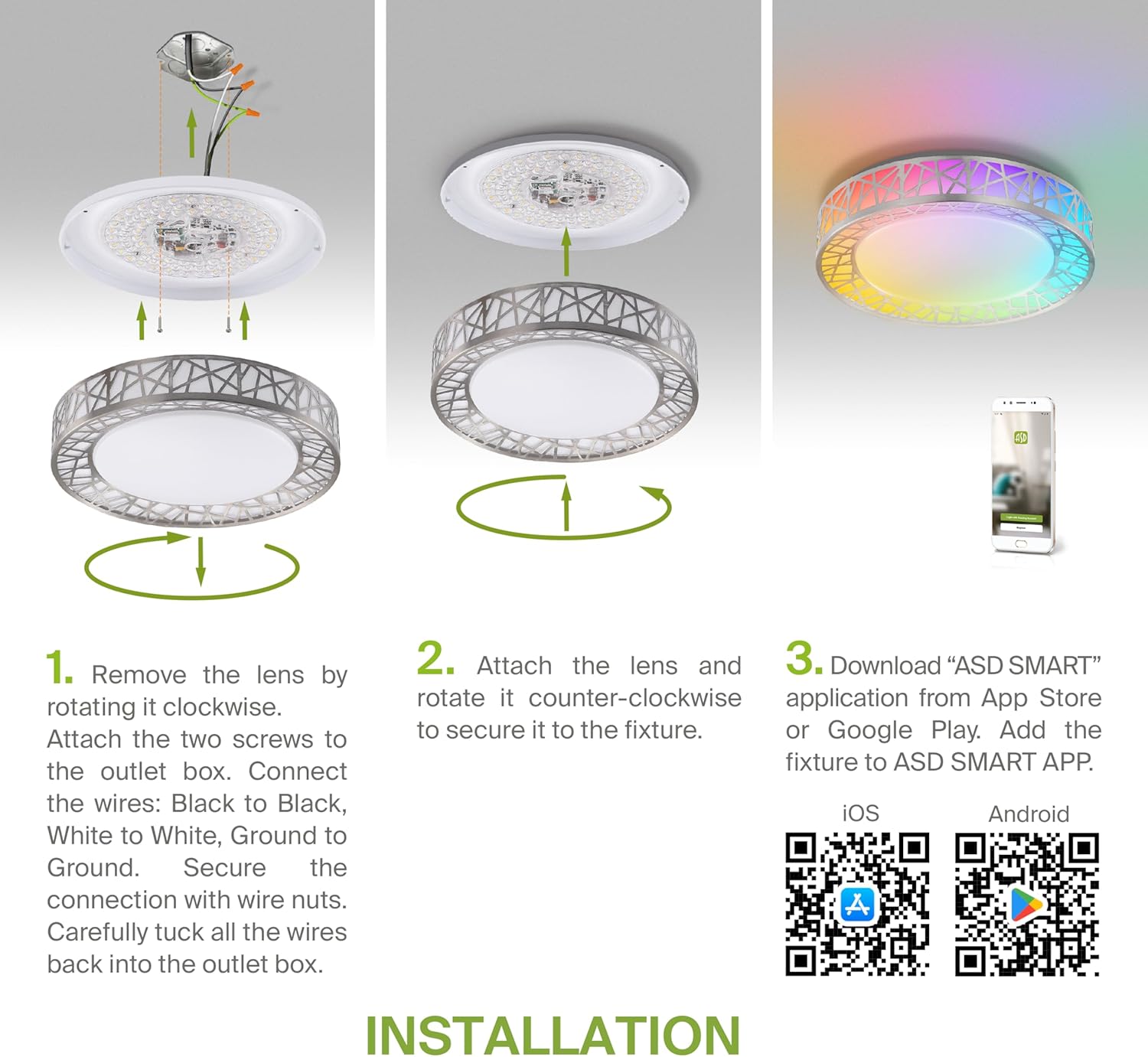
Figure 5.2: Complete installation overview including app download.
6. عملیاتي لارښوونې
Your ASD Smart RGBW Flush Mount Ceiling Light offers multiple control methods:
6.1 ریموٹ کنټرول
The included remote control allows for basic functions:
- آن/بند: څراغ فعال یا بند کړئ.
- دیمینګ: Adjust brightness levels smoothly.
- د CCT سمون: Change color temperature (e.g., from warm white to cool white).
- د RGB رنګ انتخاب: Cycle through or select specific RGB colors.
6.2 ASD SMART App Control
The ASD SMART app provides full control and advanced features:
- 16.7 ملیون رنګونه: Choose any color from the full RGBW spectrum.
- Smooth Dimming & CCT: Precisely adjust brightness and color temperature (2700K-6500K).
- Lighting Patterns: Select pre-set or custom lighting scenes and effects.
- ډله کول: Control multiple fixtures simultaneously.
- مهالویش: Set timers for lights to turn on/off or change settings automatically.

Figure 6.1: RGBW color capabilities.

Figure 6.2: Control via remote and smart app.

Figure 6.3: Seamless dimming functionality.
۵.۳ د غږ کنټرول (الیکسا او ګوګل اسسټنټ)
The fixture is compatible with Amazon Alexa and Google Assistant for convenient voice commands:
- Ensure your ASD SMART app is linked to your Alexa or Google Home account.
- Use commands such as "Alexa, turn on the living room light" or "Hey Google, set the bedroom light to blue."

شکل ۱۱: د الیکسا او ګوګل اسسټنټ سره مطابقت.
7. ساتنه
To ensure the longevity and optimal performance of your ceiling light:
- پاکول: د پاکولو دمخه بریښنا قطع کړئ. فکسچر د نرم او وچ ټوکر سره پاک کړئ. د کثافاتو پاکوونکي یا محلولونه مه کاروئ.
- د بلب بدلول: This fixture uses integrated LED technology and does not require bulb replacement.
8. ستونزه حل کول
که تاسو د خپل چت د رڼا سره ستونزې سره مخ شئ، لاندې عامې ستونزې او حل لارې وګورئ:
| ستونزه | احتمالي لامل | د حل لاره |
|---|
| رڼا نه راځی | برېښنا نشته، تارونه خلاص دي، سویچ خراب دی | د سرکټ ماتونکی وګورئ. ډاډ ترلاسه کړئ چې د تار ټولې اړیکې خوندي دي. د دیوال سویچ ازموینه وکړئ. |
| ریموټ کنټرول کار نه کوي | Dead battery, out of range, interference | Replace remote battery. Ensure you are within range. Remove any obstructions. |
| اپلیکیشن نشي کولی رڼا سره وصل شي | Incorrect Wi-Fi password, light not in pairing mode, 5GHz Wi-Fi network | Verify Wi-Fi password. Reset light to pairing mode (refer to app instructions). Ensure you are on a 2.4GHz Wi-Fi network. |
| د غږ کنټرول ځواب نه ورکوي | App not linked to voice assistant, incorrect device name | Check linking in ASD SMART app and voice assistant app. Verify device name in voice assistant app. |
9. تضمین او ملاتړ
ASD چمتو کوي a د 5 کلن محدود تضمین for this product, guaranteeing top quality and safety. The fixture is ETL certified, ensuring compliance with North American safety standards.
For technical support, warranty claims, or any questions not covered in this manual, please contact ASD customer service. Refer to the product packaging or the official ASD webد اړیکو معلوماتو لپاره سایټ.


