1. پیژندنه
This manual provides detailed instructions for the installation, operation, and maintenance of your ESX Vision VMX900DAB Universal 1-DIN Multimedia Receiver. Please read this manual thoroughly before using the device to ensure proper functionality and to maximize your user experience.
The ESX Vision VMX900DAB is a versatile 1-DIN multimedia receiver featuring a 9-inch multi-angle touchscreen display. It integrates advanced connectivity options including wireless Apple CarPlay and Android Auto, DAB+ digital radio, Bluetooth hands-free calling and audio streaming, and a comprehensive media player. The unit is designed for universal compatibility and offers a removable monitor for enhanced security.
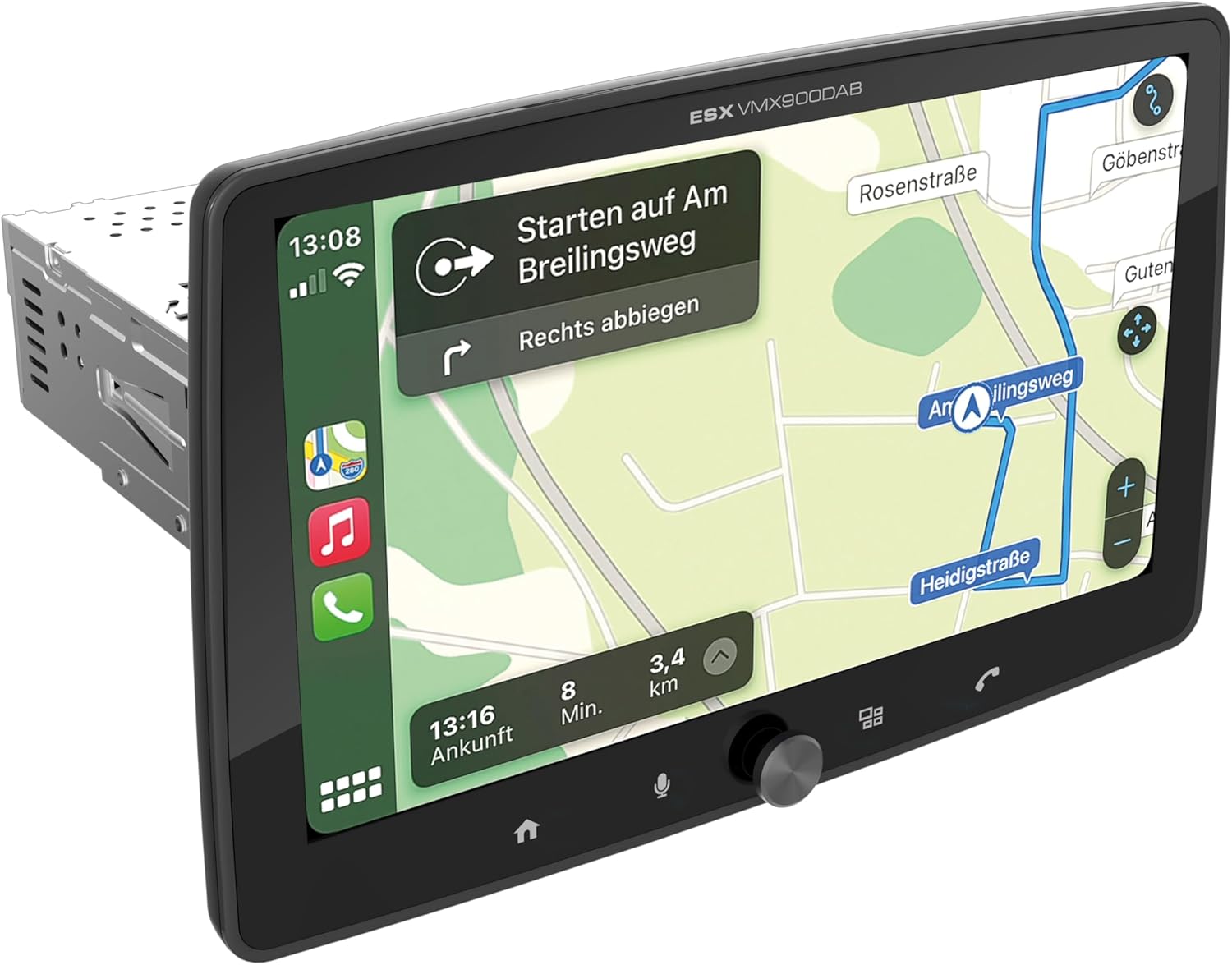
Figure 1.1: ESX Vision VMX900DAB with navigation interface.
2. ترتیب او نصب کول
2.1 د بسته محتويات
د نصبولو دمخه، ډاډ ترلاسه کړئ چې ټولې برخې شتون لري:
- ESX Vision VMX900DAB Main Unit
- Detachable 9-inch Touchscreen Monitor
- د بریښنا/سپیکر د تارونو هارنس
- بهرنی مایکروفون
- د GPS انتن
- DAB+ انتن
- د USB توسیع کیبلونه
- د نصبولو هارډویر (بریکٹونه، پیچونه)
- د کارونکي لارښود (دا لاسوند)

شکل ۲: شامل شوي لوازمات او برخې.
۳.۱ د اصلي واحد نصب کول
- ډاډ ترلاسه کړئ چې د نصبولو پیل کولو دمخه د موټر بیټرۍ قطع شوې ده.
- Insert the 1-DIN main unit into the vehicle's dashboard opening.
- Secure the main unit using the provided mounting brackets and screws.
2.3 د مانیټور سره نښلول
The 9-inch monitor is detachable and connects to the main unit via a click system.
- Align the monitor's connector with the slot on the main unit.
- Gently push the monitor until it clicks securely into place.
- To remove, press the release button (if applicable) and pull the monitor away.

Figure 2.2: Detachable monitor with click system.
2.4 د تارونو نښلول
Refer to the wiring diagram provided with the unit for specific connections. Key connections include:
- ځواک او سپیکرونه: Connect the main wiring harness to the vehicle's power supply and speakers.
- بهرني مایکروفون: Plug the external microphone into its dedicated input for optimal hands-free call quality.
- د GPS انټینا: د GPS انتن سره وصل کړئ او په یو روښانه ځای کې یې نصب کړئ view د دقیق موقعیت لپاره د اسمان څخه.
- DAB+ انتن: Connect the DAB+ antenna for digital radio reception.
- USB پورټونه: Two USB-A ports are available. One for media playback and charging (1.5A), and another specifically for Apple CarPlay/Android Auto and charging (1.5A).
- RCA مخکېampپورته شوي محصولات: Six 4V RCA outputs (FL/FR/RL/RR/SUB1/SUB2) are available for connecting external ampژغورونکي
- AUX RCA Inputs: Stereo audio and video inputs (L/R/VIDEO) for external audio/video sources.
- Camera RCA Inputs: Dedicated inputs for front and rear cameras.
- د سټیرینګ ویل کنټرول: Analog steering wheel remote control input (learnable) for integration with vehicle controls.
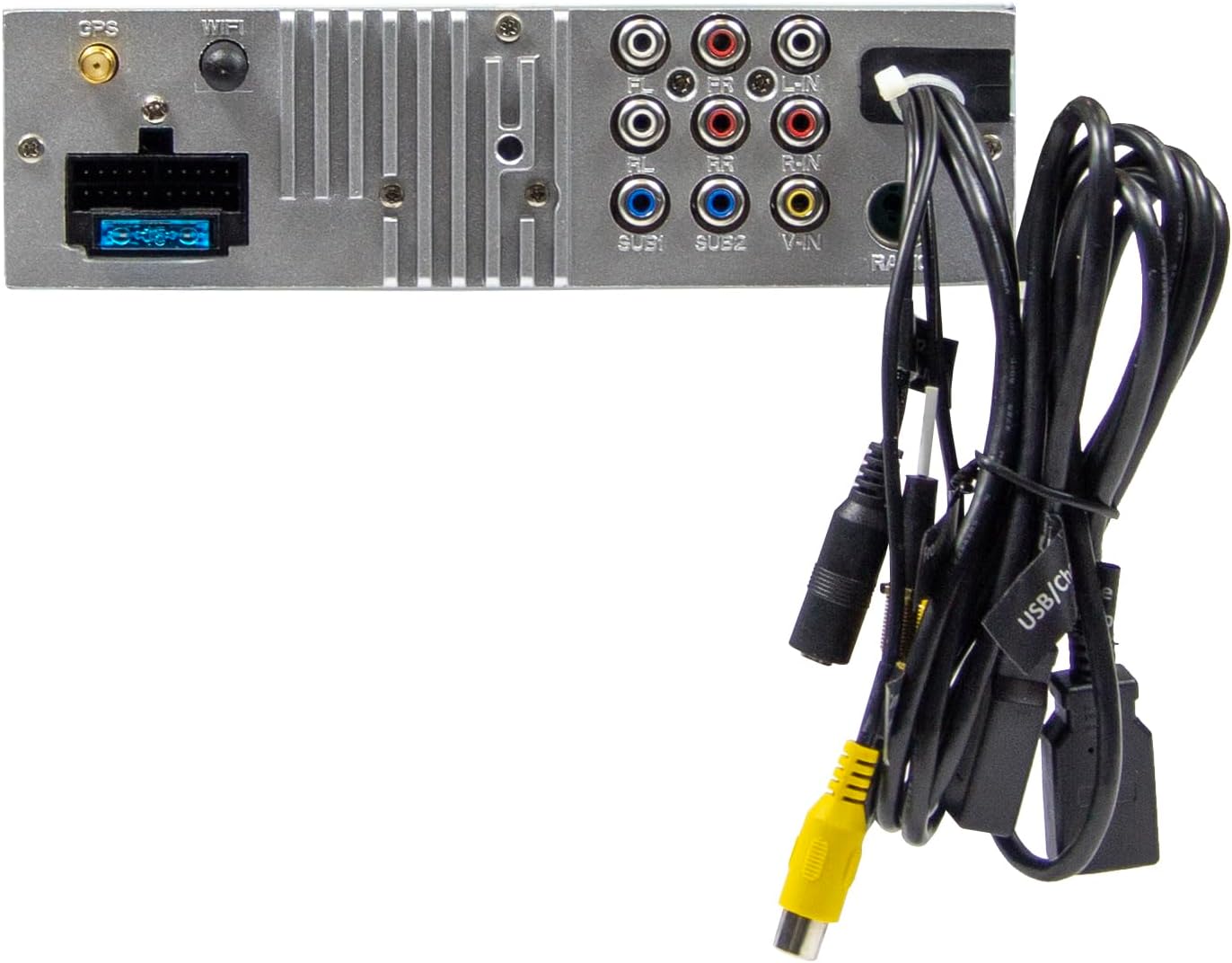
Figure 2.3: Rear connections of the main unit.
3. عملیاتي لارښوونې
۴.۱ د بریښنا فعالول/بندول او اساسي کنټرولونه
- پاور آن: The unit will power on automatically with the vehicle's ignition.
- بندول: The unit will power off automatically with the vehicle's ignition.
- د حجم کنټرول: د حجم تنظیمولو لپاره په مخکینۍ تخته کې د لوی روټري نوب څخه کار واخلئ.
- د فعالیت کلیدونه: Four function keys on the front panel provide quick access to common features.
- ټچ سکرین: All primary functions are controlled via the 9-inch touchscreen.
۳.۱ د کور سکرین او نیویګیشن
The home screen provides access to all main functions and applications.

Figure 3.1: Main menu/home screen.
۴.۱ د ایپل کارپلی او انډرایډ آټو
The VMX900DAB supports both wireless and wired (via USB) Apple CarPlay and Android Auto.
- بې سیم اړیکه: Enable Bluetooth and Wi-Fi on your smartphone and follow the on-screen prompts to connect.
- د تار نښلول: Connect your smartphone to the dedicated USB-A port using a compatible USB cable.
- Once connected, your smartphone's compatible apps (navigation, music, calls, messages) will be mirrored on the receiver's display.

Figure 3.2: Apple CarPlay interface.
3.4 Radio Functions (DAB+/FM/AM)
- د DAB+ راډیو: Select the DAB+ icon from the home screen. The unit will scan for available digital radio stations.
- ایف ایم/ایم راډیو: Select the Radio icon. Use the touchscreen to tune to stations, save presets, and access RDS functions.
3.5 Bluetooth Hands-Free and Audio Streaming
- جوړه کول: Enable Bluetooth on your smartphone and search for the VMX900DAB. Select the device and confirm pairing.
- د لاسونو څخه وړیا تلیفون کول: Once paired, you can make and receive calls directly through the receiver. The external microphone ensures clear voice transmission. Your phonebook can be synchronized.
- غږیزې خپرونې: Stream music wirelessly from your smartphone to the receiver.
۵.۳ د رسنیو غږول
The unit supports various audio, video, and photo formats via USB.
- ملاتړ شوی File بڼې: AVI، FLV، MOV، MKV، WMV، WMA، MP3، FLAC، JPEG، PNG، BMP.
- Insert a USB drive into the media USB-A port. Select the USB icon from the home screen to browse and play media files.
3.7 Monitor Adjustment
The monitor can be tilted and adjusted in height to achieve the optimal viewing angle and prevent obstruction of vehicle controls.

Figure 3.3: Adjustable monitor mechanism.
3.8 اصلاح کول
- د سټارټ اپ لوګو: Customize the startup logo in the settings menu.
- RGB Key Illumination: Select from various RGB colors and animation effects for the key illumination.
- د مینو ژبې: Supported languages include DEU, ENG, SWE, ITA.
4. ساتنه
4.1 د واحد پاکول
- Use a soft, dry cloth to wipe the display and unit surfaces.
- For stubborn marks on the screen, use a screen cleaner specifically designed for electronic displays and a microfiber cloth.
- Do not use abrasive cleaners, solvents, or harsh chemicals, as these can damage the finish or screen.
4.2 عمومي پاملرنه
- د واحد د سختې تودوخې، د اوږدې مودې لپاره د مستقیم لمر وړانګو، یا لوړ رطوبت سره د مخ کیدو څخه ډډه وکړئ.
- ډاډ ترلاسه کړئ چې د واحد شاوخوا شاوخوا هوا مناسبه وي ترڅو د ډیر تودوخې مخه ونیسي.
- When removing the monitor, handle it carefully to avoid damage to the connectors.
5. ستونزه حل کول
If you encounter issues with your VMX900DAB, refer to the following common problems and solutions:
| ستونزه | احتمالي لامل | د حل لاره |
|---|---|---|
| هیڅ ځواک نشته | ناسم تارونه؛ فلج شوی فیوز؛ د موټر سوځول بند دي | Check power connections; Replace fuse; Turn on vehicle ignition |
| غږ نشته | غږ ډېر ټیټ دی؛ خاموش فعال شوی دی؛ د سپیکر د تارونو ستونزه ده | غږ زیات کړئ؛ خاموشي غیر فعال کړئ؛ د سپیکر اتصالونه وګورئ |
| بلوتوث نه نښلي | Bluetooth off on phone/unit; Incorrect pairing process | Ensure Bluetooth is on; Re-attempt pairing process |
| د ایپل کارپلی/انډرایډ آټو نه پیل کیږي | Incorrect USB port; Faulty USB cable; Phone not compatible/configured | Use the dedicated USB port; Try a different USB cable; Check phone settings for CarPlay/Android Auto |
| د راډیو ضعیف استقبال | Antenna not connected; Poor antenna placement; Weak signal area | Check antenna connection; Adjust antenna position; Try in a different location |
| مانیټر نه ښکاري | Monitor not securely attached; Connector issue | Ensure monitor is fully clicked into place; Check for debris in connector |
If the problem persists after attempting these solutions, please contact ESX customer support or your authorized dealer.
6. مشخصات
| فیچر | مشخصات |
|---|---|
| د ماډل شمیره | VMX900DAB |
| ښودل | 9-inch Multi-angle Touchscreen |
| د فارم فکتور | 1-DIN Universal |
| ارتباط | USB, Bluetooth, Auxiliary |
| ځانګړي ځانګړتیاوې | Wireless Apple CarPlay, Wireless Android Auto, Detachable Monitor with Click System |
| د راډیو تونر | DAB+ (Digital Radio), FM/AM with RDS |
| بلوتوث | Hands-free function, Audio Streaming |
| USB بندرونه | 2x USB-A (1.5A charging, one dedicated for CarPlay/Android Auto) |
| Max Music Power | 4 x 80 W |
| مخکېampپورته شوي محصولات | 6x RCA (4V) (FL/FR/RL/RR/SUB1/SUB2) |
| AUX داخلونه | RCA (L/R/VIDEO) |
| د کیمرې ننوتل | RCA (Front/Rear) |
| ملاتړ شوی File شکلونه | AVI, FLV, MOV, MKV, WMV, WMA, MP3, FLAC, JPEG, PNG, BMP |
| بهرنی مایکروفون | شامل دي |
| د سټیرینګ ویل کنټرول | Analog (learnable) |
| د GPS رسیدونکی | شامل دي |
| مینو ژبې | DEU, ENG, SWE, ITA |
| د ټول تولید بریښنا | 320 واټ |
| شاوخوا د غږ چینل ترتیب کول | 4.2 |
| د آډیو وتلې حالت | سټیریو |
7. تضمین او ملاتړ
For warranty information, please refer to the documentation provided at the time of purchase or contact your authorized ESX dealer. Warranty terms and conditions may vary by region and retailer.
For technical support or further assistance, please contact ESX customer service or visit the official ESX webد ملاتړ سرچینو لپاره سایټ.


