پیژندنه
This manual provides essential information for the safe and effective operation, maintenance, and troubleshooting of your vannect X390AS Walking Pad. Please read it thoroughly before initial use and retain it for future reference.
د خوندیتوب معلومات
د خوندي عملیاتو ډاډ ترلاسه کولو لپاره ، مهرباني وکړئ لاندې احتیاطي تدابیر ونیسئ:
- د واکینګ پیډ کارولو دمخه پدې لارښود کې ټولې لارښوونې ولولئ.
- د هر نوي تمرین پروګرام پیل کولو دمخه د ډاکټر سره مشوره وکړئ.
- د کار کولو پرمهال ماشومان او څاروي د واک پیډ څخه لرې وساتئ.
- Place the walking pad on a firm, level surface with adequate clear space around it.
- The maximum user weight capacity is 150 kg (330 lbs). Do not exceed this limit.
- کله چې په کارولو کې نه وي یا د پاکولو/ساتنې دمخه د واکینګ پیډ د بریښنا له ساکټ څخه خلاص کړئ.
- که چیرې د واکینګ پیډ خراب شوی تار یا پلګ ولري، یا په سمه توګه کار نه کوي، نو مه یې چلوئ.
مهمه یادونه: Recommended for use on hard floors to effectively prevent the risk of injury during exercise and to better dissipate heat to the motor, increasing the life of the motor. Avoid using on carpets or soft floors.
د بسته محتويات
مهرباني وکړئ تصدیق کړئ چې ټول توکي په کڅوړه کې شتون لري:
- vannect X390AS Walking Pad
- مقناطیسي ریموټ کنټرول
- د بریښنا تار
- د کارونکي لارښود (دا لاسوند)
- Lubricant (may be included for belt maintenance)
چمتو کول
The vannect X390AS Walking Pad comes fully assembled. Follow these steps to prepare it for use:
- بسته بندي کول: د تګ راتګ پیډ په احتیاط سره د هغې له بسته بندۍ څخه لرې کړئ.
- ځای په ځای کول: Place the walking pad on a firm, level surface. Ensure there is adequate clear space around the unit for safe operation. As noted in the safety section, avoid carpets or soft floors for optimal performance and motor longevity.
- د بریښنا پیوستون: Connect the power cord to the walking pad's power input, then plug the other end into a grounded electrical outlet.
- د انعطاف تنظیم (اختیاري): The walking pad features a 9% manual incline. To activate, locate the adjustable feet at the rear of the unit and position them to raise the walking surface. Ensure both sides are evenly adjusted for stability.

The main image of the vannect X390AS Walking Pad, illustrating its compact design, remote control, and the 9% incline capability. A user is shown walking on the pad, and another is using it with a standing desk.

This image shows a user exercising on the walking pad while working at a standing desk, highlighting its suitability for office or home office environments.
عملیاتي لارښوونې
د ریموټ کنټرول دندې
The walking pad is primarily operated using the magnetic remote control. Ensure the remote has working batteries.

An image detailing the remote control for the walking pad, showing buttons for Mode, Speed+, Program, Speed-, Start/Pause, and Stop. It also illustrates the display tracking Speed, Time, Distance, and Calories.
- پاور آن/بند: Press the main power switch on the walking pad itself to turn it on. The remote control manages exercise functions once the unit is powered.
- پیل / وقف: Press the 'Start/Pause' button to begin or temporarily stop your workout. Your workout data will be retained during a pause.
- د سرعت سمون: Use the 'Speed +' and 'Speed -' buttons to increase or decrease the walking belt speed. The speed range is 1-10 km/h.
- درېدل: Press the 'Stop' button to end your workout completely.
- Mode/Program: Use the 'Mode' or 'P' button to cycle through different display modes or pre-set programs (if available).
- مقناطیسي ځانګړتیا: The remote control has magnets on the back for convenient storage on the walking pad when not in use, preventing loss.
د LED نندارې
مدغم شوی LED ډسپلې ستاسو د ورزش پرمختګ په اړه ریښتیني وخت فیډبیک چمتو کوي:

یو مفصل view of the walking pad's LED display, which tracks essential workout metrics such as time, speed, distance, and calories burned.
- وخت: ستاسو د اوسني ورزش موده ښیې.
- سرعت: Shows the current speed of the walking belt in kilometers per hour (km/h).
- واټن: Indicates the total distance covered during your workout.
- کالوري: Provides an estimated number of calories burned.
د ورزش طریقې
The walking pad supports various exercise intensities to suit your fitness needs:
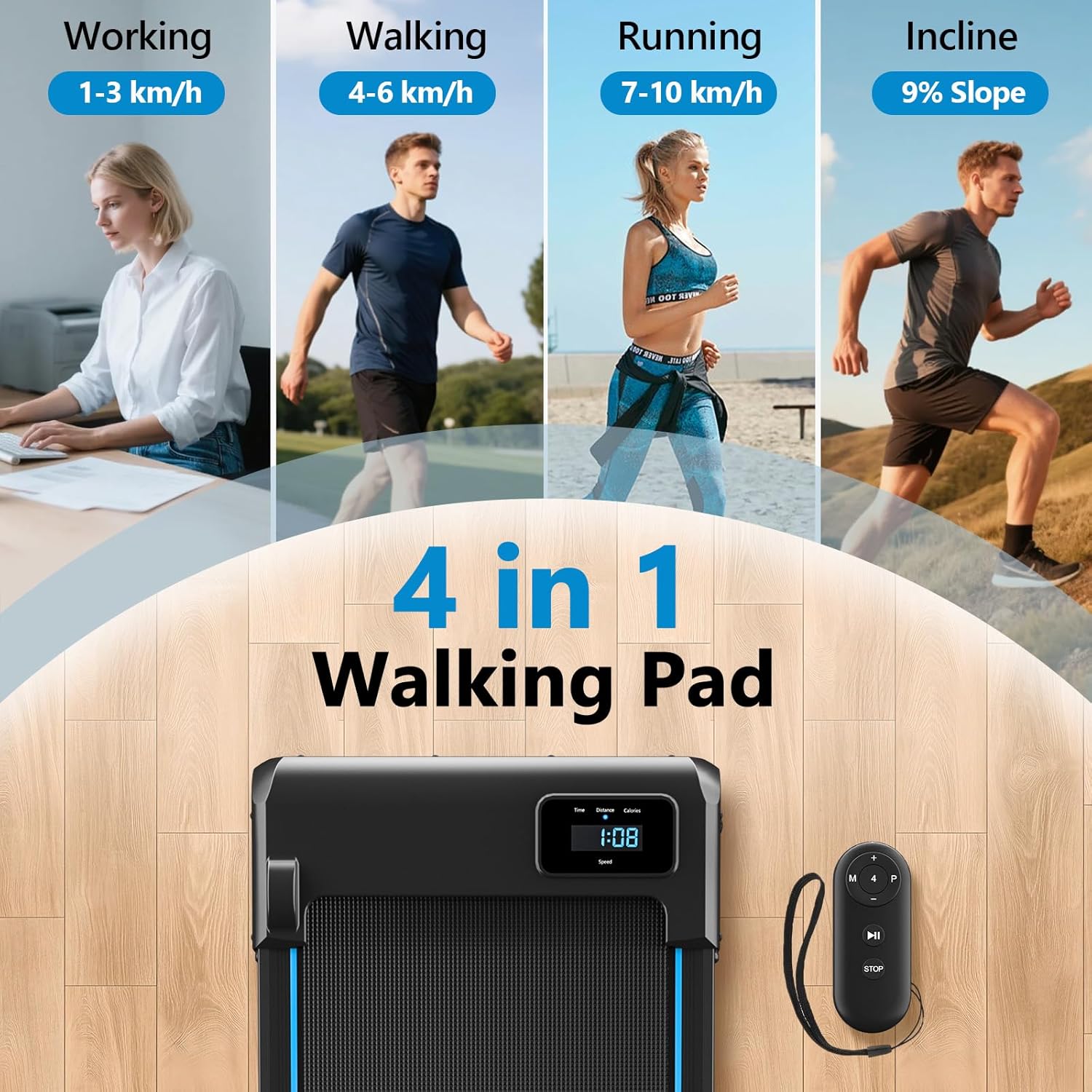
This image visually explains the four primary modes of the walking pad: working (1-3 km/h), walking (4-6 km/h), running (7-10 km/h), and the 9% incline mode, demonstrating its versatility.
- کاري حالت: Speed range of 1-3 km/h, ideal for light activity while working or performing other tasks.
- د چلولو حالت: Speed range of 4-6 km/h, suitable for a brisk walk.
- چلولو حالت: Speed range of 7-10 km/h, for jogging or light running.
- Incline Mode: Utilize the 9% manual incline feature to increase calorie burning and engage leg muscles more effectively.
ساتنه
Regular maintenance is crucial for ensuring the longevity and optimal performance of your walking pad.
پاکول
- د اعلان سره د تګ ځای پاک کړئamp د خولې او دوړو د لرې کولو لپاره د هر استعمال وروسته ټوکر.
- Avoid using abrasive cleaners or solvents, as these can damage the surface.
- Keep the area around the walking pad clean and free of dust, pet hair, and debris to prevent interference with moving parts.
غوړول
The running belt requires periodic lubrication to reduce friction between the belt and the deck, which extends the lifespan of both the belt and the motor. Refer to the included lubricant instructions or contact customer support for guidance on proper application frequency and method.
د بیلټ تنظیم کول
If the running belt becomes misaligned (drifts to one side) or feels loose (slips during use), it may need adjustment. Consult the detailed instructions in the full user manual or contact customer support for assistance with belt centering and tensioning.
د ستونزو حل کول
If you encounter any issues with your walking pad, refer to the following common problems and their potential solutions:
| ستونزه | احتمالي لامل | د حل لاره |
|---|---|---|
| د واک کولو پیډ نه چالانېږي. | Power cord not securely connected; Electrical outlet not working; Main power switch is off. | Ensure the power cord is securely plugged into both the walking pad and a grounded electrical outlet; Test the outlet with another device; Turn on the main power switch on the walking pad. |
| Running belt stops or slips during use. | Running belt is too loose; Motor overload due to excessive weight or speed; Lack of lubrication. | Adjust the running belt tension (refer to full manual); Ensure user weight is within the specified limit (150 kg / 330 lbs); Lubricate the running belt as per maintenance instructions. |
| ریموټ کنټرول ځواب نه ورکوي. | Remote control battery is low or dead; Obstruction between the remote and the walking pad's sensor. | Replace the remote control battery; Ensure there is a clear line of sight between the remote and the walking pad's display/sensor. |
| د عملیاتو پرمهال غیر معمولي شور. | Loose parts; Lack of running belt lubrication; Running belt misalignment. | Check for any loose screws or components and tighten them; Lubricate the running belt; Adjust the running belt alignment (refer to full manual). |
مشخصات
Key technical specifications for the vannect X390AS Walking Pad:
| فیچر | تفصیل |
|---|---|
| د ماډل شمیره | د X390AS معرفي کول |
| برانډ | vannect |
| د موټرو ځواک | ۵.۵ هارس پاور (اوچت) |
| د سرعت حد | 1-10 km/h |
| انلاین | ۷٪ (لاسي سمون) |
| د اعظمي وزن ظرفیت | ۷.۰ کیلو ګرامه (۱۵.۵ پونډه) |
| د چلولو کمربند ابعاد | ۱۵ سانتي متره x ۵ سانتي متره (تقریبا) |
| د محصول ابعاد (L x W x H) | 116 x 50.5 x 12.5 سانتي متره |
| مواد | د کاربن فولاد |
| د شور کچه | <30 dB |
| ځانګړي ځانګړتیاوې | LED Display, Remote Control, Anti-slip Running Belt, Shock Absorption System |
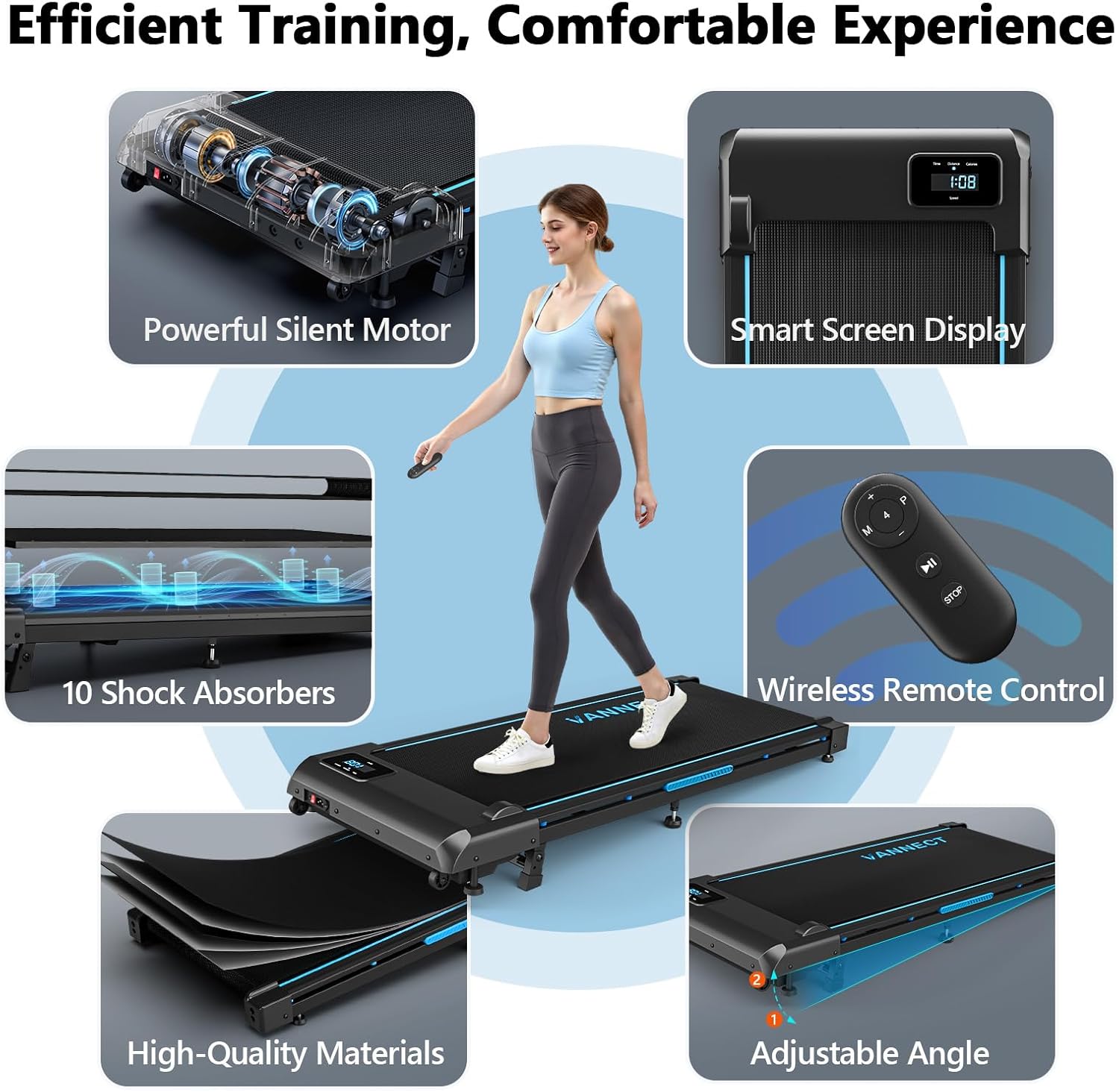
This collage illustrates key features such as the powerful silent motor, smart screen display, 10 shock absorbers, wireless remote control, high-quality materials, and adjustable angle.

This image highlights the advanced shock absorption system, featuring 10 silicone shock absorbers and a 5-layer anti-slip running belt designed for knee protection and a smoother workout.

This image demonstrates the walking pad's portability with built-in transport wheels and its compact design for easy storage under furniture.
تضمین او ملاتړ
For warranty information, technical assistance, or customer support, please refer to the contact details provided with your purchase documentation or visit the official vannect webسایټ
The manufacturer, vannect, offers lifetime technical support on Amazon for a superior customer experience.
جوړونکی: vannect
د لومړي شتون نیټه: 21 مارچ 2025


