1. پیژندنه
د پیرودلو لپاره مننهasing the COLSUR K8-WHITE Portable Bluetooth CD Player. This device is designed to provide versatile audio entertainment, combining CD playback with modern features like Bluetooth connectivity, FM radio, and a multi-level table lamp. Please read this manual thoroughly before use to ensure proper operation and to maximize your enjoyment of the product.
2. د خوندیتوب معلومات
- وسیله د باران، رطوبت، یا ډیرې تودوخې سره مه مخ کوئ.
- د تودوخې سرچینو ته نږدې یا مستقیم لمر کې د وسیله ځای په ځای کولو څخه ډډه وکړئ.
- وسیله مه جلا کوئ یا یې پخپله ترمیمولو هڅه مه کوئ. ټولې خدمتونه وړ پرسونل ته راجع کړئ.
- وسیله د قوي مقناطیسي ساحو څخه لرې وساتئ.
- Use only the provided Type-C charging cable and a compatible power adapter (not included) for charging.
- د وسیلې د چلولو پر مهال د هوا مناسبه هوا ډاډمنه کړئ.
3. د بسته محتويات
مهرباني وکړئ د لاندې توکو لپاره په بسته کې وګورئ:
- COLSUR K8-WHITE Portable Bluetooth CD Player
- د ډول - سي چارج کیبل
- د کارن لارښود
- د وال ماونټ کټ (که چیرې تطبیق شي)
- د میز ولاړ (که چیرې تطبیق شي)
4. محصول ختم شوview
The COLSUR K8-WHITE is a versatile audio device designed for various listening experiences. It features a compact design suitable for tabletop placement or wall mounting.
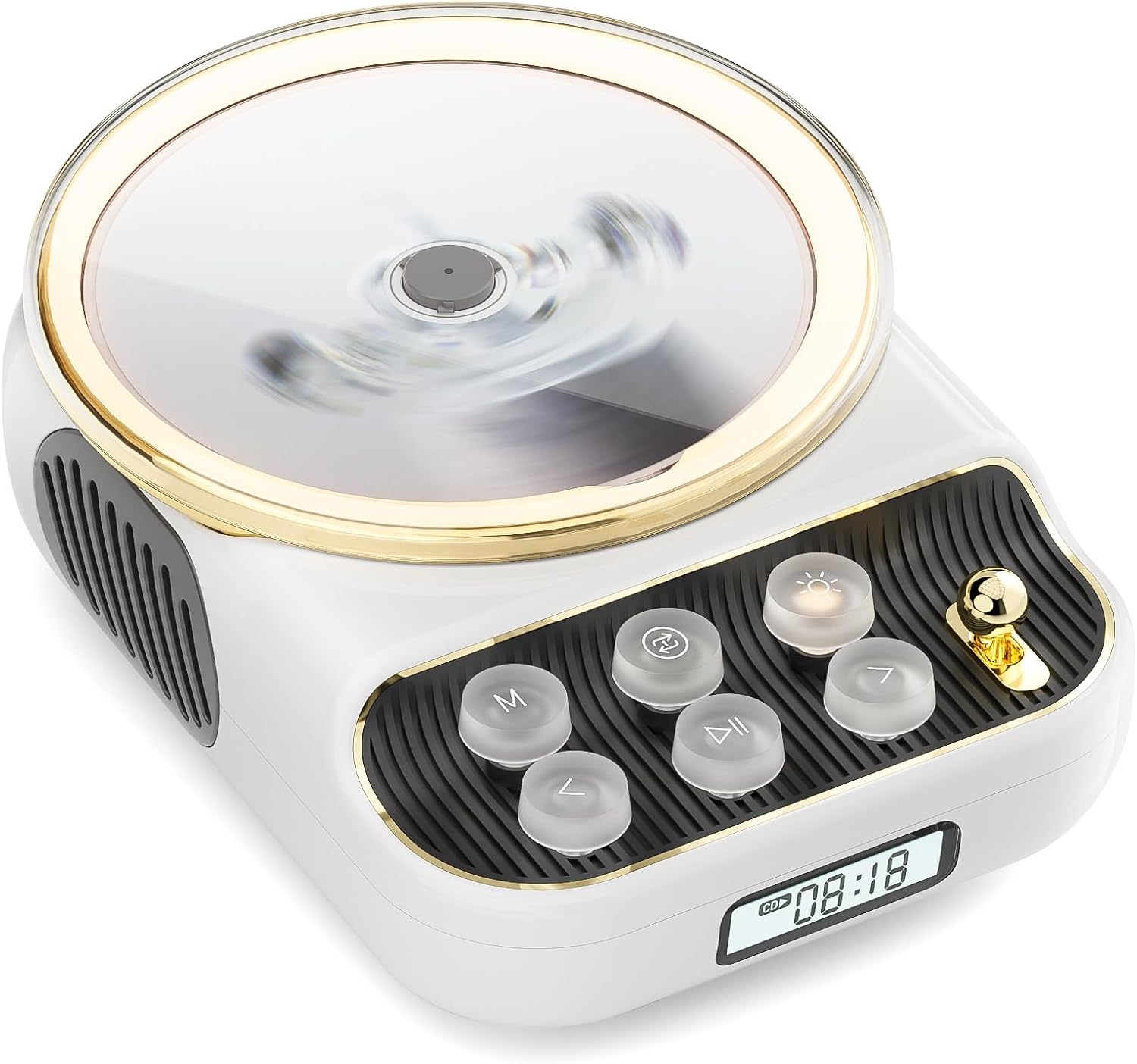
مخکی view of the COLSUR K8-WHITE Portable Bluetooth CD Player, showcasing its circular CD compartment, control buttons, and digital display.

This image illustrates the multifunctionality of the COLSUR K8-WHITE, highlighting its capabilities for CD playback, Bluetooth mode, FM radio, TF card speaker, 3.5mm audio jack, and night light function.
د کنټرول ترتیب

A detailed diagram showing the various buttons, ports, and features of the COLSUR K8-WHITE CD Player, including the CD cover, function buttons, display, Type-C charging port, TF card interface, and speaker.
- د سي ډي کمپارټمنټ: د آډیو سي ډي ګانو د داخلولو لپاره.
- ښکاره کول: Shows current mode, track number, time, or FM frequency.
- د فعالیت تڼۍ: (M) Mode, (Loop) Repeat, (Light) Light/Bluetooth Transmit, (Play/Pause), (Previous/Volume Down), (Next/Volume Up).
- د حجم نوب: د غږ حجم تنظیموي.
- د ډول-C چارج کولو بندر: For power input and charging the internal battery.
- د TF کارت انٹرفیس: For playing music from a TF card.
- د 3.5mm آډیو تولید: د هیډفونونو یا بهرني سپیکرو د نښلولو لپاره.
5. ترتیب کول
5.1 د وسیلې چارج کول
The device has a built-in 4000mAh rechargeable Lithium-ion battery. Before first use, fully charge the device.
- Connect the provided Type-C charging cable to the Type-C port on the device.
- Connect the other end of the cable to a compatible USB power adapter (5V/2A recommended, not included).
- The charging indicator on the display will show charging status. It will turn off or change color when fully charged.
5.2 بریښنا کول / بندول
To power on the device, press and hold the Power button (often integrated with Play/Pause or a dedicated button, refer to the control layout diagram). To power off, press and hold the Power button again.
۴.۴ د ځای پر ځای کولو اختیارونه
The COLSUR K8-WHITE can be used as a tabletop device or mounted on a wall.
- د ټابلیټ کارول: Place the device on a stable, flat surface. Ensure the non-slip feet are securely positioned.
- دیوال نصبول: Use the provided wall mount kit (if included) to securely attach the device to a wall. Follow the instructions provided with the wall mount kit for safe installation.
6. عملیاتي لارښوونې
6.1 CD پلے بیک

The image shows the COLSUR K8-WHITE CD Player on a wooden table, playing a CD, and a separate image illustrating its use as a Bluetooth speaker connected to a smartphone.
The player supports CD, CD-R, CD-RW, MP3, and WMA formats.
- د سي ډي کمپارټمنټ پوښ خلاص کړئ.
- Carefully place a CD onto the spindle, ensuring it is seated correctly.
- د سي ډي کمپارټ پوښ وتړئ.
- فشار ورکړئ م (موډ) button repeatedly until "CD" mode is displayed.
- فشار ورکړئ پلی/ودرول د بيا غږولو پيلولو لپاره ت buttonۍ.
- د کارولو مخکینی/حجم ښکته او بل / حجم پورته د ټریکونو پریښودو لپاره تڼۍ.
- د. په کارولو حجم تنظیم کړئ د حجم نوب.
- فشار ورکړئ لوپ button to cycle through repeat modes (e.g., repeat one, repeat all, random).
6.2 د بلوتوټ ریسیور حالت
Connect your smartphone, tablet, or other Bluetooth-enabled devices to stream audio wirelessly. The device features Bluetooth version 5.3 for stable connection.
- فشار ورکړئ م (موډ) button repeatedly until "BT" (Bluetooth) mode is displayed. The device will enter pairing mode, indicated by a flashing Bluetooth icon or specific sound.
- په خپل بهرني وسیله کې، بلوتوث فعال کړئ او د شته وسایلو لټون وکړئ.
- Select "COLSUR K8-WHITE" (or similar name) from the list to pair.
- Once paired, you can play music from your external device, and the audio will output through the CD player's speakers.
6.3 FM راډیو حالت

The COLSUR K8-WHITE CD Player is shown on a desk, with its display showing an FM radio frequency, indicating its radio function.
Enjoy your favorite radio stations with the built-in FM tuner (frequency range: 76 MHz to 108 MHz).
- فشار ورکړئ م (موډ) button repeatedly until "FM" mode is displayed.
- فشار ورکړئ او ونیسئ پلی/ودرول button to initiate an automatic scan for FM stations. The device will save found stations.
- د کارولو مخکینی/حجم ښکته او بل / حجم پورته ت savedۍ د خوندي شوي سټیشنونو له لارې تګ راتګ لپاره.
- د. په کارولو حجم تنظیم کړئ د حجم نوب.
۵.۳ د TF کارت پلے بیک
موسيقي غږول files directly from a TF (MicroSD) card.
- Insert a TF card (with MP3/WMA files) into the TF card slot.
- فشار ورکړئ م (موډ) button repeatedly until "TF" mode is displayed. The device should automatically start playing music from the card.
- د کارولو مخکینی/حجم ښکته او بل / حجم پورته د ټریکونو پریښودو لپاره تڼۍ.
- د. په کارولو حجم تنظیم کړئ د حجم نوب.
6.5 AUX داخلول
Connect external audio devices (e.g., MP3 players, older phones) via the 3.5mm AUX jack.
- Connect one end of a 3.5mm audio cable (not included) to the AUX port on the CD player.
- بل پای د خپل بهرني وسیلې آډیو آوټ پټ سره وصل کړئ.
- فشار ورکړئ م (موډ) button repeatedly until "AUX" mode is displayed.
- Control playback from your external device. Adjust volume using the د حجم نوب په سي ډي پلیر کې.
6.6 د هیډفون محصول
For private listening, connect headphones to the 3.5mm audio output jack.
- Plug your headphones into the 3.5mm audio output jack.
- The internal speakers will automatically mute.
- د. په کارولو حجم تنظیم کړئ د حجم نوب.
6.7 جدول Lamp Function and Bluetooth Transmission

The COLSUR K8-WHITE CD Player is shown on a bedside table, emitting a soft glow, functioning as a night light while a person sleeps in the background.
The device includes a table lamp with three brightness levels and a Bluetooth transmission mode.
- Short Press the Light Button:
- First press: Activates a warm light (low brightness).
- Second press: Activates a flashing light (medium brightness).
- Third press: Turns off the light. The lights will cycle through these states.
- Long Press the Light Button: Activates the device's Bluetooth transmission mode. In this mode, the CD player can transmit audio to wireless headphones or other Bluetooth speakers.
7. ساتنه
- پاکول: د وسیلې بهرنۍ برخه پاکولو لپاره نرم، وچ ټوکر وکاروئ. مایع پاکوونکي یا د کثافاتو مواد مه کاروئ.
- د سي ډي پاملرنه: Handle CDs by their edges. Clean CDs with a soft, lint-free cloth, wiping from the center outwards.
- ذخیره کول: کله چې د اوږدې مودې لپاره نه کارول کیږي، وسیله په یخ او وچ ځای کې وساتئ.
8. ستونزه حل کول
| ستونزه | احتمالي لامل | د حل لاره |
|---|---|---|
| وسیله فعاله نه ده. | بیټرۍ ختمه شوې. | Connect the device to a power source using the Type-C cable and charge it. |
| د سپیکرو څخه هیڅ غږ نشته. | Volume is too low or muted. Headphones are connected. Incorrect mode selected. | Increase volume. Disconnect headphones. Ensure correct mode (CD, BT, FM, TF, AUX) is selected. |
| سي ډي نه غږېږي یا نه تیریږي. | CD is dirty, scratched, or inserted incorrectly. CD format not supported. | Clean the CD. Ensure the CD is inserted correctly. Try a different CD. Verify CD format compatibility. |
| د بلوتوث جوړه جوړه ناکامه کیږي. | Device is not in pairing mode. External device Bluetooth is off or out of range. | Ensure the CD player is in Bluetooth mode and flashing. Move external device closer. Restart both devices. |
| د ایف ایم راډیو استقبال کمزوری دی. | کمزوری سیګنال. مداخله. | Reposition the device. Extend any external antenna if available. Try scanning again. |
9. مشخصات
- نښه: کولسور
- ماډل: K8-WHITE
- رنګ: سپین
- د ارتباط ټیکنالوژي: Bluetooth 5.3, AUX (3.5mm jack), Type-C (charging)
- Supported Media Formats: Audio CD, CD-R, CD-RW, MP3, WMA (from CD or TF card)
- د ایف ایم راډیو فریکونسی: ۴۶۲ میګاهرتز - ۴۶۷ میګاهرتز
- بیټرۍ: ۲۸۰mAh لیتیم آیون (د چارج وړ)
- ځانګړي ځانګړتیاوې: Built-in speaker, Table lamp with 3 brightness levels, TF card slot, Headphone output
- مطابقت لرونکي وسایل: Headphones, Bluetooth speakers, Amplifiers, Bluetooth audio receivers
10. تضمین او ملاتړ
For warranty information or technical support, please refer to the documentation included with your purchase or contact the retailer/manufacturer directly. Keep your proof of purchase for warranty claims.


