1. پیژندنه
The Beafon Silverline ML10 LTE Desk Phone is designed for ease of use and reliability, offering essential communication features with enhanced safety options. This manual provides detailed instructions for setting up, operating, and maintaining your device.
کلیدي ځانګړتیاوې عبارت دي له:
- 4G LTE Desk Phone connectivity
- Hearing Aid Compatible (HAC M4/T4)
- Programmable SOS emergency numbers with included SOS wristband/necklace (433 MHz range)
- Three quick dial keys for photos or symbols
- Digital announcement when pressing keys
- Extra-large XXL digits on display
- Extra loud ringer (90 dB) and earpiece volume (+40 dB)
- Hands-free function and Bluetooth LE
- SMS functionality and Audio Booster button

۱.۱. د خوندیتوب مهم معلومات
Please read all safety instructions before using the device to prevent injury or damage. Keep this manual for future reference.
- وسیله د سختې تودوخې، مستقیم لمر وړانګو، یا رطوبت سره مه مخ کوئ.
- Use only approved accessories and power adapters.
- د قوي تاثیراتو سره د وسیله له مینځه وړلو یا تابع کولو څخه ډډه وکړئ.
- د وسیلې د جلا کولو یا ترمیم کولو هڅه مه کوئ. د وړ خدماتو پرسونل سره اړیکه ونیسئ.
- Keep the device away from medical devices, such as pacemakers, to avoid interference.
3. د بسته محتويات
ډاډ ترلاسه کړئ چې ټول توکي په کڅوړه کې شتون لري:
- Beafon Silverline ML10 LTE Desk Phone unit
- لاسي صنایع او کویل شوی تار
- د بریښنا اډاپټر
- USB charger cable (USB-C)
- SOS wristband
- SOS necklace
- Lithium-ion battery (pre-installed or separate)
- د کارونکي لارښود (دا لاسوند)
4. محصول ختم شوview
Familiarize yourself with the various parts of your Beafon ML10 desk phone.


5. ترتیب کول
5.1. د سیم کارت داخلول
- Ensure the phone is powered off and disconnected from the power source.
- Locate the SIM card slot, usually on the back or side of the device.
- Insert a Nano SIM card into the designated slot, ensuring correct orientation.
- د سیم کارت سلاټ پوښ په خوندي ډول وتړئ.
5.2. د نښلولو بریښنا
- Connect the USB-C charger cable to the phone's charging port.
- د بریښنا اډاپټر په دیوال کې ولګوئ.
- The phone can operate on battery power via 4G LTE, eliminating the need for a fixed line connection.
۳. د بریښنا لومړنی فعالول او د ژبې انتخاب
- Press and hold the Power button until the display turns on.
- د خپلې خوښې ژبه غوره کولو لپاره په سکرین کې لارښوونې تعقیب کړئ.
- The phone will automatically search for a 4G LTE network.

6. عملیاتي لارښوونې
6.1. تلیفونونه کول او ترلاسه کول
- تلیفون کول: Lift the handset, dial the number using the large keypad, and press the green call button.
- د تلیفون ترلاسه کول: When the phone rings (up to 90 dB), lift the handset or press the hands-free button to answer.
- د لاسونو څخه پاک فعالیت: Press the dedicated hands-free button to activate speakerphone during a call.
6.2. Quick Dial Keys
The phone features three programmable quick dial keys (I, II, III) that can be customized with photos or symbols for easy access to frequently called contacts.
- برنامه کول: Navigate to the phone's menu, select 'Quick Dial Settings', and assign a contact number to each key. You can also associate a photo or symbol.
- کارول: Simply press the desired quick dial key to call the assigned contact.
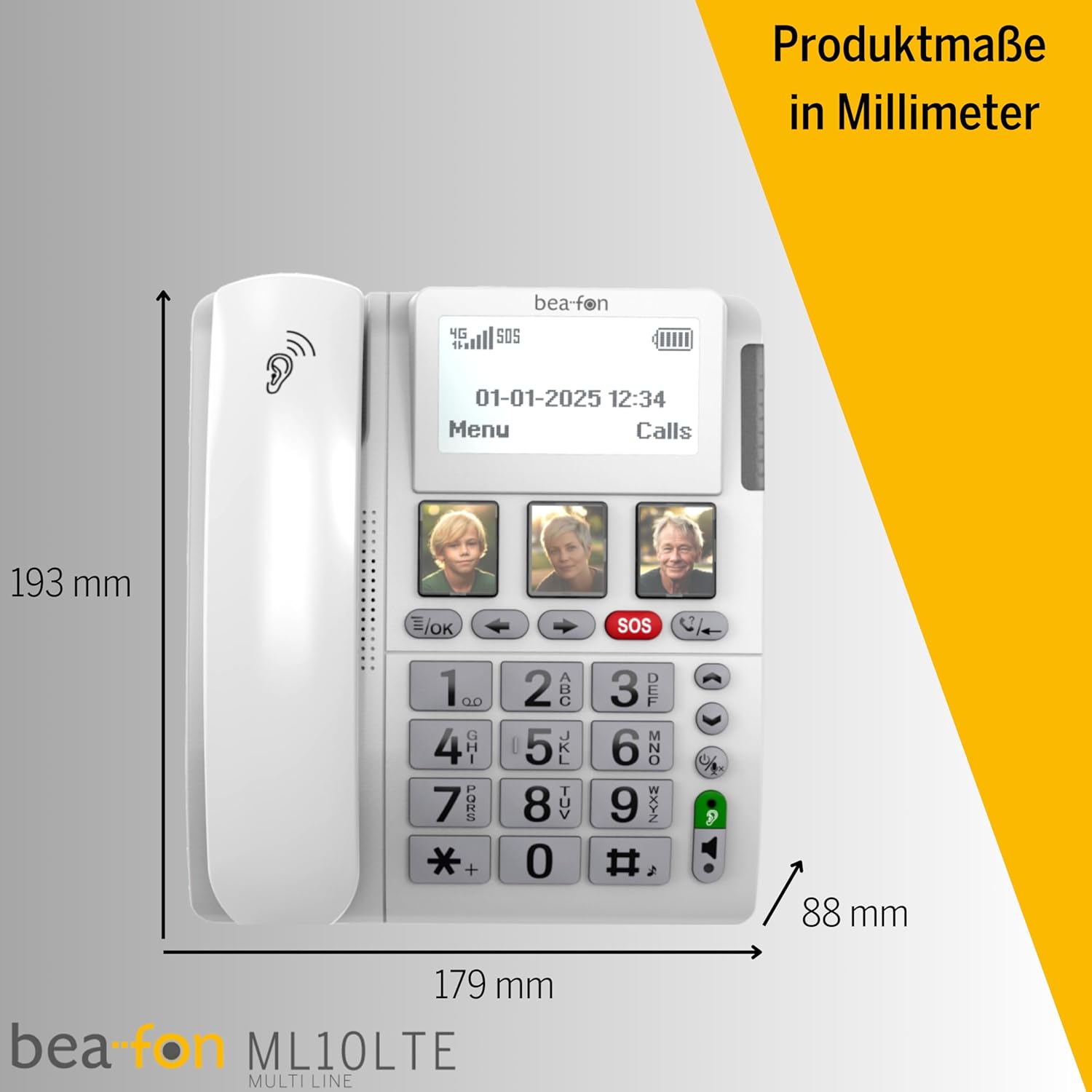
6.3. SOS Emergency Function
The SOS function allows you to quickly contact pre-selected emergency numbers. It includes an SOS button on the phone and a separate SOS wristband/necklace.
- Programming SOS Numbers: Access the 'SOS Settings' in the menu to program up to five emergency contact numbers.
- Activating SOS (Phone): Press and hold the red SOS button on the phone. The phone will automatically call the programmed numbers in sequence until an answer is received.
- Activating SOS (Wristband/Necklace): Press the button on the SOS wristband or necklace. This will trigger the phone to initiate the emergency call sequence. The wristband/necklace has a range of 433 MHz.


6.4. نورې دندې
- SMS: The phone supports sending and receiving text messages. Access the 'Messages' menu to compose or read SMS.
- Audio Booster: Press the Audio Booster button during a call to temporarily increase the earpiece volume for clearer audio.
- بلوتوث LE: Use Bluetooth Low Energy to connect compatible wireless accessories.
- HAC Compatibility: The phone is certified HAC M4/T4, making it suitable for users with hearing aids.
7. ساتنه
7.1. د آلې پاکول
د خپل تلیفون په غوره حالت کې ساتلو لپاره:
- د تلیفون سطحه د نرم، ډ سره پاک کړئamp ټوکر
- سخت کیمیاوي توکي او کثافات پاکونکي مه کاروئ.
- Ensure no moisture enters openings such as the microphone or speaker.
7.2. د بیټرۍ پاملرنه
The phone is powered by a Lithium-ion battery. To prolong battery life:
- د بیټرۍ په مکرر ډول د بشپړ چارج کولو څخه ډډه وکړئ.
- Charge the phone regularly, especially if not in use for extended periods.
- وسیله په یخ او وچ ځای کې ذخیره کړئ کله چې نه کارول کیږي.
8. ستونزه حل کول
If you encounter issues with your Beafon ML10, refer to the following common problems and solutions:
| ستونزه | احتمالي حل |
|---|---|
| تلیفون نه چالانیږي | Check if the power adapter is correctly connected and the battery is charged. Ensure the battery is properly inserted. |
| زنګونه نشي وهلی یا ترلاسه کولی نشي | Verify that the SIM card is correctly inserted and activated. Check for network signal strength on the display. Restart the phone. |
| د SOS فعالیت کار نه کوي | Ensure SOS numbers are correctly programmed. Check the battery level of the SOS wristband/necklace. Verify the wristband/necklace is within range (433 MHz). |
| ضعیف غږ کیفیت | Adjust the earpiece volume. Ensure the microphone is not blocked. If using hands-free, ensure you are close to the phone. |
| ښودنه خالي یا کنګل شوې ده | Try restarting the phone by holding the power button. If unresponsive, disconnect power and re-connect. |
9. مشخصات
Technical details of the Beafon Silverline ML10 LTE Desk Phone:
| فیچر | تفصیل |
|---|---|
| برانډ | بیفون |
| د ماډل شمیره | 15031162187 |
| عملیاتي سیسټم | RTOS |
| د تلیفون ډول | نانو سیم |
| ارتباط | 4G LTE, Bluetooth LE |
| د بیټرۍ جوړښت | لیتیم آیون (۱ پکې شامل دی) |
| د بریښنا سرچینه | د بیټرۍ چلول |
| د رینجر حجم | تر 90 dB پورې |
| Earpiece Volume | +40 ډی بی |
| د اوریدلو مرستې مطابقت | HAC M4/T4 |
| SOS Wristband/Necklace Range | 433 MHz |
| وزن | 210 ګرامه |
| د زنګ وهونکي ID | هو |
| څو کرښې عملیات | د لاین کرښه عملیه |
10. تضمین او ملاتړ
Information regarding the specific warranty period and detailed support contact information for the Beafon Silverline ML10 LTE Desk Phone is not available in the provided product data. Please refer to the product packaging or the manufacturer's official website for the most current warranty terms and customer support details.


