1. پیژندنه
This manual provides essential information for the installation, operation, and maintenance of your FSP VITA GM 650W ATX 3.1 PC Power Supply. Please read this manual thoroughly before installation to ensure proper and safe usage of the product. The FSP VITA GM 650W is designed to deliver stable and efficient power to your computer system, adhering to the ATX 3.1 and PCIe Gen 5.1 specifications.
2. د خوندیتوب معلومات
تل د خپلو تجهیزاتو د ټپي کیدو یا زیان څخه د مخنیوي لپاره لاندې خوندیتوب احتیاطي تدابیر په پام کې ونیسئ:
- د برېښنا رسولو واحد مه خلاصوئ. لوړ حجمtages are present inside, and opening the casing voids the warranty and poses a risk of electric shock.
- د برېښنا رسولو ځای په ښه هوا لرونکي ځای کې نصب کړئ، د تودوخې سرچینو، مستقیم لمر وړانګو او رطوبت څخه لرې.
- ډاډ ترلاسه کړئ چې د بریښنا رسولو سمه نصب شوې او ستاسو د کمپیوټر په قضیه کې خوندي شوې ده.
- Use only the modular cables provided with the power supply. Using incompatible cables can cause damage.
- Connect the power supply to a grounded electrical outlet.
- Disconnect the AC power cord from the wall outlet before installing or removing the power supply or any other components.
- د بریښنا رسولو یا د هغې په کیبلونو کې د درنو شیانو له ایښودلو څخه ډډه وکړئ.
- If the power supply is damaged or malfunctioning, discontinue use immediately and contact FSP support.
3. د بسته محتويات
ډاډ ترلاسه کړئ چې ټول توکي ستاسو په کڅوړه کې شتون لري:
- FSP VITA GM 650W ATX 3.1 PC Power Supply
- Modular Cable Set (Motherboard, CPU, PCIe, SATA, Peripheral)
- د AC بریښنا تار
- د سکرو نصب کول
- د کارونکي لارښود (دا لاسوند)
4. محصول ختم شوview
The FSP VITA GM 650W is a high-efficiency power supply designed for modern PC systems. It features:
- د ATX 3.1 اطاعت: Designed to meet the latest Intel Power Design Guide ATX 3.1 specifications, ensuring compatibility with future hardware.
- PCIe Gen 5.1 Support: Ready for next-generation graphics cards.
- د ۸۰ پلس سرو زرو تصدیق: Achieves high efficiency, reducing power dissipation, heat, and noise.
- Synchronous Rectifier LLC Resonance Converter Topology: Reduces switching loss and enhances efficiency.
- +5V & 3.3V DC to DC Circuit Design: Improves efficiency and stabilizes output voltage.
- 105°C Japanese Bulk Capacitor: Ensures reliability and extended lifespan.

شکل ۱: مخکینۍ برخه view of the FSP VITA GM 650W Power Supply, showcasinد هغې کمپیکټ ډیزاین او د فین ګریل.
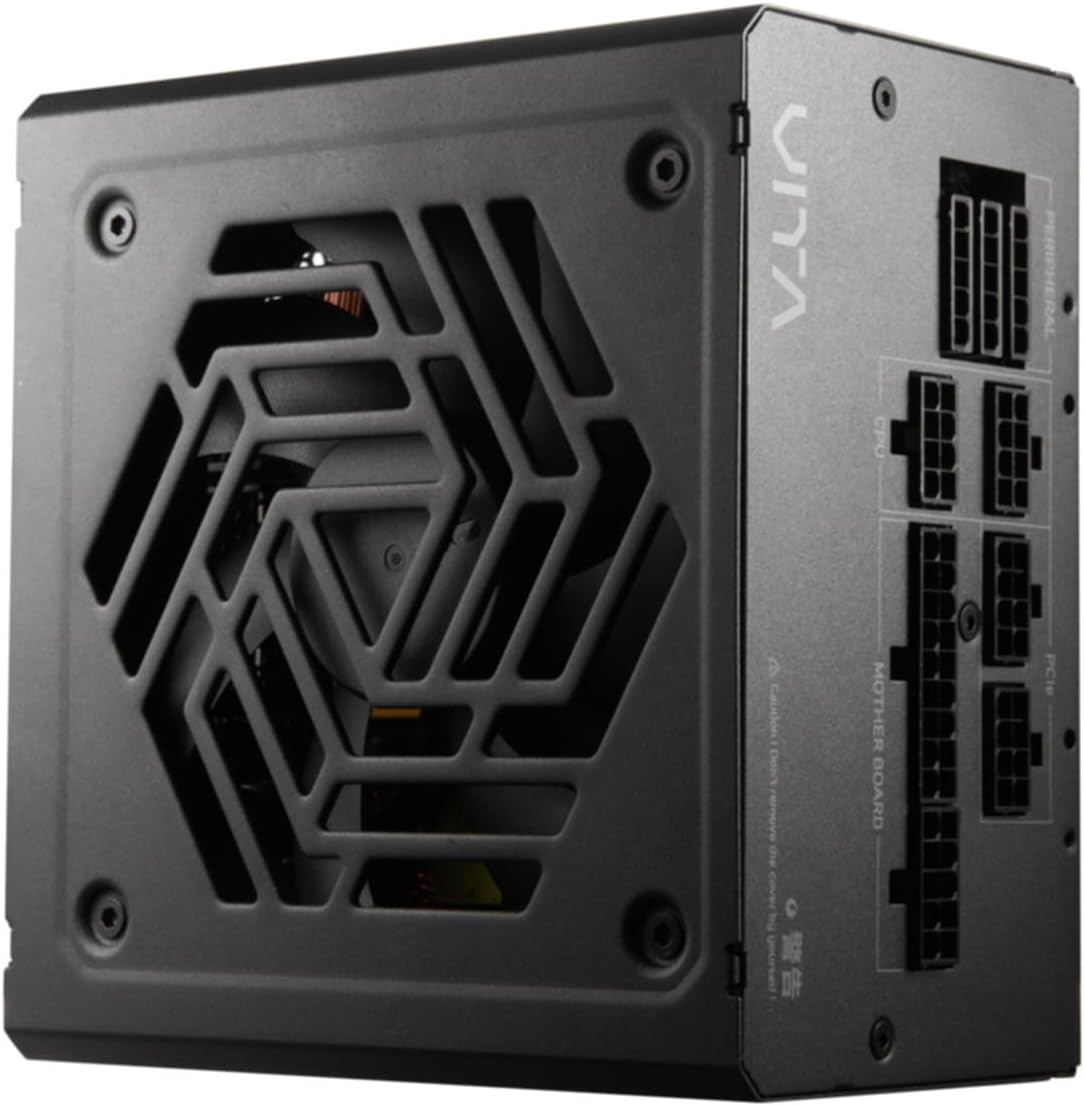
شکل ۱: پورته څخه ښکته view of the FSP VITA GM 650W Power Supply, highlighting the fan and ventilation design.

شکل 4.3: اړخ view of the FSP VITA GM 650W Power Supply, showing the FSP branding and VITA model name.
5. ترتیب او نصب کول
Follow these steps to install your FSP VITA GM 650W power supply:
- چمتووالی:
- خپل کمپیوټر بند کړئ او د AC بریښنا تار د دیوال له ساکټ څخه جلا کړئ.
- خپل کمپیوټر قضیه پرانیزئ.
- که چیرې د موجوده بریښنا رسولو ځای ونیسئ، نو ټول کیبلونه د زاړه PSU څخه جلا کړئ او له قضیې څخه یې لرې کړئ.
- د PSU نصب کول:
- Carefully place the FSP VITA GM 650W into the power supply bay of your PC case.
- په PSU کې د سکرو سوري د قضیې سره سم کړئ.
- د چمتو شوي نصب شوي سکرو په کارولو سره د بریښنا رسولو خوندي کړئ.
- د ماډلر کیبلونو نښلول:
The FSP VITA GM 650W is a modular power supply. Connect only the cables required for your system components.

Figure 5.1: Modular cable connection panel. Ensure cables are firmly seated.
- د مور بورډ ځواک: د 24-پن ATX کیبل د مور بورډ سره وصل کړئ.
- د CPU ځواک: Connect the 4+4-pin or 8-pin EPS/ATX12V cable(s) to the CPU power connector(s) on your motherboard.
- د PCIe ځواک: د 6+2-pin PCIe کیبلونه خپل ګرافیک کارتونو سره وصل کړئ.
- د SATA بریښنا: د SATA بریښنا کیبلونه د SSDs، HDDs، او آپټیکل ډرایو سره وصل کړئ.
- پردی ځواک: Connect 4-pin Molex cables to other peripherals as needed.
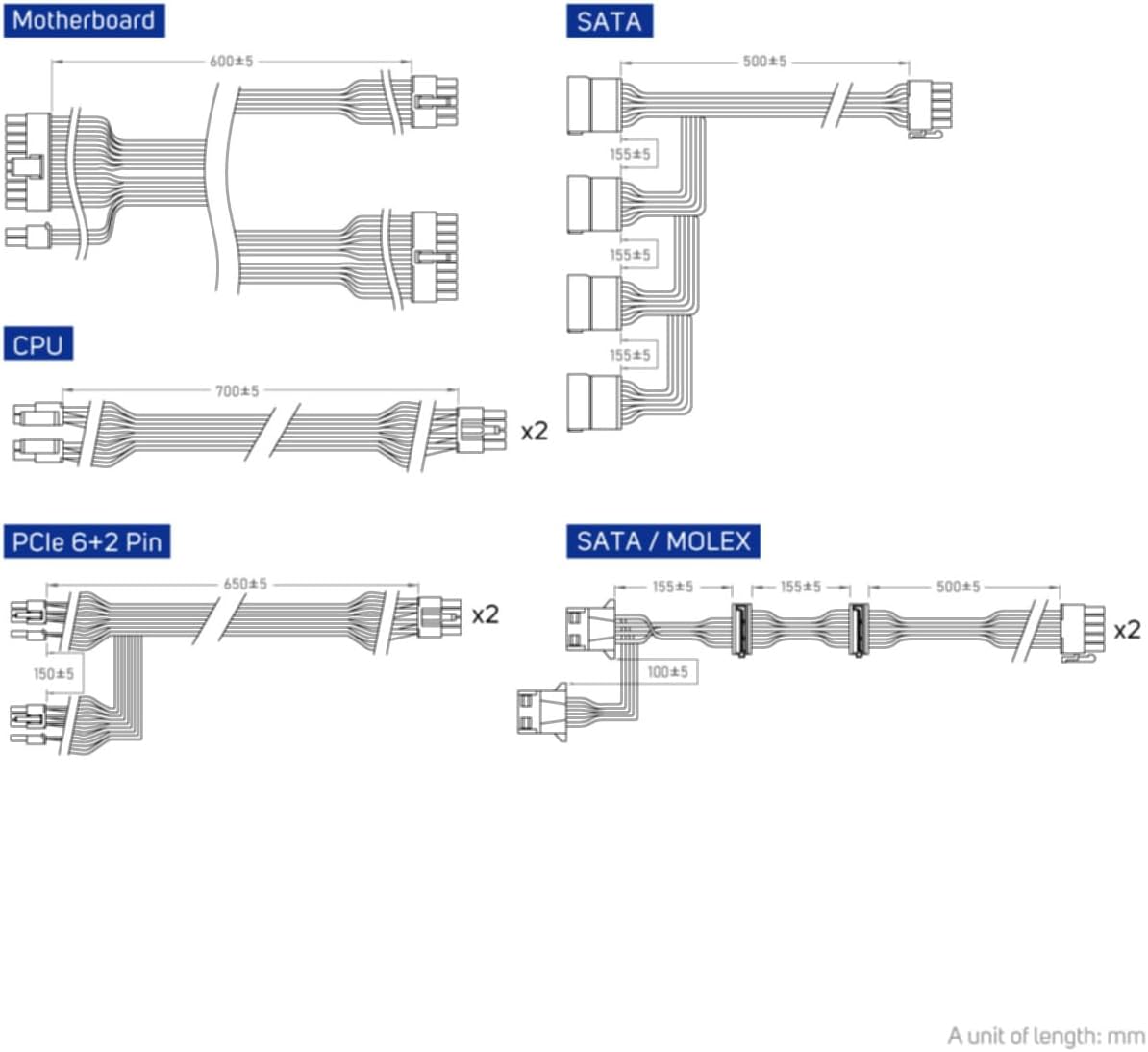
Figure 5.2: Diagram illustrating the various modular cables included and their approximate lengths (in mm).
- وروستۍ چکونه:
- Ensure all cables are securely connected and routed to avoid obstructing airflow.
- د خپل کمپیوټر قضیه وتړئ.
- د AC بریښنا تار د بریښنا رسولو سره وصل کړئ او بیا د دیوال سره تړلي ځای سره وصل کړئ.
6. عملیاتي لارښوونې
After installation, you can power on your system:
- Ensure the power switch on the back of the power supply is in the "ON" (I) position.
- د خپل کمپیوټر په قضیه کې د بریښنا تڼۍ فشار ورکړئ.
- The power supply will provide stable power to your components.

شکل 6.1: شاته view of the power supply, showing the AC power input and the main power switch.
Bridge Time Importance: The FSP VITA GM 650W adheres to the recommended ATX 3.1 bridge time values. This feature ensures the power supply can maintain a stable output voltage for a critical duration after a power interruption, preventing system instability or damage during sudden power fluctuations or outages.
7. ساتنه
To ensure optimal performance and longevity of your power supply:
- د دوړو پاکول: د کمپریس شوي هوا په کارولو سره د بریښنا رسولو د فین ګریل او وینټونو څخه په دوره یي ډول دوړې پاکې کړئ. ډاډ ترلاسه کړئ چې سیسټم د پاکولو دمخه بند او پلګ شوی دی.
- د کیبل مدیریت: Maintain good cable management inside your PC case to ensure proper airflow and prevent overheating.
- د چاپیریال شرایط: د بریښنا رسولو د سپارښتنې شوي تودوخې او رطوبت حدودو کې کار وکړئ.
8. ستونزه حل کول
If you encounter issues with your FSP VITA GM 650W power supply, refer to the following common problems and solutions:
| ستونزه | احتمالي لامل | د حل لاره |
|---|---|---|
| سیسټم فعال نه دی. |
|
|
| سیسټم چالان کیږي مګر سمدلاسه بندیږي. |
|
|
| د PSU څخه غیر معمولي غږونه. |
|
|
If the problem persists after trying these solutions, please contact FSP customer support for further assistance.
9. مشخصات
| فیچر | تفصیل |
|---|---|
| د ماډل شمیره | 790980 |
| برانډ | FSP |
| واټtage | 650W |
| د ATX نسخه | 3.1 |
| د موثریت تصدیق | 80 پلس طلا |
| د توکي وزن | 2.72 کیلوګرامه (5.98 پونډه) |
| جوړونکی | FSP |
| نیټه لومړی شتون لري | د اګست ۷، ۲۰۲۴ |
10. تضمین او ملاتړ
For warranty information, technical support, or service inquiries, please refer to the official FSP webسایټ ته مراجعه وکړئ یا د دوی د پیرودونکو خدماتو څانګې سره اړیکه ونیسئ. د تضمین ادعاوو لپاره د پیرود ثبوت وساتئ.
FSP Official Webسایټ: www.fsp-group.com
11. ریسایکل کول او ضایع کول
Please dispose of this product responsibly. Electronic waste should not be disposed of with household waste. Contact your local authorities or recycling center for information on proper disposal methods for electronic components.


