
پیژندنه
Welcome to the Parsonver SR2 Smart Watch user manual. This guide provides detailed instructions on how to set up, operate, maintain, and troubleshoot your new smart watch. Please read this manual thoroughly to ensure optimal performance and longevity of your device.

Image: The Parsonver SR2 Smart Watch, showcasing its display with time, date, steps, and heart rate, alongside a smaller inset of its GPS tracking feature.
1. ترتیب کول
1.1 د بسته محتويات
مخکې له دې چې تاسو پیل کړئ، مهرباني وکړئ ډاډ ترلاسه کړئ چې ټول توکي ستاسو په کڅوړه کې شتون لري:
- پارسنور SR2 سمارټ واچ
- د چارج کیبل
- د کارونکي لارښود (دا لاسوند)

Image: An illustration showing the Parsonver SR2 Smart Watch, its magnetic charging cable, and the included user manual.
1.2 د وسیلې چارج کول
Upon first use, fully charge your smart watch. Connect the magnetic charging cable to the charging contacts on the back of the watch and plug the USB end into a power adapter (not included) or a computer's USB port. A full charge typically takes approximately 2 hours.
Image: The Parsonver SR2 Smart Watch connected to its magnetic charging cable, displaying a 100% charge indicator.
۳.۳ د اپلیکیشن نصب او جوړه کول
To unlock the full functionality of your Parsonver SR2 Smart Watch, download and install the companion application on your smartphone.
- Scan the QR code in the manual or search for the 'Parsonver' app in your phone's app store (Google Play Store for Android, Apple App Store for iPhone).
- اپلیکیشن نصب کړئ او یو حساب جوړ کړئ یا ننوتل وکړئ.
- ډاډ ترلاسه کړئ چې ستاسو په سمارټ فون کې بلوتوټ فعال دی.
- Open the Parsonver app, navigate to the device section, and follow the on-screen instructions to pair your SR2 Smart Watch.
- د بشپړ فعالیت لپاره د اپلیکیشن لخوا غوښتل شوي ټول اړین اجازې ورکړئ، په شمول د خبرتیاو او موقعیت خدماتو.
۴. ستاسو د سمارټ واچ چلول
2.1 بنسټیز نیویګیشن
The Parsonver SR2 Smart Watch features a responsive touchscreen and dual physical buttons for intuitive control.
- ټچ سکرین: د مینو او ځانګړتیاو له لارې د نیویګیټ کولو لپاره کیڼ/ښي، پورته/ښکته سوائپ کړئ. د غوره کولو لپاره ټایپ کړئ.
- پورتنۍ تڼۍ: معمولا د کور سکرین ته د بیرته راستنیدو یا وسیله د بیدارولو لپاره کارول کیږي.
- ښکته تڼۍ: Customizable. Can be set to quickly access workout modes or frequently used applications via the companion app.

Image: A close-up of the Parsonver SR2 Smart Watch highlighting its dual button design and a menu showing 'Exercise', 'Walking', and 'Treadmill' options.
2.2 Bluetooth Calling & Smart Notifications
The SR2 Smart Watch supports Bluetooth 5.3 for stable connectivity, allowing you to answer and make calls directly from your wrist and receive smart notifications.
- زنګ وهل/ځواب ورکول: Once paired, incoming calls will display on your watch. You can answer or reject them. Use the integrated microphone and speaker for conversations.
- سمارټ خبرتیاوې: Receive alerts for calls, SMS, and various social media applications directly on your watch. Ensure app permissions are granted for notifications.
- Quick Call Replies: (Android only) Respond instantly to calls with pre-set messages.

Image: A person interacting with the Parsonver SR2 Smart Watch, showing a call screen with a dial pad and contact list, along with icons for various social media notifications.
2.3 Sports Modes & Built-in GPS
Track your fitness activities with over 100 sports modes and accurate built-in GPS.
- 100+ د سپورت طریقې: Select your activity from a wide range of sports to get precise tracking of duration, distance, calories burned, and heart rate zones.
- جوړ شوی GPS: Accurately record your workout routes without needing your phone. View detailed maps and statistics in the companion app after your activity.
- سمارټ کشف: The watch can automatically recognize when you are running, walking, or using a treadmill.

Image: A person running outdoors, with the Parsonver SR2 Smart Watch displaying a GPS-tracked route on its screen and a smartphone app showing detailed workout data including distance and time.
2.4 24-Hour Health Monitoring
Monitor your health metrics continuously with the SR2 Smart Watch.
- د زړه ضربان څارنه: Tracks your heart rate throughout the day. Set custom alerts for high or low readings.
- د خوب څارنه: Analyzes your sleep patterns (deep sleep, light sleep, REM, awake time, sporadic naps) to provide insights into your sleep quality.
- د وینې اکسیجن (SpO2) څارنه: Measures your blood oxygen levels, providing clear trends and real-time tracking.
- د فشار څارنه: Understand your emotional fluctuations through data-driven body-mind analysis.
- Women's Health Companion: Provides data-driven cycle management features.

Image: A person sleeping, wearing the Parsonver SR2 Smart Watch, with graphics illustrating sleep monitoring, heart rate monitoring, stress monitoring, and blood oxygen monitoring features.
2.5 Watch Faces & DIY
Personalize your watch with a variety of watch faces or create your own.
- 100+ د څار مخونه: Choose from a wide selection of pre-installed watch faces to match your style.
- DIY Watch Faces: Use the companion app to upload your own photos and customize your watch face.

Image: The Parsonver SR2 Smart Watch displaying a custom watch face with a photo, surrounded by various other watch face designs and a smartphone screen showing the watch face synchronization interface.
2.6 اضافي ځانګړتیاوې
The SR2 Smart Watch offers a range of other useful functions:
- نړیوال ساعت
- د روښانتیا تنظیم کول
- الارم
- محاسبه کوونکی
- ټایمر
- زما تلیفون ومومئ
- Lift-to-wake
- سټاپ واچ
- د موسیقۍ کنټرول
- Remote Camera Trigger
- د تنفس تمرینونه
- Reminders (Handwashing, Medication, Event, Drinking, Standing)

Image: The Parsonver SR2 Smart Watch screen surrounded by icons representing various features like weather, music, camera control, alarm, and more.
3. ساتنه
۵.۱ د اوبو ضد درجه بندي (IP68)
The Parsonver SR2 Smart Watch is rated IP68 waterproof, meaning it is rigorously tested to withstand splashes, hand washing, face washing, and intense sweat. It is suitable for daily use and light water exposure.
Note: Avoid using the watch while showering, in saunas, or swimming, as hot water, steam, or prolonged submersion can compromise the seal and cause damage.

Image: A man kayaking on a river, wearing the Parsonver SR2 Smart Watch, illustrating its IP68 waterproof capability against splashes.
Clean پاکول او پالنه
- خپل ساعت او تسمه په منظم ډول د نرم، ډamp ټوکر
- د سختو کیمیاوي موادو، خړوبونکو پاکوونکو، یا محلولونو کارولو څخه ډډه وکړئ.
- ډاډ ترلاسه کړئ چې د چارج کولو اړیکې د چارج کولو دمخه پاکې او وچې دي ترڅو د زنګ وهلو مخه ونیول شي.
3.3 د بیټرۍ پاملرنه
- Charge the watch regularly, avoiding complete discharge for extended periods.
- ساعت په یخ او وچ ځای کې وساتئ کله چې کارول نه وي.
- Typical battery life is 5-7 days with normal use, and up to 40 days in standby mode. Actual battery life may vary based on usage.
4. ستونزه حل کول
If you encounter issues with your Parsonver SR2 Smart Watch, please refer to the following common solutions:
| مسله | احتمالي حل |
|---|---|
| وګورئ چې نه چالانیږي | ډاډ ترلاسه کړئ چې ساعت په بشپړه توګه چارج شوی دی. لږترلږه د 30 دقیقو لپاره یې چارجر سره وصل کړئ. |
| د تلیفون سره جوړه نشي کیدی | Ensure Bluetooth is enabled on your phone. Restart both the watch and phone. Make sure the watch is within Bluetooth range. Check app permissions. |
| خبرتیاوې ندي ترلاسه شوي | Verify that notification permissions are granted in the Parsonver app and your phone's settings. Ensure the app is running in the background. |
| د روغتیا ناسم معلومات | ډاډ ترلاسه کړئ چې ساعت ستاسو په لاس کې په کلکه اغوستل شوی وي، نه ډیر تنګ او نه ډیر خلاص. د ساعت په شا سینسر پاک کړئ. د اندازه کولو پرمهال له ډیر حرکت څخه ډډه وکړئ. |
| GPS نه تعقیبوي | ډاډ ترلاسه کړئ چې تاسو په یوه خلاصه بهرنۍ سیمه کې یاست چې پاکه هوا ولري view د اسمان. د خپل فعالیت پیل کولو دمخه د ساعت د GPS سیګنال ترلاسه کولو لپاره انتظار وکړئ. |
| د بیټرۍ لنډ ژوند | Reduce screen brightness, disable 'Lift-to-wake' if not needed, limit continuous heart rate monitoring, and close unused apps on the watch. |
که ستونزه دوام ومومي، مهرباني وکړئ د نورو مرستې لپاره د پیرودونکي ملاتړ سره اړیکه ونیسئ.
5. مشخصات
| فیچر | تفصیل |
|---|---|
| د ماډل شمیره | SR2 |
| د محصول ابعاد | 9.84 x 1.69 x 0.46 انچه |
| د توکي وزن | ۰.۹۸۶ اونس (۲۷.۹۴ ګرامه) |
| د سکرین اندازه | ۱.۲ انچه (د ولاړ سکرین ښودنې اندازه) |
| د لید وړ سکرین ډیګونال | ۵۵ انچه / ۱۴۰ سانتي متره |
| د حافظې د ذخیره کولو ظرفیت | 256 MB |
| بې سیم مخابرات | بلوتوث 5.3 |
| د انسان انٹرفیس ننوت | ټچ سکرین |
| د نړیوال خوندیتوب درجه بندي | IP68 |
| بیټرۍ | ۱ سانتي ګراد بیټرۍ ته اړتیا ده (شامل ده) |
| جوړونکی | پارسونور |
| د لومړي شتون نیټه | د اکتوبر ۲۹، ۲۰۲۳ |
6. تضمین او ملاتړ
6.1 د محصول تضمین
Parsonver products are designed and manufactured to the highest quality standards. This product is covered by a limited warranty against defects in materials and workmanship. Please refer to the warranty card included in your package or contact Parsonver customer support for specific warranty terms and conditions.
6.2 د پیرودونکي ملاتړ
For any questions, technical assistance, or support needs, please contact Parsonver customer service. Our support team is available 24/7 to assist you.
- آنلاین ملاتړ: Visit the official Parsonver website or contact us through the companion app for online assistance.
- د بریښنالیک ملاتړ: Refer to your warranty card or product packaging for email contact information.
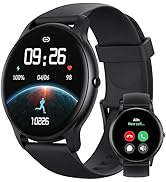
Image: An icon representing 24/7 online customer support, featuring a headset and chat bubbles.


