1. پیژندنه
This manual provides detailed instructions for the installation, operation, and maintenance of your SJoyBring Double Din Car Stereo, Model JOY-W006. Please read this manual thoroughly before using the product to ensure proper functionality and safety. This device integrates advanced features such as wireless Apple CarPlay, Android Auto, Bluetooth 5.3, and a 4.2-channel audio system for an enhanced in-car entertainment experience.
2. د بسته محتويات
ډاډ ترلاسه کړئ چې لاندې ټول توکي ستاسو په بسته کې شامل دي:
- Double Din Car Stereo with Frame
- شاته View کیمره د کیبل سره
- Harness and Remote Control
- Brackets, Disassembly Tool, and Screws
- د کارن لارښود

Image: Package contents including the head unit, wiring harness, remote, camera, and installation accessories.
3. کلیدي ځانګړتیاوې
- بېسیم ایپل کارپلی او انډرایډ آټو: Seamless smartphone integration for navigation, music, and communication via Bluetooth.
- Enhanced 4.2-Channel Audio System: Delivers 240W output with dedicated outputs for front, rear, and dual subwoofers, allowing for a customizable sound experience.
- High-Quality Bluetooth 5.3: Features an independent Bluetooth module and external antenna for stable, low-latency connections, improved transmission efficiency, and reduced static noise during calls and audio streaming.
- Front and Rear Camera Support: Includes a rear view camera with HD night-vision for easier and safer parking. The system automatically activates the camera when reversing.
- Steering Wheel Control (SWC) Compatibility: Allows control of volume, track skipping, and calls directly from your steering wheel (additional interface may be required).
- ۱۰.۱ انچه ایچ ډي ټچ سکرین: Responsive 1024x600P display for clear visuals and intuitive control.
- AM/FM راډیو: Access to local radio stations.
- Built-in 10-Band EQ: Customize audio output with various preset and user-defined equalization settings.
- USB/TF/AUX Input: Multiple connectivity options for media playback.
- د تار لرونکې هنداره لینک: Display your smartphone screen directly on the stereo (supports Android and iOS).

Image: Feature comparison highlighting the SJoyBring stereo's advantages in audio output, power, and Bluetooth technology.
4. ترتیب او نصب کول
Proper installation is crucial for optimal performance. It is recommended to consult a professional for installation if you are unfamiliar with car audio wiring. Ensure the vehicle's power is disconnected before beginning installation.
4.1. د نصب کولو دمخه چکونه
- مطابقت: This unit has a standard double din size of 6.69" x 3.81" (170mm x 97mm). Verify your dashboard opening size. An additional dash kit may be required for a proper fit.
- لوازم: Some vehicles may require a wire harness adapter and a radio antenna adapter, which are sold separately.
4.2. Wiring Diagram Overview
Refer to the detailed wiring diagram provided in the physical user manual for specific connections. Key connections include:
- ځواک: Yellow (+12V constant), Red (+12V ignition switch), Black (Ground).
- ويناوال: Front Right/Left, Rear Right/Left.
- د کیمرې ننوتل: Dedicated inputs for front and rear cameras.
- Subwoofer Outputs: Two dedicated RCA outputs for subwoofers.
- د سټیرینګ ویل کنټرول: Connect to your vehicle's SWC wires (requires an additional interface for some vehicles).

Image: Wiring diagram and physical dimensions of the SJoyBring car stereo.
Video: Demonstration of a double din car stereo installation, showing wiring connections and mounting. This video illustrates the general process of connecting the wiring harness and installing the head unit into a vehicle's dashboard. It highlights the various cable connections for power, speakers, and accessories, which are crucial for proper setup.
5. عملیاتي لارښوونې
۴.۲. بېسیم ایپل کارپلی او انډرایډ آټو
Connect your smartphone via Bluetooth to enable wireless Apple CarPlay or Android Auto. This allows access to your phone's navigation, music, messages, and other compatible apps directly on the stereo's touchscreen. Use voice commands (Siri/Google Assistant) for hands-free operation.
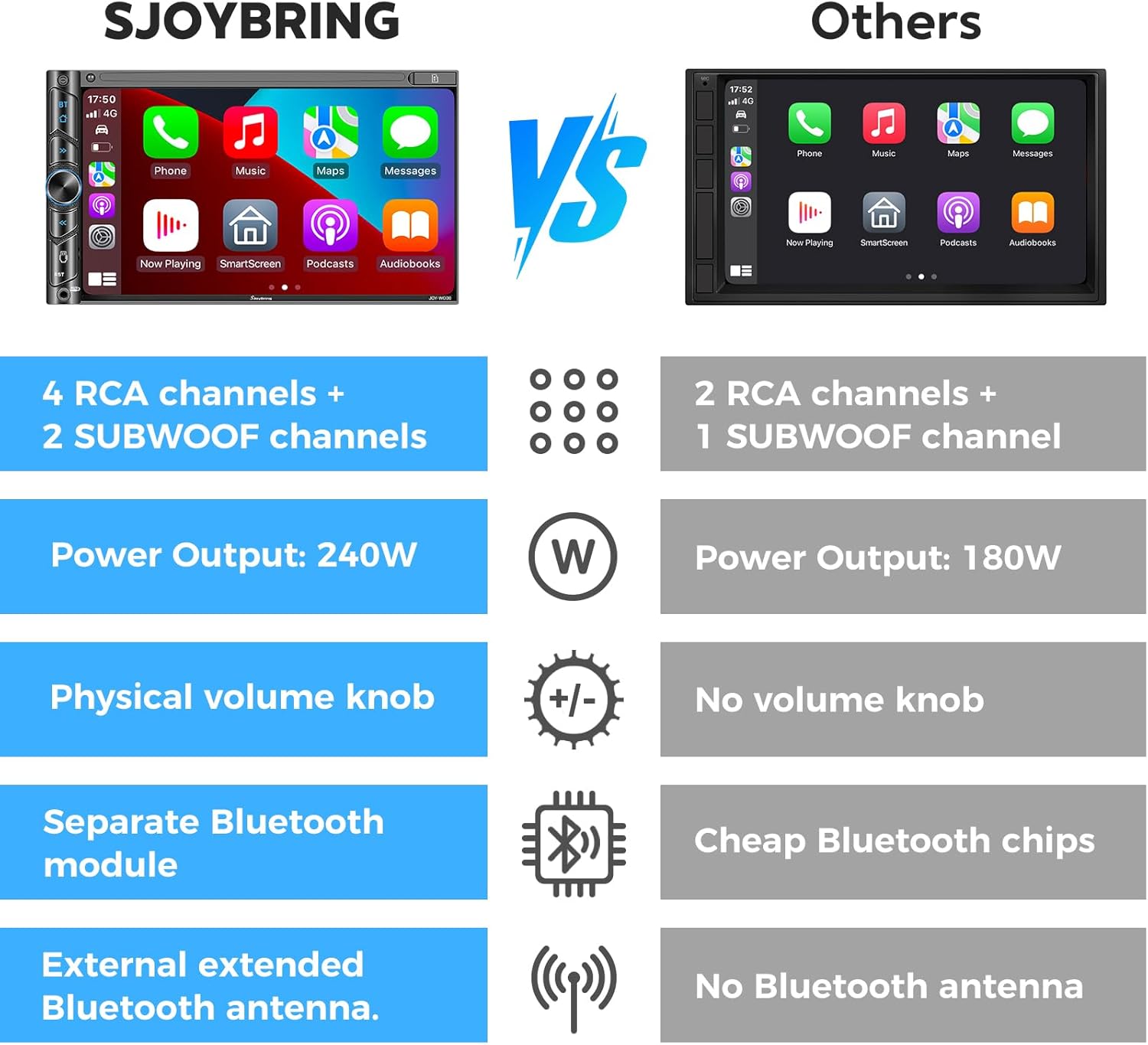
Image: The SJoyBring car stereo screen showing the Apple CarPlay interface with various app icons.
Video: A demonstration of the SJoyBring 7-inch wireless car stereo in operation, showcasing its user interface and responsiveness. The video highlights the seamless integration of wireless Apple CarPlay and Android Auto, allowing users to access navigation, music, and communication features directly from the touchscreen. It also demonstrates the use of voice control for safer driving.
۴.۶. د آډیو تنظیمات او برابرونکی
Access the EQ Setup menu to adjust audio frequencies. The 10-band equalizer allows for fine-tuning sound output. You can select from preset modes (Jazz, Classic, Rock, Pop, Soft) or create a custom user profile. Adjust subwoofer levels and speaker balance (FAD/BAL) for optimal sound distribution.

Image: The audio settings interface, showing equalizer adjustments and speaker output configuration for the 4.2-channel system.
5.3. د بلوتوټ ارتباط
The independent Bluetooth 5.3 module ensures a quick and stable connection for hands-free calling and audio streaming. Pair your device through the Bluetooth menu on the stereo.

Image: Illustration of the independent Bluetooth module and external antenna, highlighting quick connection and noise reduction.
۴. د کیمرې فعالیت
The stereo supports both front and rear view cameras. When the vehicle is shifted into reverse, the rear camera feed automatically displays on the screen, providing a clear view with parking guidelines. The included rear camera offers HD night-vision.

Image: Front and rear camera views, demonstrating HD and night vision capabilities for parking assistance.
۸.۸. د سټیرینګ ویل کنټرولونه (SWC)
If your vehicle supports steering wheel controls and you have the necessary interface, you can program the stereo to respond to these controls. This allows for safe adjustment of volume, track changes, and call management without taking your hands off the wheel. Refer to the "Wheel" settings in the stereo's menu for configuration.

Image: The stereo's interface for setting up steering wheel controls, showing options for volume, track, and mode.
6. ساتنه
- پاکول: Use a soft, dry cloth to clean the touchscreen and unit. Avoid abrasive cleaners or solvents.
- دحرارت درجه: Operate the unit within recommended temperature ranges. Extreme temperatures can affect performance and lifespan.
- د فرم ویئر تازه معلومات: Check the SJoyBring website or contact support for any available firmware updates to ensure optimal performance and access to new features.
7. ستونزه حل کول
که تاسو له ستونزو سره مخ شئ، نو لاندې عام د ستونزو حل کولو مرحلو ته مراجعه وکړئ:
- ځواک نشته: Check all power connections (Yellow, Red, Black wires). Ensure the vehicle's fuse is intact.
- غږ نشته: د سپیکرو اړیکې تایید کړئ. د غږ کچه او د EQ ترتیبات وګورئ. ډاډ ترلاسه کړئ چې سمه آډیو سرچینه غوره شوې ده.
- د بلوتوټ اتصال مسلې: Ensure Bluetooth is enabled on both the stereo and your smartphone. Try unpairing and re-pairing the device. Check for interference.
- کارپلی/انډرایډ آټو نه وصل کیږي: Ensure your phone's operating system is up to date. Verify Bluetooth connection. For wired mirror link, ensure the USB cable is functioning correctly.
- شاته کیمره نه ښکاري: Check the camera's power and video signal connections. Ensure the reverse trigger wire is correctly connected.
- واحد کنګل کیږي/بې ځوابه پاتې کیږي: Use the reset button (often a small pinhole) to restart the unit.
For further assistance, please contact SJoyBring customer support.
8. د محصول مشخصات
| د ماډل شمیره | JOY-W006 |
| د محصول ابعاد | 3.5"D x 7"W x 3.81"H (6.69" x 3.81" standard double din) |
| د توکي وزن | ۲.۴۵ پونډه |
| د ارتباط ټیکنالوژي | مرستندویه، بلوتوث، USB، وای فای |
| بې سیم مخابرات | بلوتوټ 5.3، وای فای |
| ځانګړي ځانګړتیاوې | Android Auto, Apple CarPlay, GPS Navigation (via phone), Hands-Free Calling, Subwoofer Output, Front/Rear Camera Support |
| د کنټرولر ډول | Google Assistant, iOS (Siri) |
| د آډیو وتلې حالت | سټیریو |
| شاوخوا د غږ چینل ترتیب کول | 4.2 |
| د ویډیو کوډ کولو ملاتړ | MPEG-4, RMVB, DivX, AVI, 1080P, MP3, WMA, JPEG |
| جوړونکی | SJOYBRING |
| نیټه لومړی شتون لري | د اپریل 15، 2025 |
9. تضمین او ملاتړ
SJoyBring is committed to providing quality products and customer service. For any inquiries or support needs, please refer to the following:
- د پیرودونکو خدمت: For technical support or product questions, please contact the seller, "Stereo Expert", directly through the Amazon platform.
- بیرته ستنیدل/بدلونونه: Refer to Amazon's return policy for details on returns and replacements.
- د شفافیت تایید: Each SJoyBring item includes a unique code for verification.
For additional information, visit the official SJoyBring store on Amazon: SJoyBring Store


