1. پیژندنه
د پیرودلو لپاره مننهasing the iFFALCON 40S55T 40-inch Full HD Google TV. This manual provides essential information for the safe and efficient use of your television. Please read it thoroughly before operating the device and retain it for future reference.
The iFFALCON 40S55T is a tunerless smart TV designed for streaming content, offering a Full HD display, Google TV operating system, Chromecast built-in, and Dolby Audio for an immersive entertainment experience.
2. د خوندیتوب معلومات
د دې ټلویزیون کارولو پرمهال تل د خوندیتوب لومړني احتیاطي تدابیر تعقیب کړئ ترڅو د اور، بریښنا شاک او ټپي کیدو خطر کم کړئ.
- تلویزیون باران یا رطوبت ته مه ښکاره کوئ.
- تلویزیون مه خلاصوه casinز؛ ټولې خدمتونه وړ پرسونل ته راجع کړئ.
- ډاډ ترلاسه کړئ چې د تلویزیون شاوخوا مناسب هوا ورکول.
- تلویزیون د مستقیم لمر وړانګو، تودوخې سرچینو او قوي مقناطیسي ساحو څخه لرې وساتئ.
- Use only the power cord and accessories supplied by the manufacturer.
- د برېښنا د طوفانونو پر مهال یا کله چې د اوږدې مودې لپاره نه کارول کیږي، تلویزیون خلاص کړئ.
3. د بسته محتويات
ډاډ ترلاسه کړئ چې ټول توکي په بکس کې شتون لري:
- iFFALCON 40S55T 40-inch Full HD Google TV
- ریموټ کنټرول
- د تلویزیون سټینډ (۲ ټوټې)
- د تلویزیون سټینډ لپاره پیچونه
- د بریښنا کیبل
- د تضمین کارت
- د لارښود لارښود (دا سند)
4. ترتیب کول
۴.۱ د تلویزیون سټینډ سره نښلول
- د سکرین د زیان مخنیوي لپاره په احتیاط سره تلویزیون په نرم او فلیټ سطح کې کیږدئ.
- د تلویزیون په ښکته برخه کې د هرې سټینډ ټوټې سره د اړونده سلاټونو سره سمون ورکړئ.
- د ورکړل شویو پیچونو په کارولو سره سټینډونه خوندي کړئ. ډاډ ترلاسه کړئ چې دوی په کلکه ټینګ شوي دي.
4.2 د نښلولو بریښنا
د برېښنا کیبل د تلویزیون د برېښنا ان پټ سره وصل کړئ او بیا یې د دیوال په یوه ساکټ کې ولګوئ. تلویزیون به د سټینډ بای حالت ته ننوځي.
4.3 Initial Setup (Google TV & Network)
د لومړي ځل لپاره د بریښنا په فعالولو سره، تلویزیون به تاسو ته د ګوګل تلویزیون لپاره د لومړني تنظیم کولو پروسې له لارې لارښوونه وکړي. پدې کې شامل دي:
- د ژبې انتخاب.
- د Wi-Fi شبکې سره وصل کول.
- Signing in with your Google account to access personalized content and apps.
- د شرایطو او مقرراتو منل.
4.4 نښلول
The iFFALCON 40S55T offers various connection options for external devices.

انځور: اوورview of the TV's connectivity options, including HDMI, USB, Bluetooth, and Wi-Fi.
- HDMI بندرونه: Connect external devices like gaming consoles, Blu-ray players, or set-top boxes.
- USB پورټ: د میډیا غږولو لپاره د USB ذخیره کولو وسیلو سره وصل کولو لپاره files.
- وای فای: For wireless internet connection to access streaming services and online features.
- بلوتوث: For connecting wireless headphones, speakers, or other Bluetooth-enabled accessories.
4.5 Tunerless Operation
This TV is designed as a tunerless model, meaning it does not have a built-in tuner for terrestrial (over-the-air) broadcasts. To watch terrestrial, BS, or CS broadcasts, an external tuner is required and must be purchased separately.

Image: The iFFALCON 40S55T TV showcasing its smart features, highlighting its tunerless design and ability to enjoy internet video content without an antenna connection.
۴. د تلویزیون چلول
5.1 ریموټ کنټرول اوورview
The remote control provides access to all TV functions, including power, volume, channel navigation, and smart TV features. It also supports voice search via 'Hey Google'.

Image: The TV remote control, featuring quick access buttons for popular streaming services and a dedicated microphone button for voice commands.
- د بریښنا تڼۍ: تلویزیون چالان یا بند کړئ.
- د نیویګیشن تڼۍ: د مینو نیویګیټ کولو لپاره د لارښوونې پیډ او OK تڼۍ وکاروئ.
- د حجم/چینل تڼۍ: Adjust volume and change channels (if an external tuner is connected).
- د اپلیکیشن شارټ کټ تڼۍ: Direct access to popular streaming services like Netflix, YouTube, etc.
- د مایکروفون تڼۍ: Press and hold to activate 'Hey Google' voice search.
۵.۱ د ګوګل تلویزیون ځانګړتیاوې
Your iFFALCON TV runs on Google TV, providing a personalized and integrated entertainment experience.
- د محتوا راټولول: Google TV organizes movies, shows, and live TV from all your apps and subscriptions into one place.
- شخصي سپارښتنې: ستاسو پر بنسټ viewing history and preferences, Google AI suggests content you might enjoy.
- غږ لټون: Use the 'Hey Google' feature on your remote to quickly find content, get information, or control smart home devices.
- د Chromecast جوړ شوی: Easily cast content from your smartphone, tablet, or computer directly to your TV screen.

Image: A smartphone screen mirroring content to the iFFALCON TV, demonstrating the Chromecast built-in feature for enjoying mobile content on a larger display.
5.3 د عکس تنظیمات
The TV incorporates advanced image processing technologies to deliver a superior viewتجربه
- AI PQ Processor: TCL's proprietary AiPQ Processor intelligently adjusts image quality at the pixel level, enhancing clarity, color, and contrast for a vivid and realistic picture.
- Full HD (FHD): Experience sharp and detailed images with Full High Definition resolution, offering 200% more detail than standard HD screens.

Image: A visual comparison illustrating the enhanced detail and clarity provided by Full HD resolution compared to standard HD.
- HDR10/HLG Support: Enjoy a wider range of colors and contrast with HDR10 and HLG compatibility, revealing stunning detail in both bright and dark scenes.

انځور: د تلویزیون په سکرین کې نندارهasing the vibrant and detailed picture quality achieved with HDR10/HLG technology.
- مایکرو ډیمنګ: This technology analyzes the image in hundreds of separate zones to adjust brightness and darkness independently, enhancing contrast and picture quality.

Image: A visual representation of Micro Dimming technology, illustrating how it enhances contrast and picture depth by adjusting brightness in specific areas of the screen.
5.4 Sound Settings (Dolby Audio)
The TV features Dolby Audio for clear, rich, and immersive sound.
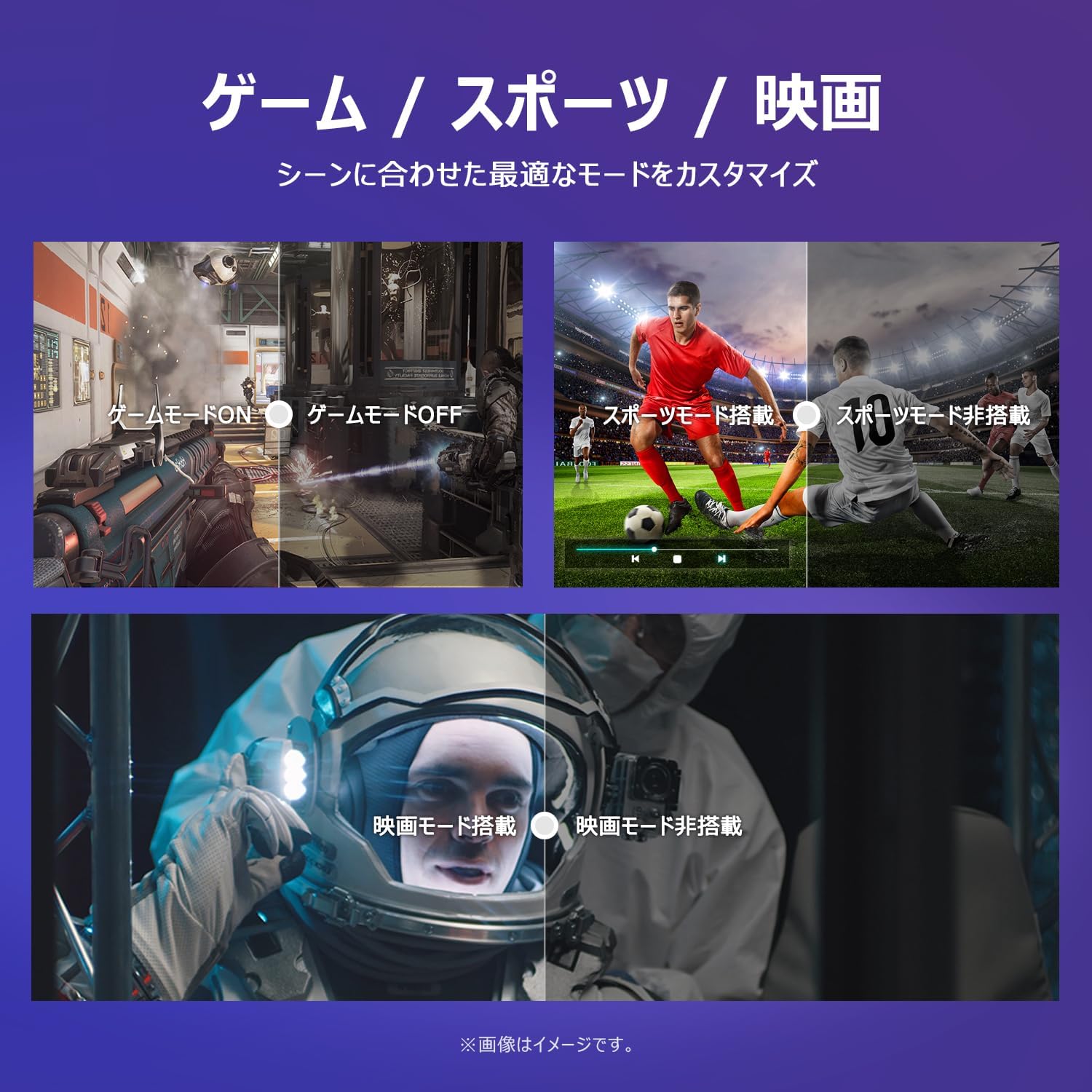
Image: The TV screen with a visual representation of sound, highlighting the immersive audio experience provided by Dolby Audio.
Access the sound settings menu to adjust modes like Standard, Music, Movie, or Custom to suit your preferences.
5.5 د لوبې حالت
Activate Game Mode for an optimized gaming experience with reduced input lag.
Image: Visual comparisons demonstrating the optimized settings for Game Mode, Sports Mode, and Movie Mode, adapting the TV's performance to different content types.
The TV also offers dedicated Sports Mode and Movie Mode to enhance viewing for specific content types.
5.6 د سیسټم ترتیبات
The quick settings menu allows you to customize frequently used system settings and rearrange their order for intuitive and convenient access.

انځور: الف view of the TV's quick system settings interface, illustrating how users can easily access and customize various functions like brightness, picture mode, and network settings.
6. ساتنه
سمه پاملرنه او ساتنه به ستاسو د تلویزیون ژوند وغځوي.
- د سکرین پاکول: سکرین په نرمۍ سره د نرم، لینټ نه پاک ټوکر سره پاک کړئ. د سختو نښو لپاره، د سکرین پاکوونکي څخه کار واخلئ چې په ځانګړي ډول د تلویزیونونو لپاره ډیزاین شوی وي، په ټوکر باندې تطبیق شي، نه په مستقیم ډول په سکرین باندې.
- د سي پاکولasing: د تلویزیون د پاکولو لپاره نرم، وچ ټوکر وکاروئasinج. د کثافاتو پاکوونکي یا محلولونه مه کاروئ.
- وینټیلیشن: ډاډ ترلاسه کړئ چې د تلویزیون په شا کې د هوا د تودوخی دروازې بندې نه وي ترڅو د ډیر تودوخې مخه ونیول شي.
- د بریښنا تار: د بریښنا تار په منظم ډول د کوم زیان لپاره وګورئ. که زیانمن شوی وي، د بدلولو لپاره د پیرودونکي ملاتړ سره اړیکه ونیسئ.
7. ستونزه حل کول
که تاسو په خپل تلویزیون کې ستونزې سره مخ شئ، لاندې عامې ستونزې او حل لارې وګورئ. که ستونزه دوام ومومي، د پیرودونکو ملاتړ سره اړیکه ونیسئ.
| ستونزه | احتمالي لامل | د حل لاره |
|---|---|---|
| هیڅ ځواک نشته | د برېښنا کیبل نه دی وصل شوی؛ د برېښنا ساکټ کار نه کوي | Ensure power cable is securely plugged in; Test outlet with another device |
| انځور نشته، خو غږ شته | د ننوتلو ناسمه سرچینه؛ د بهرني وسیلې ستونزه | Press the 'Input' button on the remote to select the correct source; Check external device connections |
| غږ نشته، خو انځور شته | غږ خاموش یا ډیر ټیټ دی؛ د بهرني آډیو سیسټم ستونزه | Unmute or increase volume; Check audio cable connections to external sound system |
| ریموټ کنټرول کار نه کوي | بیټرۍ ختمې شوې؛ د ریموټ او تلویزیون ترمنځ خنډ | Replace batteries; Remove any obstructions; Ensure remote is pointed at the TV's IR sensor |
| د وائی فای سره وصل نشو | غلط پټنوم؛ د روټر ستونزه؛ تلویزیون د روټر څخه ډیر لرې دی | Verify Wi-Fi password; Restart router; Move TV closer to router or use a Wi-Fi extender |
8. مشخصات
Detailed technical specifications for the iFFALCON 40S55T TV:

Image: Dimensional drawing of the iFFALCON 40S55T TV, indicating its physical measurements.
| فیچر | مشخصات |
|---|---|
| د سکرین اندازه | 40 انچه |
| د ښودلو ډول | VA Liquid Crystal |
| قرارداد | بشپړ HD (1920 x 1080) |
| د تازه کولو نرخ | 60 Hz |
| د اړخ نسبت | 16:9 |
| د تناسب تناسب | 1000:1 |
| عملیاتي سیسټم | ګوګل تلویزیون |
| د آډیو تولید | 20 Watts (2.1 channels) |
| د HDMI بندرونه | 2 |
| USB بندرونه | 1 |
| بې سیم ارتباط | وای فای، بلوتوث |
| د محصول اندازه کول (W x H x D) | ۲۵.۳ x ۶۱.۳ x ۵۳.۹ سانتي متره (د سټینډ سره) |
| د محصول وزن | 4.63 کیلو ګرامه |
| د وال ماونټ مطابقت لري | هو |
| لوازم شامل دي | Stand, Remote Control, Warranty Card, Power Cable |
9. تضمین او ملاتړ
Your iFFALCON 40S55T TV comes with a manufacturer's warranty. Please refer to the included warranty card for specific terms, conditions, and duration of coverage.
For technical support, troubleshooting assistance beyond this manual, or warranty claims, please contact iFFALCON customer service. Contact information can typically be found on the warranty card or the official iFFALCON webسایټ
Please have your model number (40S55T) and purchase date ready when contacting support.