1. پیژندنه
Thank you for choosing the Altera Homestep Walking Pad. This manual provides essential information for the safe and efficient use of your new walking pad. Please read all instructions carefully before operation and retain this manual for future reference.
2. د خوندیتوب لارښوونې
To reduce the risk of serious injury, read all important precautions and instructions in this manual and on your walking pad before use.
- Always place the walking pad on a level, stable surface.
- د کار کولو پرمهال ماشومان او څاروي د واک پیډ څخه لرې وساتئ.
- د ګرځېدو ځای شاوخوا کافي پاکه فضا ډاډمنه کړئ (لږترلږه په ټولو خواوو کې 0.6 متره).
- که وزن مو له ۱۴۵ کیلوګرامه (۳۱۹ پونډه) څخه زیات وي، نو د قدم وهلو پیډ مه کاروئ.
- مناسب ورزشي بوټان واغوندئ.
- Always attach the safety key clip to your clothing before starting the walking pad.
- که تاسو بې هوښه، چکر وهونکي یا درد احساس کوئ، سمدلاسه تمرین بند کړئ.
- کله چې په کارولو کې نه وي یا د پاکولو/ساتنې دمخه د واکینګ پیډ د بریښنا له ساکټ څخه خلاص کړئ.
- که چیرې د واکینګ پیډ خراب شوی تار یا پلګ ولري، یا په سمه توګه کار نه کوي، نو مه یې چلوئ.
3. د بسته محتويات
- Altera Homestep Walking Pad
- ریموټ کنټرول
- د بریښنا کیبل
- د کارونکي لارښود (دا لاسوند)
4. محصول ختم شوview
Familiarize yourself with the main components and features of your Altera Homestep Walking Pad.

Image 4.1: The Altera Homestep Walking Pad shown with its remote control.

انځور ۲: تفصیلي view of the LED display and remote control buttons. The display shows Time, Speed, Distance, and Calories. The remote has buttons for Speed Control (+/-), Mode (M), Start/Hold, and Stop.

Image 4.3: Diagram illustrating remote control functions: '+' to increase speed, 'M' to change mode, '-' to reduce speed, 'START/HOLD' to start/continue, and 'STOP' to pause.

انځور 4.4: View of the walking pad's underside, highlighting anti-slip leveling feet, transport wheels, and the manual power switch.

Image 4.5: Diagram showing the multi-layered running belt construction, including wear-resistant surface, noise reduction, impact absorption, and high-resistance support layers.
5. ترتیب کول
- خلاص کړئ: Carefully remove the walking pad and all components from the packaging.
- ځای په ځای کول: Place the walking pad on a flat, stable, and non-slip surface. Ensure there is sufficient space around the unit for safe operation.
- د بریښنا پیوستون: Connect the power cable to the walking pad and then to a grounded electrical outlet.
- د خوندیتوب کیلي: Locate the safety key. This key must be in place for the walking pad to operate. Attach the clip of the safety key to your clothing before starting.
- پاور آن: Flip the manual power switch (refer to Image 4.4) to the 'ON' position. The LED display should illuminate.
6. عملیاتي لارښوونې
6.1 د ریموټ کنټرول کارول
The walking pad is controlled via the included remote control. Ensure the remote has working batteries.
- Start/Hold: Press the "START/HOLD" button to begin or resume your workout. The walking pad will start at a low speed.
- درېدل: Press the "STOP" button to pause or end your workout.
- د سرعت سمون: Use the "+" button to increase speed and the "-" button to decrease speed. The speed range is 1 km/h to 6 km/h.
- د موډل انتخاب: Press the "M" button to cycle through different display modes (Time, Speed, Distance, Calories).
6.2 د LED ښودنه
The integrated LED display provides real-time feedback on your workout progress (refer to Image 4.2).
- وخت: ستاسو د ورزش موده ښیي.
- سرعت: Shows your current walking speed in km/h.
- DIST: Indicates the distance you have walked.
- کال: ستاسو د ناستې په جریان کې سوځیدلي کالوري اټکل کوي.
6.3 Adjustable Incline
The Altera Homestep Walking Pad features two manual incline positions to vary your workout intensity.
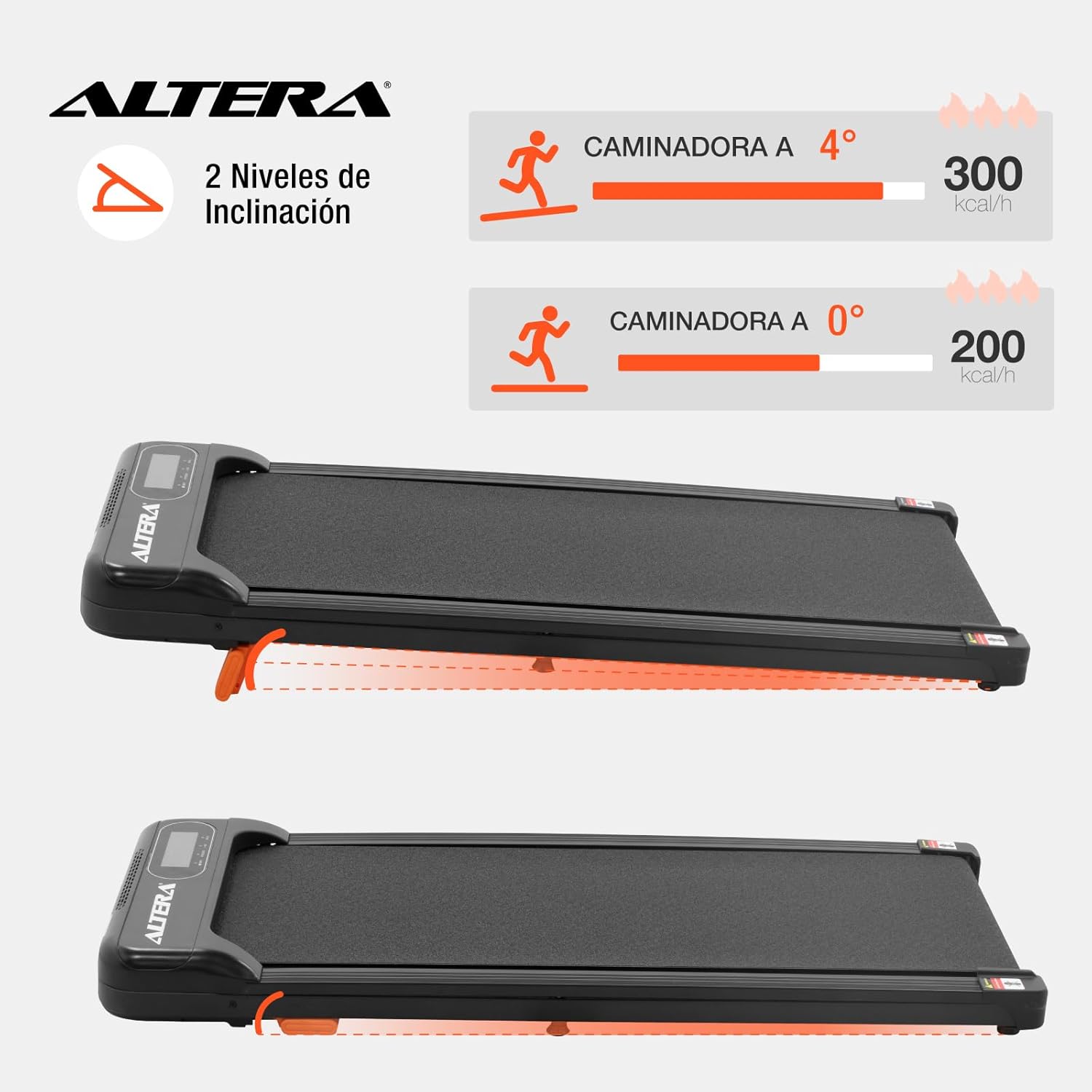
Image 6.1: Illustration of the two incline levels: 0 degrees (flat) and 4 degrees (inclined), showing estimated calorie burn difference.
To adjust the incline:
- Ensure the walking pad is turned off and unplugged.
- Carefully lift the front of the walking pad.
- Deploy or retract the small orange support feet located at the front underside of the unit to select your desired incline level.
- Ensure the support feet are securely locked in place before resuming use.
6.4 ټرانسپورټ او ذخیره کول
The walking pad is designed for easy storage and portability.
- To move the unit, ensure it is powered off and unplugged.
- Lift the front end slightly to engage the transport wheels (refer to Image 4.4).
- Roll the walking pad to your desired storage location. Its compact design allows it to fit in small spaces.
7. ساتنه
منظم ساتنه ستاسو د چلولو پیډ اوږد عمر او غوره فعالیت تضمینوي.
- پاکول: د اعلان سره د تګ ځای پاک کړئamp د هر استعمال وروسته ټوکر. د کثافاتو پاکوونکي یا محلول مه کاروئ.
- د کمربند غوړول: The walking belt may require lubrication periodically. Refer to the manufacturer's guidelines for specific lubrication instructions and recommended lubricants.
- د کمربند فشار: Check the walking belt tension regularly. If the belt slips or feels loose, it may need adjustment. Consult a qualified technician if you are unsure how to adjust it.
- ذخیره کول: Store the walking pad in a dry, cool place away from direct sunlight and moisture.
8. ستونزه حل کول
| ستونزه | احتمالي لامل | د حل لاره |
|---|---|---|
| د تګ پیډ نه پیل کیږي. |
|
|
| کمربند ښویېږي یا ځنډېږي. |
|
|
| ریموټ کنټرول ځواب نه ورکوي. |
|
|
9. مشخصات

Image 9.1: Technical specifications table and dimensional diagram of the Altera Homestep Walking Pad.
| فیچر | تفصیل |
|---|---|
| د ماډل شمیره | CAM-HOM-02 |
| د موټرو ځواک | 1.5 HP |
| د سرعت حد | ۱ - ۱۰ کیلومتره/ساعت |
| د کارونکي اعظمي وزن | ۷.۰ کیلو ګرامه (۱۵.۵ پونډه) |
| د انحراف کچه | 2 (manual, up to 4 degrees) |
| د چلولو کمربند ابعاد | 95 cm x 36 cm |
| د محصول ابعاد (L x W x H) | 110 x 46 x 10 سانتي متره |
| د محصول وزن | 17 کیلو ګرامه |
| مواد | فلزي، پلاستيک |
| ځانګړتیاوې | Bluetooth, Portable, LED Display, Anti-slip belt, Transport wheels |
| د بریښنا سرچینه | Electric Cord (110V) |
10. تضمین او ملاتړ
For warranty information or technical support, please refer to the contact details provided with your purchase or visit the official Altera webسایټ. د تضمین ادعاوو لپاره د پیرود ثبوت وساتئ.


