1. پیژندنه
This manual provides detailed instructions for the safe and effective operation of your TOOLTOP ET120M 120MHz Handheld Digital Oscilloscope. Please read this manual thoroughly before using the device to ensure proper functionality and to prevent damage.
2. د خوندیتوب معلومات
Always observe the following safety precautions when using the ET120M oscilloscope:
- وسیله په لوند یا d کې مه چلوئamp شرایط
- Ensure the device is powered off before connecting or disconnecting probes.
- یوازې چمتو شوي لوازم یا تصویب شوي بدیلونه وکاروئ.
- د وسیلې د خلاصولو یا بدلولو هڅه مه کوئ؛ ټولې خدمتونه وړ پرسونل ته راجع کړئ.
- وسیله د قوي بریښنایی مقناطیسي ساحو څخه لرې وساتئ.
3. د بسته محتويات
ډاډ ترلاسه کړئ چې لاندې ټول لیست شوي توکي ستاسو په کڅوړه کې شتون لري:
- TOOLTOP ET120M Handheld Digital Oscilloscope
- 100MHz Oscilloscope Probe
- د USB چارج کیبل
- د کارن لارښود
- د جامو کڅوړه

شکل 3.1: د بسته محتويات
4. محصول ختم شوview
4.1. د وسایلو ځانګړتیاوې
The TOOLTOP ET120M is a compact and portable handheld digital oscilloscope designed for various electrical testing and repair applications. Key features include:
- 120MHz analog bandwidth and 500MS/s real-time sampد نرخ کچه
- 2.4-inch 320x240 clear color LCD screen.
- Integrated square wave signal output (1kHz, 10KHz, 100KHz, 1MHz).
- 12 types of automatic parameter measurements (Vpp, Vrms, Vavg, Vp, Vmax, Vmin, F, T, T+, T-, Du+, Du-).
- Three scan modes: Auto, Normal, and Single.
- Ability to store 2500 DSO waveforms with thumbnail browsing.
- Built-in rechargeable lithium battery for up to 6 hours of continuous use.
- Durable design with a silicone protective cover.

شکل ۲: مهمې ځانګړتیاوېview
4.2. د اجزاو پیژندنه
Familiarize yourself with the main components and controls of the ET120M oscilloscope:

شکل 4.2: مخکی View of ET120M Oscilloscope
- د ښودلو سکرین: 2.4-inch LCD for waveform display and menu navigation.
- Input BNC Connector: For connecting the oscilloscope probe.
- د کنټرول تڼۍ: Including MENU, F1, F2, SAVE, AC/DC, 1X/10X, 50%, TRIG, EDGE, STOP, AUTO, and directional/OK buttons for navigation and settings adjustment.
- USB پورټ: د وسیله چارج کولو لپاره.
5. ترتیب کول
۱. ابتدايي چارج کول
Before first use, fully charge the built-in lithium battery using the provided USB charging cable and a standard USB power adapter (not included). The charging indicator will show the charging status.
5.2. د پلټنې اتصال
Connect the oscilloscope probe to the BNC input connector on the top of the device. Ensure the connection is secure. Set the probe attenuation switch (if applicable) to the desired setting (e.g., 1X or 10X) and match this setting on the oscilloscope via the 1X/10X button.
6. عملیاتي لارښوونې
6.1. بریښنا فعال/بند
Press and hold the power button (usually located on the side or top) to turn the device on or off.
6.2. Basic Waveform Acquisition
After powering on, connect the probe to the circuit under test. The oscilloscope will display the waveform. Use the directional buttons to navigate menus and adjust settings.
6.3. Waveform Acquisition Modes
The ET120M supports three scan modes:
- اتومات: Automatically adjusts time base and vertical amplitude for a stable waveform display. Press the آټو button for one-key waveform adaptation.
- نورمال: Displays a waveform only when a trigger condition is met.
- واحد: Captures and displays a single waveform when a trigger condition is met, then stops.

Figure 6.1: Auto Waveform Adaptation
6.4. Parameter Measurement
The device can automatically measure 12 different waveform parameters. Access these measurements through the menu system. Parameters include Peak-to-Peak Voltage (Vpp), Root Mean Square Voltage (Vrms), Average Voltage (Vavg), Peak Voltage (Vp), Maximum Voltage (Vmax), Minimum Voltage (Vmin), Frequency (F), Period (T), Positive Pulse Width (T+), Negative Pulse Width (T-), Positive Duty Cycle (Du+), and Negative Duty Cycle (Du-).
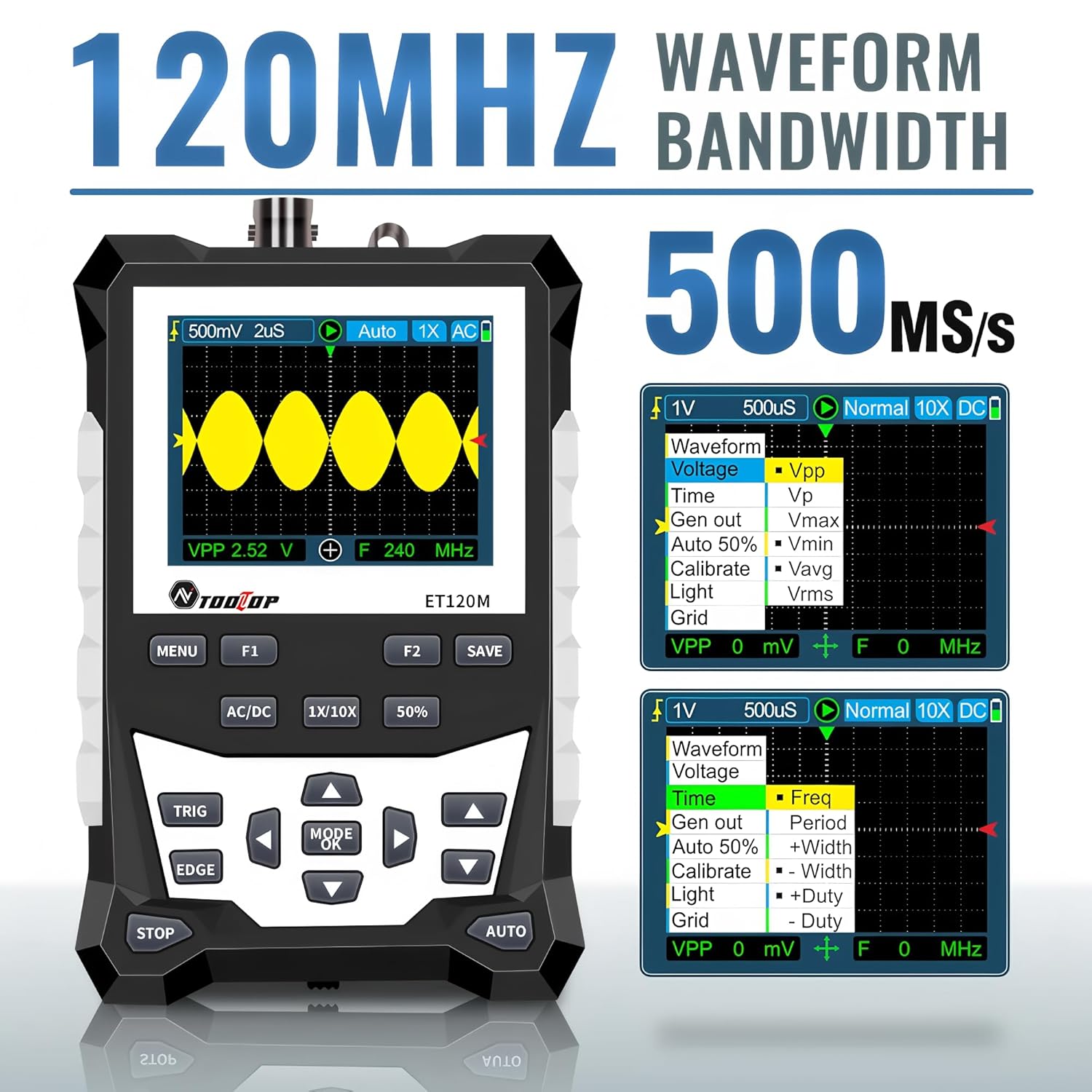
Figure 6.2: Automatic Measurement Functions
6.5. Square Wave Signal Output
The ET120M can generate square wave signals at specific frequencies. Navigate to the signal output function in the menu to select between 1kHz, 10KHz, 100KHz, and 1MHz output frequencies. This feature is useful for testing circuits.

Figure 6.3: Square Wave Signal Output Function
6.6. Waveform Storage and Recall
The device can store up to 2500 DSO waveforms. Use the خوندي کړئ button to store the current waveform. Stored waveforms can be browsed via thumbnails for easy recall and analysis.

Figure 6.4: Waveform Storage and Browsing
6.7. Adjusting Waveform Parameters
You can manually adjust various waveform display parameters to fine-tune your measurements:
- د وخت اساس: Adjusts the horizontal scale (time per division).
- Amplitude (Vertical Sensitivity): Adjusts the vertical scale (volts per division).
- Trigger Slope: Sets the trigger to rising or falling edge.
- د محرک کچه: حجم ټاکيtage level at which the waveform is triggered.

Figure 6.5: Adjusting Waveform Display Parameters
7. ساتنه
7.1. پاکول
To clean the device, use a soft, dry cloth. For stubborn dirt, a slightly damp د نرم صابون سره ټوکر کارول کیدی شي، ډاډ ترلاسه شي چې مایع وسیله ته ننوځي. د کثافاتو پاکونکي یا محلول مه کاروئ.
7.2. ذخیره کول
When not in use for extended periods, store the oscilloscope in a cool, dry place, away from direct sunlight and extreme temperatures. It is recommended to store it in the provided cloth bag to protect it from dust and scratches.
7.3. د بیټرۍ پاملرنه
To prolong battery life, avoid fully discharging the battery frequently. If storing for a long time, charge the battery to approximately 50% every few months.
8. ستونزه حل کول
If you encounter issues with your ET120M oscilloscope, refer to the following common problems and solutions:
- وسیله نه فعالیږي: ډاډ ترلاسه کړئ چې بیټرۍ چارج شوې ده. د USB چارج کولو کیبل وصل کړئ او بیا هڅه وکړئ.
- هیڅ څپې بڼه نه ده ښودل شوې: Check probe connection. Ensure the probe is properly connected to the circuit under test. Adjust vertical sensitivity and time base settings. Try the AUTO function.
- Unstable waveform: Adjust the trigger level and trigger slope. Ensure the trigger mode is appropriate for the signal.
- ناسم اندازه ګیري: Verify probe attenuation setting (1X/10X) matches the device setting. Perform a probe compensation if necessary (refer to advanced operation in a full manual).
For persistent issues, contact TOOLTOP customer support.
9. مشخصات
9.1. عمومي مشخصات
| ښودل | 320x240 LCD screen |
| د ښودلو ساحه | 50mm x 40mm |
| شاته څراغ | White, brightness adjustable |
| خنډ | x1: 1MΩ / x10: 10MΩ |
| بیټرۍ | 18650 lithium battery (built-in) |
| اتومات بند | د 15 دقیقو لپاره عملیات نشته |
| د څپو بڼه ذخیره | 2500 DSO waveforms |
| اندازه | 124mm x 80mm x 35mm |
| عملیاتي شرایط | 0°C ~ +40°C; <75%RH |
| د ذخیره کولو شرایط | -10°C ~ +60°C; <90%RH |
9.2. Oscilloscope Specifications
| انلاګ بینډ ویت | 120MHz |
| Maximum Real-time Sampد نرخ کچه | 500MSps |
| عمودي حل | 8 بټونه |
| عمودی درستیت | ± (5٪ + 0.2div) |
| Auto Zero Reference | د DC اندازه کولو په جریان کې |
| د محرک کچه | ±3.8div (0.1div per step) |
| د ټریګر موقعیت | ±6div (0.1div per step) |
| Cursor Function | ΔV, Δt, 1/Δt |
| غیر خطيتوب | ±1 bits |
| د نښلولو طریقه | DC/AC |
| Division Vertical | ±3.8 Horizontal: 12 |
| د وخت اساس رینج | 6ns / Div ~ 50s / div |
| د وخت اساس دقت | ±(0.01%+0.1div) |
| د سکن موډ | اتومات/واحد/نورمال |
| محرک سلپ | Rising / Falling |
| د ریکارډ اوږدوالی | 12 div |
| د اتوماتیک ترتیب | Automatically set time base and vertical ampدرود |
| Automatic Measurement Functions | Vpp, Vrms, Vavg, Vp, Vmax, Vmin, F, T, T+, T-, Du+, Du- |
| د عمودی حساسیت حد | x1: 50mV/div ~ 10V/div; x10: 500mV/div ~ 100V/div |
10. تضمین او ملاتړ
For warranty information or technical support, please refer to the documentation provided with your purchase or contact TOOLTOP customer service directly. Keep your purchase receipt as proof of purchase.


