پیژندنه
Thank you for choosing the Trevi XF 3150 KB Portable Karaoke Speaker. This powerful 130W speaker is designed to deliver high-quality audio with a Bass Reflex system, two 8-inch speakers, and a 1-inch tweeter. It features wireless audio connectivity, USB/SD card playback, AUX input, and dedicated inputs for microphones and guitars. Enjoy the integrated multicolor LED disco lights and the True Wireless Stereo (TWS) function for an enhanced audio experience. The speaker operates on an integrated rechargeable battery or via the included power adapter, offering versatility for any occasion. This manual provides essential information for safe and efficient use of your device.

مخکی view of the Trevi XF 3150 KB portable karaoke speaker, showcasing its design and active multicolor LED lights.
تنظیم او لومړی کارول
۱. د بکس خلاصول او اجزا
Carefully remove all components from the packaging. Ensure the following items are included:
- Trevi XF 3150 KB Portable Karaoke Speaker
- مایکروفون
- ریموټ کنټرول
- د بریښنا کیبل
- د تضمین کارت
2. په بریښنا ورکول او چارج کول
The speaker can be powered by its internal rechargeable 7.4V battery or by connecting it to a power outlet using the included power adapter. For first use, it is recommended to fully charge the battery.
- چارج کول: Connect the power cable to the DC IN port on the rear panel of the speaker and then to a power outlet. The charging indicator will illuminate.
- پاور آن/بند: فشار ورکړئ او ونیسئ پاور د کنټرول پینل یا ریموټ کنټرول تڼۍ د سپیکر د فعالولو یا بندولو لپاره.
3. د کنټرول پینلview
Familiarize yourself with the main controls located on the top panel of the speaker.

تفصيلي view of the speaker's control panel, showing various input and sound adjustment knobs, along with function buttons.
4. د ریموټ کنټرول افعالونه
شامل ریموټ کنټرول له لرې واټن څخه اسانه عملیات ته اجازه ورکوي.

The remote control for the Trevi XF 3150 KB speaker, featuring buttons for mute, mode, record, playback, volume, channel selection, scan, EQ, and power.
۴.۳. بېسیم (بلوتوث) اتصال
Connect your smartphone, tablet, or laptop wirelessly to the speaker.
- سپیکر چالان کړئ.
- فشار ورکړئ موډ تڼۍ تر هغه وخته پورې چې "نیلي" په نندارتون کې ښکاره شي، د بلوتوټ حالت په ګوته کوي.
- Enable Bluetooth on your device and search for "Trevi XF 3150 KB".
- Select the speaker to pair. A confirmation sound will indicate a successful connection.

Illustration of connecting a smartphone to the speaker via Bluetooth for wireless music streaming.
۳. د TWS (ریښتیني بې سیم سټیریو) فعالیت
د ښه سټیریو تجربې لپاره، تاسو کولی شئ دوه Trevi XF 3150 KB سپیکرې په بېسیم ډول وصل کړئ.
- ډاډ ترلاسه کړئ چې دواړه سپیکرې فعالې دي او په بلوتوث حالت کې دي.
- On one speaker (the primary), press and hold the TWS/REP تڼۍ
- The primary speaker will search for and connect to the secondary speaker. A confirmation sound will indicate successful pairing.
- Once connected, pair your device to the primary speaker via Bluetooth as described above.

Diagram illustrating the True Wireless Stereo (TWS) function, allowing two speakers to connect for a wider soundstage.
۵. د USB/SD کارت پلے بیک
غږ غږول files directly from a USB flash drive or micro-SD card.
- یو USB فلش ډرایو دننه کړئ USB port or a micro-SD card into the SD slot on the rear panel.
- فشار ورکړئ موډ د USB یا SD حالت غوره کولو لپاره تڼۍ.
- Playback will start automatically. Use the playback controls (Play/Pause, Next/Previous Track) on the control panel or remote.
8. د AUX داخل
د ۳.۵ ملي میتر آډیو کیبل په کارولو سره بهرني آډیو وسایل وصل کړئ.
- د ۳.۵ ملي میتر آډیو کیبل یوه پای له سره وصل کړئ اکس ان port on the speaker and the other end to the audio output of your external device.
- فشار ورکړئ موډ د AUX حالت غوره کولو لپاره تڼۍ.
- د خپل بهرني وسیلې څخه پلے بیک او حجم کنټرول کړئ.
۳.۳. مایکروفون او ګیتار ان پټونه
Connect the included microphone or a guitar for karaoke or live performances.
- مایکروفون سره وصل کړئ په مایک کې port (6.3mm jack) or a guitar to the ګیتار ان port (6.3mm jack) on the rear panel.
- په کارولو سره د مایکروفون حجم تنظیم کړئ مایک VOL knob and guitar volume using the د ګیتار غږ د کنټرول پینل کې غوټۍ.
- د کارولو MIC BASS, مایک ټریبل, ECHO، او ځنډول knobs to fine-tune the microphone sound.
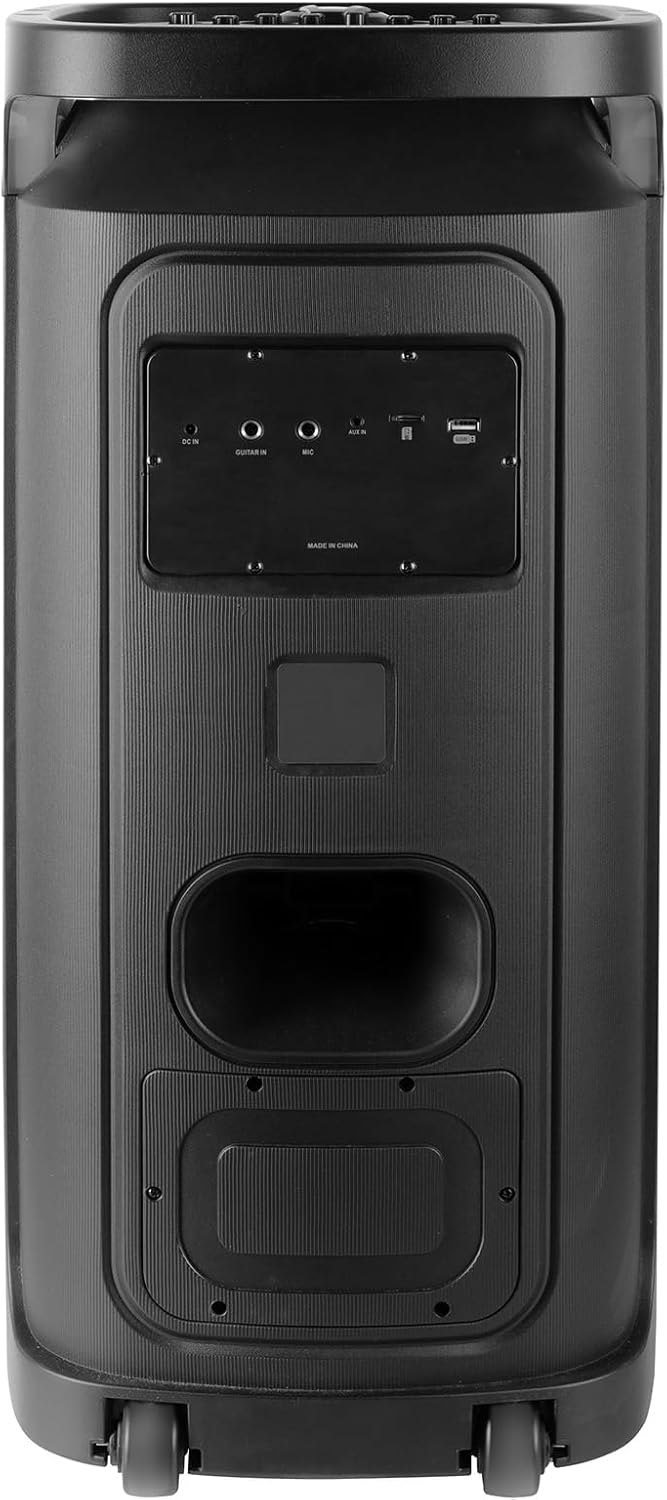
Rear panel of the Trevi XF 3150 KB speaker, displaying the various input ports including DC IN, AUX IN, MIC IN, GUITAR IN, USB, and SD card slot.
عملیاتي لارښوونې
۱. بنسټیز آډیو پلے بیک
Once an audio source is connected (Bluetooth, USB, SD, AUX), use the following controls:
- حجم: Adjust the main volume using the large central knob or the VOL + / VOL- په ریموټ کې تڼۍ.
- پلی کول / ودرول: فشار ورکړئ پلی/پاز تڼۍ
- راتلونکی / مخکینی لار: د کارولو بل او پخوانۍ تڼۍ
- برابرول: فشار ورکړئ EQ button on the remote to cycle through preset equalization modes (e.g., Pop, Rock, Jazz, Classic, Flat).
- باس / ټریبل: د کارولو باس او سخت knobs on the control panel for manual sound adjustment.
- اضافي باس: فشار ورکړئ اضافي باس button for enhanced bass output.
۵. د کاراوکی فعالیت
Utilize the included microphone and dedicated controls for karaoke sessions.
- Connect the microphone as described in the Setup section.
- سمون مایک VOL ستاسو د خوښې کچې ته.
- کارول ECHO او ځنډول knobs to add vocal effects.
- د PRI (Microphone Priority) button can be pressed to lower the music volume automatically when speaking into the microphone.
3. Disco Light Effects
Enhance your listening experience with dynamic multicolor LED lights.
- فشار ورکړئ LED button on the control panel to turn the disco lights on or off.
- The lights will cycle through various colors and patterns automatically.

The Trevi XF 3150 KB speaker displaying its dynamic multicolor LED disco light effects, creating a party atmosphere.
ساتنه
1. پاکول
د خپل سپیکر ظاهري بڼه او فعالیت ساتلو لپاره:
- تل د پاکولو دمخه د بریښنا کیبل قطع کړئ.
- د بهرنۍ سطحې د پاکولو لپاره نرم، وچ ټوکر وکاروئ.
- د کثافاتو پاکوونکي، موم یا محلول مه کاروئ ځکه چې دوی ممکن پای ته زیان ورسوي.
- په هر ډول خلاصیدو کې د رطوبت له ننوتلو څخه ډډه وکړئ.
2. د بیټرۍ پاملرنه
To prolong the life of the integrated rechargeable battery:
- د لومړي کارولو دمخه بیټرۍ په بشپړ ډول چارج کړئ.
- د بیټرۍ په مکرر ډول له بشپړې وچولو څخه ډډه وکړئ.
- If storing the speaker for an extended period, charge the battery to approximately 50% and recharge every few months.
- Do not expose the speaker to extreme temperatures, as this can affect battery performance.
د ستونزو حل کول
If you encounter issues with your Trevi XF 3150 KB speaker, refer to the following common problems and solutions:
| ستونزه | احتمالي لامل | د حل لاره |
|---|---|---|
| سپیکر نه چالانېږي. | بیټرۍ ختمه شوې ده یا د بریښنا کیبل نه دی وصل شوی. | Connect the power cable and charge the battery. Ensure the power button is pressed correctly. |
| د غږ تولید نشته. | Volume is too low, incorrect input mode, or audio source issue. | حجم زیات کړئ. فشار ورکړئ موډ button to select the correct input. Check the audio source device. |
| د بلوتوث وسیله نشي جوړه کیدی. | Speaker is not in Bluetooth mode, device is too far, or already paired to another device. | Ensure speaker is in Bluetooth mode. Move device closer. Disconnect from other devices and try again. |
| مایکروفون کار نه کوي. | Microphone not connected properly, MIC VOL is low, or microphone is faulty. | Ensure microphone is securely plugged into the په مایک کې port. Increase مایک VOL. Test with another microphone if available. |
| د TWS اړیکه ناکامه شوه. | Speakers are too far apart, or one speaker is not in Bluetooth mode. | Ensure both speakers are in Bluetooth mode and within close proximity. Repeat the TWS pairing steps. |
مشخصات
| د ماډل نوم | XF 3150 KB |
| برانډ | ټریوی |
| د تولید بریښنا | 130W (زیات) |
| د سپیکر اندازه | 2 x 8-inch woofers, 1 x 1-inch tweeter |
| د ارتباط ټیکنالوژي | بلوتوث، USB، SD، AUX |
| د بې سیمه مخابراتو ټیکنالوژي | بلوتوث |
| د بریښنا سرچینه | Battery, Corded Electric (7.4V rechargeable battery) |
| ځانګړي ځانګړتیاوې | Built-in Microphone, Wireless Connectivity, Disco Lights, TWS Function |
| د محصول ابعاد | ۶.۳D x ۹.۵W x ۱۱.۵H سانتي متره |
| د توکي وزن | 1 کیلوګرامه |
| د کنټرول طریقه | لرې |
| د آډیو وتلې حالت | سټیریو |
| د نصب کولو ډول | د پوړ ودریدل |
| وړاندیز شوي استعمالونه | For smartphones or tablets, For computers, For home parties, For karaoke |
| مطابقت لرونکې وسیلې | Smartphone, Tablet, Laptop, MP3 Player, Computer, Karaoke System |
د تضمین معلومات
دا محصول د الف سره راځي محدود تضمین. Please refer to the included warranty card for detailed terms and conditions, including coverage period and claim procedures. Keep your proof of purchase for warranty service.
ملاتړ
For further assistance, product information, or to explore other Trevi products, please visit the official Trevi brand store:


