1. محصول ختم شوview
تورview BL7000 is a rugged smartphone designed for durability and performance. It features advanced AI capabilities, 5G connectivity, a high-resolution display, and a robust camera system, all powered by Android 15.

انځور: مخ او شا view د تور پوستوview BL7000 AI 5G Rugged Phone, showcasinد هغې ډیزاین او د کیمرې ماډل.
۲. په بکس کې څه دي؟
ډاډ ترلاسه کړئ چې ټول توکي د محصول په بسته بندۍ کې شتون لري:
- تورview BL7000 سمارټ فون
- چارجر
- د USB چارج کیبل
- SIM slot opener
- د کارن لارښود
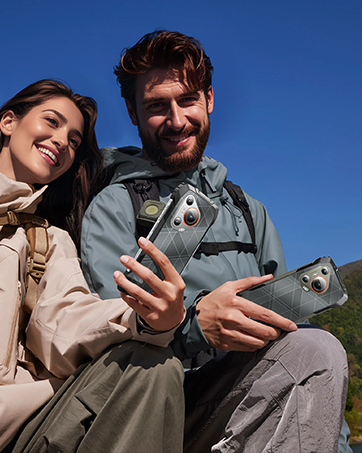
انځور: د تور رنګ انځورview BL7000 smartphone and its included accessories: charger, USB cable, SIM tool, and user manuals.
3. ترتیب کول
3.1 د سیم کارت نصب کول
- د وسیلې په اړخ کې د سیم کارت ټری ومومئ.
- Insert the SIM slot opener into the small hole next to the tray and press gently until the tray ejects.
- Place your Nano-SIM cards and/or TF (microSD) card into the designated slots on the tray. Ensure correct orientation.
- ټری په احتیاط سره تلیفون ته بیا دننه کړئ تر هغه چې دا د وسیلې بدن سره فلش شي.
د شبکې مطابقت په اړه یادونه: تورview BL7000 supports dual SIM cards and is compatible with T-Mobile. It is مطابقت نلري with CDMA carriers such as AT&T, Cricket Wireless, Verizon, Straight Talk, or U.S. Cellular.

Image: Diagram showing the dual SIM card slot and TF card expansion on the Blackview BL7000, along with other features like GPS, fingerprint, Face ID, NFC, and the customizable shortcut button.
۴.۲ لومړنی بریښنا فعالول او تنظیم کول
- د بریښنا تڼۍ فشار ورکړئ او ونیسئ تر هغه چې تور ويview لوګو ښکاري.
- د لومړني تنظیم بشپړولو لپاره د سکرین پرامپټس تعقیب کړئ، پشمول د ژبې انتخاب، د وای فای اتصال، د ګوګل حساب ننوتل، او امنیتي ترتیبات.
3.3 Security Features Setup
- د ګوتې نښه خلاصه کول: Navigate to Settings > Security & privacy > Fingerprint unlock to register your fingerprints.
- د مخ پېژندپاڼې خلاصول: Navigate to Settings > Security & privacy > Face unlock to set up facial recognition.
4. عملیاتي لارښوونې
4.1 بنسټیز نیویګیشن
تورview BL7000 operates on Android 15 with Doke OS 4.1. Use standard Android gestures for navigation:
- له لاندې څخه پورته پورته کړئ: کور سکرین ته لاړ شئ.
- Swipe up and hold: وروستي ایپسونه خلاص کړئ.
- له چپ یا ښي څنډې څخه سوائپ کړئ: بیرته تګ.
- ټایپ: یو توکي وټاکئ.
- اوږد فشار: د شرایطو مینو ته لاسرسی ومومئ یا عکسونه حرکت وکړئ.
4.2 AI Features (Doke AI & Gemini 2.0)
The BL7000 integrates advanced AI capabilities to enhance user experience:
- Smart Q&A: Ask questions and receive intelligent responses.
- غږیزه خبرې: Engage in natural language conversations with the AI assistant.
- Predictive Text: Improved text input with smart suggestions.
- Doke AI Apps: Explore dedicated applications for image editing, video creation, and music generation.

انځور: اوورview of Doke AI features including Smart Q&A, voice interaction, and AI-powered apps for image, video, and music creation.
4.3 د کیمرې عملیات
The BL7000 features a versatile camera system:
- ۱۰۸ میګاپکسله مصنوعي ذهانت اصلي کامره: د لوړ ریزولوشن عکسونو لپاره چې د AI پرمختګونه لري.
- 32MP Self-facing Camera: For clear selfies.
- ۲۴ میګاپکسله د شپې لید کیمره: Utilizes advanced ISOCELL 2.0 Technology for low-light photography. Access this mode in the camera app for enhanced visibility in dark environments.
- د مصنوعي ذهانت وړتیاوې: The camera app includes features like magic eraser, photo unblur, sky replacement, and color focus.

Image: Diagram illustrating the Blackview BL7000's camera setup, highlighting the 50MP main, 32MP self-facing, and 20MP night vision cameras.
4.4 ځانګړتیاوې ښکاره کول
The 6.78-inch 2.4K display offers a smooth visual experience:
- 120Hz ریفریش نرخ: Provides fluid scrolling and animations. The intelligent adaptive refresh rate adjusts dynamically for optimal performance and power efficiency.
- ۱۳۶۶x۷۶۸ ریزولوشن: Ensures sharp and clear visuals.
- ۳۳۰ نټونه روښانتیا: Offers good visibility even in bright outdoor conditions.

انځور: تورview BL7000 display showcasing its 120Hz refresh rate and 2.4K resolution for smooth and detailed visuals.
4.5 نښلول
- 5G ارتباط: Supports high-speed 5G networks.
- بلوتوث 5.2: For stable and fast wireless connections with accessories.
- NFC: For convenient contactless payments and data sharing.
- وای فای: Supports standard Wi-Fi protocols for internet access.
- USB: د چارج کولو او ډیټا لیږد لپاره.
4.6 Useful ToolBag and Shortcut Button
The BL7000 includes a pre-installed ToolBag app and a customizable shortcut button:
- ToolBag Apps: Compass, Height Measure, Flashlight, Sound Meter, Protractor, Mirror, Warning, Magnifier, Pic Hanging, Plumb Bob, Barometer, Step Count.
- دودیز شوی شارټ کټ تڼۍ: This physical button can be configured for quick access to functions such as starting sound recording, opening the flashlight, taking a screenshot, Push-to-Talk (PTT), SOS emergency call, or opening game mode.
5. ساتنه
5.1 د بیټرۍ مدیریت
- The BL7000 is equipped with a 7500mAh battery.
- Use the provided 33W fast charger for quick recharging. A 30-minute charge can provide approximately 40% battery.
- د OTG ریورس چارج کول: The phone can act as a power bank to charge other devices. Connect a compatible OTG cable to your BL7000 and then to the device you wish to charge.

Image: Diagram showing the internal battery structure and the 33W fast charging capability of the Blackview بي ايل ۱۰.
۵.۱ کلکوالی او دوام
The BL7000 is built to withstand harsh environments:
- Waterproof (IP68 & IP69K): د ۳۰ دقیقو لپاره تر ۱.۵ مترو پورې ډوبیدو وړ.
- Dust-proof (IP68 & IP69K): د دوړو د ننوتلو په وړاندې خوندي شوی.
- د غورځېدو ضد (MIL-STD-810H): Certified to military standards for durability against drops.
- د کارنینګ ګوریلا ګلاس ۵: Protects the screen from scratches and impacts.
- د حرارت درجه: Designed to function in temperatures ranging from -20°C to +60°C.

Image: Visuals demonstrating the Blackview BL7000's MIL-STD-810H drop-proof certification and IP68/IP69K water and dust resistance, along with its operational temperature range.
Clean پاکول او پالنه
To maintain your device, wipe it with a soft, damp cloth. Avoid harsh chemicals or abrasive materials. Ensure all ports are dry before charging.
6. ستونزه حل کول
- د شبکې اړیکه نشته:
- ډاډ ترلاسه کړئ چې ستاسو سیم کارت په سمه توګه داخل شوی دی.
- Verify that your carrier is compatible with the Blackview BL7000 (T-Mobile compatible; not compatible with AT&T, Cricket Wireless, Verizon, Straight Talk, or U.S. Cellular).
- د شبکې ترتیبات وګورئ (ترتیبات > شبکه او انټرنیټ > موبایل شبکه).
- تلیفون بیا پیل کړئ.
- وسیله بې ځوابه:
- د بیا پیلولو لپاره د 10-15 ثانیو لپاره د بریښنا تڼۍ فشار ورکړئ او ونیسئ.
- If the issue persists, ensure the battery is charged.
- د اپلیکیشنونو خرابېدل/ورو فعالیت:
- د شاليد غوښتنلیکونه بند کړئ.
- د اپلیکیشن کیش پاک کړئ (ترتیبات > اپلیکیشنونه > [د اپلیکیشن نوم] > ذخیره او کیش > کیش پاک کړئ).
- ډاډ ترلاسه کړئ چې د ذخیره کولو کافي ځای شتون لري.
- Consider a factory reset as a last resort (Settings > System > Reset options > Erase all data (factory reset)). خبرداری: دا به ستاسو په تلیفون کې ټول معلومات حذف کړي. لومړی مهم معلومات بیک اپ کړئ.
7. مشخصات
| فیچر | مشخصات |
|---|---|
| د ماډل نوم | BL7000 |
| عملیاتي سیسټم | انډرایډ ۱۳.۰ (ډوک او ایس ۳.۱) |
| پروسیسر | د MTK Dimensity 6300 (5G) |
| RAM | Up to 24GB (8GB physical + 16GB virtual) |
| داخلي ذخیره | 256GB |
| د پراخیدو وړ ذخیره | د TF کارت له لارې تر ۱TB پورې |
| د ښودلو اندازه | 6.78 انچه |
| د ښودلو ریزولوشن | ۳۸۴۰x۲۱۶۰ (۴K) |
| د تازه کولو نرخ | 120Hz |
| اصلي کیمره | 50MP AI کیمره |
| سیلفي کیمره | 32MP کیمره |
| د شپې لید کیمره | 20MP کیمره |
| د بیټرۍ ظرفیت | 7500mAh |
| چارج کول | ۱۸ واټ چټک چارج، د OTG ریورس چارج کول |
| د دوام درجه بندي | IP68، IP69K، MIL-STD-810H |
| د سکرین ساتنه | کارنینګ ګوریلا ګلاس ۳ |
| ارتباط | 5G, Bluetooth 5.2, NFC, Wi-Fi, USB |
| ابعاد | 6.92 x 3.2 x 0.71 انچه |
| وزن | 12.7 اونس (360 ګرامه) |
8. تضمین او ملاتړ
- تضمین: تورview BL7000 comes with a 2-year warranty.
- د پیرودونکو خدمت: Dedicated customer service is available for support.
- چټک غبرګون: Expect 7/24 1v1 quick response for inquiries.
- د ژوند اوږد ملاتړ: تورview provides lifelong support for its products.
- On-site Repair: On-site repair services may be available.
Image: A team of Blackview customer service representatives, symbolizing available support.


