پیژندنه
This manual provides comprehensive instructions for the setup, operation, maintenance, and troubleshooting of your KOORUI GN10 27-inch QHD 240Hz Mini-LED Gaming Monitor. Please read this manual thoroughly before using the product to ensure proper functionality and to prevent damage.
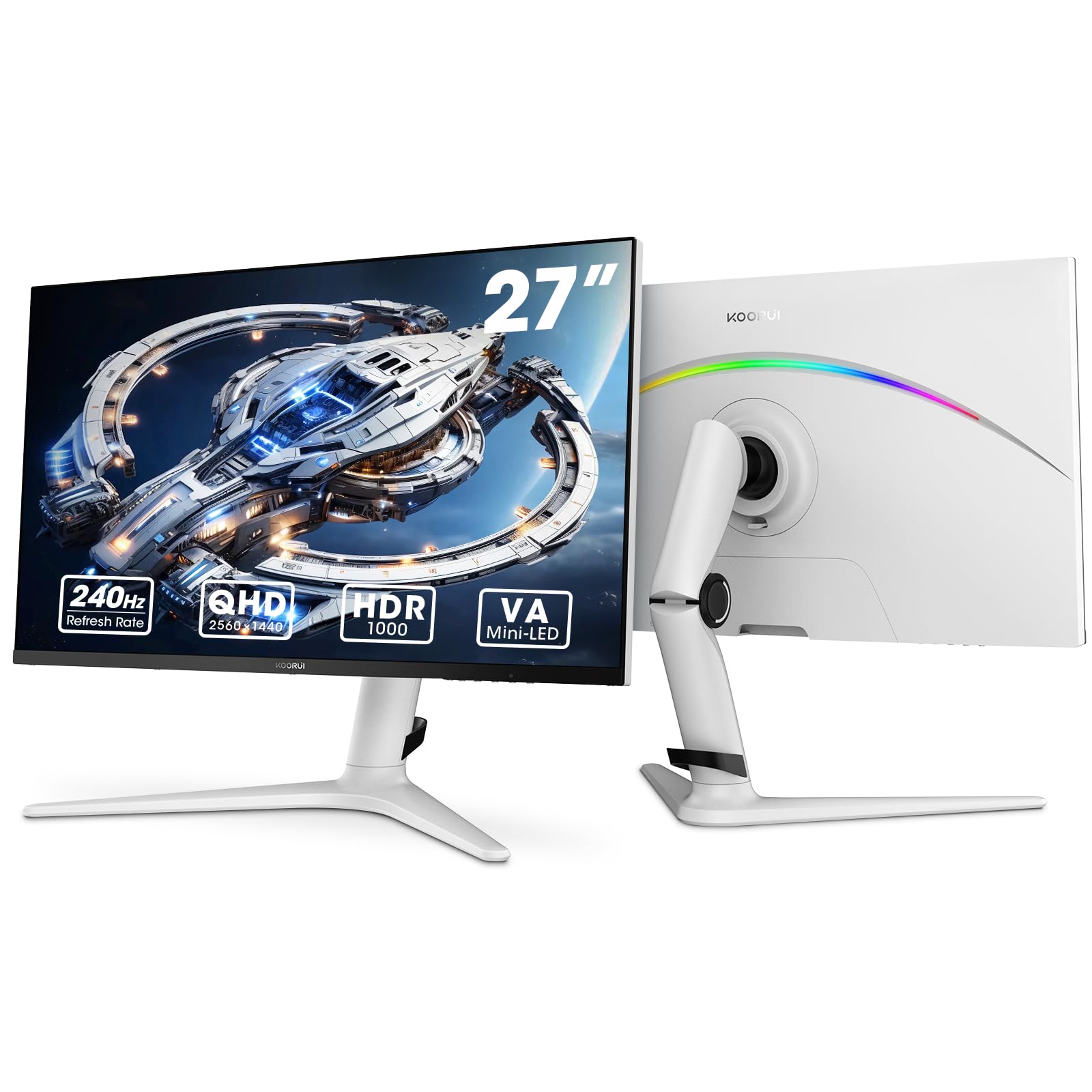
Figure 1: KOORUI GN10 27-inch QHD 240Hz Mini-LED Gaming Monitor.
1. ترتیب کول
۲.۱ د بکس خلاصول او د بسته بندۍ محتويات
په احتیاط سره د بسته بندۍ څخه ټولې برخې لرې کړئ. ډاډ ترلاسه کړئ چې لاندې لیست شوي ټول توکي شتون لري:
- KOORUI GN10 Monitor
- د څارنې موقف (اساس او بازو)
- د بریښنا کیبل
- HDMI کیبل (x2)
- د ډیسپلی پورټ (DP) کیبل
- د کارونکي لارښود (دا لاسوند)
۲.۲ د ولاړې اسمبلۍ
د مانیټر سټینډ د راټولولو لپاره دا ګامونه تعقیب کړئ:
- Attach the stand arm to the monitor panel. Ensure it clicks securely into place or is fastened with screws if provided.
- Connect the stand base to the stand arm. Tighten any screws to secure the base.
- راټول شوی مانیټر په یوه مستحکم او فلیټ سطحه کېږدئ.

Figure 2: Monitor stand showing height, tilt, swivel, and pivot adjustments.
The ergonomic stand allows for height, tilt, swivel, and pivot adjustments to optimize your viewزاویه.

Figure 3: Monitor dimensions for placement planning.
1.3 د وسایلو سره نښلول
The monitor supports multiple input sources. Connect your computer or gaming console using the provided cables.
- DisplayPort (DP): For optimal performance, especially at 240Hz refresh rate and QHD resolution, use the DisplayPort cable.
- HDMI: Two HDMI 2.0 ports are available for connecting other devices such as gaming consoles (PS5, Xbox, Switch) or additional computers.
- آډیو بهر: بهرني سپیکرې یا هیډفونونه د 3.5 ملي میتر آډیو آوټ پټ جیک سره وصل کړئ.

شکل 4: شاته view of the monitor showing available ports (Audio Out, DP 1.4, HDMI 2.0 x2) and VESA mount points.
1.4 ابتدايي پاور آن
- د بریښنا کیبل د مانیټر سره وصل کړئ او بیا د بریښنا آوټ لیټ سره.
- Press the power button, usually located on the back or bottom of the monitor, to turn it on.
- The monitor will automatically detect the input source. If not, use the OSD menu to select the correct input.
2. عملیاتي لارښوونې
۳.۱ د پردې پرده ښودنه (OSD) مینو
The OSD menu allows you to adjust various monitor settings. Access the OSD menu using the joystick or buttons typically located on the back or bottom of the monitor.
د OSD مینو عام انتخابونه پدې کې شامل دي:
- د انځور ترتیبات: Brightness, Contrast, Sharpness, Gamma.
- د رنګ ترتیبات: Color Temperature, Hue, Saturation, Color Space (sRGB, DCI-P3).
- د ننوتلو انتخاب: په لاسي ډول د ډیسپلی پورټ او HDMI ان پټونو ترمنځ تیر کړئ.
- آډیو: Volume control for the audio output.
- د لوبو ځانګړتیاوې: Adaptive Sync, Response Time (Overdrive), Game Modes.
- د OSD ترتیبات: ژبه، د OSD وخت پای، شفافیت.
2.2 د ښودلو ترتیبات
The KOORUI GN10 monitor offers advanced display features for an enhanced visual experience.
- قرارداد: The native resolution is QHD (2560 x 1440). Ensure your connected device is set to this resolution for optimal clarity.
- د تازه کولو نرخ: Supports up to 240Hz. Configure your graphics card settings to utilize this high refresh rate for smoother motion.
- د ځواب وخت: Features a 1ms (GtG) response time, reducing motion blur and ghosting in fast-paced content.
- HDR 1000: High Dynamic Range 1000 provides superior contrast and color depth. Enable HDR in your operating system and monitor settings for compatible content.

Figure 5: Visual comparison illustrating the enhanced contrast and detail with HDR 1000 enabled.

Figure 6: Comparison of QHD (2560x1440) and FHD (1920x1080) resolutions, highlighting increased detail with QHD.
۴.۳ د لوبو ځانګړتیاوې
The monitor includes features designed to enhance your gaming experience:
- Adaptive Sync (G-Sync Compatible): Synchronizes the monitor's refresh rate with your GPU's frame rate to eliminate screen tearing and stuttering. Ensure this feature is enabled in both the monitor OSD and your graphics card control panel.
- Game Display Modes: Access specific on-screen overlays via the OSD menu, such as:
- کراسشیر: د ښه هدف ټاکلو لپاره په سکرین کې کراسشیر چمتو کوي.
- ټایمر: Displays a countdown timer.
- د FPS کاونټر: Shows your current frames per second.
- RTS Counter: A specific counter for Real-Time Strategy games.

Figure 7: Illustration of various exclusive game display modes and Adaptive Sync functionality.

Figure 8: Visual representation of smooth gaming experience with 240Hz refresh rate and 1ms response time.
۶.۳ د RGB رڼا
The monitor features a crescent RGB light strip on the back. This lighting can be customized through the OSD menu to match your preference or gaming setup.

شکل 9: شاته view of the monitor highlighting the customizable RGB light strip.
3. ساتنه
3.1 د مانیټر پاکول
د مانیټر ظاهري بڼه او فعالیت ساتلو لپاره، د پاکولو دا لارښوونې تعقیب کړئ:
- تل د مانیټر بریښنا بند کړئ او د پاکولو دمخه د بریښنا کیبل خلاص کړئ.
- د نرم، لینټ پاک ټوکر څخه لږ څه کار واخلئampد اوبو یا غیر خارښونکي سکرین کلینر سره مینځل شوی.
- کلینر په مستقیم ډول په سکرین مه سپری کوئ، لومړی یې په ټوکر باندې واچوئ.
- Avoid using alcohol, ammonia, or abrasive cleaners, as these can damage the screen surface.
- د دوړو او داغونو د لرې کولو لپاره سکرین په نرمۍ سره پاک کړئ.
- مانیټر پاک کړئ جasing د نرم، وچ ټوکر سره.
3.2 عمومي پاملرنه
- په مانیټر یا د هغې په کیبلونو کې د درنو شیانو له ایښودلو څخه ډډه وکړئ.
- مانیټر د لمر مستقیم رڼا، ډیرې تودوخې، یا ډیرې سړې هوا ته مه ښکاره کوئ.
- Keep the monitor away from liquids and high humidity environments.
- د ډیر تودوخې مخنیوي لپاره د مانیټر شاوخوا مناسب هوا ورکول ډاډمن کړئ.
4. ستونزه حل کول
که تاسو د خپل مانیټر سره ستونزې سره مخ شئ، لاندې عامې ستونزې او حل لارې وګورئ:
| ستونزه | احتمالي لامل | د حل لاره |
|---|---|---|
| په پرده هیڅ عکس نشته |
|
|
| ځلیدونکی یا تحریف شوی انځور |
|
|
| د آډیو څخه هیڅ غږ نشته |
|
|
| Adaptive Sync not working |
|
|
که چیرې د دې حل لارو هڅه کولو وروسته هم ستونزه دوام ومومي، مهرباني وکړئ د پیرودونکو ملاتړ سره اړیکه ونیسئ.
5. مشخصات
| فیچر | تفصیل |
|---|---|
| برانډ | KOORUI |
| د ماډل شمیره | GN10 |
| د سکرین اندازه | ۷۸۷ انچه |
| قرارداد | QHD Wide 1440p (2560 x 1440) |
| د اړخ نسبت | 16:9 |
| د سکرین سطحه | مټ |
| د تناسب تناسب | 20,000,000:1 |
| د تازه کولو نرخ | 240 Hz |
| ټیکنالوژي ښکاره کول | مینی LED |
| Viewزاویه | 178 درجې |
| روښانتیا | 350 Candela |
| رنګ Gamut | 100% sRGB، 95% DCI-P3 |
| د غبرګون وخت | 1 Millisecond (GtG) |
| د HDMI بندرونه | 2 (HDMI 2.0) |
| DisplayPort | 1 (DP 1.4) |
| آډیو بهر | هو |
| د تطبیق وړ همغږي | د G-Sync مطابقت لري |
| اضافي ځانګړتیاوې | Flicker-Free, Frameless, Height Adjustable, Tilt Adjustable, Swivel Adjustable, Rotatable |
| رنګ | سپین / خړ |
| د نصب کولو ډول | Desk Mount, VESA 75x75mm compatible |
6. تضمین او ملاتړ
6.1 د تضمین معلومات
The KOORUI GN10 monitor comes with a د 3 کلن محدود تضمین. The display screen is backed for 1 year, and other accessories for 3 years. A 12-month replacement service is also provided for eligible issues.
This warranty covers manufacturing defects and malfunctions under normal use. It does not cover damage caused by misuse, accidents, unauthorized modifications, or external factors.
6.2 د پیرودونکي ملاتړ
For technical assistance, warranty claims, or inquiries regarding missing accessories, please contact KOORUI customer support. Have your product model (GN10) and purchase information ready when contacting support.
Contact information can typically be found on the KOORUI official webسایټ یا ستاسو د پرچون پلورونکي د ملاتړ چینلونو له لارې.
۸. د محصول ویډیو مظاهره
ویډیو ۱: د محصول رسمي ویډیو نندارهasing the KOORUI GN10 Gaming Monitor's features and design.


