1. پیژندنه
This manual provides instructions for the safe and effective operation of your SJCAM C300 Pocket Travel Action Camera. Please read this manual thoroughly before using the device and retain it for future reference.
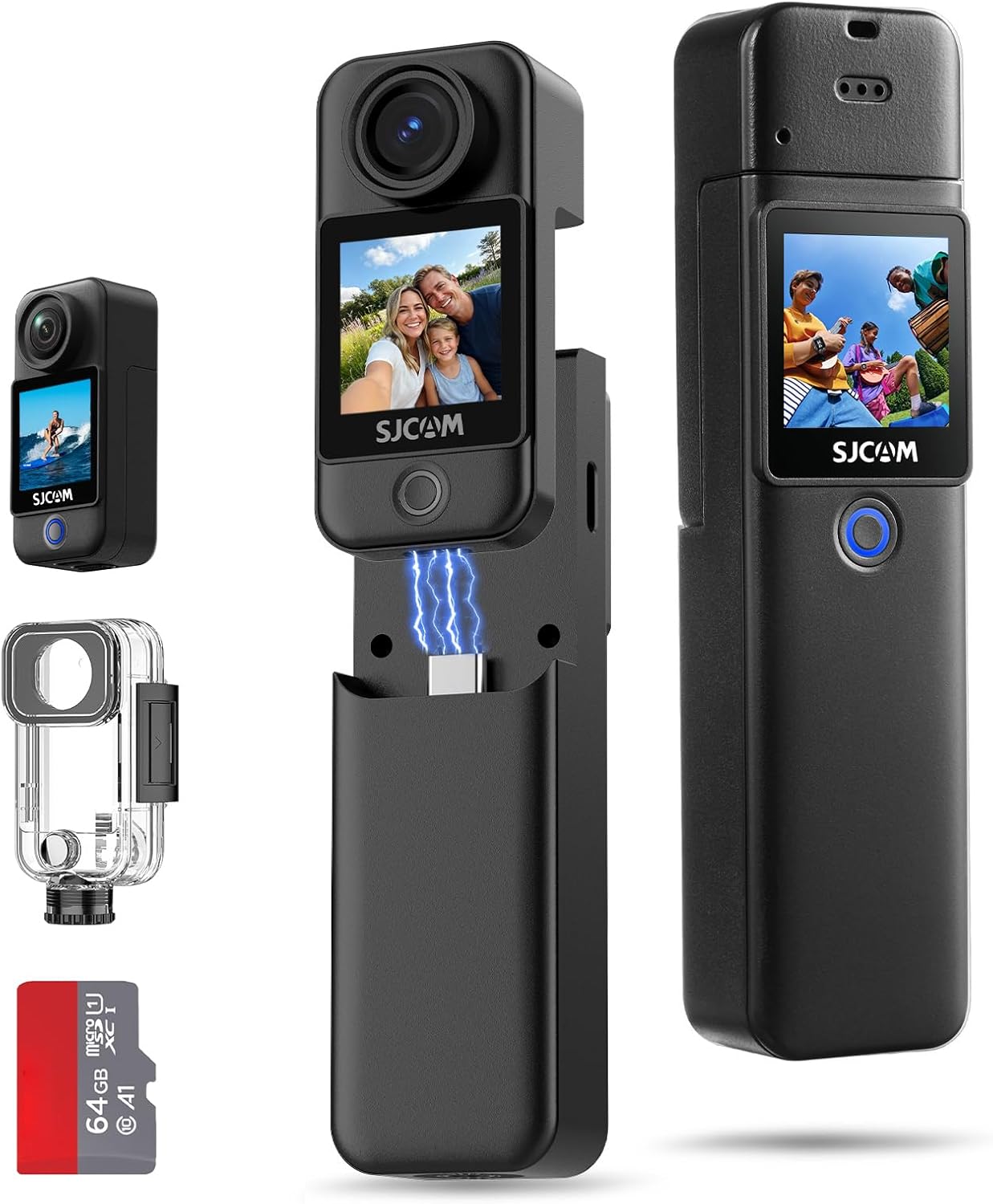
Image: The SJCAM C300 camera shown with its detachable battery handle, waterproof housing, and a 64GB microSD card.
2. محصول ختم شوview
2.1 اجزا
- د کیمرې واحد: Main body with lens, front and rear touchscreens.
- د بیټرۍ دستګاه: Detachable unit providing extended power and grip.
- د پنروک قضیه: Provides protection for underwater use up to 30 meters.
- د مایکرو ایس ډی کارت سلاټ: For storage of recorded media.
- د USB ډول-C پورټ: For charging, data transfer, and webد cam فعالیت.
2.2 کنټرولونه او شاخصونه
- د بریښنا / حالت تtonۍ: Powers the device on/off and switches between modes.
- د شټر/ریکارډ تtonۍ: Initiates photo capture or video recording.
- ټچ سکرینونه: Front and rear screens for preview، پلے بیک، او مینو نیویگیشن.
- د شاخص څراغونه: Display power status, charging status, and recording status.

انځور: یو اوورview of the SJCAM C300's key features, including 4K/30fps video, 1.33" dual touchscreens, 6-axis gyro stabilization, and 7-hour battery life.
3. ترتیب کول
3.1 د بیټرۍ چارج کول
The C300 camera utilizes a dual-battery design. Ensure both the camera unit and the battery handle are charged before use. Connect the camera to a USB power source using the provided USB Type-C cable. The indicator light will show charging status and turn off when fully charged.
۵.۲ د مایکرو ایس ډی کارت داخلول
A MicroSD card (up to 128GB, Class 10 or higher recommended) is required for storing photos and videos. Locate the MicroSD card slot on the camera unit. Insert the card with the contacts facing the correct direction until it clicks into place. To remove, gently press the card until it springs out.
3.3 Assembling the Camera
- Attaching Battery Handle: Align the camera unit with the battery handle and slide it into place until securely connected.
- Using the Waterproof Case: For underwater activities, place the camera unit inside the waterproof case and ensure all latches are securely closed. Test the case for leaks without the camera before first use.
- د نصبولو لوازم: Utilize the various included brackets and mounts (e.g., helmet base, flat bottom bracket) to attach the camera to desired surfaces or gear.
4. بنسټیز عملیات
۸ پاور آن/بند
- پاور آن: د پاور/موډ تڼۍ د څو ثانیو لپاره فشار ورکړئ او ونیسئ تر هغه چې سکرین روښانه شي.
- بندول: د پاور/موډ تڼۍ د څو ثانیو لپاره فشار ورکړئ او ونیسئ تر هغه چې سکرین بند نشي.
4.2 د ویډیو ثبتول
- په کیمره کې بریښنا.
- Select video mode using the Power/Mode button or touchscreen.
- Press the Shutter/Record button to start recording. A red indicator light will flash.
- Press the Shutter/Record button again to stop recording. The indicator light will stop flashing.
۵.۲ عکسونه اخیستل
- په کیمره کې بریښنا.
- Select photo mode using the Power/Mode button or touchscreen.
- د سکرین په کارولو سره خپل شاټ چوکاټ کړئ.
- Press the Shutter/Record button to capture a photo.
۶.۲ د مینو نیویګیټ کول
The C300 features dual 1.33-inch touchscreens for intuitive navigation. Swipe left/right or up/down on the screen to access different modes and settings. Tap on icons to select options and adjust parameters such as resolution, frame rate, and exposure.

Image: A user demonstrating the front and rear 1.33" HD dual touchscreens of the SJCAM C300 camera.
5. پرمختللي ځانګړتیاوې
5.1 6-Axis Gyro Stabilization
The integrated 6-axis gyroscope actively counteracts motion, providing continuously smooth and stable footage. This feature is designed to reduce image shake during dynamic activities.

Image: A visual comparison illustrating the effect of stabilization on footage, showing a dog running with and without stabilization.
5.2 5G WiFi Connectivity
Connect the C300 to your smartphone via 5G WiFi for fast file transfers and remote control through the dedicated SJCAM app. This allows for quick sharing of high-resolution videos and photos.
۴.۵ ۱۰X ډیجیټل زوم
The camera supports 8X digital zoom, allowing you to magnify subjects for closer shots. This feature is accessible through the camera's touchscreen interface.
5.4 F2.0 Large Aperture and Low Light Performance
The F2.0 large aperture enhances brightness and clarity in low-light conditions, improving image quality in dimly lit environments.

Image: Two individuals using the SJCAM C300 for a selfie, illustrating the F2.0 large aperture for enhanced brightness.
۳.۲ د ډزو ځانګړي حالتونه
The C300 offers various shooting modes to enhance your creative possibilities:
- 8X Slow Motion: Captures fast-paced action in slow motion.
- مخکې ریکارډ: Records a short period of video before the shutter button is pressed.
- برسټ عکس: په چټکۍ سره څو عکسونه اخلي.
- د وخت تېرېدل: Captures a series of photos over time to create a time-lapse video.
- Delay-Record: Starts recording after a set delay.
- د موټر حالت: Functions as a dashcam, automatically recording when the vehicle starts.

Image: A collage demonstrating different shooting modes available on the SJCAM C300, including slow motion, pre-record, burst photo, time lapse, delay-record, and car mode.
5.6 4K Wi-Fi Live Streaming & Webکمره
The C300 supports 4K Wi-Fi live streaming, allowing you to broadcast your content directly. It can also function as a webcam when connected to a computer, providing smooth and stable video for online meetings or streaming.

Image: Illustrations of the SJCAM C300 being used for 4K Wi-Fi live streaming with a smartphone and as a webکیمره د لپ ټاپ سره وصل ده.
5.7 Versatile Type-C Port
The Type-C port offers three operational modes when connected to a computer:
- د USB فلش ډرایو: لاسرسی ذخیره شوی fileپه مستقیم ډول.
- د کمپیوټر کیمره: Use the camera as a webکیم
- یوازې چارج: For battery charging without data transfer.

Image: The SJCAM C300 connected via its Type-C port, displaying menu options for Mass Storage, PC Camera, and Charge Only.
۳. د اوبو ضد کارول
The SJCAM C300 is waterproof up to 30 meters (100 feet) when enclosed in its IP68-rated waterproof housing. Ensure the housing is properly sealed before any underwater use. This allows for capturing footage during diving, swimming, and other water sports.

Image: An individual using the SJCAM C300 in its waterproof housing while diving underwater, demonstrating its capability for capturing aquatic scenes.
7. ساتنه
- لینز د نرم، لینټ نه پاک ټوکر په کارولو سره پاک وساتئ.
- د اوږدې مودې لپاره د کیمرې د لوړې تودوخې یا مستقیم لمر وړانګو سره د مخ کیدو څخه ډډه وکړئ.
- After using the waterproof case in saltwater, rinse it with fresh water and allow it to air dry.
- کیمره او لوازمات په وچ او یخ ځای کې وساتئ.
8. ستونزه حل کول
۶.۱ کیمره نه چالانېږي
- ډاډ ترلاسه کړئ چې بیټرۍ په بشپړ ډول چارج شوې.
- Check if the battery handle is securely attached.
۶.۲ د ثبتولو مسلې
- ډاډ ترلاسه کړئ چې مایکرو ایس ډی کارت داخل شوی او کافي خالي ځای لري.
- Ensure the MicroSD card is formatted correctly (FAT32 or exFAT).
- Use a high-speed MicroSD card (Class 10 or UHS-I/UHS-3 recommended) for 4K recording.
۵.۲ د انځور/ویډیو ضعیف کیفیت
- د کیمرې لینز پاک کړئ.
- د رڼا مناسب شرایط ډاډمن کړئ.
- Check camera settings for resolution and stabilization.
9. مشخصات
| فیچر | تفصیل |
|---|---|
| د ویډیو حل | تر 4K پورې |
| د عکس حل | 20MP |
| د ډګر View (FOV) | 154 درجې پراخه |
| ثبات | 6-Axis Gyro Stabilization |
| سکرینونه | Dual 1.33-inch Touchscreens |
| د بیټرۍ ژوند | Up to 7 hours (420 minutes) with dual batteries |
| د پنروک ژوروالی | 30 meters (100 feet) with waterproof housing |
| ارتباط | 5G WiFi, USB Type-C |
| ذخیره کول | MicroSD Card (up to 128GB, not included unless specified) |
| اپرچر | F2.0 لوی اپرچر |
| Weight (Camera Unit) | نږدې 1.94 اوز |
| Weight (with Battery Handle) | نږدې 3.77 اوز |
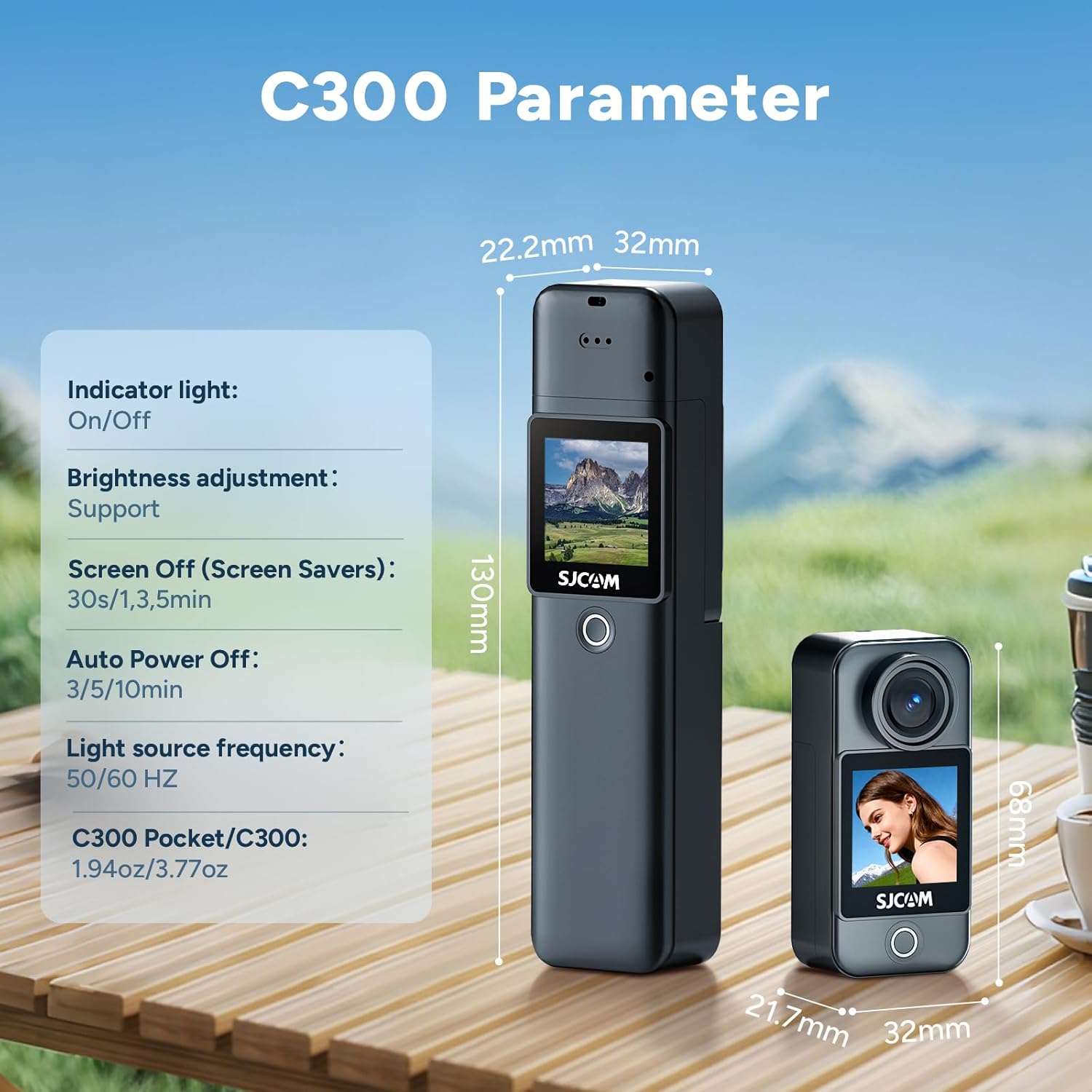
Image: A diagram illustrating the physical dimensions and some internal parameters of the SJCAM C300 camera.
۲. په بکس کې څه دي؟
The standard package for the SJCAM C300 includes the following items:
- C300 Camera Unit (x1)
- Battery Handle (x1)
- Frame Mount (x1)
- Waterproof Case (x1)
- USB کیبل (x1)
- لانیارډ (x1)
- بریکٹ (x1)
- Back Clip (x1)
- Flat Bottom Bracket (x1)
- Helmet Base (x2)
- Micro SD Card (64GB) (x1)
- Wiping Cloth (x1)

Image: A visual representation of all items included in the SJCAM C300 product package.
11. تضمین او ملاتړ
SJCAM products are covered by a manufacturer's warranty. For specific warranty terms, technical support, or service inquiries, please refer to the official SJCAM webسایټ ته مراجعه وکړئ یا مستقیم د دوی د پیرودونکي ملاتړ سره اړیکه ونیسئ. د تضمین ادعاوو لپاره د پیرود ثبوت وساتئ.


