1. پیژندنه
Thank you for choosing the Camtro M6 Outdoor Security Camera. This battery-powered wireless camera is designed to provide reliable outdoor surveillance with features such as 1080p video resolution, color night vision, two-way audio, and smart AI motion detection. This manual provides essential information for setting up, operating, and maintaining your camera to ensure optimal performance.
2. د بسته محتويات
مهرباني وکړئ تصدیق کړئ چې ټول توکي ستاسو په کڅوړه کې شتون لري:
- Camtro M6 Outdoor Security Camera
- د لارښوونې لارښود
- د سکرو نصب کول
3. محصول ختم شوview
Familiarize yourself with the components of your Camtro M6 camera.

شکل 3.1: مخکی view of the Camtro M6 Outdoor Security Camera, showing the lens, light, and motion sensor.
The Camtro M6 features a durable, weather-resistant design suitable for outdoor use. Key components include:
- د کیمرې لینز: Captures 1080p high-definition video.
- Infrared LED / Spotlight: Provides illumination for night vision and color night vision.
- د حرکت سینسر: Detects movement for smart alerts.
- مایکروفون: د دوه اړخیز آډیو اړیکو لپاره.
- سپیکر: د دوه اړخیزه آډیو اړیکو او خبرتیاو لپاره.
- د نصبولو اساس: For secure installation on walls or other surfaces.

شکل 3.2: اوورview of Camtro M6 features including AI Human Detection, Color Night Vision, Two-way Talk, and Cloud Storage.
4. ترتیب کول
Follow these steps to set up your Camtro M6 camera:
- کیمره چارج کړئ: Before initial use, fully charge the camera battery using the provided charging cable. A full charge ensures optimal battery life.
- اپلیکیشن ډاونلوډ کړئ: لټون the official Camtro security camera app on your smartphone's app store (iOS or Android) and install it.
- یو حساب جوړ کړئ: اپلیکیشن خلاص کړئ او د نوي کارونکي حساب جوړولو لپاره په سکرین کې لارښوونې تعقیب کړئ.
- وسیله اضافه کړئ: In the app, select the option to add a new device. Follow the prompts to connect your camera to your 2.4GHz وائی فای شبکه. Ensure your phone is connected to a 2.4GHz network during setup. 5GHz Wi-Fi is not supported.
- کیمره نصب کړئ: Choose a suitable outdoor location for mounting. Use the included mounting screws to securely attach the camera to a wall or other stable surface. Ensure the camera has a clear field of view and is within range of your Wi-Fi signal.
5. عملیاتي لارښوونې
Once set up, you can access and control your camera through the mobile app.
5.1 ژوندی View
Open the app and select your camera to view the live feed. This allows you to monitor your property in real-time from anywhere.
۴.۴ دوه اړخیزه آډیو

شکل 5.1: Illustration of the two-way audio function, allowing communication through the camera.
په ژوندۍ بڼه کې د مایکروفون آیکون باندې کلیک وکړئ view to enable two-way audio. You can speak through your phone, and your voice will be projected through the camera's speaker. Similarly, you can hear audio from the camera's location.
۴.۲ سمارټ AI حرکت کشف

شکل 5.2: The camera's AI Human Detection feature distinguishing between human movement and other objects.
The camera features AI-powered motion detection that can distinguish between humans, animals, and other moving objects. This reduces false alarms. You will receive push notifications on your smartphone when motion is detected. Adjust sensitivity settings within the app.
۴.۳ د شپې رنګین لید
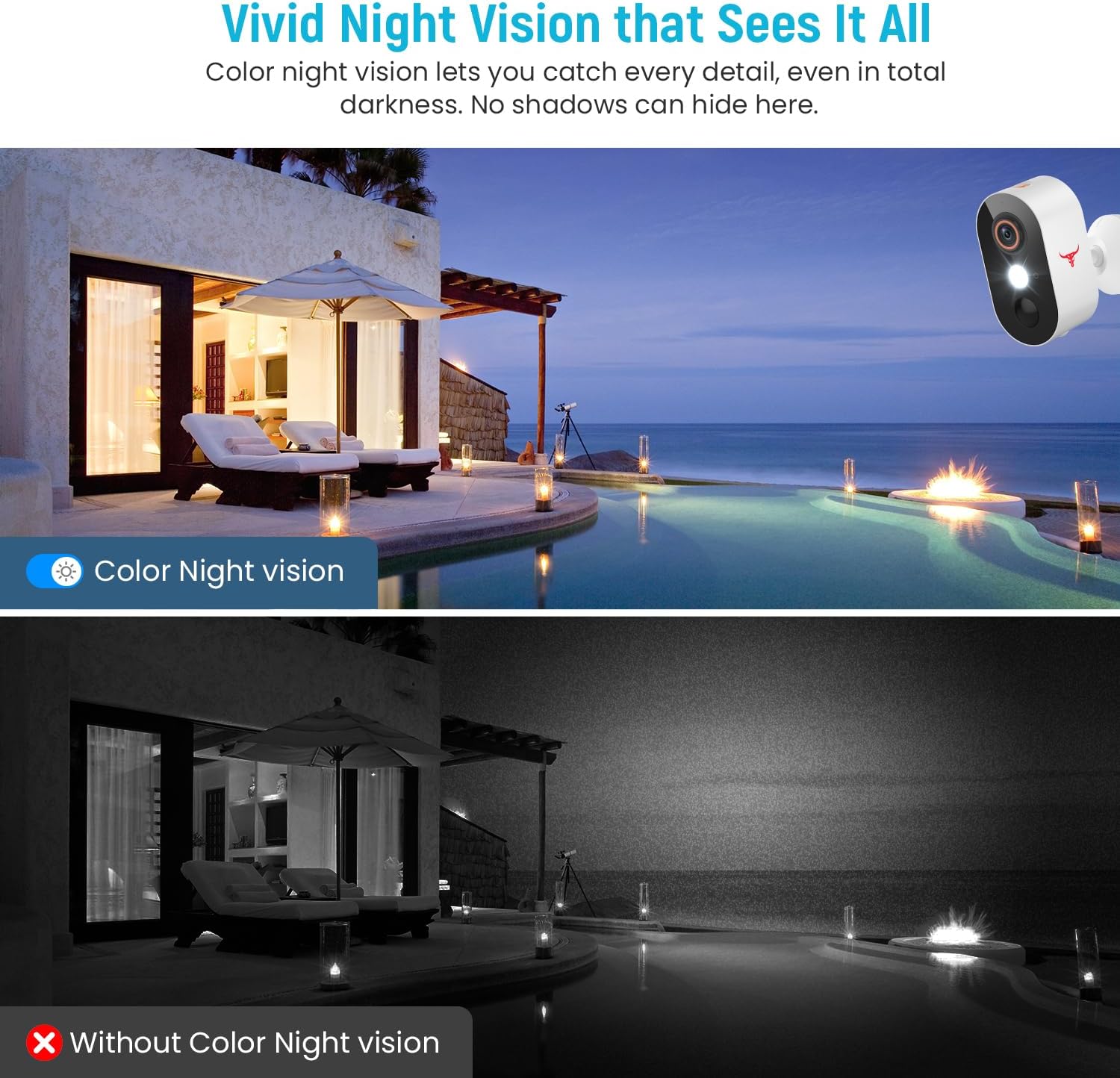
شکل 5.3: Comparison of color night vision and standard black and white night vision.
The Camtro M6 provides vivid color night vision, allowing you to see details in low-light conditions. The camera automatically switches to night vision mode when ambient light is insufficient.
۷.۳ د کلاوډ ذخیره

شکل 5.4: Visual representation of cloud storage for recorded video events.
The camera supports cloud storage for recording and reviewing video events. A subscription is required to access recorded footage. Please refer to the app for subscription options and details.
6. ساتنه
منظم ساتنه ستاسو د کیمرې اوږد عمر او غوره فعالیت تضمینوي.
- د بیټرۍ چارج کول: The camera is battery-powered. Monitor the battery level in the app and recharge the camera as needed. Battery life can vary based on usage and environmental factors.
- پاکول: په دوره یي ډول د کیمرې لینز او کور د نرم، ډ سره پاک کړئamp د دوړو او کثافاتو د لرې کولو لپاره ټوکر. سخت کیمیاوي مواد مه کاروئ.
- د فرم ویئر تازه معلومات: Keep the camera's firmware updated through the app to access new features and improvements.

شکل 6.1: The Camtro M6 camera demonstrating its weather resistance against shine, rain, snow, and dust.
The camera is designed to withstand various weather conditions, operating effectively in temperatures ranging from 14°F to 140°F.
7. ستونزه حل کول
If you encounter issues with your Camtro M6 camera, refer to the following common problems and solutions:
| ستونزه | احتمالي لامل | د حل لاره |
|---|---|---|
| کیمره د وای فای سره نه نښلول کیږي | Incorrect Wi-Fi password, 5GHz Wi-Fi network, weak signal | Ensure correct 2.4GHz Wi-Fi password. Confirm your router is broadcasting a 2.4GHz network. Move camera closer to the router. |
| د ویډیو خراب کیفیت | د وای فای کمزوری سیګنال، چټل لینز | Improve Wi-Fi signal strength. Clean the camera lens. |
| د حرکت کشف کار نه کوي یا ډیر غلط الارمونه لري | Incorrect sensitivity settings, camera placement | Adjust motion detection sensitivity in the app. Ensure camera is positioned to avoid unnecessary triggers (e.g., swaying branches). |
| بیټرۍ په چټکۍ سره وچیږي | Frequent motion events, continuous live view, low temperature | Reduce motion detection sensitivity. Limit continuous live viewing. Ensure camera is fully charged. |
| دوه اړخیزه غږ ناڅرګند دی | Weak Wi-Fi signal, microphone/speaker obstruction | Check Wi-Fi connection. Ensure microphone and speaker are clear of obstructions. |
8. مشخصات
Detailed technical specifications for the Camtro M6 Outdoor Security Camera:
- ماډل: M6
- د کور دننه او بهر کارول: بهر
- مطابقت لرونکي وسایل: سمارټ فون (iOS، Android)
- د بریښنا سرچینه: د بیټرۍ چلول
- د ارتباط پروتوکول: وای فای (یوازې 2.4GHz)
- د نصب کولو ډول: دیوال غر
- د ویډیو نیول حل: 1080p
- د توکي ابعاد (L x W x H): 2.8 x 1.7 x 3.4 انچه
- د توکي وزن: ۱.۶۲ اونس (۰.۱ پونډه)
- بیټرۍ: ۱ غیر معیاري بیټرۍ (شامله ده)
- د ویډیو اخیستلو بڼه: MP4
- ځانګړې ځانګړنه: Motion Sensor, Color Night Vision, 2-Way Audio
- د محصول لپاره وړاندیز شوي کارول: بهرنی امنیت
9. تضمین او ملاتړ
For warranty information and technical support, please refer to the contact details provided with your purchase or visit the official Camtro webسایټ. زموږ د پیرودونکو خدماتو ټیم د هرې پوښتنې یا ستونزې سره د مرستې لپاره شتون لري چې تاسو ورسره مخ شئ.


