1. پیژندنه
Thank you for choosing the VAVA 5.5" 720P HD Video Baby Monitor. This manual provides essential information for the safe and effective use of your device. Please read it thoroughly before operation and retain it for future reference.
This monitor offers a secure and clear way to observe your baby with its 5.5-inch 720p display, two-way audio, night vision, and pan/tilt/zoom capabilities. It operates on a dedicated wireless connection, ensuring privacy and reliability.
په بکس کې څه دي
- Baby Monitor (Parent Unit)
- Camera (Baby Unit)
- د AC بریښنا اډاپټر x2
- د ماونټ کټ
- د کیمرې غره
- د بریښنا کیبل x2
- د کارن لارښود

Image 1.1: VAVA 5.5" 720P HD Video Baby Monitor components, including the parent unit (monitor) and baby unit (camera).
2. د خوندیتوب معلومات
Please observe the following safety precautions to prevent electric shock, injury, or damage to the product:
- Keep the monitor and camera out of reach of children.
- Do not place the camera or power cords within 3 feet (1 meter) of the crib.
- Use only the provided AC power adapters.
- محصول د اوبو یا رطوبت سره مه اخلئ.
- د تودوخې سرچینو یا مستقیم لمر ته نږدې د محصول له ایښودلو څخه ډډه وکړئ.
- Ensure proper ventilation; do not cover the product with blankets or other materials.
- Do not attempt to repair or modify the product yourself. Contact customer support for assistance.
3. محصول ختم شوview
د پلار واحد (څارونکي)
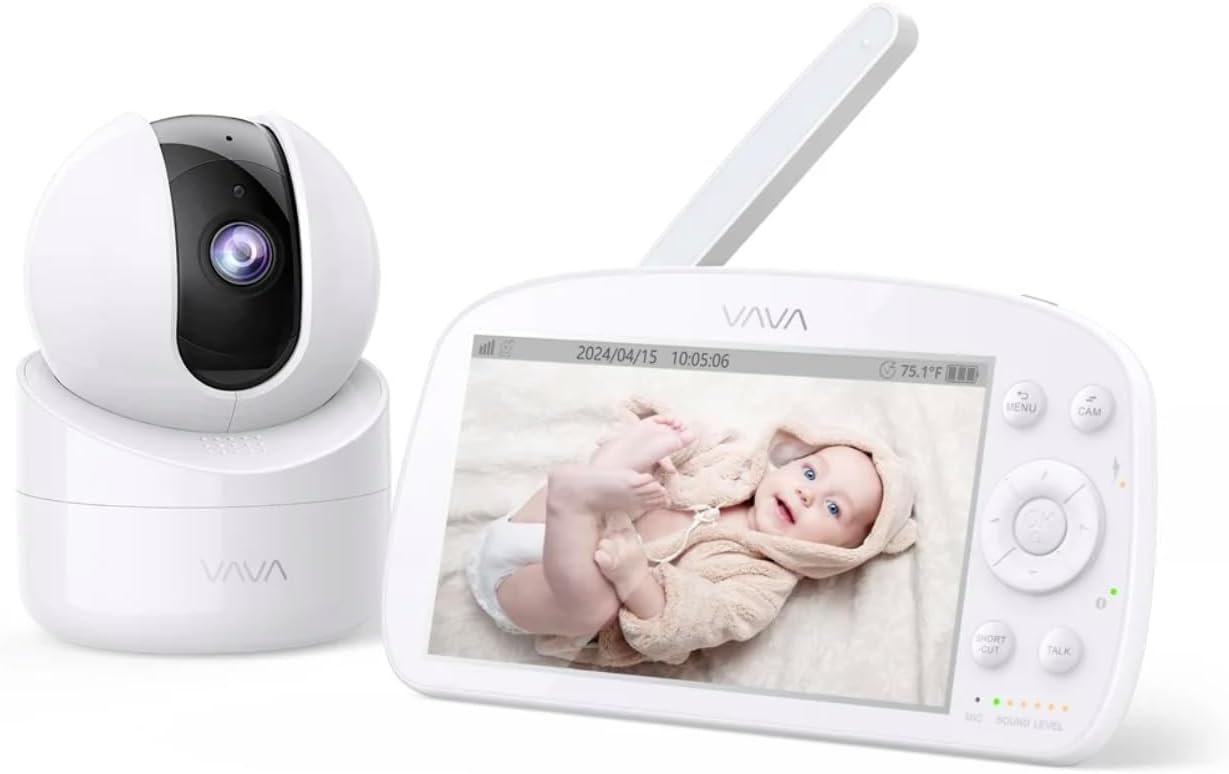
Image 3.1: The VAVA parent unit (monitor) and baby unit (camera) shown together.
The parent unit features a 5.5-inch HD display, control buttons, a microphone, speaker, and an antenna for signal reception.
د ماشوم واحد (کیمره)

Image 3.2: The VAVA baby unit (camera) with its pan/tilt base, featuring the lens and microphone.
The baby unit includes a 720p camera with infrared LEDs for night vision, a microphone, speaker, and a temperature sensor. It supports pan, tilt, and digital zoom functions.
4. ترتیب کول
۴.۱ د کیمرې ځای پر ځای کول
د ماشوم واحد (کیمره) په داسې ځای کې ځای په ځای کړئ چې روښانه وي view of your baby in the crib. Ensure it is at least 3 feet (1 meter) away from the crib to prevent entanglement with cords. The camera can be placed on a flat surface or mounted to a wall using the included mount kit.

انځور ۶: پخوانیample of camera placement, mounted above a crib for optimal viewing.
4.2 فعالول
- Connect one AC power adapter to the baby unit and plug it into a power outlet.
- Connect the second AC power adapter to the parent unit and plug it into a power outlet. The parent unit has a built-in rechargeable battery for portable use.
- Press and hold the power button on the parent unit to turn it on. The display will activate.
۴.۴ جوړه کول (که اړتیا وي)
The baby unit and parent unit are pre-paired at the factory. If the connection is lost or you are adding an additional camera (up to 4 cameras supported), follow these steps:
- په اصلي واحد کې، فشار ورکړئ مینو تڼۍ
- Navigate to the camera icon (Pairing) and select it.
- Choose an available camera channel (e.g., CAM 2, CAM 3, CAM 4).
- Press the pairing button on the back of the baby unit within 10 seconds.
- Once paired, the image from the camera will appear on the parent unit display.
5. عملیاتي لارښوونې
5.1 Parent Unit Controls

Image 5.1: The parent unit in use, displaying the live feed from the baby unit.
- د مینو تڼۍ: Access settings, pairing, lullabies, and other functions.
- د نیویګیشن تڼۍ (پورته/ښکته/کیڼ/ښي): Move through menus and control camera pan/tilt.
- د OK تtonۍ: ټاکنې تصدیق کړئ.
- د خبرو تڼۍ: Press and hold to speak to your baby through the camera's speaker (Two-Way Audio).
- د زوم تڼۍ: Magnify the image (2X-4X digital zoom).
- د VOX حالت: Voice Operated eXchange. The screen will turn on automatically when sound is detected from the baby unit. Adjust sensitivity in the menu.
- لولوز: Select and play lullabies from the menu to soothe your baby.
- د شپې لید: Automatically activates in low light conditions, providing a clear black and white image.
- د آٹو پیلوټ حالت: Cycles through connected cameras automatically.
5.2 Camera Control (Pan & Tilt)
د اصلي واحد څخه، د کیمرې د لرې تنظیم کولو لپاره د نیویګیشن تڼۍ وکاروئ viewزاویه:
- مطبوعاتي پورته/ ښکته to tilt the camera vertically.
- مطبوعاتي کیڼ/ښي to pan the camera horizontally.
6. ساتنه
6.1 پاکول
- د پاکولو دمخه دواړه واحدونه له بریښنا څخه جلا کړئ.
- Use a soft, dry cloth to wipe the surfaces of the monitor and camera.
- For the camera lens, use a lens cleaning cloth to avoid scratches.
- د کثافاتو پاکوونکي یا محلول مه کاروئ.
۶.۲ د بیټرۍ پاملرنه (د مور او پلار واحد)
- د بیټرۍ د ژوند اوږدولو لپاره، د بیټرۍ په مکرر ډول د بشپړ چارج کولو څخه ډډه وکړئ.
- Charge the parent unit regularly.
- که چیرې یونټ د اوږدې مودې لپاره ذخیره کوئ، نو بیټرۍ یې نږدې 50٪ ته چارج کړئ او په یخ او وچ ځای کې یې وساتئ.
7. ستونزه حل کول
| ستونزه | احتمالي لامل | د حل لاره |
|---|---|---|
| په اصلي واحد کې هیڅ انځور نشته | Parent unit is off; Camera is off; Out of range; Not paired. | Ensure both units are powered on. Move units closer. Re-pair the camera (see Section 4.3). |
| د عکس ضعیف کیفیت | Weak signal; Obstructions; Dirty lens. | Move units closer. Remove obstructions. Clean camera lens. |
| هیڅ غږ یا تحریف شوی غږ نشته | Volume too low; Out of range; Interference. | Increase parent unit volume. Move units closer. Avoid placing near other electronic devices. |
| د اصلي واحد بیټرۍ په چټکۍ سره ختمیږي | High screen brightness; VOX mode off; Old battery. | Reduce screen brightness. Enable VOX mode. Contact support for battery replacement if necessary. |
| Camera not responding to pan/tilt | Connection issue; Camera malfunction. | Check connection. Power cycle both units. If issue persists, contact support. |
8. مشخصات
| فیچر | تفصیل |
|---|---|
| د ماډل نوم | VAVA 5.5" 720P Video Baby Monitor |
| د ماډل شمیره | 83-24011-022 |
| د ښودلو اندازه | 5.5 انچه |
| د ویډیو حل | 720p HD |
| د لیږد حد | تر 900 فوټو پورې (د لید کرښه) |
| د ارتباط ټیکنالوژي | Wireless (Dedicated 2.4GHz FHSS) |
| د بریښنا سرچینه | Corded Electric, Rechargeable (Parent Unit) |
| ځانګړي ځانګړتیاوې | 2-Way Audio, Night Vision, Pan & Tilt, Zoom (2X-4X), VOX Mode, Lullabies, Temperature Sensor |
| د کور دننه / بهر کارول | دننه |
| د نصب کولو ډول | د میز ټاپ غر |
| د محصول ابعاد | 8.46 x 8 x 5 انچه |
| د توکي وزن | ۲.۴۵ پونډه |
| UPC | 191280045666 |
9. تضمین او ملاتړ
9.1 د تضمین معلومات
VAVA products are designed and manufactured to the highest quality standards. This product is covered by a manufacturer's warranty from the date of purchase. Please refer to the warranty card included in your package or visit the official VAVA webد تضمین د تفصيلي شرایطو او مقرراتو لپاره سایټ.
9.2 د پیرودونکي ملاتړ
If you encounter any issues or have questions regarding your VAVA 5.5" 720P HD Video Baby Monitor, please contact VAVA Customer Support. Our team is available to assist you with troubleshooting, technical support, and warranty claims.
د اړیکو د تازه معلوماتو لپاره، مهرباني وکړئ لیدنه وکړئ: www.vava.com/support


