1. پیژندنه
The NYXI Warrior Wireless Switch Controller is a versatile gaming peripheral designed for enhanced gameplay across multiple platforms. It features advanced technologies such as Hall Effect Joysticks and Triggers for precision and longevity, micro mechanical switch buttons for rapid response, HD Rumble for immersive feedback, and a 6-axis gyroscope for motion sensing. This controller is compatible with Nintendo Switch, Nintendo GameCube (NGC), Wii, and PC.

Image: NYXI Warrior controllers in various colors, highlighting the product line.
2. د بسته محتويات
- NYXI Warrior Wireless Switch Controller
- د USB بې سیم رسیدونکی
- د USB-C چارج کیبل
- د کارونکي لارښود (دا لاسوند)

Image: The NYXI Warrior controller and its wireless receiver.
3. د تنظیم کولو لارښود
3.1 د کنټرولر چارج کول
Before first use, fully charge the controller. Connect the supplied USB-C charging cable to the controller's USB-C port and the other end to a USB power source (e.g., console, PC, or USB wall adapter). The indicator lights on the controller will show charging status and turn off when fully charged. A full charge typically takes approximately 2-3 hours.
3.2 د وسایلو سره نښلول
۳.۲.۴ د نینټینډو سویچ اتصال
- خپل د نینټینډو سویچ کنسول چالان کړئ.
- د کور مینو څخه ، غوره کړئ کنټرولونکي، بیا گرفت / نظم بدل کړئ.
- فشار ورکړئ او ونیسئ د جوړه کولو تڼۍ on the top of the NYXI Warrior controller for 3 seconds until the indicator lights begin to flash rapidly.
- Once connected, the corresponding player indicator light(s) on the controller will remain solid.
3.2.2 PC/NGC/Wii Connection (via USB Wireless Receiver)
- Insert the USB Wireless Receiver into an available USB port on your PC, NGC, or Wii console.
- Ensure the NYXI Warrior controller is powered on.
- The controller should automatically connect to the receiver. The indicator light on the receiver and controller will become solid once a connection is established.
- For PC, additional driver installation may be required depending on the operating system. Refer to your PC's documentation for USB device setup.

Image: The NYXI Warrior controller connected to a laptop via its USB receiver, demonstrating PC compatibility.

Image: The NYXI Warrior controller with a Nintendo Wii console, illustrating Wii compatibility.
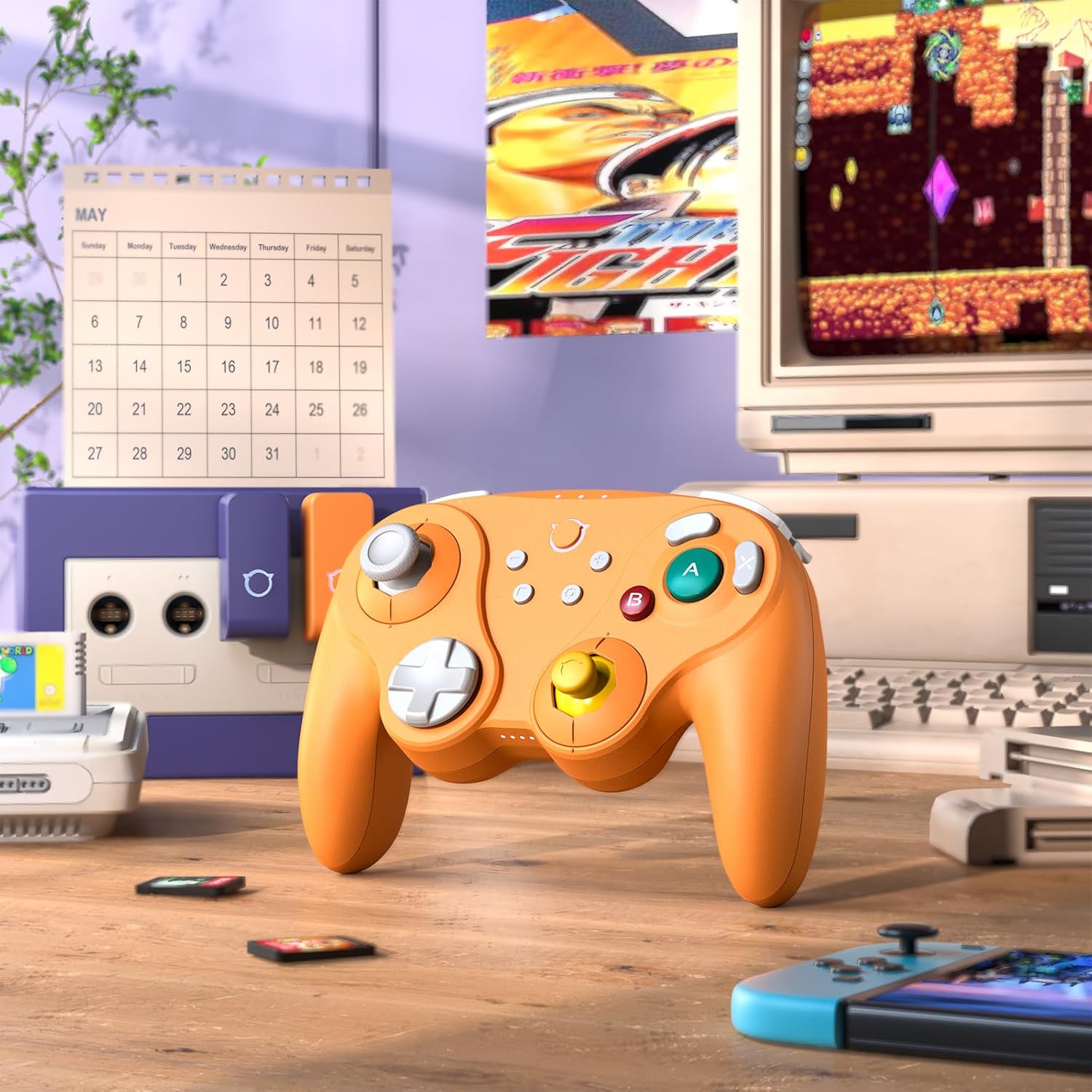
Image: The NYXI Warrior controller with a retro gaming setup, illustrating GameCube compatibility.
4. عملیاتي لارښوونې
۴.۱ د تڼۍ ترتیب او دندې
The NYXI Warrior controller features a comprehensive button layout for various gaming needs:
- کیڼ انالوګ سټیک: د حرکت او کیمرې کنټرول لپاره.
- D-pad: لارښوونه.
- ښي انلاګ سټیک: د کیمرې کنټرول یا د لوبې دننه ځانګړو کړنو لپاره.
- د A/B/X/Y تڼۍ: Action buttons with micro mechanical switches for precise and rapid input.
- د L/R تڼۍ: د اوږو تڼۍ.
- د ZL/ZR محرکونه: Hall Effect analog triggers for precise input, adjustable for different gameplay styles.
- +/- تڼۍ: Start/Select or Menu functions.
- د کور تڼۍ: Returns to the console's home screen.
- د سکرین شاټ تڼۍ: سکرین شاټونه نیسي.
- Programmable Back Paddles (M1/M2): Located on the underside, these can be assigned to various button functions.

انځور: مخکینۍ برخه view of the NYXI Warrior controller, illustrating its button layout.

انځور: شاته view of the NYXI Warrior controller, highlighting the programmable back paddles.

Image: Top-front view of the NYXI Warrior controller, showing triggers and charging port.

Image: Two users playing with NYXI Warrior controllers, demonstrating in-game use.
4.2 پرمختللی ځانګړتیاوې
۶.۳ د هال اغیزې جویسټیکس او محرکونه
The controller utilizes Hall Effect technology for its joysticks and triggers. This magnetic sensing technology prevents stick drift and ensures precise, long-lasting input. The triggers are also adjustable, allowing users to fine-tune their activation distance based on personal preference or game requirements.

Image: Illustration of the Hall Effect Joystick technology.

Image: Adjustable Hall Sensing Triggers feature.
4.2.2 Micro Mechanical Switch Buttons
The A/B/X/Y buttons and D-pad utilize micro mechanical switches, offering a short travel distance of approximately 0.3mm and a response speed of 0.2ms. This design provides tactile feedback and minimal latency, crucial for competitive gaming.

Image: Microswitches for A/B/X/Y buttons and D-pad.
۵.۴ ۶-محور ګیروسکوپ
The integrated 6-axis gyroscope supports motion sensing, particularly useful for games on the Nintendo Switch that utilize tilt or motion controls.

Image: 6-Axis Gyroscope feature illustration.
4.2.4 HD Rumble
The controller features HD Rumble, providing enhanced vibration feedback that can convey a wider range of sensations, from subtle tremors to powerful impacts, enriching the gaming experience.

Image: HD Rumble feature illustration.
4.2.5 Programmable Back Paddles and Turbo Function
The interchangeable back paddles (M1 and M2) can be programmed to replicate other button inputs, offering additional customization and ergonomic advantages. The controller also supports a turbo function for rapid, repeated button presses. Refer to the specific programming instructions provided with the controller for detailed steps on assigning functions to the back paddles and activating turbo mode.

Image: Interchangeable Back Paddle Design.
5. ساتنه
- پاکول: Use a soft, dry cloth to clean the controller's surface. For stubborn dirt, slightly dampټوکر د اوبو سره ومینځئ. د سختو کیمیاوي موادو یا خړوبونکو موادو کارولو څخه ډډه وکړئ.
- ذخیره کول: کنټرولر په یخ او وچ ځای کې د مستقیم لمر وړانګو او سختې تودوخې څخه لرې وساتئ.
- د بیټرۍ پاملرنه: To prolong battery life, avoid fully discharging the controller frequently. If storing for an extended period, charge the battery to approximately 50% every few months.
- سمبالول: د کنټرولر له غورځولو یا د قوي ټکانونو سره د مخ کیدو څخه ډډه وکړئ، ځکه چې دا کولی شي داخلي برخو ته زیان ورسوي.
6. ستونزه حل کول
۴.۳ کنټرولر نه نښلي
- ډاډ ترلاسه کړئ چې کنټرولر په کافي اندازه چارج شوی دی.
- Verify the USB Wireless Receiver is securely plugged into the console/PC.
- For Switch, ensure you are in the "Change Grip/Order" menu.
- Try re-pairing the controller by pressing the pairing button.
- Restart your console/PC and the controller.
6.2 Input Lag or Unresponsive Buttons
- ډاډ ترلاسه کړئ چې نږدې د بېسیم مداخلې قوي سرچینې شتون نلري (د بیلګې په توګه، د وای فای روټرونه، نور بېسیم وسایل).
- کنسول/کمپیوټر ته نږدې شئ.
- وګورئ چې د کنټرولر بیټرۍ ټیټه ده که نه.
- Perform a controller reset (refer to manufacturer's specific reset procedure if available, typically a small pinhole button).
۴.۳ د جویسټیک کیلیبریشن
While Hall Effect joysticks are designed to prevent drift, if you experience any unusual behavior, you may need to recalibrate them through your console's system settings (e.g., Nintendo Switch System Settings > Controllers and Sensors > Calibrate Control Sticks).
7. مشخصات
| د ماډل شمیره | جنګیالی |
| ASIN | B0FB9577L9 |
| د کڅوړې ابعاد | 7.64 x 7.52 x 3.58 انچه |
| د توکي وزن | ۲.۴۵ پونډه |
| بیټرۍ | 1 لیتیم آئن بیټرۍ (شامل ده) |
| نیټه لومړی شتون لري | د مارچ 24، 2025 |
8. تضمین او ملاتړ
For information regarding warranty coverage, technical support, or replacement parts, please refer to the official NYXI website or contact the retailer from whom the product was purchased. Keep your proof of purchase for warranty claims.
Official NYXI Store: NYXI Store on Amazon


