1. پیژندنه
The GOLDCHAMP GC-T0-TS68 Megohmmeter Insulation Resistance Tester is a versatile and robust instrument designed for precise measurements of AC/DC voltage and insulation resistance. It features a wide measurement range, data storage capabilities, and automatic calculation functions for Polarization Index (PI) and Dielectric Absorption Ratio (DAR). This manual provides essential information for safe and effective use of the device.
2. د خوندیتوب معلومات
Always adhere to safety precautions when operating electrical testing equipment. Failure to do so may result in injury or damage to the device. This device is designed with smart auto-discharge and low battery warnings to enhance user safety.
- Ensure the device is turned off before connecting or disconnecting test leads.
- که چیرې وسیله خرابه ښکاري یا په غیر معمولي ډول کار کوي نو مه کاروئ.
- صحیح والیت تایید کړئtage range is selected for the measurement being performed.
- د ازموینې پرمهال د ژوندیو سرکټونو سره د تماس څخه ډډه وکړئ.
- Replace batteries promptly when low battery warning is displayed.
3. ترتیب کول
۱. د بکس خلاصول او اجزا
Carefully unpack the GOLDCHAMP GC-T0-TS68 Megohmmeter and verify all components are present. The standard package includes:
- 1 x GOLDCHAMP GC-T0-TS68 Megohmmeter
- 1 x Black Storage Bag
- 1 x د لارښوونې لارښود
- 8 x AA Batteries (Note: Batteries may not be included in all packages. Please check product description.)
- 1 x Pair of Meter Pens (Test Leads)
- 1 x Pair of Crocodile Clips
- ۱ x کوچنی سکریو ډرایور
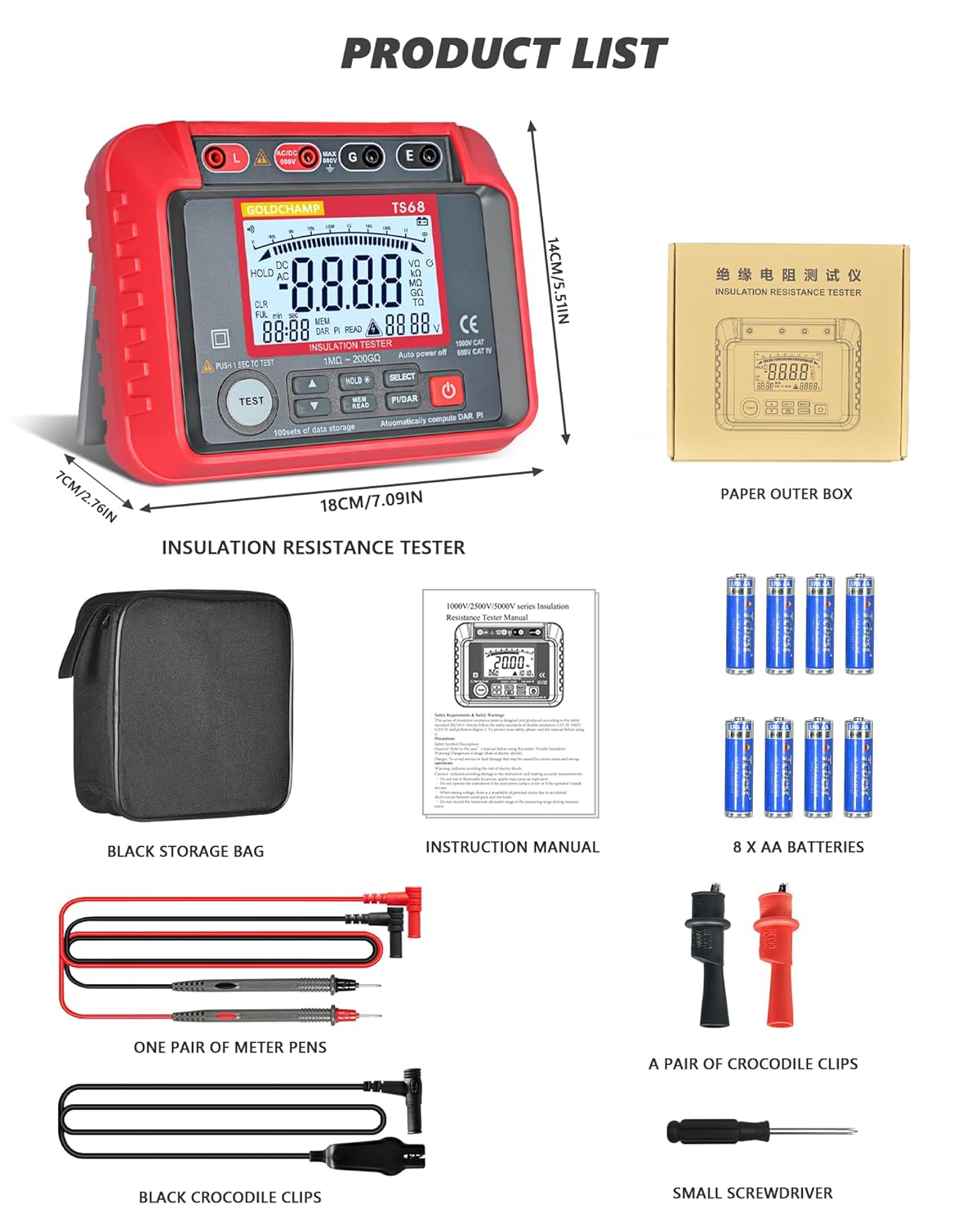
Figure 3.1: Contents of the GOLDCHAMP GC-T0-TS68 package, including the megohmmeter, storage bag, instruction manual, batteries, test leads, crocodile clips, and a small screwdriver.
3.2. د بیټرۍ نصب کول
The device requires 8 AA batteries for operation. To install or replace batteries:
- ډاډ ترلاسه کړئ چې وسیله بنده ده.
- د وسیلې په شا کې د بیټرۍ د برخې پوښ ومومئ.
- Use the provided small screwdriver to loosen the screw(s) securing the battery cover.
- Remove the cover and insert 8 AA batteries, observing the correct polarity (+/-) as indicated inside the compartment.
- د بیټرۍ پوښ بدل کړئ او پیچونه ټینګ کړئ.

Figure 3.2: The battery compartment of the megohmmeter, showing the placement of AA batteries.
4. عملیاتي لارښوونې
4.1. وسیله ختمه شوهview او کنټرولونه
Familiarize yourself with the various parts and controls of the GC-T0-TS68 Megohmmeter for effective operation.

شکل 4.1: مفصل view of the megohmmeter's panel, highlighting key components such as the LCD display, output jacks, measurement terminals, and control buttons.
- Output Jack L: Live output terminal.
- Measurement Positive Terminal: Positive input for measurements.
- Input Negative Shield G: Ground/Shield terminal.
- Sampling Jack E: Earth terminal for insulation resistance.
- د مایع کرسټال ښودنه (LCD): Displays measurement results and settings.
- لوړ والیtage Start Button (TEST): Initiates insulation resistance test.
- د UP تtonۍ: مینو ته ننوځي یا ارزښتونه زیاتوي.
- ښکته تtonۍ: مینو ته ننوځي یا ارزښتونه کموي.
- Data Hold/Backlight Button (HOLD): Freezes current display; long press activates/deactivates backlight.
- Data Read/Save Button (MEM/READ): Accesses stored data or saves current data.
- Function Selection Button (SELECT): Cycles through measurement functions.
- Polarization Index (PI) / Dielectric Absorption Ratio (DAR) Button (PI/DAR): Initiates PI/DAR calculations.
- د بریښنا آن/آف بټن: وسیله آن یا بندوي.
۵.۱. د AC/DC حجم اندازه کولtage
The GC-T0-TS68 can measure AC/DC voltage له 10V څخه 600V ته.
- Connect the red test lead to the "Measurement Positive Terminal" and the black test lead to the "Input Negative Shield G" or "Sampling Jack E" for voltage اندازه کول.
- Turn on the device using the Power ON/OFF button.
- Use the Function Selection Button to select the ACV or DCV mode.
- Carefully connect the test leads to the circuit or component to be measured.
- ټوک ولولئtage ارزښت په LCD کې ښودل شوی.
4.3. Measuring Insulation Resistance
This device measures insulation resistance from 1 MΩ to 200 GΩ with multiple test voltages (250V-2500V).
- Ensure the circuit or equipment under test is de-energized and safely discharged before connecting the megohmmeter.
- Connect the red test lead to the "Output Jack L" and the black test lead to the "Sampling Jack E" or "Input Negative Shield G" depending on the test setup.
- وسیله چالان کړئ.
- Use the Function Selection Button to select the desired insulation resistance test voltage (د مثال په توګه، 250V، 500V، 1000V، 2500V).
- Press and hold the High Voltage Start Button (TEST) to initiate the test. The high voltagد e شاخص به روښانه شي.
- Read the insulation resistance value on the LCD. Release the TEST button to stop the test. The device features automatic discharge after the test.

Figure 4.2: The megohmmeter connected to electrical equipment for an insulation resistance test.

Figure 4.3: The megohmmeter connected to a pipe for an insulation resistance test.

Figure 4.4: The megohmmeter connected to a power plug for an insulation resistance test.
4.4. PI and DAR Calculations
The device automatically calculates Polarization Index (PI) and Dielectric Absorption Ratio (DAR) to assess insulation health.
- Perform an insulation resistance test as described above.
- Press the PI/DAR button. The device will automatically perform the necessary measurements over time and display the calculated PI and DAR values.
۶.۹. د معلوماتو ذخیره کول او یادول
The GC-T0-TS68 can store up to 100 sets of measurement data.
- After a measurement, press the HOLD button to freeze the display.
- Press the MEM/READ button to save the current data.
- To recall stored data, press the MEM/READ button repeatedly to cycle through the stored records.

Figure 4.5: Illustration of the data storage and recall feature, showing multiple data sets on the display.
۶.۹. د شاته رڼا فعالیت
The high-contrast backlight display enhances usability in low-light conditions.
- To activate the backlight, press and hold the HOLD button.
- To deactivate the backlight, press and hold the HOLD button again.

Figure 4.6: The megohmmeter displaying a clear, backlit screen for improved visibility.
5. ساتنه
Proper maintenance ensures the longevity and accuracy of your GOLDCHAMP GC-T0-TS68 Megohmmeter.
- پاکول: وسیله په وچ، نرم ټوکر سره پاک کړئ. د کثافاتو پاکوونکي یا محلولونه مه کاروئ.
- ذخیره کول: Store the device in its durable carrying case in a cool, dry place when not in use. Remove batteries if storing for extended periods to prevent leakage.
- فزیکي ساتنه: The device features shockproof silicone armor and a double-insulated casing. While designed to withstand drops and rough handling, avoid unnecessary impacts to maintain optimal performance.

Figure 5.1: The megohmmeter's robust design with silicone shock protection.
6. ستونزه حل کول
If you encounter issues with your GC-T0-TS68 Megohmmeter, refer to the following common troubleshooting steps:
| ستونزه | احتمالي لامل | د حل لاره |
|---|---|---|
| وسیله فعاله نه ده. | مړه یا په غلط ډول نصب شوي بیټرۍ. | د بیټرۍ قطبي والی وګورئ او د تازه AA بیټرۍ سره یې بدل کړئ. |
| ناسم لوستل. | Poor connection of test leads; incorrect measurement mode selected; external interference. | Ensure test leads are securely connected. Verify the correct function (ACV/DCV/Insulation) is selected. Move away from strong electromagnetic fields. |
| "OL" or "OVER" displayed. | اندازه کول د وسیلې له حد څخه ډیر دي. | Ensure the measured value is within the specified range for the selected test voltage. |
| لوړ والیtage warning (HV) remains on after test. | Residual charge in the circuit. | The device has an auto-discharge function. Wait for the HV indicator to turn off before disconnecting leads. If it persists, ensure the circuit is safely discharged manually. |
که چیرې د دې حل لارو هڅه کولو وروسته هم ستونزه دوام ومومي، مهرباني وکړئ د پیرودونکو ملاتړ سره اړیکه ونیسئ.
7. مشخصات
Key technical specifications for the GOLDCHAMP GC-T0-TS68 Megohmmeter:
| فیچر | تفصیل |
|---|---|
| برانډ | ګولډچAMP |
| د ماډل شمیره | GCCA-T0-TS68 |
| د موصلیت مقاومت رینج | ۰.۱ ملي متر - ۱۰ ګرامه |
| د محصول Voltage (Insulation Test) | 250V, 500V, 1000V, 2500V (Multiple test voltagع) |
| AC/DC حجمtage اندازه کول | ۱۰۰ وولټ - ۲۵۰ وولټ |
| د معلوماتو ذخیره کول | 100 سیټونه |
| ښودل | د شاتنۍ LCD نندارې |
| ځانګړي ځانګړتیاوې | Automatic PI & DAR calculations, Data Hold, Auto Power-Off, Smart Auto-Discharge, Low Battery Warning, 45° Stand, Shockproof Silicone Armor, Double-Insulated Casing |
| د بریښنا سرچینه | د بیټرۍ چلول (۲ x AA بیټرۍ) |
| د توکي وزن | 798 ګرامه |
| د پارسل ابعاد | 17.98 x 14 x 6.99 سانتي متره |
| د اندازه کولو دقت | +/-0.5% |
| من عملیاتي حجمtage | 10 ولټه |
| د لوړ حرارت درجه درجه | 35 درجې سیلسیس |
| د اصلي هیواد | چین |
8. تضمین او ملاتړ
For warranty information and customer support, please refer to the documentation included with your product or contact GOLDCHAMP customer service directly. Keep your purchase receipt as proof of purchase.
- د تضمین موده: Please check your product packaging or the official GOLDCHAMP webد ځانګړو تضمین شرایطو لپاره سایټ.
- د پیرودونکي ملاتړ: For technical assistance, troubleshooting, or service inquiries, contact GOLDCHAMP د پیرودونکو ملاتړ د دوی د رسمي چینلونو له لارې.


