1. پیژندنه
This manual provides comprehensive instructions for the KOSPET Magic R10 GPS Smart Watch. It covers device setup, operational procedures, maintenance guidelines, and troubleshooting tips to ensure optimal performance and user experience. Please read this manual thoroughly before using your device.

Image 1.1: KOSPET Magic R10 Smart Watch displaying time, date, battery, steps, and calories.
۲. په بکس کې څه دي؟
د کڅوړې د پرانیستلو پر مهال، ډاډ ترلاسه کړئ چې ټول توکي شتون لري:
- 1 x KOSPET Magic R10 Stainless Steel Smart Watch
- 1 x چارجر کیبل
- ۱ x د کارونکي لارښود (دا سند)
3. ترتیب کول
3.1 ابتدايي چارج کول
Before first use, fully charge your KOSPET Magic R10 Smart Watch. Connect the provided charger cable to the watch's charging port and a USB power source. The watch display will indicate charging status.
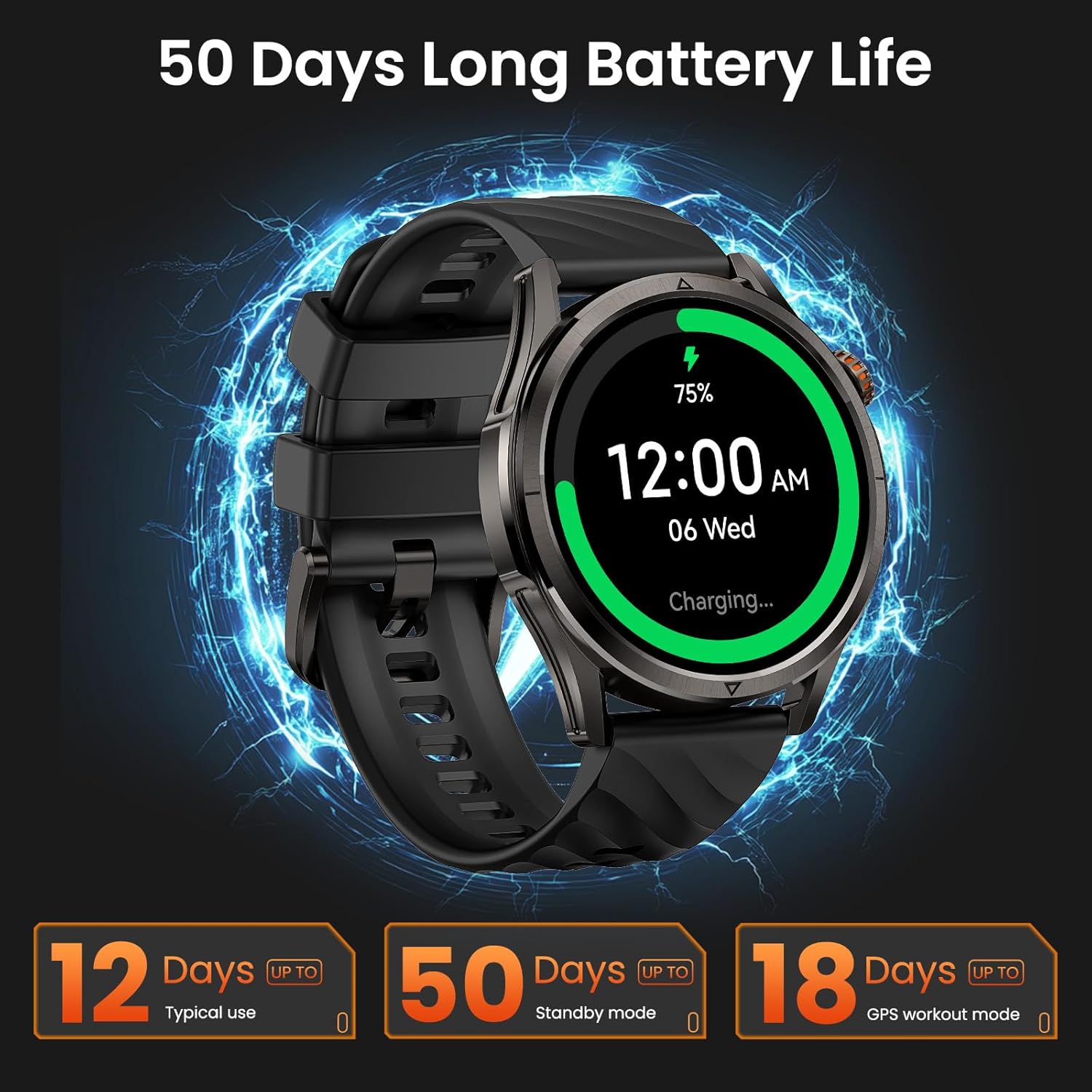
Image 3.1: KOSPET Magic R10 Smart Watch on a charger, indicating 75% battery and displaying battery life estimates.
3.2 App Installation (Apexmove)
The KOSPET Magic R10 Smart Watch requires the Apexmove application for full functionality. The app is compatible with iOS 10.0+ and Android 5.1+ devices.
- Download the 'Apexmove' app from the Apple App Store (for iOS) or Google Play Store (for Android).

Image 3.2: Download the Apexmove app from your device's app store.
3.3 Pairing with Phone
To connect your watch to your smartphone:
- ډاډ ترلاسه کړئ چې ستاسو د تلیفون بلوتوث فعال دی.
- Open the Apexmove app. Navigate to 'Device' and select 'Add a new device'.
- The app will search for your watch. Select 'KOSPET Magic R10' from the list.
- په خپل تلیفون او ساعت دواړو کې د جوړه کولو غوښتنه تایید کړئ.

Image 3.3: Connection steps for iOS devices.
3.4 Notification Setup
To receive messages and app notifications on your watch, follow these steps:
د iOS وسیلو لپاره:
- Ensure the Apexmove app remains active in the background.
- In the Apexmove app, go to 'Device' and open 'SMS Reminder' to enable SMS notifications.
- Still in 'Device', click 'App Notification' and enable notifications for desired applications.
- Go to your iPhone's 'Settings' > 'Notifications' > 'Apexmove' and allow notifications.

Image 3.4: iOS message and app notification setup.
د Android وسیلو لپاره:
- Keep the Apexmove app active (add to whitelist in settings if necessary).
- Turn off 'Do Not Disturb' and 'Low Power Mode' on your phone.
- In the Apexmove app, go to 'Device' and open 'SMS Reminder' to enable SMS notifications.
- Still in 'Device', click 'App Notification' and enable notifications for desired applications.
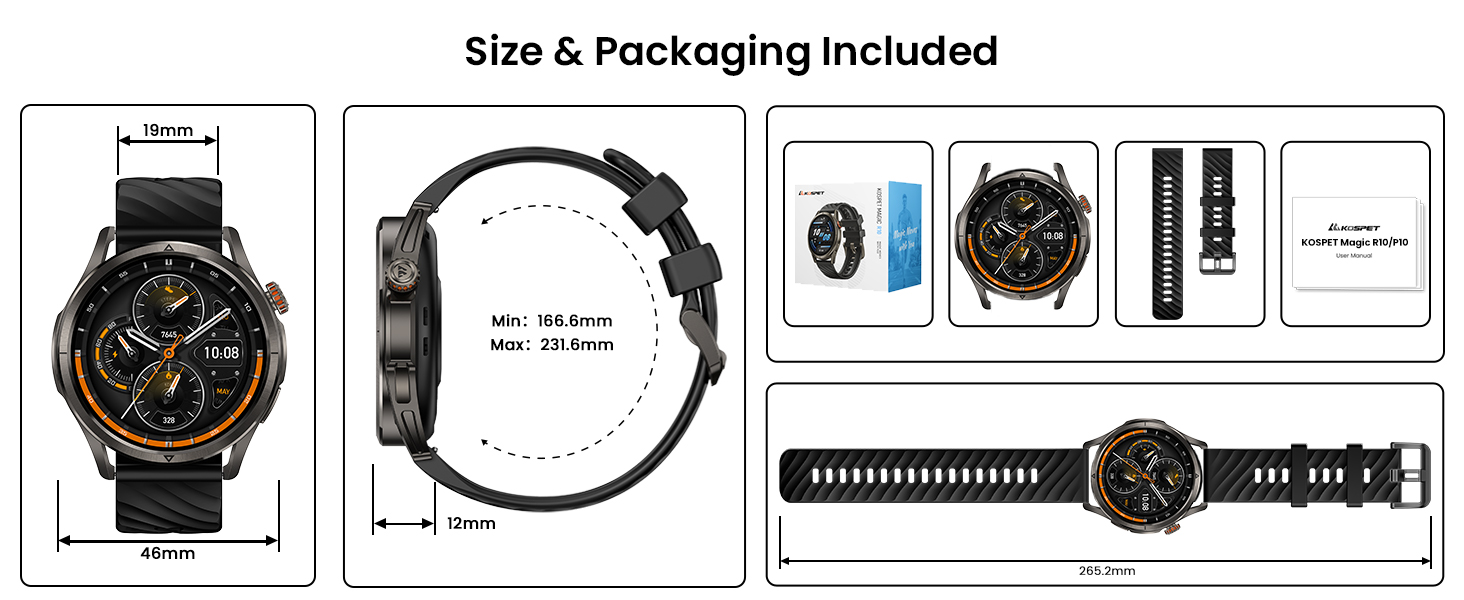
Image 3.5: Android message and app notification setup.
4. عملیاتي لارښوونې
۲.۱ ښودنه او نیویګیشن
The Magic R10 features a 1.43" AMOLED display with Corning Gorilla Glass for durability and clear visibility. Navigate the watch interface using touch gestures and the physical buttons.
۵.۳ د جي پي ایس فعالیت
The watch includes built-in GPS that connects to 6 satellite systems, providing accurate location tracking. Dual-band GNSS ensures reliable signal strength, even in challenging environments. An integrated Altitude Pressure Compass provides elevation data and directional guidance.

Image 4.1: Multi-GNSS positioning and route tracking.
4.3 سپورت موډونه
The Magic R10 supports 180 sport modes. It also features 6 smart recognition sports (walking, cycling, elliptical, etc.) that automatically detect and begin monitoring your activity without manual input.

Image 4.2: Apexmove app interface displaying activity data for various sports.
4.4 د روغتیا څارنه
The watch is equipped with a 4PD sensor for comprehensive health tracking, including:
- د زړه ضربان: د زړه ضربان ۲۴/۷ دوامداره څارنه.
- SpO2: Blood oxygen saturation tracking.
- د خوب څارنه: د خوب تعقیبويtagموده او موده.
- Stress and Emotions: د فشار کچه څاري.
- Menstrual Cycles: Provides tracking for women's health.
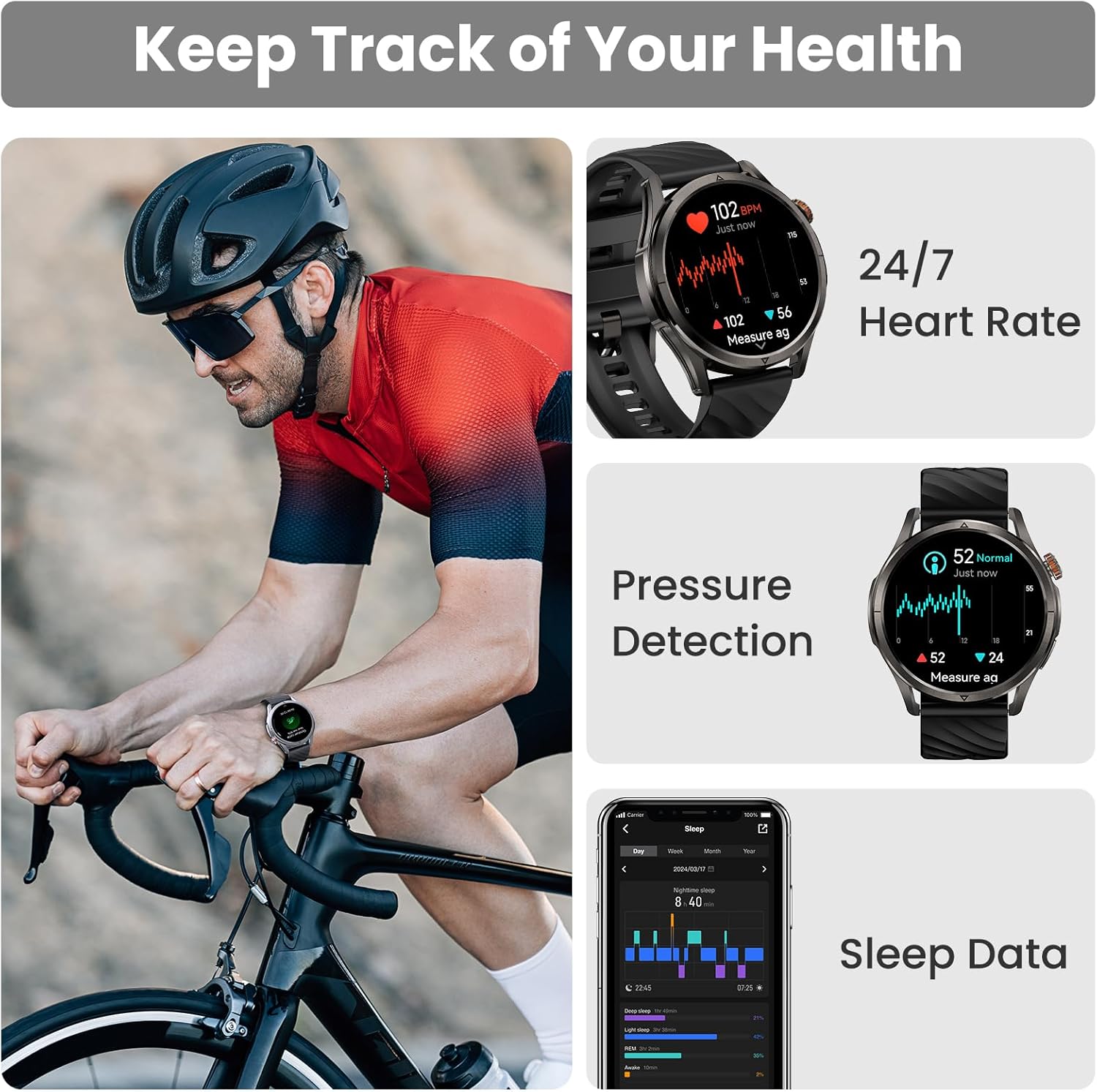
Image 4.3: Health monitoring features including heart rate, pressure, and sleep data.

Image 4.4: Menstrual cycle tracking interface.

Image 4.5: Heart rate monitoring during exercise.

Image 4.6: Sleep monitoring data display.
4.5 Calling and Notifications
The watch allows you to answer and make calls directly from your wrist when connected to your phone. It also displays message reminders and notifications from various applications.

Image 4.7: Call management, voice assistant, and message reminders.
4.6 د غږ مرسته
Utilize the built-in voice assistant for hands-free task execution, such as checking weather or initiating calls.
5. ساتنه
۲.۷ د اوبو مقاومت
The Magic R10 has a 5ATM water resistance rating, making it suitable for swimming and daily exposure to water (rain, sweat). It is not recommended for diving or high-pressure water activities.

Image 5.1: Watch being used for swimming, demonstrating 5ATM water resistance.
5.2 پاکول
خپل ساعت او تسمه په منظم ډول د نرم، ډamp ټوکر. د سختو کیمیاوي موادو یا خړوبونکو موادو کارولو څخه ډډه وکړئ. ډاډ ترلاسه کړئ چې د چارج کولو دمخه د چارج کولو اړیکې پاکې او وچې دي.
5.3 د بیټرۍ پاملرنه
د بیټرۍ ژوند اوږدولو لپاره:
- د سخت تودوخې څخه ډډه وکړئ.
- Charge the watch fully before prolonged storage.
- Do not allow the battery to completely drain frequently.
6. ستونزه حل کول
۷.۲ د بلوتوث اتصال ستونزې
If your watch fails to connect or maintain a Bluetooth connection:
- ډاډ ترلاسه کړئ چې ستاسو په تلیفون او ساعت کې بلوتوټ فعال دی.
- خپل تلیفون او ساعت دواړه بیا پیل کړئ.
- Ensure the Apexmove app is updated to the latest version.
- Try unpairing the watch from your phone's Bluetooth settings and then re-pairing through the Apexmove app.
- Check if other Bluetooth devices are causing interference. Temporarily disconnect other devices if necessary.
۵.۱ د بیټرۍ لنډ ژوند
که د بیټرۍ ژوند د توقع څخه لنډ وي:
- د سکرین روښانتیا کمه کړئ.
- Disable 'Always On Display' if enabled.
- Limit frequent GPS usage or long GPS tracking sessions.
- غیر ضروري خبرتیاوې بندې کړئ.
- Ensure the watch is fully charged using the provided cable.
۸.۳ ناسم روغتیایی معلومات
For accurate health monitoring:
- ډاډ ترلاسه کړئ چې ساعت ستاسو په لاس کې په کلکه اغوستل شوی دی، نه ډیر تنګ او نه ډیر خلاص.
- د سینسر ساحه پاکه وساتئ.
- د اندازه کولو په وخت کې له ډیر حرکت څخه ډډه وکړئ (د مثال په توګه، SpO2).
7. مشخصات
| فیچر | مشخصات |
|---|---|
| د ماډل شمیره | Magic R10 |
| د سکرین اندازه | ۷۸۷ انچه |
| د ښودلو ډول | AMOLED |
| د بدن مواد | سټینلیس سټیل |
| د اوبو مقاومت | 5ATM |
| GPS | Built-in GPS (6 satellite systems, Dual-band GNSS) |
| د بیټرۍ ظرفیت | 450 ملیونهamp ساعتونه |
| د بیټرۍ ژوند (عام استعمال) | تر 12 ورځو پورې |
| Battery Life (GPS Workout Mode) | تر 18 ساعتونو پورې |
| Battery Life (Standby Mode) | تر 50 ورځو پورې |
| د حافظې د ذخیره کولو ظرفیت | 128 MB |
| د عملیاتي سیسټم مطابقت | Android 5.1+ او iOS 10.0+ |
| ارتباط | بلوتوث |
| ځانګړي ځانګړتیاوې | Activity Tracker, Always On Display, GPS, Notifications, Voice Assistant, Phone Call |
| د توکي وزن | 9.6 اونس |

Image 7.1: Watch dimensions and package contents.
8. تضمین او ملاتړ
For warranty information and customer support, please refer to the official KOSPET website or contact the retailer from whom you purchased the device. Keep your proof of purchase for warranty claims.


