1. پیژندنه
This manual provides detailed instructions for the SatelliteSale Notus M2 Remote Control, a voice-activated Bluetooth replacement designed for Optimum Stream Devices. It covers setup, operation, maintenance, and troubleshooting to ensure optimal performance and user experience.

انځور: مخکینۍ برخه view of the SatelliteSale Notus M2 Remote Control.
2. د بسته محتويات
ډاډ ترلاسه کړئ چې ټول توکي په کڅوړه کې شتون لري:
- 1 x SatelliteSale Notus M2 Remote Control
- ۲ x AAA بیټرۍ (مخکې نصب شوي یا په جلا توګه شامل شوي)
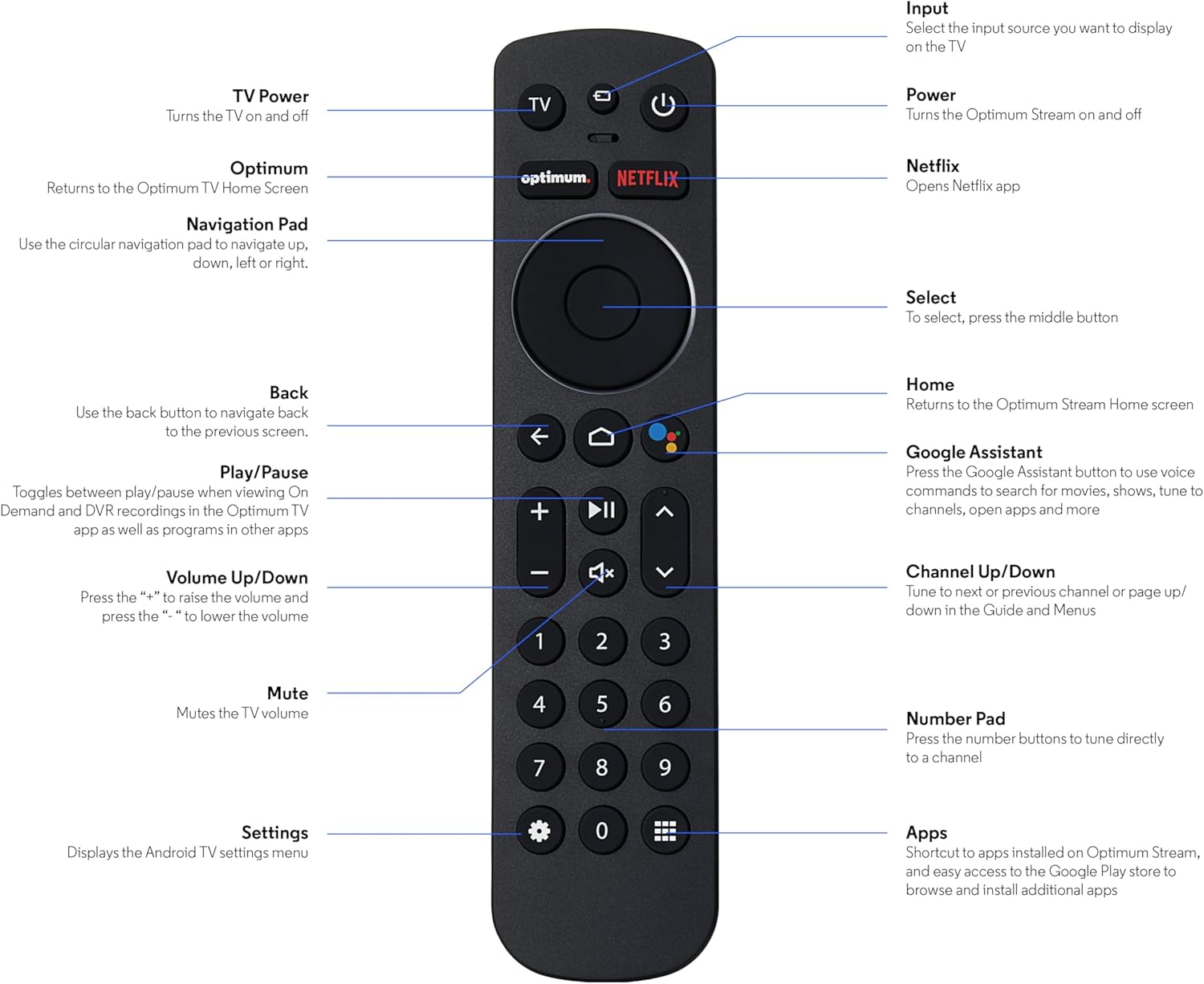
Image: The SatelliteSale Notus M2 Remote Control shown alongside two AAA batteries.
3. Remote Control Layout and Functions
Familiarize yourself with the buttons and their functions on your SatelliteSale Notus M2 Remote Control.

Image: Detailed diagram of the SatelliteSale Notus M2 Remote Control with labels for each button and its corresponding function.
- د تلویزیون ځواک: تلویزیون روان او بندوي.
- داخلول: Selects the input source to display on the TV.
- ځواک: Turns the Optimum Stream device on and off.
- غوره: Returns to the Optimum TV Home Screen.
- Netflix: Opens the Netflix application directly.
- د نیویګیشن پیډ (سرکلر): Use to navigate up, down, left, or right within menus.
- Select (Middle Button of Nav Pad): یو انتخاب تاییدوي.
- شاته: مخکینی سکرین ته راستنیږي.
- کور: Returns to the Optimum Stream Home screen.
- Google Assistant (Microphone Icon): Activates voice commands for search, playback control, and hands-free assistance.
- پلی کول / ودرول: Toggles between play and pause for content.
- حجم پورته / ښکته (+/-): د تلویزیون حجم تنظیموي.
- خاموش: Mutes the TV volume.
- چینل پورته/ښکته (غشي): Tunes to the next or previous channel, or navigates pages in guides and menus.
- د شمېرې پیډ (۰-۹): Directly tunes to a channel or enters numerical input.
- ترتیبات (د ګیر عکس): Displays the Android TV settings menu.
- Apps (Grid Icon): Provides shortcuts to installed apps on Optimum Stream and access to the Google Play Store.
4. ترتیب کول
4.1 د بیټرۍ نصب کول
The remote requires two AAA batteries. Ensure correct polarity when inserting.
- د ریموټ کنټرول شاته د بیټرۍ کڅوړه ومومئ.
- د خلاصولو لپاره د بیټرۍ پوښ ښکته خوا ته وغورځوئ.
- دوه AAA بیټرۍ دننه کړئ، د (+) او (-) ټرمینلونو سره سمون خوري لکه څنګه چې د خونې دننه ښودل شوي.
- د بیټرۍ پوښ بیرته خپل ځای ته د سلایډ کولو سره بدل کړئ تر هغه چې کلیک وکړي.

انځور: View of the remote control with the battery compartment open, showing the correct orientation for AAA battery insertion.
4.2 Pairing Your Remote with Optimum Stream Device
Your remote is designed to be paired with your Optimum Stream device for full functionality, including Bluetooth connectivity and voice control. If your remote becomes unpaired or if you are setting up a new remote, follow these steps:

Image: An illustration explaining the importance of direct line of sight for initial pairing and the flexibility of remote placement after pairing.
مهمه یادونه: For initial pairing, the Optimum Stream box needs to be in direct line of sight of the remote. If your box is behind a TV or in a cabinet, you may need to temporarily relocate it so the remote can be directly pointed at the Stream box. Once pairing is complete, the Stream box can be moved out of sight as the remote uses Bluetooth.
- Ensure batteries are correctly installed in your remote.
- Turn on your TV and your Optimum Stream cable box.
- Press any button on the Stream remote to ensure you are on the Home Screen.
- د کور سکرین څخه، غوره کړئ ترتیبات (gear icon).
- وټاکئ Device and Remote Settings > لیرې او لوازم.
- وټاکئ Add Stream Remote.
- د جوړه کولو پروسې بشپړولو لپاره د پردې لارښوونې تعقیب کړئ.
- You will see an on-screen confirmation once the remote is successfully paired.

Image: Visual representation of pairing steps 1 through 5, showing the remote and on-screen prompts.

Image: Visual representation of pairing steps 6 through 9, detailing the final stages of the pairing process.
5. عملیاتي لارښوونې
5.1 د غږ کنټرول
The SatelliteSale Notus M2 remote features voice control for convenient operation. Press the microphone button (Google Assistant icon) and speak your command clearly. You can use voice commands to:
- لټون content (movies, TV shows, actors).
- پلې بیک کنټرول کړئ (لوبه کول، وقفه کول، ګړندی مخ په وړاندې کول، بیرته راګرځول).
- غوښتنلیکونه خلاص کړئ.
- Tune to specific channels.
- Get information (weather, sports scores).

Image: A person using the voice control feature of the remote, with sound waves emanating from the remote towards the TV screen.

انځور: یو پخوانیample of a voice command, "Hey Google, turn on the Spider-Man movie," displayed on screen with the remote.
5.2 Bluetooth Wireless Connectivity
Once paired, the remote utilizes Bluetooth for communication with your Optimum Stream device. This means you do not need a direct line of sight to operate the device, allowing for greater flexibility in remote usage and device placement.
5.3 Dedicated Streaming App Buttons
The remote includes dedicated buttons for popular streaming applications, such as Netflix. Pressing these buttons provides one-touch access to your favorite entertainment platforms.
6. ساتنه
- پاکول: Use a soft, dry cloth to clean the remote. Do not use liquid cleaners or aerosols.
- د بیټرۍ بدلول: Replace batteries when the remote's response becomes sluggish or it stops functioning. Always replace both batteries at the same time with new AAA batteries.
- ذخیره کول: ریموټ په یخ او وچ ځای کې د مستقیم لمر وړانګو او سختې تودوخې څخه لرې وساتئ.
7. ستونزه حل کول
| ستونزه | احتمالي لامل | د حل لاره |
|---|---|---|
| ریموټ بې ځوابه دی. | مړه یا ټیټ بیټرۍ. | دواړه AAA بیټرۍ نوي سره بدل کړئ. |
| Remote not controlling Optimum Stream device. | Remote is unpaired or pairing failed. | Follow the pairing instructions in Section 4.2. Ensure direct line of sight during initial pairing. |
| د غږ کنټرول کار نه کوي. | Remote not paired via Bluetooth, or microphone issue. | Ensure the remote is properly paired via Bluetooth (Section 4.2). Speak clearly and close to the microphone. |
| تڼۍ چپکونکې یا بې ځوابه دي. | د تڼیو لاندې خاورې یا کثافات. | ریموټ د نرم او وچ ټوکر سره پاک کړئ. د توییدو څخه مخنیوی وکړئ. |
8. مشخصات
| فیچر | تفصیل |
|---|---|
| د ماډل شمیره | SS-RC-NOTUS-M2 |
| ارتباط | بلوتوث بې سیم |
| ځانګړي ځانګړتیاوې | Voice Activated (Google Assistant), Dedicated App Buttons, Ergonomic Design |
| مطابقت لرونکې وسیلې | Optimum Stream Box (powered by Android TV) |
| د بریښنا سرچینه | 2 x AAA بیټرۍ (شامل دي) |
| رنګ | مټ تور |
| د توکي وزن | 3.66 اونس |
| د کڅوړې ابعاد | 7.28 x 1.89 x 1.22 انچه |
9. تضمین او ملاتړ
For warranty information or technical support, please refer to the official SatelliteSale webسایټ ته لاړ شئ یا مستقیم د دوی د پیرودونکو خدماتو سره اړیکه ونیسئ. د تضمین ادعاوو لپاره خپل د پیرود رسید وساتئ.
جوړونکی: سپوږمکۍ


