پیژندنه
The GAMDIAS Aura GC10m V2 WH is a micro-tower computer case designed for Micro-ATX and Mini-ITX motherboards. It features a dual-chamber design, panoramic tempered glass panels, and comes equipped with three Addressable RGB (ARGB) fans to enhance system aesthetics and cooling. This manual provides essential information for the proper installation, operation, and maintenance of your computer case.
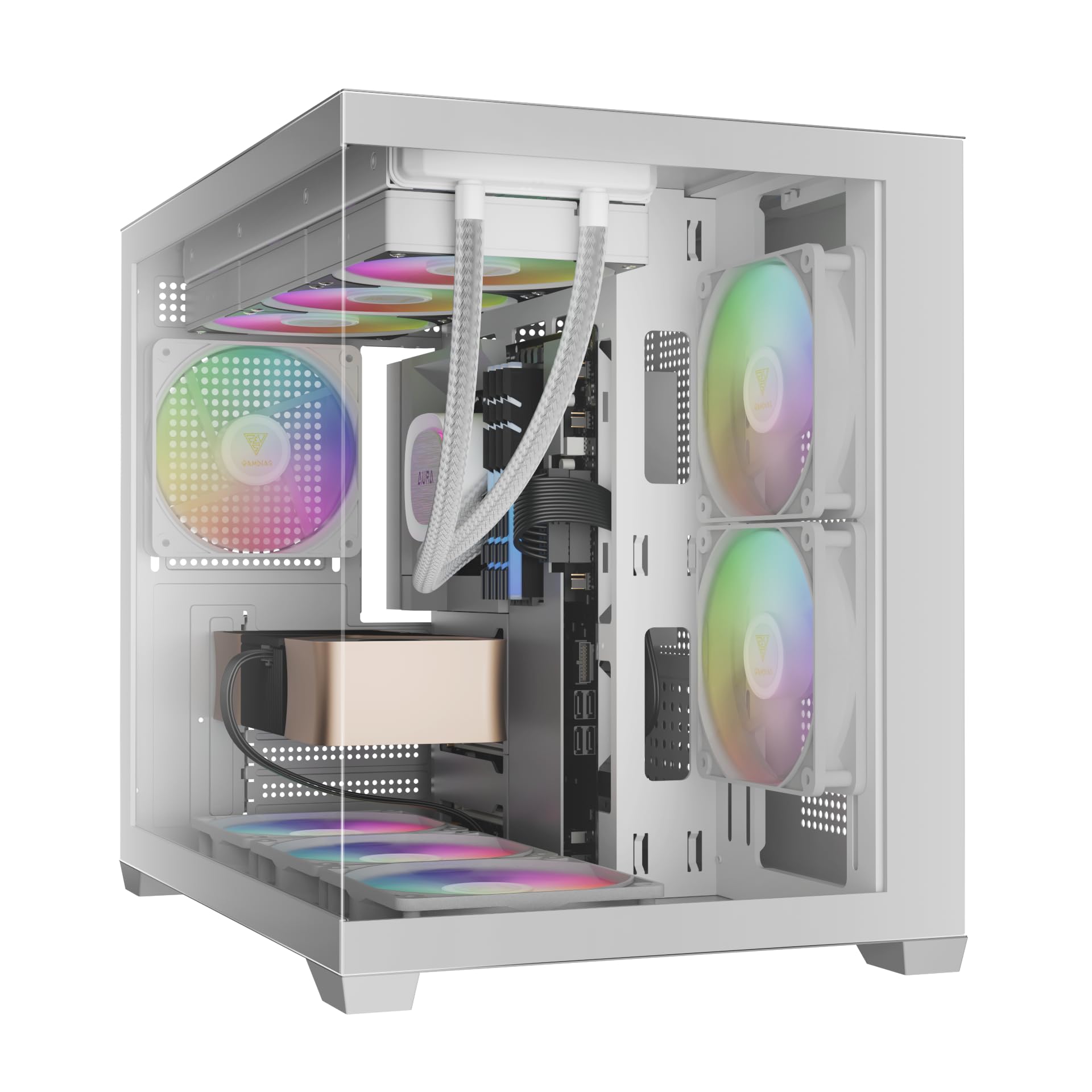
انځور: مخکینۍ برخه view of the GAMDIAS Aura GC10m V2 WH Micro-Tower Computer Case, showcasing its tempered glass panels and pre-installed ARGB fans.
تنظیم او نصب کول
د نصبولو پیل کولو دمخه، ډاډ ترلاسه کړئ چې تاسو ټول اړین اجزا او وسایل لرئ. د نصبولو ځانګړو لارښوونو لپاره خپل مور بورډ او اجزاو لارښودونو ته مراجعه وکړئ.
۱. د قضیې چمتو کول
Carefully remove the tempered glass side and front panels. These are typically secured with thumbscrews or a latch mechanism. Place them on a soft, flat surface to prevent scratches.

انځور: زاویه لرونکی view of the case with the tempered glass side panel removed, showing the internal structure and fan mounts.
2. د مور بورډ نصب کول
- د I/O شیلډ (که ستاسو د مور بورډ سره مخکې له مخکې وصل نه وي) د کیس په شا خلاصیدو کې نصب کړئ.
- Align your Micro-ATX or Mini-ITX motherboard with the standoffs inside the case.
- د ورکړل شویو پیچونو په کارولو سره مور بورډ خوندي کړئ.

انځور: داخلي view of the case, highlighting the motherboard tray area and fan mounting points.
۳. د بریښنا رسولو واحد (PSU) نصب کول
- Install your PSU into its designated compartment, typically at the rear bottom of the case.
- د قضیې له شا څخه د پیچونو سره PSU خوندي کړئ.
- Ensure the PSU fan faces the correct direction for optimal airflow (usually downwards if there's a vent, or upwards if not).

Image: Rear internal view of the case, showing the PSU mounting area and cable routing options.
4. د ډرایو نصب کول
- 3.5" / 2.5" Drive Bay (HDD Cage): Locate the HDD cage. Install one 3.5" HDD or one 2.5" SSD/HDD.
- 2.5" Drive Bays: The case supports three additional 2.5" SSDs/HDDs. Mount these drives to the designated brackets or locations within the case.
5. د فین او ریډیټر نصب کول
The case comes with three pre-installed ARGB fans (two side, one rear). Additional fans or radiators can be installed in the following locations:
- پورته: Supports 3 x 120mm or 2 x 140mm fans; 360mm or 280mm radiators.
- اړخ: Supports 2 x 120mm or 2 x 140mm fans; 240mm radiators. (Pre-installed 2 x 120mm ARGB fans)
- لاندې: د ۲ x ۱۲۰ ملي میتر یا ۲ x ۱۴۰ ملي میتر فین ملاتړ کوي.
- شاته: Supports 1 x 120mm or 1 x 140mm fan; 120mm radiators. (Pre-installed 1 x 120mm ARGB fan)

انځور: داخلي view showing the pre-installed ARGB fans on the side and rear, illustrating fan placement.
6. Connecting Front I/O Ports and ARGB
Connect the following cables from the case to your motherboard:
- USB 2.0: Connect the USB 2.0 header cable.
- ډول- C: Connect the USB Type-C header cable (if your motherboard supports it).
- HD آډیو: Connect the HD Audio header cable.
- Power/Reset/LEDs: Connect the front panel power, reset, HDD LED, and power LED cables according to your motherboard manual.
- ARGB Fans: Connect the ARGB fan cables to your motherboard's 5V ARGB header or to the integrated ARGB controller (if applicable). The case includes an LED Switch Button for controlling ARGB lighting if connected to the case's internal controller.

انځور: پورته view of the case, showing the front I/O panel with USB ports and the LED switch button.
عملیات
پاور کول
Once all components are installed and connected, close the side panels. Connect your monitor, keyboard, mouse, and power cable. Press the power button on the front panel of the case to start your system.
د ARGB رڼا کنټرول
مخکې له مخکې نصب شوي ARGB فین په دوه لارو کنټرول کیدی شي:
- د LED سویچ تڼۍ: If the ARGB fans are connected to the case's internal controller, press the dedicated LED Switch Button on the front I/O panel to cycle through various lighting effects and colors.
- د مور بورډ سافټویر: If the ARGB fans are connected directly to a compatible 5V ARGB header on your motherboard, you can control the lighting effects using your motherboard's proprietary RGB software (e.g., ASUS Aura Sync, MSI Mystic Light, Gigabyte RGB Fusion, ASRock Polychrome Sync).
ساتنه
منظم ساتنه ستاسو د کمپیوټر اجزاو غوره فعالیت او اوږد عمر ډاډمن کولو کې مرسته کوي.
- د دوړو فلټرونه: The case features removable dust filters (e.g., on the top and bottom). Periodically remove and clean these filters with compressed air or water (ensure they are completely dry before reinstallation).
- د قضیې پاکول: یو نرم استعمال کړئ، دamp cloth to clean the exterior surfaces of the case. For tempered glass panels, use a glass cleaner and a microfiber cloth. Avoid abrasive cleaners.
- د داخلي دوړو لرې کول: Every few months, open the case and use compressed air to remove dust from internal components, especially fan blades and heatsinks.
د ستونزو حل کول
که تاسو له ستونزو سره مخ شئ، لاندې عام حلونه په پام کې ونیسئ:
- سیسټم نه فعالیږي:
- ډاډ ترلاسه کړئ چې PSU چالان شوی او په سمه توګه د دیوال آوټ لیټ سره وصل دی.
- ډاډ ترلاسه کړئ چې ټول بریښنا کیبلونه (24-pin ATX، CPU، GPU، ډرایوونه) په خوندي ډول وصل دي.
- Check that the front panel power button cable is correctly connected to the motherboard.
- ARGB Fans Not Lighting Up/Spinning:
- Confirm ARGB cables are securely connected to a 5V ARGB header on the motherboard or the case's controller.
- Ensure fan power cables are connected to appropriate fan headers on the motherboard or PSU.
- If using motherboard software, verify it is installed and configured correctly.
- مخکینۍ I/O پورټونه کار نه کوي:
- Check that the USB and HD Audio cables from the front panel are correctly connected to their respective headers on the motherboard.
For persistent issues, consult your motherboard manual or contact GAMDIAS support.
مشخصات
| ماډل | AURA GC10 V2 WH |
| د قضیې ډول | Micro-Tower |
| د مور بورډ ملاتړ | Micro-ATX، Mini-ITX |
| ابعاد (LxWxH) | 42 x 29 x 37 سانتي متره |
| وزن | 5 کیلو ګرامه |
| د ډرایو خلیج | 1 x 3.5" or 1 x 2.5" (HDD Cage), 3 x 2.5" |
| I/O بندرونه | 1 x Type-C, 1 x USB 2.0, 1 x HD Audio, 1 x LED Switch Button |
| مخکې نصب شوي فین | 2 x 120mm ARGB (Side), 1 x 120mm ARGB (Rear) |
| د فین ملاتړ |
|
| د ریډیټر ملاتړ |
|
| د CPU کولر لوړوالی محدودیت | 165mm |
| VGA Length Limit | 400mm |
| PSU Length Limit | 160mm |
د تضمین معلومات
For detailed warranty terms and conditions, please refer to the official GAMDIAS webسایټ یا د تضمین کارت چې ستاسو محصول سره شامل دی. د تضمین ادعاوو لپاره د پیرود ثبوت وساتئ.
د پیرودونکي ملاتړ
If you require further assistance or have questions regarding your GAMDIAS Aura GC10m V2 WH computer case, please contact GAMDIAS customer support.
- جوړونکی: GAMDIAS TAIWAN
- پته: No. 113, Jian 2nd Rd., Zhonghe, Dist., New Taipei City 235, Taiwan
- واردونکی (هند): Allway Distributions Pvt Ltd, No-49, H.B. Samajha Road, Baswangudi , Bengaluru- 560004
- Importer Contact (India): 8904307700
- رسمي Webسایټ: www.gamdias.com (مهرباني وکړئ رسمي وګورئ website for the most up-to-date support contact information and resources.)


