1. پیژندنه
This manual provides detailed instructions for the installation, operation, and maintenance of your SINOVCLE 7-inch Wireless CarPlay & Android Auto Portable Car Stereo. Please read this manual thoroughly before using the device to ensure proper functionality and safety. Keep this manual for future reference.
2. محصول ختم شوview
2.1 د بسته محتويات
ډاډ ترلاسه کړئ چې ټول توکي په کڅوړه کې شتون لري:
- Car Stereo Display
- Mounting Hardware (High Freedom Stand)
- د کارن لارښود
- Reversing Camera (Optional, if included in your package)
- 64G TF Card (Optional, if included in your package)
- 1 USB Cigarette Lighter Power Plug
- AV IN Input Cable
- AUX کیبل

Image: Contents of the SINOVCLE Portable Car Stereo package, including the main unit, mounting stand, cables, and optional accessories.
2.2 کلیدي ځانګړتیاوې
- ۵.۰ انچه IPS ټچ سکرین: Provides a clear display with 1024x600 resolution.
- بېسیم او تار لرونکی کارپلی/انډرایډ آټو: Seamless integration with your smartphone for navigation, music, and communication.
- بلوتوث 5.0: Supports hands-free calling and wireless audio streaming.
- د GPS نیویګیشن: Utilizes online maps from your connected smartphone for real-time navigation.
- د عکس لینک: Displays your smartphone screen directly on the device.
- د FM لیږدونکی: Transmits audio to your vehicle's FM radio for sound output through car speakers.
- AUX محصول: Connects directly to your car's AUX input for audio output.
- Backup Camera Input (AVIN): Supports connection to a reversing camera for parking assistance.
- نړیوال فټ: Compatible with a wide range of vehicles (12V-30V DC power supply).
- د USB چارج بندر: Dedicated USB port on the power plug for phone charging.

Image: The SINOVCLE 7-inch Portable Car Stereo display unit along with its suction cup mount, backup camera, AUX cable, and 64GB TF card.
۴. د تنظیم لارښوونې
3.1 د آلې نصبول
Attach the provided mounting hardware to the back of the car stereo display. Secure the mount to your dashboard or windshield using the suction cup. Adjust the screen angle for optimal viewing. The mount allows for 360-degree adjustment.
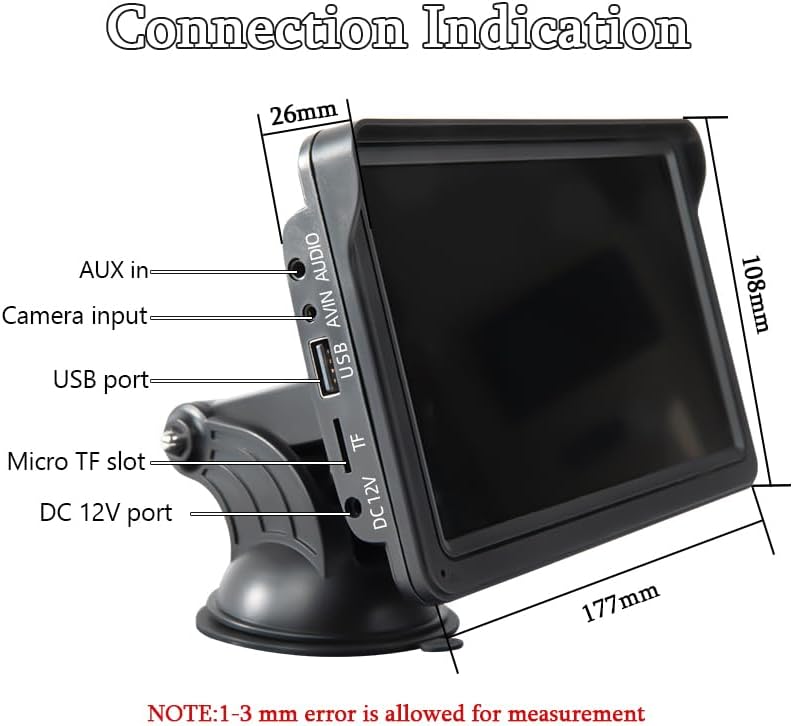
Image: Illustrations demonstrating the 360-degree adjustability of the screen mount, allowing for various viewزاویې او موقعیتونه
3.2 د بریښنا نښلول
This device is powered via the cigarette lighter power plug. Insert the power plug into your vehicle's cigarette lighter socket. The device will power on automatically. The power supply voltage range is 12V to 30V DC, making it suitable for most vehicle models.

Image: The car stereo installed on a dashboard, showing the power cable connected to the cigarette lighter socket, which includes a dedicated USB port for phone charging.
3.3 Connecting a Backup Camera (Optional)
If you have a backup camera, connect its video output to the AVIN (Reversing camera input) port on the car stereo using a 2.5mm to RCA adapter cable. Ensure the camera is properly installed and powered according to its own instructions.

Image: The car stereo displaying a backup camera feed with parking guidelines, alongside a separate image of a rear-view د کیمرې واحد.
4. عملیاتي لارښوونې
4.1 CarPlay & Android Auto Connection
The device supports both wired and wireless connections for Apple CarPlay and Android Auto.
د بریښنا پيوستون
- Connect your smartphone to the car stereo's USB port using a USB data cable.
- The device will automatically enter the CarPlay or Android Auto interface.
4.1.2 بيسيم پيوستون
- On your smartphone, enable both Bluetooth and Wi-Fi functions.
- On the car stereo, navigate to the 'PhoneLink' or 'CarPlay/Android Auto' section.
- لټون and connect to the car stereo's Bluetooth device name from your phone's Bluetooth settings.
- Once Bluetooth is paired, the device will automatically initiate the CarPlay or Android Auto interface via Wi-Fi.

Image: A sequence of smartphone screenshots illustrating the steps to connect to CarPlay wirelessly, including enabling Wi-Fi and Bluetooth, selecting the device, and confirming pairing.

Image: A sequence of smartphone screenshots illustrating the steps to connect to Android Auto wirelessly, including enabling Wi-Fi and Bluetooth, selecting the device, and confirming pairing.
4.2 د GPS نیویګیشن
When connected to CarPlay or Android Auto, the device utilizes your smartphone's online map applications (e.g., Google Maps, Apple Maps) for navigation. This provides live GPS tracking, instant route adjustments for traffic, and access to up-to-date maps without manual updates. The 7-inch screen offers a larger, clearer view د نیویګیشن لپاره.

Image: The car stereo displaying a navigation route from a mapping application, with various map app icons shown alongside.
4.3 د بلوتوټ فعالیت
The integrated Bluetooth 5.0 allows for:
- د لاسونو څخه وړیا تلیفون کول: Make and receive calls directly from the car stereo display using the built-in microphone.
- د بې سیم میوزیک جریان: Play audio from your smartphone through the car stereo.
- Dual-Device Pairing: Maintain connection with two devices for seamless switching between audio sources.

Image: The car stereo displaying a phone dialer interface, indicating active Bluetooth connection for hands-free calling, with a smartphone also showing a call screen.
4.4 FM Transmitting
To output audio through your vehicle's speakers via FM radio:
- On the car stereo, select the FM Transmitter function.
- Choose an unoccupied FM frequency on the car stereo.
- Tune your vehicle's FM radio to the exact same frequency.
- Audio from the car stereo will now play through your car's speakers. Avoid frequencies occupied by local FM stations to prevent interference.

Image: The car stereo displaying FM transmission settings, with a car's built-in radio also tuned to the same FM frequency, illustrating the audio transmission process.
4.5 AUX Cable Connection
If your car has an AUX input, you can connect the car stereo directly using the provided AUX cable for audio output. Plug one end into the car stereo's audio port and the other into your car's AUX input.
۵.۵ د عکس لینک
The Mirror Link function allows you to display your smartphone's screen directly on the car stereo. Connect your iPhone via USB cable for casting. For Android phones, connect via USB and follow prompts to install any necessary app software on your mobile phone.

Image: The car stereo displaying a mirrored smartphone screen, with separate images showing wired connection methods for iPhone and Android devices to enable Mirror Link.
5. ساتنه
To ensure the longevity and optimal performance of your SINOVCLE car stereo, follow these maintenance guidelines:
- پاکول: د سکرین او بهرنۍ برخې پاکولو لپاره نرم، وچ ټوکر وکاروئ. د سختو داغونو لپاره، لږ څه وچ کړئampټوکر د اوبو یا سکرین خوندي پاکوونکي سره ومینځئ. د خړوبونکي موادو یا سخت کیمیاوي موادو څخه ډډه وکړئ.
- دحرارت درجه: د اوږدې مودې لپاره د وسیلې د سختو تودوخې، ګرم او سړې دواړو سره د تماس څخه ډډه وکړئ.
- رطوبت: Keep the device dry. Do not expose it to water or other liquids.
- د کیبل مدیریت: Ensure all cables are securely connected and not pinched or tangled, which can cause damage.
- د سافټویر تازه معلومات: جوړونکي وګورئ website periodically for any available firmware updates to improve performance and add features.
6. ستونزه حل کول
که تاسو په خپل وسیله کې ستونزې سره مخ شئ، لاندې عامې ستونزې او حل لارې وګورئ:
۱ برېښنا نشته
- د بریښنا اتصال چیک کړئ: Ensure the cigarette lighter power plug is fully inserted into the vehicle's socket and the vehicle's ignition is on.
- د موټر ځواک: ډاډ ترلاسه کړئ چې د موټر د سګرټ لایټر ساکټ فعال دی (د مثال په توګه، د بل وسیلې سره د ازموینې له لارې).
- فیوز: Check the fuse in the cigarette lighter plug or your vehicle's fuse box if applicable.
6.2 Wireless CarPlay/Android Auto Connection Issues
- بلوتوث او وای فای: Ensure both Bluetooth and Wi-Fi are enabled on your smartphone.
- وسیله هیر کړئ: On your smartphone, 'forget' the car stereo from your Bluetooth and Wi-Fi settings, then attempt to pair again.
- وسیلې بیا پیل کړئ: Restart both your smartphone and the car stereo.
- Manual Discrepancy: If the on-screen display differs from the manual's instructions, prioritize the on-screen prompts or contact support.
- د تار سره د نښلولو ازموینه: Try a wired connection to confirm basic functionality of CarPlay/Android Auto.
۶.۱ د آډیو آوټ پټ نشته
- د حجم کچه: Check the volume settings on both the car stereo and your vehicle's audio system.
- د FM لیږدونکی: If using FM transmission, ensure the car stereo and your vehicle's radio are tuned to the exact same, unoccupied frequency.
- د AUX اتصال: If using AUX, ensure the cable is securely connected to both the car stereo and your vehicle's AUX input, and your car's audio source is set to AUX.
- بلوتوټ آډیو: If using Bluetooth, ensure your phone's audio output is directed to the car stereo.
6.4 Backup Camera Not Displaying
- د کیبل پیوستون: Verify the AVIN cable is securely connected to the car stereo.
- د کیمرې ځواک: Ensure the backup camera itself is receiving power and is functioning correctly.
- اډاپټر کیبل: Confirm the 2.5mm to RCA adapter cable is correctly used and not damaged.
۵.۳ د ټچ سکرین بې ځوابه
- بیا پیل کول: بریښنا بنده کړئ او وسیله بیا پیل کړئ.
- پاکه پرده: ډاډ ترلاسه کړئ چې سکرین پاک او د کثافاتو یا رطوبت څخه پاک دی.
7. مشخصات
| فیچر | مشخصات |
|---|---|
| د ماډل شمیره | XSP-207-SXT-303-12D |
| د سکرین اندازه | 7 انچه |
| د ښودلو ریزولوشن | IPS 1024x600 |
| د ارتباط ټیکنالوژي | مرستندویه، بلوتوث، USB |
| بلوتوث نسخه | 5.0 |
| د کنټرولر ډول | ټچ سکرین |
| ځانګړي ځانګړتیاوې | Android Auto, Built-In Bluetooth, Multi-device Support, Touchscreen, Wireless Carplay |
| مطابقت لرونکې وسیلې | Smartphones (iOS/Android), Backup Cameras |
| د بریښنا رسولو Voltage | 12V~30V DC |
| د آډیو وتلې حالت | سټیریو |
| د نښلونکي ډول | 3.5mm جیک، USB |
| د محصول ابعاد | ۶۳" ژوروالی x ۵۵.۲" ژوروالی x ۳۰.۲۴" ژوروالی (۱۶۰ x ۱۴۰.۲ x ۷۶.۸ سانتي متره) |
| د توکي وزن | ۶ پونډه (۳ کیلو ګرامه) |

انځور: یوه خوا view of the SINOVCLE car stereo, highlighting its slim profile and IPS 1024x600 touch screen, with comparison images showing clarity differences.
8. د خوندیتوب معلومات
- تل وسیله په مسؤلیت سره او د ځایی ترافیک قوانینو سره سم چل کړئ.
- د موټر چلولو پرمهال د وسیله نصبولو یا خدمت کولو هڅه مه کوئ.
- ډاډ ترلاسه کړئ چې وسیله په خوندي ډول نصب شوې ده او ستاسو خنډ نه ګرځي view د سړک څخه وتل یا د موټرو کنټرول کې مداخله کول.
- Avoid prolonged exposure to direct sunlight or extreme temperatures inside the vehicle.
- وسیله د اوبو او نورو مایعاتو څخه لرې وساتئ.
9. تضمین او ملاتړ
For warranty information and technical support, please refer to the documentation provided with your purchase or contact SINOVCLE customer service directly. Contact details can typically be found on the product packaging or the official SINOVCLE webسایټ


