1. پیژندنه
This manual provides detailed instructions for the setup, operation, and maintenance of your AIPER HydroComm Smart Pool Monitor and AIPER Pilot X1 Handheld Pool Vacuum. These devices are designed to work together to ensure your pool water remains clean, healthy, and perfectly balanced.

Figure 1: AIPER HydroComm Smart Pool Monitor and Pilot X1 Handheld Pool Vacuum.
محصول پای ته ورسیدview
د AIPER HydroComm Smart Pool Monitor offers real-time, continuous monitoring of key pool water parameters. It provides instant insights and tailored recommendations via the Aiper app, ensuring optimal water quality.
د AIPER Pilot X1 Handheld Pool Vacuum is designed for efficient cleaning of both deep and shallow areas of your pool. It features powerful suction and versatile filtration options to capture various types of debris.
2. ترتیب کول
2.1 AIPER HydroComm Smart Pool Monitor Setup
- وسیله چارج کړئ: Before first use, fully charge the HydroComm monitor using the provided charging cable.
- Download the Aiper App: لټون "Aiper" in your mobile device's app store (iOS or Android) and download the official application.
- د اپلیکیشن سره جوړه کړئ:
- Open the Aiper app and create an account or log in.
- Follow the in-app instructions to add a new device. Ensure your HydroComm is powered on and within Bluetooth range of your mobile device.
- The app will guide you through the pairing process.
- په حوض کې ځای پر ځای کول: Once paired, gently place the HydroComm monitor into your pool. Ensure the detection head is fully submerged in the water.

Figure 2: AIPER HydroComm Smart Pool Monitor placed in a pool for continuous monitoring.
2.2 AIPER Pilot X1 Handheld Pool Vacuum Setup
- وسیله چارج کړئ: Connect the Pilot X1 to its charger and ensure it is fully charged before initial use.
- لاستی راټول کړئ: Attach the telescopic handle to the main vacuum unit. Ensure it clicks securely into place.
- فلټر نصب کړئ: Select the appropriate filter for your cleaning needs (360µm for large debris or 100µm with sleeve for fine particles) and install it into the filter compartment. Ensure it is properly seated.
3. عملیات
3.1 AIPER HydroComm Smart Pool Monitor Operation
- د ریښتیني وخت څارنه: The HydroComm continuously measures water parameters. Open the Aiper app to view د ریښتیني وخت ډاټا.
- 5-in-1 Water Testing: The device measures pH, ORP (Oxidation-Reduction Potential), EC (Electrical Conductivity), TDS (Total Dissolved Solids), and Temperature.

Figure 3: The HydroComm monitors five key water parameters: pH, ORP, EC, TDS, and Temperature.
- Interpreting Results & Recommendations: The Aiper app provides a comprehensive rating of your pool's condition and offers personalized recommendations to optimize water quality based on the measured parameters.

Figure 4: The Aiper app displays a comprehensive pool rating and treatment recommendations.
- د معلوماتو تعقیب او تحلیل: The app stores historical data, allowing you to track trends and analyze your pool's water quality over time.

Figure 5: The Aiper app provides data tracking and analysis features for water quality records.
3.2 AIPER Pilot X1 Handheld Pool Vacuum Operation
- پاور آن: Press the power button on the handle to turn on the vacuum.
- Dual Depth Cleaning:
- ژور حالت: Suitable for depths greater than 20 inches (50 cm), ideal for spas, above-ground, and in-ground pools, including corners.
- Shallow Mode: Ideal for depths greater than or equal to 0.6 feet (18 cm), perfect for pool steps, lounging areas, and other shallow sections.
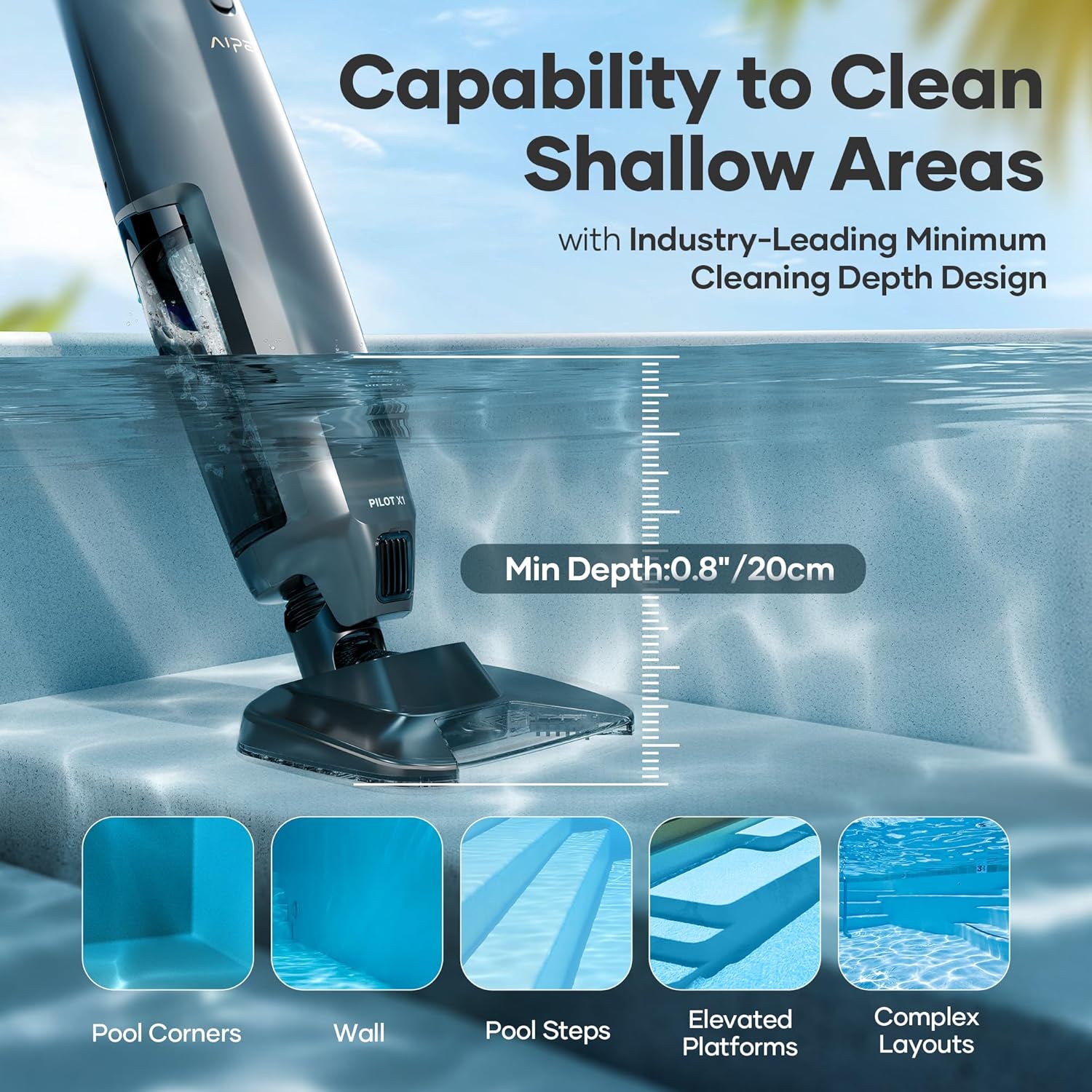
Figure 6: The Pilot X1 is capable of cleaning shallow areas such as pool steps and elevated platforms.
- د لوړ موثریت فلټریشن: The Pilot X1 offers two filter options:
- 360µm Filter: For capturing larger debris such as stones, leaves, and coarse sand.
- 100µm Filter with Sleeve: For picking up finer particles like fine sand, dust, and other small debris.

Figure 7: The Pilot X1 offers two filter options for different debris sizes.
- د پاکولو کړنلاره: Guide the vacuum along the pool surfaces, ensuring the suction head makes full contact to effectively remove debris.
- بندول: After cleaning, press the power button to turn off the vacuum.
4. ساتنه
4.1 AIPER HydroComm Smart Pool Monitor Maintenance
- د سینسر پاکول: Regularly clean the detection head and sensors with a soft cloth and clean water to ensure accurate readings. Avoid abrasive materials.
- ذخیره کول: When not in use for extended periods, store the HydroComm in a cool, dry place, away from direct sunlight. Ensure it is fully charged before storage.
4.2 AIPER Pilot X1 Handheld Pool Vacuum Maintenance
- د فلټر پاکول: After each use, remove the filter(s) and rinse them thoroughly with clean water. Allow them to air dry completely before reinstallation or storage.
- د واحد پاکول: د ویکیوم واحد بهرنۍ برخه د اعلان سره پاک کړئamp cloth. Do not submerge the entire unit in water beyond its intended operational depth.
- چارج کول: Recharge the vacuum after each use or when the battery indicator shows low power to ensure it is ready for the next cleaning session.
- ذخیره کول: Store the Pilot X1 in a dry, shaded area when not in use.
5. ستونزه حل کول
| ستونزه | احتمالي لامل | د حل لاره |
|---|---|---|
| HydroComm not connecting to app | Bluetooth off; device out of range; low battery; app issue. | Ensure Bluetooth is on. Move device closer to phone. Charge HydroComm. Restart app and device. |
| Inaccurate HydroComm readings | Dirty sensors; device not fully submerged; water chemistry imbalance. | Clean sensors thoroughly. Ensure device is fully submerged. Adjust pool chemistry as per app recommendations. |
| Pilot X1 not turning on | Low battery; power button malfunction. | Charge the vacuum fully. If problem persists, contact customer support. |
| Pilot X1 poor suction | Clogged filter; full debris compartment; improper filter installation. | Clean or replace filter. Empty debris compartment. Reinstall filter correctly. |
| Pilot X1 not holding charge | Battery degradation; faulty charger. | Ensure charger is working. If battery life is significantly reduced, contact customer support for battery replacement options. |
6. مشخصات
| فیچر | تفصیل |
|---|---|
| برانډ | AIPER |
| د ماډل نومونه | HydroComm, Pilot X1 |
| ASIN | B0FCS3NC2P |
| مواد | پلاستیک |
| رنګ | Black (Pilot X1), White (HydroComm) |
| د کنټرول طریقه | App (HydroComm), Manual (Pilot X1) |
| ځانګړي ځانګړتیاوې | Handheld, Rechargeable (Pilot X1); Real-Time Monitoring, 5-in-1 Testing, App Control (HydroComm) |
| د لګولو ډول | لارښود |
| موثریت | High Efficiency, Effective, Energy Efficient |
| Power Source (Pilot X1) | د اوبو په واسطه چلول کېدونکی |
| HydroComm Test Parameters | pH (0-14), ORP (0-1000 mV), EC (0-12000 µS/cm), TDS (0-6000 mg/L), Temperature (5°C-45°C) |
| Pilot X1 Suction Power | ۳۳۰ جي پي اېچ (۵.۵ جي پي اېم) |
| Pilot X1 Min Cleaning Depth | 0.8 inches / 20 cm (for shallow mode) |
| Pilot X1 Filter Options | 360µm (coarse debris), 100µm with sleeve (fine particles) |
7. د پیرودونکي ملاتړ
For further assistance, technical support, or warranty information, please visit the official AIPER webسایټ ته مراجعه وکړئ یا مستقیم د دوی د پیرودونکو خدماتو سره اړیکه ونیسئ.
AIPER Official Webسایټ: www.aiper.com


