1. پیژندنه
This manual provides essential information for setting up, operating, maintaining, and troubleshooting your Vibox IV-528 PC Gamer. This mid-range gaming PC offers an ideal balance of performance and value, perfect for smooth gaming at 1080p and 1440p resolutions. Equipped with a powerful multi-core processor and a dedicated graphics card, it easily handles popular games and allows for future upgrades.
کلیدي ځانګړتیاوې عبارت دي له:
- AMD Ryzen 7 5700X Processor (8 cores, up to 4.6 GHz)
- NVIDIA GeForce RTX 3050 Graphics Card (6 GB GDDR6 RAM)
- 500 GB Ultra-fast SSD storage
- 16 GB Dual-channel DDR4 RAM at 3200 MHz
- Pre-installed Windows 11 Home
- 300 Mbps Wi-Fi Adapter included

Figure 1: The Vibox IV-528 PC Gamer, showcasinد هغې داخلي برخې او د RGB رڼا.
2. ترتیب کول
2.1 پیک کول
کمپیوټر په احتیاط سره له بسته بندۍ څخه لرې کړئ. ډاډ ترلاسه کړئ چې ټول محافظتي فلمونه او داخلي بسته بندۍ توکي د سیسټم د بریښنا ورکولو دمخه لرې شوي دي. د راتلونکي ترانسپورت یا تضمین ادعاوو لپاره اصلي بسته بندي وساتئ.
2.2 د پردیو سره نښلول
Connect your monitor, keyboard, mouse, and other peripherals to the appropriate ports on the back of the PC. The PC features versatile connectivity options.
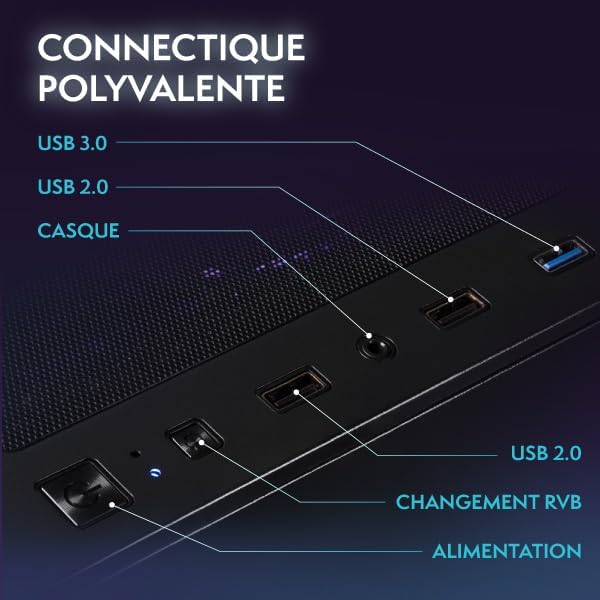
Figure 2: Front panel connectivity including USB 3.0, USB 2.0, headphone jack, RGB control, and power button.
- څارنه: Connect your monitor using an HDMI or DisplayPort cable to the dedicated graphics card ports.
- کیبورډ او موږک: د هر شته USB پورټونو سره وصل شئ.
- شبکه: For wired internet, connect an Ethernet cable to the LAN port. For wireless internet, the included Wi-Fi adapter will provide connectivity.
- ځواک: Connect the power cable to the PC's power supply unit (PSU) and then to a wall outlet.
۱.۳ د وینډوز ۱۱ لومړنی بوټ اپ او تنظیم کول
Press the power button on the front of the PC. The system will boot into Windows 11. Follow the on-screen instructions to complete the initial Windows setup, including language, region, network connection, and user account creation.
3. چلول
۵.۲ وینډوز ۱۱ کور
Your Vibox IV-528 comes with Windows 11 Home pre-installed, optimized for gaming and productivity. Windows 11 offers features such as:
- Faster loading times with DirectStorage
- AutoHDR for enhanced graphics
- Seamless Xbox Game Pass integration
- Optimized CPU performance

Figure 3: Key features of Windows 11 Home for gamers.
۵.۶ د لوبو فعالیت
The NVIDIA GeForce RTX 3050 graphics card and AMD Ryzen 7 5700X processor are designed to deliver smooth gaming experiences at 1080p and 1440p resolutions. Performance may vary depending on game settings and specific titles.
۵.۴ د RGB رڼا کنټرول
The PC features customizable RGB lighting for its fans and AIO cooler. Use the dedicated RGB change button on the front panel (refer to Figure 2) or pre-installed software (if applicable) to cycle through various colors and lighting modes to personalize your setup.

Figure 4: Hex RGB Infinity 120mm fans with customizable lighting.
4. ساتنه
4.1 پاکول
Regularly clean the exterior of your PC with a soft, dry cloth. For internal cleaning, use compressed air to remove dust from fans, heatsinks, and vents. Ensure the PC is powered off and unplugged before cleaning. The mesh design of the case aids in airflow but also requires periodic cleaning.

Figure 5: Modern ATX gaming case with mesh design for optimal airflow.
4.2 د یخولو سیسټم
The Vibox IV-528 features an AIO (All-In-One) 120mm liquid cooler for the CPU and efficient case fans to maintain optimal temperatures. Ensure that the PC has adequate ventilation and that no vents are obstructed. The system utilizes a reverse airflow design for next-generation cooling efficiency.

Figure 6: Vibox AIO 120mm liquid cooler, designed for compact and efficient cooling.
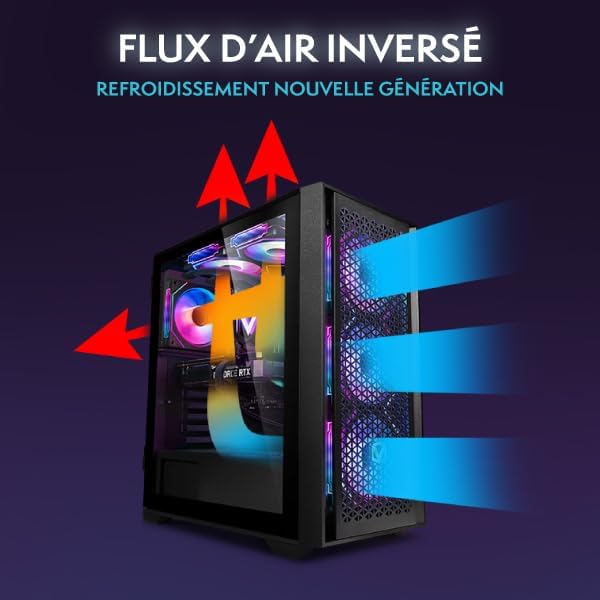
Figure 7: Reverse airflow cooling system for enhanced thermal performance.
4.3 د سافټویر تازه معلومات
Regularly update your Windows operating system, graphics drivers (NVIDIA), and other software to ensure optimal performance, security, and compatibility with the latest games and applications.
5. ستونزه حل کول
- ځواک نشته:
- ډاډ ترلاسه کړئ چې د بریښنا کیبل په خوندي ډول د کمپیوټر او دیوال آوټ لیټ دواړو سره وصل دی.
- Check if the power switch on the PSU (located at the back of the PC) is in the 'ON' position.
- د دیوال ساکټ د بل وسیلې سره ازموینه وکړئ.
- په مانیټر کې هیڅ نندارتون نشته:
- Verify that the monitor is powered on and connected to the graphics card (NVIDIA RTX 3050) ports, not the motherboard ports.
- د مانیټر د ننوتلو سرچینې ترتیبات وګورئ.
- Try a different HDMI or DisplayPort cable.
- System is Slow or Unresponsive:
- هغه غیر ضروري غوښتنلیکونه بند کړئ چې په شاليد کې روان دي.
- د شته وینډوز تازه معلوماتو او ډرایور تازه معلوماتو لپاره وګورئ.
- ډاډ ترلاسه کړئ چې کمپیوټر په کافي اندازه هوا لري او ډیر ګرم نه وي.
- د مالویر سکین چل کړئ.
- د شبکې د اتصال مسلې:
- For Wi-Fi, ensure the Wi-Fi adapter is properly installed and drivers are up to date. Check network settings in Windows.
- For wired Ethernet, ensure the cable is securely connected and your router/modem is functioning correctly.
6. مشخصات
| اجزا | تفصیل |
|---|---|
| پروسیسر | AMD Ryzen 7 5700X (8 Cores, up to 4.6 GHz) |
| ګرافیک کارت | NVIDIA GeForce RTX 3050 (6 GB GDDR6 RAM) |
| RAM | 16 GB DDR4 (3200 MHz, Dual Channel) |
| ذخیره کول | 500 GB SSD |
| عملیاتي سیسټم | د وینډوز 11 کور |
| وای فای | 300 Mbps Wi-Fi Adapter included |
| کولنګ | 120mm AIO Liquid Cooler (CPU), RGB Case Fans |
| ارتباط | HDMI, DisplayPort, USB 3.0, USB 2.0, Ethernet, Audio Jacks |
| ابعاد (L x W x H) | 40 x 21 x 45 سانتي متره |
| وزن | 12.69 کیلو ګرامه |
| د بریښنا پلګ ډول | Type C/EF – 2-pin (European/Hybrid FR-DE plug) |
7. تضمین او ملاتړ
7.1 د تضمین معلومات
Your Vibox IV-528 PC Gamer is covered by a د 2 کلن برخو تضمین او lifetime labor warranty. دا تضمین د عادي استعمال لاندې موادو او کاریګرۍ نیمګړتیاوې پوښي. مهرباني وکړئ د تضمین ادعاوو لپاره د پیرود ثبوت وساتئ.
For specific warranty terms and conditions, please refer to the documentation provided with your purchase or contact Vibox customer support.
7.2 د پیرودونکي ملاتړ
If you encounter any issues not covered in the troubleshooting section or require further assistance, please contact Vibox customer support. Have your model number (IV-528) and purchase details ready when contacting support.
You can typically find contact information on the official Vibox webسایټ یا ستاسو د پرچون پلورونکي له لارې.


