1. پیژندنه او وروستهview
Welcome to the Vibox V-525 Gaming PC. This manual provides essential information for setting up, operating, maintaining, and troubleshooting your new computer. The Vibox V-525 is a high-performance gaming system featuring an AMD Ryzen 5 5500 processor, an Nvidia RTX 4060 8GB graphics card, 16GB of DDR4 RAM, and a 1TB SSD, pre-installed with Windows 11.
Please read this manual carefully before using your PC to ensure optimal performance and longevity.
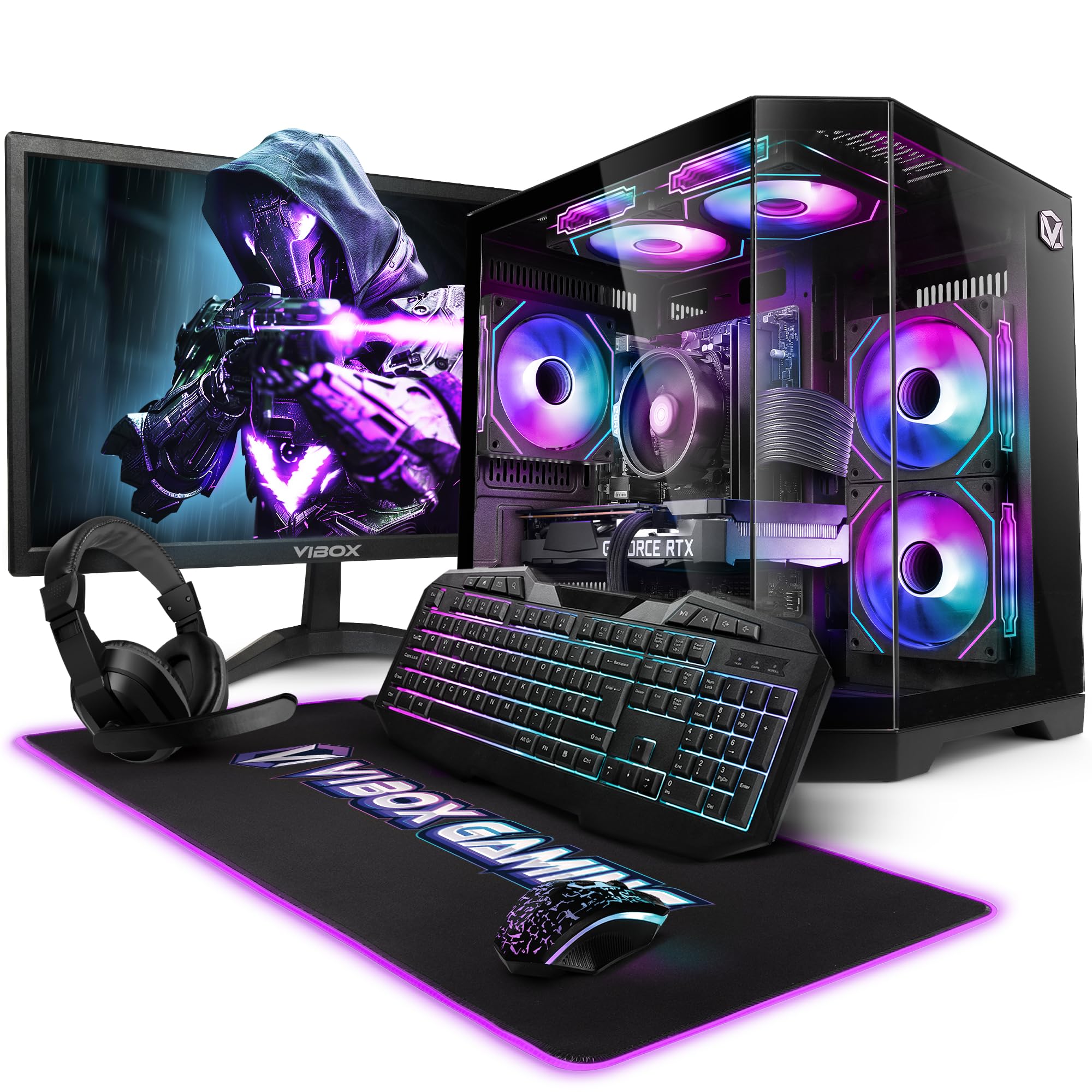
Figure 1.1: Vibox V-525 Gaming PC
2. د تنظیم کولو لارښود
2.1 پیک کول
Carefully remove all components from the packaging. Ensure you have the PC tower, 23-inch monitor, gaming keyboard, gaming mouse, headset, mouse pad, Wi-Fi adapter, and power cables.
2.2 د پردیو سره نښلول
- څارنه: Connect the 23-inch monitor to the graphics card (Nvidia RTX 4060) using an HDMI or DisplayPort cable. Ensure the cable is securely fastened.
- کیبورډ او موږک: Connect the gaming keyboard and mouse to the available USB ports on the rear or front of the PC.
- هیډسیټ: Plug your headset into the dedicated audio jacks on the front panel or rear I/O.
- Wi-Fi Adapter: Insert the 300 Mbps Wi-Fi adapter into an available USB port.
- ځواک: Connect the power cable to the PC's power supply unit (PSU) and then to a wall outlet. Connect the monitor's power cable as well.
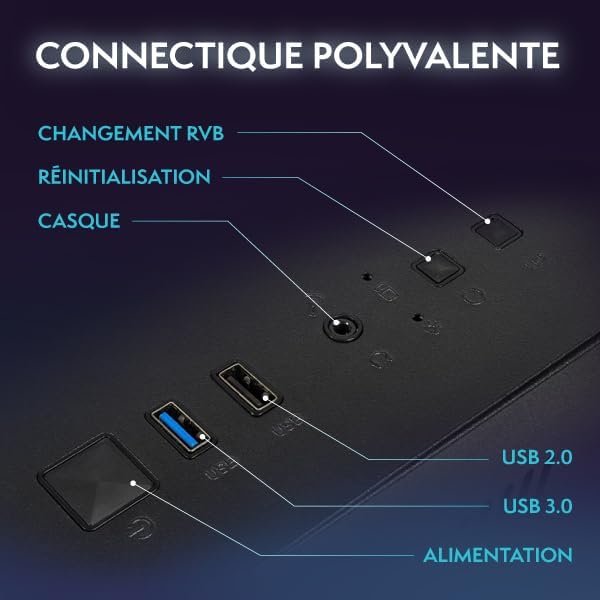
Figure 2.1: Front Panel Connectivity (Power, USB 2.0, USB 3.0, Headset, Reset, RGB Change)
۱.۳ د وینډوز ۱۱ لومړنی بوټ اپ او تنظیم کول
- د کمپیوټر په مخ کې د بریښنا تڼۍ فشار ورکړئ.
- Follow the on-screen instructions to complete the Windows 11 setup process. This typically involves selecting your region, language, creating a user account, and connecting to a network.
- Once Windows 11 is set up, ensure all drivers are installed. You can check this in Device Manager.

Figure 2.2: Windows 11 Home Features
3. عملیاتي لارښوونې
۸ پاور آن/بند
- د فعالولو لپاره: په مخکینۍ پینل کې د بریښنا تڼۍ فشار ورکړئ.
- د بندولو لپاره: Click the Start button in Windows, then select Power > Shut down. Avoid simply holding the power button to turn off, as this can lead to data loss.
- د بیا پیلولو لپاره: د سټارټ تڼۍ کلیک وکړئ، بیا پاور> بیا پیل غوره کړئ.
3.2 Basic Windows 11 Navigation
Windows 11 features a redesigned user interface. The Start menu is centrally located, and widgets provide quick access to information. Explore the settings menu to personalize your experience.
3.3 د وای فای سره نښلول
- Ensure your USB Wi-Fi adapter is plugged in.
- Click the network icon (Wi-Fi symbol) in the taskbar.
- له لیست څخه خپل مطلوب وای فای شبکه غوره کړئ او 'وصل' کلیک وکړئ.
- که غوښتنه وشي، د شبکې امنیتي کیلي (پاسورډ) دننه کړئ.
۵.۴ د RGB رڼا کنټرول
Your Vibox V-525 features Hex RGB Infinity 120mm fans. Use the 'RGB Change' button on the front panel to cycle through various lighting modes and colors. Refer to the software provided by Vibox (if applicable) for more advanced customization.

Figure 3.1: Hex RGB Infinity 120mm Fans
4. ساتنه
4.1 Cleaning Your PC
Regular cleaning helps maintain optimal performance and extends the lifespan of your components.
- بهر: یو نرم استعمال کړئ، دamp cloth to wipe down the exterior of the case. Avoid harsh chemicals.
- Interior (Dust): Periodically, and with the PC powered off and unplugged, use compressed air to remove dust from inside the case, especially from fans, heatsinks, and vents. Pay attention to the Hex RGB Infinity fans and the GPU heatsink.
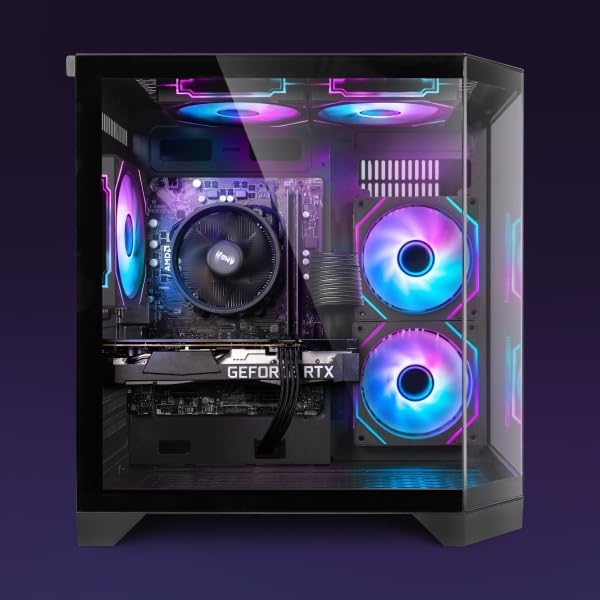
شکل 4.1: داخلي View of PC Components
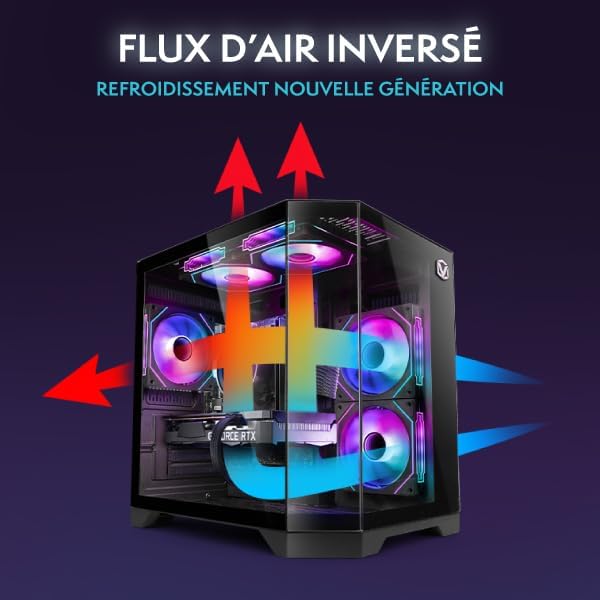
Figure 4.2: Reverse Airflow Next Generation Cooling Diagram
4.2 د سافټویر تازه معلومات
- د وینډوز تازه معلومات: په منظم ډول د ترتیباتو > وینډوز تازه معلوماتو له لارې د وینډوز تازه معلومات وګورئ او نصب کړئ.
- د موټر چلوونکي تازه معلومات: Keep your graphics card drivers (Nvidia GeForce Experience) and other component drivers up to date for optimal performance and stability.
4.3 د معلوماتو بیک اپ
په منظم ډول خپل مهم بیک اپ کړئ fileد معلوماتو د ضایع کیدو مخنیوي لپاره بهرني ډرایو یا کلاوډ ذخیره ته واستوئ.
5. ستونزه حل کول
دا برخه هغه عامې ستونزې په ګوته کوي چې تاسو ورسره مخ کیدی شئ.
۱ برېښنا نشته
- ډاډ ترلاسه کړئ چې د بریښنا کیبل په خوندي ډول د کمپیوټر او دیوال آوټ لیټ دواړو سره وصل دی.
- Check if the power switch on the PSU (at the back of the PC) is in the 'On' position.
- د بریښنا یو بل ځای هڅه وکړئ.
۷.۱ په مانیټر کې هیڅ ښودنه نشته
- Verify that the monitor's power cable is connected and the monitor is turned on.
- Ensure the video cable (HDMI/DisplayPort) is securely connected to both the graphics card (Nvidia RTX 4060) and the monitor.
- که شتون ولري، یو بل ویډیو کیبل یا مانیټر هڅه وکړئ.
۵.۳ ورو فعالیت
- د هغو غوښتنلیکونو لپاره چې ډیر CPU، RAM، یا ډیسک سرچینې مصرفوي، د ټاسک مینیجر (Ctrl+Shift+Esc) وګورئ.
- ډاډ ترلاسه کړئ چې وینډوز او ډرایورونه تازه دي.
- د ویروس سکین چل کړئ.
- Ensure adequate airflow and clean any dust buildup (refer to Section 4.1).
۵.۳ د شبکې د اتصال مسلې
- Verify the Wi-Fi adapter is properly installed and recognized by Windows.
- خپل روټر/موډیم بیا پیل کړئ.
- د وینډوز شبکې ستونزې حل کوونکی چل کړئ.
6. مشخصات
The following table details the key specifications of your Vibox V-525 Gaming PC:
| اجزا | مشخصات |
|---|---|
| پروسیسر | AMD Ryzen 5 5500 (6 Cores, Max 4.2 GHz) |
| ګرافیک کارت | Nvidia GeForce RTX 4060 (8 GB GDDR6 RAM, HDMI 2.1, DisplayPort 1.4a) |
| RAM | 16 GB DDR4 Dual Channel (3200 MHz) |
| ذخیره کول | 1 TB SSD |
| عملیاتي سیسټم | د وینډوز 11 کور |
| څارنه | 23-inch (Max Resolution: 1920 x 1080) |
| ارتباط | Wi-Fi (300 Mbps adapter included), 4 Total USB Ports |
| د کیچ حافظه | 16 MB |
| د قضیې ډیزاین | 3-Panel Tempered Glass |
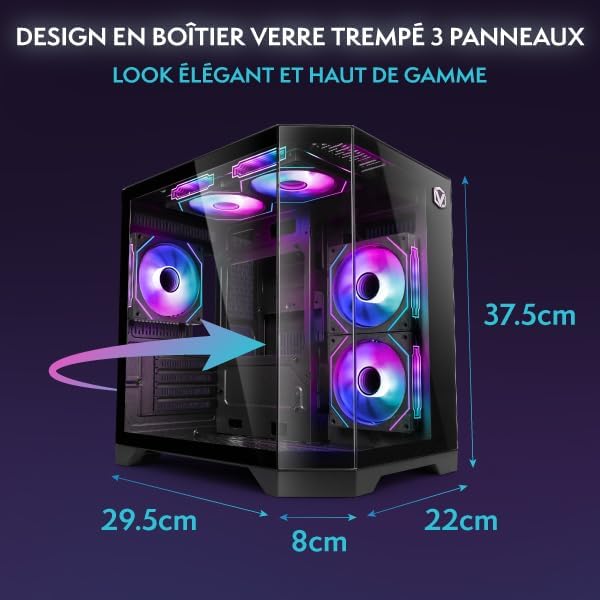
Figure 6.1: PC Case Dimensions
7. تضمین او ملاتړ
Your Vibox V-525 Gaming PC comes with a manufacturer's warranty. Please refer to the warranty card included in your product packaging for specific terms and conditions, including the warranty period and coverage details.
For technical support, troubleshooting assistance beyond this manual, or warranty claims, please contact Vibox customer service through their official webسایټ یا د اړیکې معلومات چې ستاسو د پیرود اسنادو سره چمتو شوي.
Always provide your product model (V-525) and purchase date when contacting support.


