پیژندنه
This manual provides detailed instructions for the setup, operation, and maintenance of your bemi Smartwatch Fitness Tracker. Please read this manual thoroughly before using the device to ensure proper functionality and to maximize your user experience.
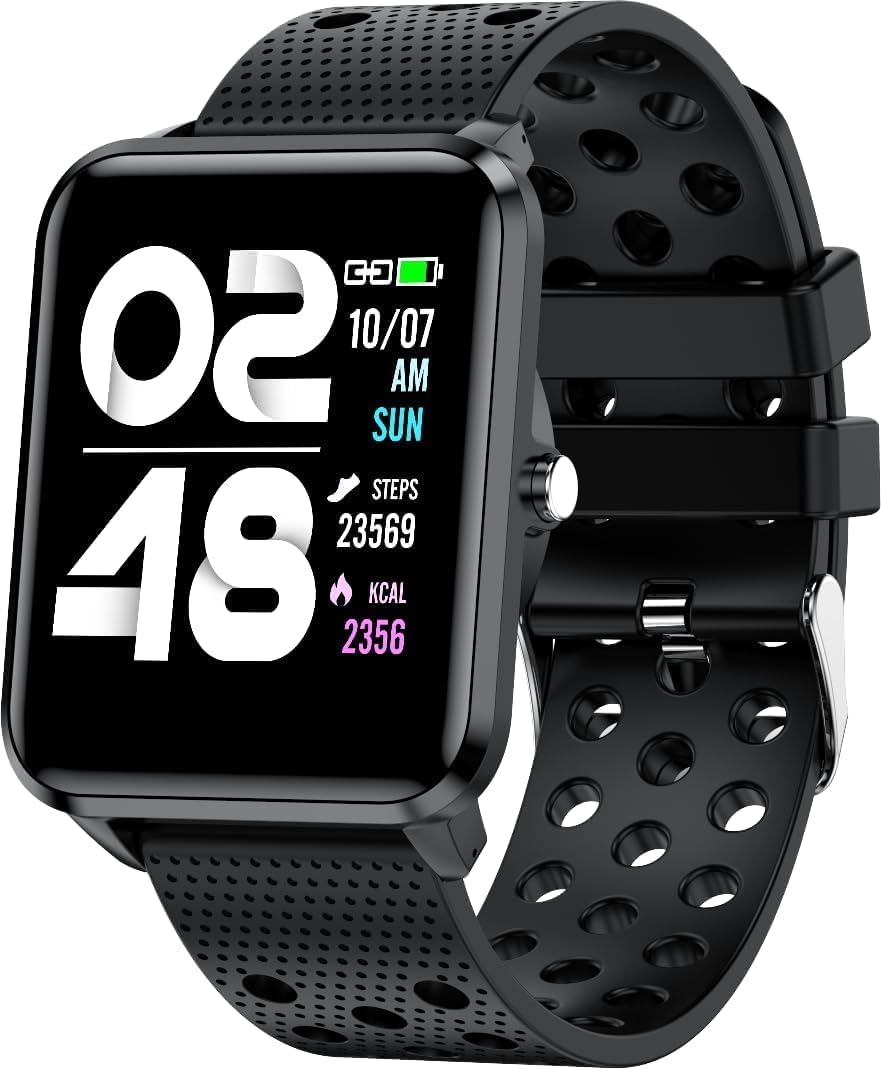
انځور: مخکینۍ برخه view of the bemi Smartwatch, showing the digital display with time, date, steps, and calories burned. The watch has a black perforated silicone band.
په بکس کې څه دي
- Kix-m Smartwatch
- USB Cable (Charging Cable)
- د کارن لارښود
- د ډالۍ بکس
چمتو کول
۲.۱. د سمارټ واچ چارج کول
Before first use, fully charge your smartwatch. Connect the provided USB charging cable to the magnetic charging points on the back of the watch and to a USB power source. The watch display will indicate charging status.

انځور: شاته view of the bemi Smartwatch, highlighting the magnetic charging contacts and the optical heart rate sensor.
۲. د کمپینین اپلیکیشن نصب کول
The smartwatch operates with the "H Band" application. Download the app from the App Store (for iOS devices) or Google Play Store (for Android devices).
- لټون "H Band" in your device's app store.
- اپلیکیشن ډاونلوډ او نصب کړئ.
- ډاډ ترلاسه کړئ چې ستاسو د سمارټ فون بلوتوث فعال دی.
3. Pairing the Smartwatch with Your Phone
- Open the "H Band" app on your smartphone.
- Follow the on-screen prompts to create an account or log in.
- په اپلیکیشن کې د وسیلې جوړه کولو برخې ته لاړ شئ.
- Select your bemi Smartwatch from the list of available devices. The app will guide you through the pairing process.
- که غوښتنه وشي، په خپل تلیفون او سمارټ واچ دواړو کې د جوړې غوښتنه تایید کړئ.
Note: The smartwatch is compatible with Android (4.4 or newer) and iOS (8.0 or newer) operating systems.
عملیاتي لارښوونې
بنسټیز نیویګیشن
- ټچ سکرین: د مینو او ځانګړتیاو له لارې د نیویګیټ کولو لپاره کیڼ/ښي، پورته/ښکته سوائپ کړئ. د غوره کولو لپاره ټایپ کړئ.
- د غاړې تڼۍ: Press to wake the screen, return to the home screen, or confirm selections.
کلیدي ځانګړتیاوې او دندې
د اصلاح وړ لید مخونه
Choose from 24 clock faces available in the "H Band" application. You can also set a photo from your phone as the watch face.

Image: The smartwatch screen showing different digital and analog watch face designs, indicating customization options available through the app.
د فعالیت تعقیب
The smartwatch monitors your steps, distance, and calories burned. All activity data is recorded and can be viewed in the "H Band" app.

Image: A person running outdoors with the bemi Smartwatch visible on their wrist, showing the step tracking interface with current steps, distance, and calories.
د زړه ضربان او د وینې اکسیجن څارنه
The watch provides 24-hour monitoring of pulse and blood oxygen levels. View real-time data on the watch or detailed historical data in the app.

Image: A close-up of the smartwatch screen showing heart rate (BPM) and blood pressure (mmHg) readings with a graph of historical data.
د خوب څارنه
Track your sleep patterns, including deep sleep, light sleep, and awake times. The app provides detailed analysis of your sleep quality.

Image: The "H Band" app interface displaying sleep quality data, including total sleep duration, deep sleep, light sleep, and awake times, with a corresponding graph.
د غږ غږ
The KIX-M features a built-in audio player with 512MB of internal memory. You can store music directly on the watch and connect Bluetooth headphones or speakers for wireless listening.

Image: The bemi Smartwatch showing its music player interface with play/pause and skip controls, alongside a pair of wireless earbuds, demonstrating its audio capabilities.
خبرتیاوې
Receive notifications for calls, messages, and various applications directly on your smartwatch. Configure notification settings within the "H Band" app.

Image: The smartwatch screen showing an incoming message notification, with icons for various social media and communication apps like SMS, Twitter, WeChat, Skype, YouTube, Facebook, Google+, Instagram، او LinkedIn.
نور سمارټ ځانګړتیاوې
- ۱۲ سپورتي طریقې: Track specific workouts like running, cycling, and more.
- د خوځښت یادونه: Get alerts to move if you've been sedentary for too long.
- Special Mode for Women: Track menstrual cycles and ovulation.
- د کیمرې کنټرول: د خپل تلیفون کیمره له لرې کنټرول کړئ.
- الارم: الارمونه مستقیم له ساعت یا ایپ څخه تنظیم کړئ.
- سټاپ واچ او ټایمر: د وخت ساتنې اساسي دندې.
- تلیفون پیدا کړئ: خپل جوړه شوی سمارټ فون ومومئ.
- GPS Position Tracking: Requires carrying your phone with you for GPS data.

Image: The "H Band" app interface displaying the female health tracking calendar, allowing users to log menstrual periods and predict ovulation.
ساتنه
ستاسو د سمارټ واچ پاکول
Regularly clean your smartwatch and band to prevent skin irritation and maintain device performance.
- د ساعت سکرین او بدن د نرم، لینټ نه پاک ټوکر سره پاک کړئ.
- د سختو ځایونو لپاره، دampټوکر په اوبو سره لږ څه ومینځئ. د سختو کیمیاوي موادو یا خړوبونکو موادو کارولو څخه ډډه وکړئ.
- د ښه اتصال ډاډ ترلاسه کولو لپاره د چارج کولو اړیکې په دوره یي ډول پاکې کړئ.
د اوبو مقاومت (IP68)
The smartwatch is IP68 waterproof, meaning it is resistant to dust and can withstand immersion in water up to 1.5 meters for up to 30 minutes. It is suitable for daily use, hand washing, and light rain. Avoid hot water, steam, or prolonged immersion in water, especially saltwater.

Image: The bemi Smartwatch with water splashing over its screen and band, illustrating its IP68 water resistance rating.
د بیټرۍ پاملرنه
- د لومړي استعمال څخه دمخه په بشپړه توګه بیټرۍ چارج کړئ.
- د بیټرۍ په مکرر ډول له بشپړې وچولو څخه ډډه وکړئ.
- که چیرې د اوږدې مودې لپاره ونه کارول شي، نو وسیله په یخ او وچ ځای کې وساتئ.
د ستونزو حل کول
| ستونزه | احتمالي لامل | د حل لاره |
|---|---|---|
| وګورئ چې نه چالانیږي | ټیټ بیټرۍ | ساعت لږ تر لږه د 30 دقیقو لپاره چارج کړئ. |
| د تلیفون سره جوړه نشي کیدی | Bluetooth off, app not open, watch not discoverable, phone OS not compatible | Ensure Bluetooth is on. Open "H Band" app. Restart watch and phone. Check OS compatibility (Android 4.4+/iOS 8.0+). |
| Inaccurate health data (HR, SpO2) | Improper fit, sensor obstruction, movement during measurement | Ensure watch is snug but comfortable on wrist. Clean sensor. Remain still during measurement. |
| خبرتیاوې ندي ترلاسه شوي | App permissions, notification settings, Bluetooth disconnected | Check app permissions for notifications. Verify notification settings in "H Band" app. Ensure watch is connected via Bluetooth. |
| سکرین بې ځوابه دی | د سافټویر خرابوالی، ټیټ بیټرۍ | ساعت بیا پیل کړئ (که امکان ولري). ساعت چارج کړئ. |
مشخصات
| فیچر | تفصیل |
|---|---|
| ماډل | KIX-M |
| د سکرین اندازه | ۷۸۷ انچه |
| د ښودلو ډول | ټچ سکرین |
| د اوبو مقاومت | IP68 |
| ارتباط | Bluetooth (Dual Bluetooth module) |
| داخلي حافظه | ۶۴۰۰۰ ایم بي (د موسیقۍ ذخیره کولو لپاره) |
| د بیټرۍ ظرفیت | 200 ملیونهamp ساعتونه (mAh) |
| عملیاتي سیسټم | ROTS |
| مطابقت لرونکی OS | انډرایډ ۹.۰+ / iOS ۱۴.۰+ |
| سینسرونه | Heart Rate Monitor, Blood Oxygen Sensor, Accelerometer |
| ځانګړتیاوې | Activity Tracker, Sleep Tracking, Pedometer, Calorie Tracker, Music Player, Notifications, Gesture Control, 10 Sport Modes, Female Health Tracking, Camera Control, Alarm, Stopwatch, Timer, Find Phone, GPS via Smartphone |
| د توکي وزن | 4.4 اونس |
| ابعاد | 5.35 x 2.64 x 2.44 انچه (د بسته ابعاد) |
تضمین او ملاتړ
For warranty information and technical support, please refer to the contact details provided with your purchase or visit the official bemi webسایټ. د هر ډول تضمین ادعا لپاره د پیرود ثبوت وساتئ.
Note: The manufacturer is Minrek.


