1. پیژندنه
دا لارښود د تور لپاره تفصيلي لارښوونې وړاندې کويview ZENO 1 8-inch tablet. It covers essential information regarding product setup, operation, maintenance, and troubleshooting to ensure optimal performance and user experience. Please read this manual thoroughly before using your device.

انځور: مخ او شا view د تور پوستوview ZENO 1 tablet, showcasing its compact design and key specifications like the 8-inch LCD, 90Hz display, Android 15 operating system, 18GB RAM, 256GB ROM, 6000mAh battery, and connectivity features.
2. د بسته محتويات
ډاډ ترلاسه کړئ چې لاندې ټول لیست شوي توکي ستاسو د محصول کڅوړه کې شامل دي:
- تورview زینو ۱ ټابلیټ
- د جلا کیدو وړ سټینډ
- د سکرین محافظت
- پاکه قضیه
- USB-C کیبل
- چارجر
- د لارښوونو لارښود (دا سند)
- Card Removal Tool

انځور: یوه چاودنه شوې view diagram illustrating all components included in the Blackview ZENO 1 retail package, such as the tablet, detachable stand, screen protector, clear case, USB-C cable, charger, and card removal tool.
3. محصول ختم شوview
۳.۲ فزیکي برخې
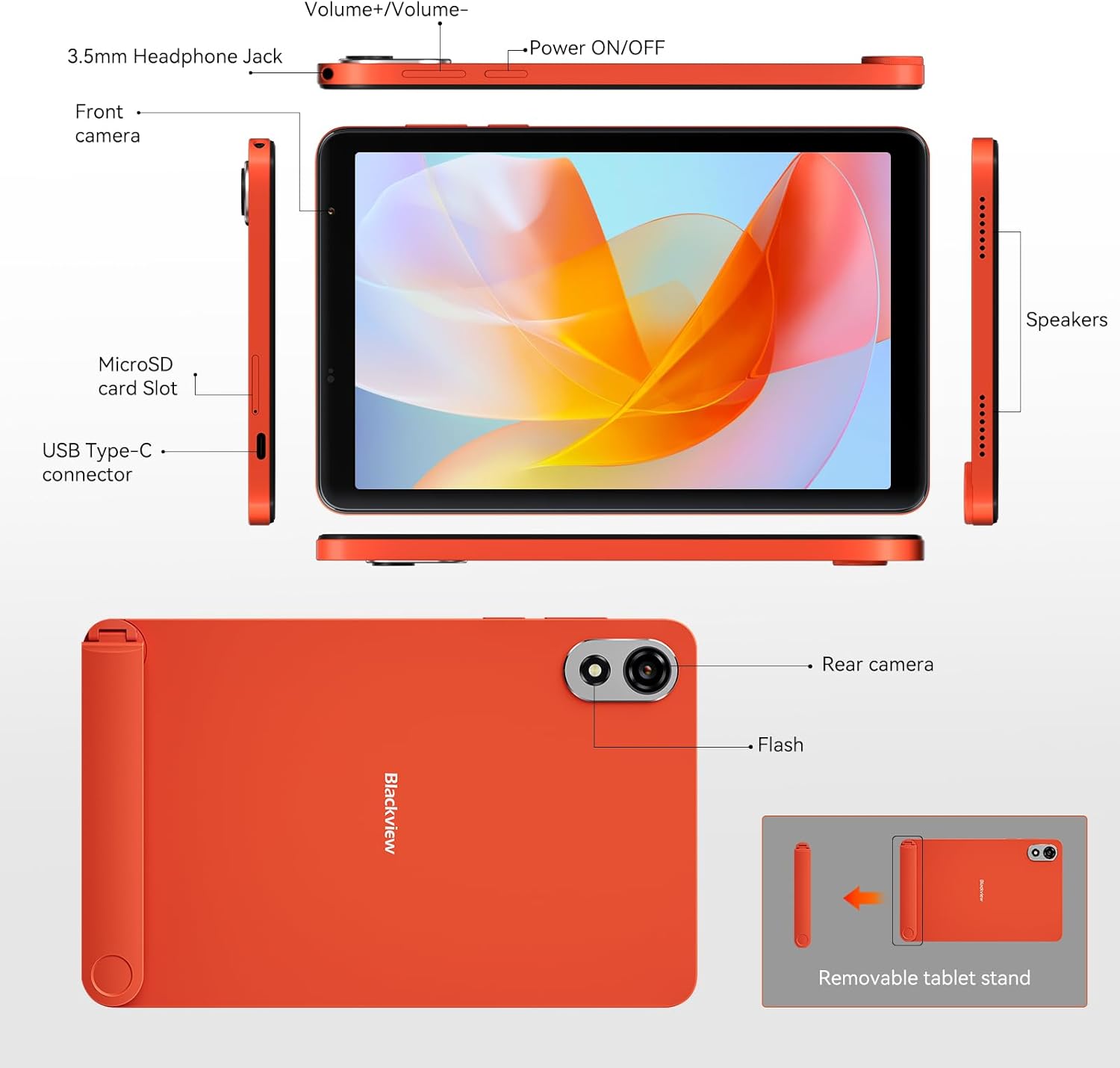
Image: A detailed diagram of the Blackview ZENO 1 tablet, labeling all external components including the headphone jack, volume controls, power button, cameras, microSD slot, USB-C port, speakers, and the removable stand.
3.2 کلیدي ځانګړتیاوې
- ښکاره کول: 8-inch LCD with 800x1280 resolution and 90Hz refresh rate.
- پروسیسر: Unisoc T615 Octa-Core Chip (1.8 GHz).
- حافظه او ذخیره: 18GB RAM (6GB + 12GB expansion) and 256GB ROM, expandable up to 2TB via TF card.
- عملیاتي سیسټم: Android 15 with Gemini AI integration.
- کامرې: 8MP Front Camera and 8MP Rear Camera with flash.
- بیټرۍ: 6000mAh long-lasting battery with Type-C charging.
- ارتباط: 4G LTE, 5G WiFi, Bluetooth 5.2, GPS, Dual SIM Card Slot.
- آډیو: Dual stereo speakers.
- امنیت: د مخ خلاصول.
- لوازم: Detachable stand included.
4. د تنظیم کولو لارښود
4.1 ابتدايي پاور آن
- فشار ورکړئ او ونیسئ بریښنا آن/بند button located on the side of the tablet until the Blackview لوګو ښکاري.
- Follow the on-screen prompts to select your language, region, and complete the initial Android setup.
۴.۲ د سیم کارت او TF کارت نصبول
تورview ZENO 1 supports dual SIM cards and TF card expansion.
- Locate the SIM card slot on the side of the tablet (refer to the Product Overview ډایگرام).
- Use the provided card removal tool to gently eject the SIM tray.
- خپل نانو سیم کارتونه او/یا TF (مایکرو ایس ډی) کارتونه په ټری کې ټاکل شوي سلاټونو کې ځای په ځای کړئ. ډاډ ترلاسه کړئ چې د سرو زرو اړیکې ښکته خوا ته دي.
- ټری په احتیاط سره ټابلیټ ته دننه کړئ تر هغه چې دا په خپل ځای کې کلیک وکړي.
انځور: نږدې انځور view demonstrating the correct insertion of dual SIM cards and a TF card into the tablet's tray.
4.3 د وای فای سره نښلول
- ورتګ ترتیبات > شبکه او انټرنیټ > وای فای.
- وای فای بدل کړئ On.
- له لیست څخه خپل مطلوب وای فای شبکه غوره کړئ.
- که غوښتل شي نو پټنوم دننه کړئ او کلیک وکړئ نښلول.
4.4 Attaching the Detachable Stand
The included detachable stand provides flexible viewزاویې
- Align the stand with the designated attachment points on the back of the tablet.
- Gently press until it securely snaps into place.
- To remove, gently pull the stand away from the tablet.

انځور: تورview ZENO 1 tablet positioned with its detachable stand, illustrating its use for hands-free viewing.
5. عملیاتي لارښوونې
۳.۱ اساسي نیویګیشن (Android ۱۱)
- کور سکرین: د کور مختلفو سکرینونو ته د لاسرسي لپاره کیڼ یا ښیې سوائپ کړئ.
- د اپلیکیشن دراز: تر پردې پورې د پردې له ښکته څخه تر څپو پورې view ټول نصب شوي غوښتنلیکونه.
- خبرتیاوې او چټک ترتیبات: د خبرتیاو او چټکو ترتیباتو بدلولو ته د لاسرسي لپاره د سکرین له پورتنۍ برخې څخه ښکته سوائپ کړئ.
- څو دندې: پورته سوائپ کړئ او د سکرین له ښکته څخه یې ونیسئ تر view وروستي اطلاقات.
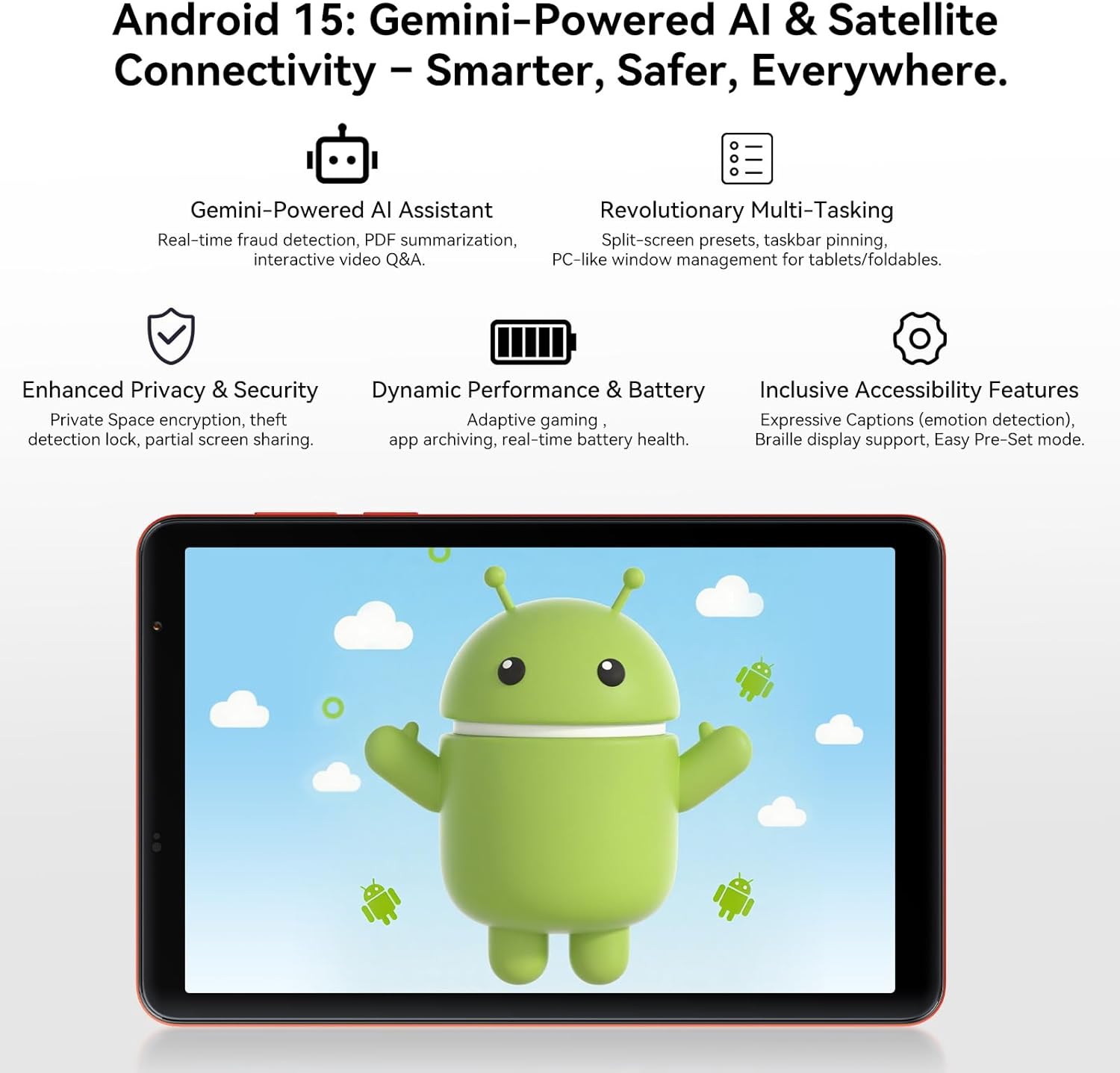
انځور: تورview ZENO 1 tablet screen showing the Android 15 operating system, highlighting features like Gemini AI, advanced multitasking, privacy controls, and performance optimizations.
۵.۲ ښودنه او لیدونه
- The 8-inch LCD with 800x1280 resolution provides clear visuals.
- د 90Hz ریفریش نرخ ensures smoother scrolling and a more fluid visual experience. Adjust refresh rate in ترتیبات > ښودل.
- Widevine L1 support enables streaming of high-definition content (1080P) from platforms like Netflix and Prime Video.

انځور: تورview ZENO 1 tablet displaying a game, demonstrating the smooth visuals provided by its 90Hz high refresh rate screen.

Image: A visual comparison on the Blackview ZENO 1 screen, illustrating the superior 1080P streaming quality achieved with Widevine L1 support compared to 720P (L3).
۴.۴ فعالیت او څو دندې ترسره کول
The Unisoc T615 Octa-Core processor and 18GB RAM (with dynamic expansion) enable smooth multitasking and efficient app performance. Android 15 offers features like split-screen presets and taskbar pinning for enhanced productivity.
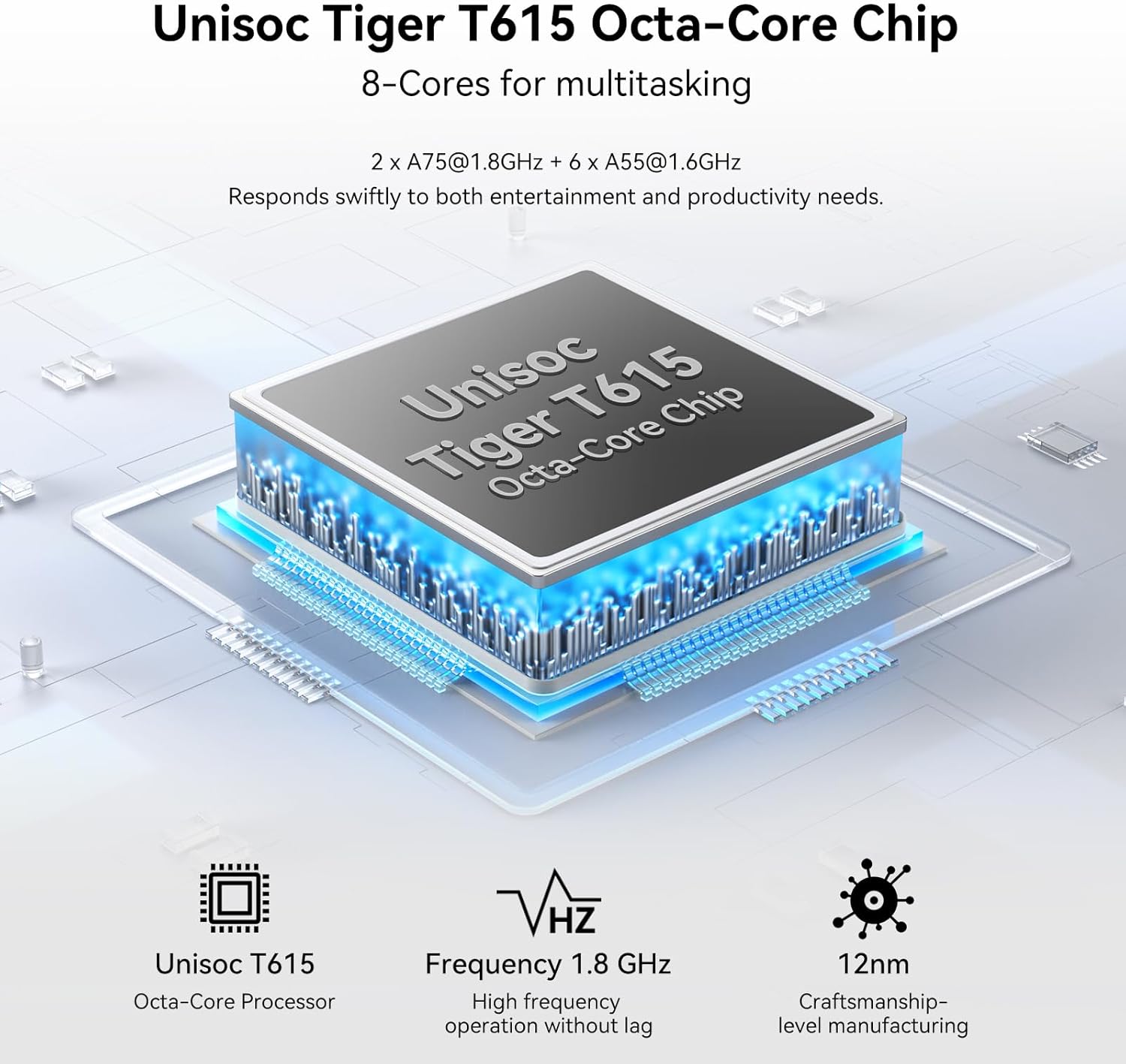
Image: A diagram illustrating the Unisoc Tiger T615 Octa-Core Chip, detailing its architecture and 1.8 GHz frequency for efficient performance.
5.4 د ذخیرې مدیریت
The tablet comes with 256GB of internal storage, expandable up to 2TB using a TF card. To manage storage, go to ترتیبات > ذخیره کول. تاسو کولی شئ view storage usage, free up space, and manage files.

انځور: تورview ZENO 1 tablet displaying a collection of digital content, emphasizing its 18GB RAM, 256GB ROM, and the capability to expand storage up to 2TB with a TF card.
۴.۴ د کیمرې کارول
The tablet features an 8MP front camera and an 8MP rear camera with flash. Open the کیمره app to capture photos and videos.
- د عکس اخیستلو لپاره د شټر تڼۍ کېکاږئ.
- د عکس او ویډیو حالتونو ترمنځ بدل کړئ.
- Use the front/rear camera toggle for selfies or main shots.
انځور: تورview ZENO 1 tablet highlighting its 8MP front and rear cameras, along with visual examples of image quality and the Face Unlock feature.
5.6 نښلول
- 4G LTE: Insert a SIM card to enable cellular data and calling. Manage cellular settings in ترتیبات > شبکه او انټرنیټ > ګرځنده شبکه.
- 5G وائی فای: Connect to high-speed Wi-Fi networks (see Section 4.3).
- بلوتوث 5.2: د بلوتوث وسیلو لکه هیډفونونو یا سپیکرو سره جوړه کړئ. لاړ شئ ترتیبات > وصل شوي وسایل > بلوتوث.
- GPS: The tablet includes GPS for navigation and location services. Ensure location services are enabled in ترتیبات > ځای.
Image: An illustration depicting the Blackview ZENO 1 tablet's comprehensive connectivity options, including 5G WiFi, 4G LTE, and GPS for reliable network access and navigation.
5.7 د بیټرۍ مدیریت
د ۵۱۵۰mAh بیټرۍ د اوږدې مودې کارونې وړتیا لري. د بیټرۍ د ژوند د ښه کولو لپاره:
- د سکرین روښانتیا تنظیم کړئ.
- په شاليد کې روان نه کارول شوي ایپسونه بند کړئ.
- د بیټرۍ سیور حالت فعال کړئ ترتیبات > بیټرۍ.
- Charge using the provided USB-C cable and charger.
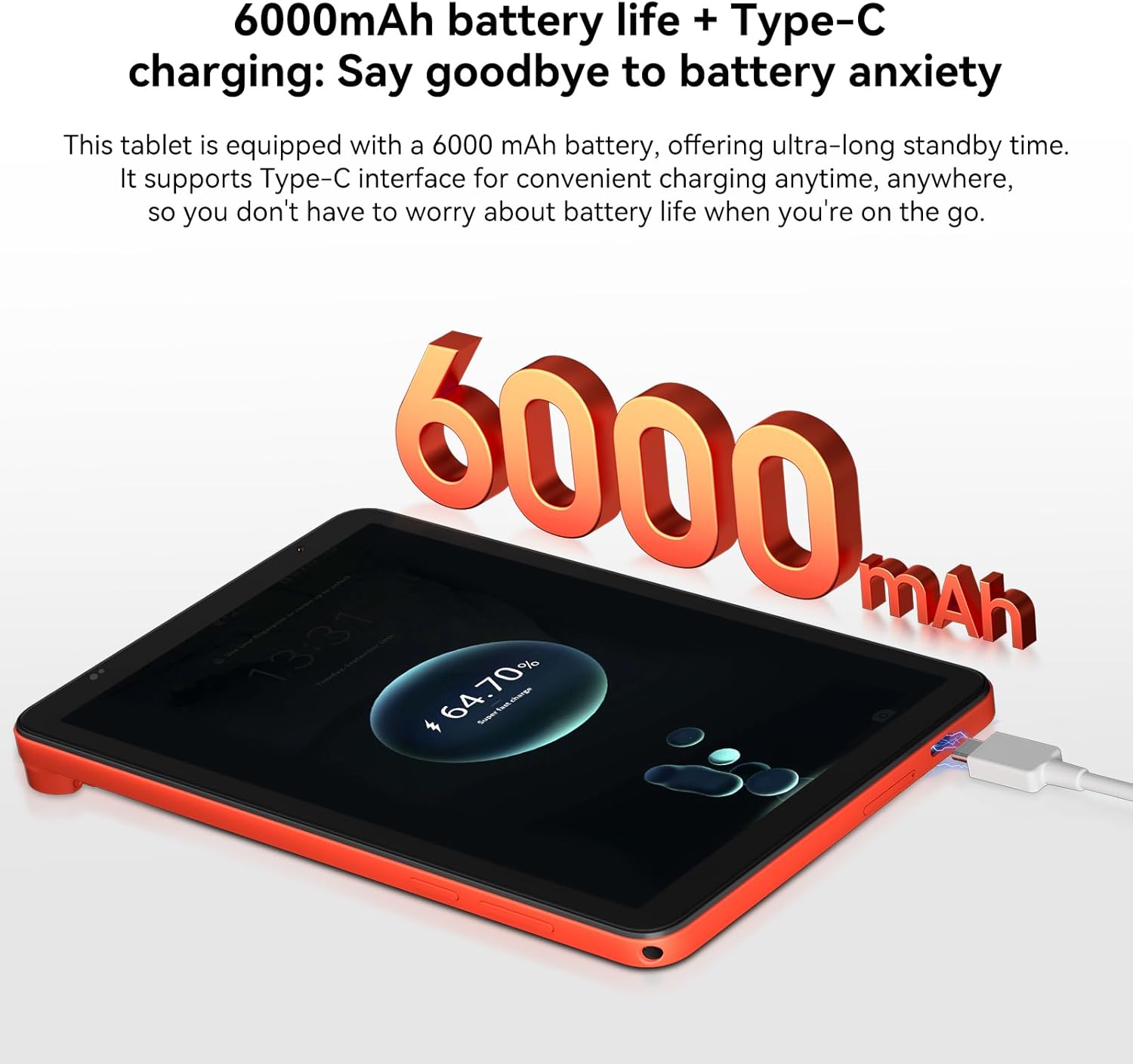
انځور: تورview ZENO 1 tablet connected to a charger, visually representing its 6000mAh battery capacity and Type-C charging capability.
5.8 د مخ خلاصول
Set up Face Unlock for convenient and secure access to your tablet.
- ورتګ ترتیبات > امنیت او محرمیت > د مخ خلاصول.
- د خپل مخ راجستر کولو لپاره د پردې لارښوونې تعقیب کړئ.
- Ensure adequate lighting when using Face Unlock.
Image: A user demonstrating the Face Unlock feature on the Blackview ZENO 1 tablet, highlighting its ease of use for secure access.
۲.۶ د غږ تجربه
The tablet is equipped with dual stereo speakers for an immersive audio experience. You can also connect headphones via the 3.5mm headphone jack or Bluetooth.
انځور: تورview ZENO 1 tablet displaying a music application, emphasizing its stereo sound capabilities through dual speakers.
5.10 Gemini AI Features
Leverage the integrated Gemini AI for enhanced functionality:
- AI-powered chats: Interact with AI for information and assistance.
- Instant image generation: Create images using AI prompts.
- Voice-activated Q&A: Ask questions and receive answers verbally.
- Intuitive controls: AI assists in optimizing user interface interactions.
6. ساتنه
6.1 پاکول
- د ټابلیټ سکرین او بدن پاکولو لپاره نرم، لینټ نه پاک ټوکر وکاروئ.
- د سختو کیمیاوي موادو، خړوبونکو پاکوونکو، یا ایروسول سپرې کارولو څخه ډډه وکړئ.
- د سختو داغونو لپاره، لږ څهampټوکر د اوبو یا د سکرین ځانګړي پاکولو محلول سره ومینځئ.
6.2 د سافټویر تازه معلومات
په منظم ډول د سافټویر تازه معلومات وګورئ او نصب کړئ ترڅو ډاډ ترلاسه کړئ چې ستاسو ټابلیټ وروستي ځانګړتیاوې، امنیتي پیچونه، او د فعالیت ښه والی لري.
- ورتګ ترتیبات > سیسټم > د سیسټم تازه کول.
- د شته تازه معلوماتو ډاونلوډ او نصبولو لپاره په سکرین کې لارښوونې تعقیب کړئ.
۴.۳ د ذخیره کولو اصلاح
د غوره فعالیت ساتلو لپاره، په دوره یي ډول د خپل ټابلیټ ذخیره اداره کړئ:
- غیر ضروري حذف کړئ files، عکسونه، او ویډیوګانې.
- هغه اپلیکېشنونه چې نه کارول کېږي، غیر نصب کړئ.
- د ایپسونو لپاره د کیش ډیټا پاک کړئ ترتیبات > ایپس > [د اپلیکیشن نوم] > ذخیره او زیرمه.
- Utilize the TF card slot for additional storage of media files.
7. ستونزه حل کول
دا برخه هغه عامې ستونزې په ګوته کوي چې تاسو یې د خپل تور رنګ سره مخ کیدی شئview زینو ۱ ټابلیټ.
7.1 عام مسایل او حلونه
- ټابلیټ نه چالانیږي: Ensure the battery is charged. Connect the charger and wait a few minutes before attempting to power on again. If unresponsive, press and hold the Power button for 10-15 seconds for a forced restart.
- د اپلیکیشنونو خرابېدل یا کنګل کېدل: Close the problematic app and reopen it. If the issue persists, clear the app's cache (Settings > Apps > [App Name] > Storage & cache) or uninstall and reinstall the app. Ensure your tablet's software is up to date.
- د وای فای اتصال ستونزې: Restart your tablet and Wi-Fi router. Forget the network in Wi-Fi settings and reconnect. Ensure you are within range of the Wi-Fi signal.
- ورو فعالیت: Close background applications. Clear cache and temporary files. Check for available storage space and free up if necessary. Restarting the tablet can also improve performance.
- بیټرۍ په چټکۍ سره له مینځه وړل: Reduce screen brightness. Disable unused features like Bluetooth, GPS, or Wi-Fi when not needed. Identify power-consuming apps in Battery settings and restrict their background activity.
۵.۲ د ملاتړ سره اړیکه ونیسئ
If you encounter issues not covered in this section or require further assistance, please refer to the Warranty and Support section for contact information.
8. تخنیکي مشخصات
| فیچر | مشخصات |
|---|---|
| برانډ | تورview |
| د ماډل نوم | ZENO1 |
| عملیاتي سیسټم | Android 15 |
| د سکرین اندازه | ۷۸۷ انچه |
| د سکرین ریزولوشن | ۲۵۶۰x۱۶۰۰ پکسلز |
| پروسیسر | یونیساک T615 اوکټا کور (1.8 GHz) |
| د ګرافیک کاپروسیسر | Mali - G57 MP1 |
| RAM | ۱۸ جي بي (۶ جي بي + ۱۲ جي بي پراخوالی) |
| داخلي ذخیره | 256 جي بي |
| د پراخیدو وړ ذخیره | د TF کارت له لارې تر ۱TB پورې |
| د شا کیمرې ریزولوشن | 8 MP |
| د مخکینۍ کیمرې ریزولوشن | 8 MP |
| بې سیم ډول | 802.11ac (5G WiFi), 4G LTE |
| بلوتوث | بلوتوث 5.2 |
| د بیټرۍ ظرفیت | 6000mAh |
| د اوسط بیټرۍ ژوند | ۸ ساعته (د کارولو پورې اړه لري) |
| د توکي وزن | 11.9 اونس (336.5 ګرامه) |
| د محصول ابعاد | 7.83 x 4.96 x 0.3 انچه (19.9 x 12.6 x 0.82 سانتي متره) |
| رنګ | نارنجي |
9. تضمین او ملاتړ
9.1 د تضمین معلومات
تورview products are subject to strict quality control standards. The Blackview د زینو ۱ ټابلیټ سره راځي a 2-Year Repair Warranty Support. This warranty covers manufacturing defects and malfunctions under normal use conditions. Please retain your proof of purchase for warranty claims.
9.2 د پیرودونکي ملاتړ
For technical assistance, warranty claims, or any product-related inquiries, please contact Blackview customer support. Lifetime technician support is available.
- آنلاین ملاتړ: Visit the official Blackview webد FAQs، ملاتړ سرچینو، او د اړیکو اختیارونو لپاره سایټ.
- د بریښنالیک ملاتړ: د خپل محصول بسته بندۍ یا رسمي ته مراجعه وکړئ webد پیرودونکو خدماتو بریښنالیک پتې لپاره سایټ.
- د تلیفون ملاتړ: Check the official Blackview webد سیمه ایزو اړیکو شمیرو لپاره سایټ.
Image: Customer service representatives ready to provide 24/7 online call support and assist with the 2-year repair warranty for Blackview محصولات


