1. پیژندنه
The Waveshare Four-Channel PCIe FFC Expansion Board is specifically designed for the Raspberry Pi 5, enabling the expansion of its PCIe interface. This board allows for flexible configurations, including stacking multiple PCIe HAT modules, to enhance the functionality and versatility of your Raspberry Pi 5 in various applications. It supports PCIe Gen2 (PCIe 2.0) speed for reliable data transfer and efficient performance.
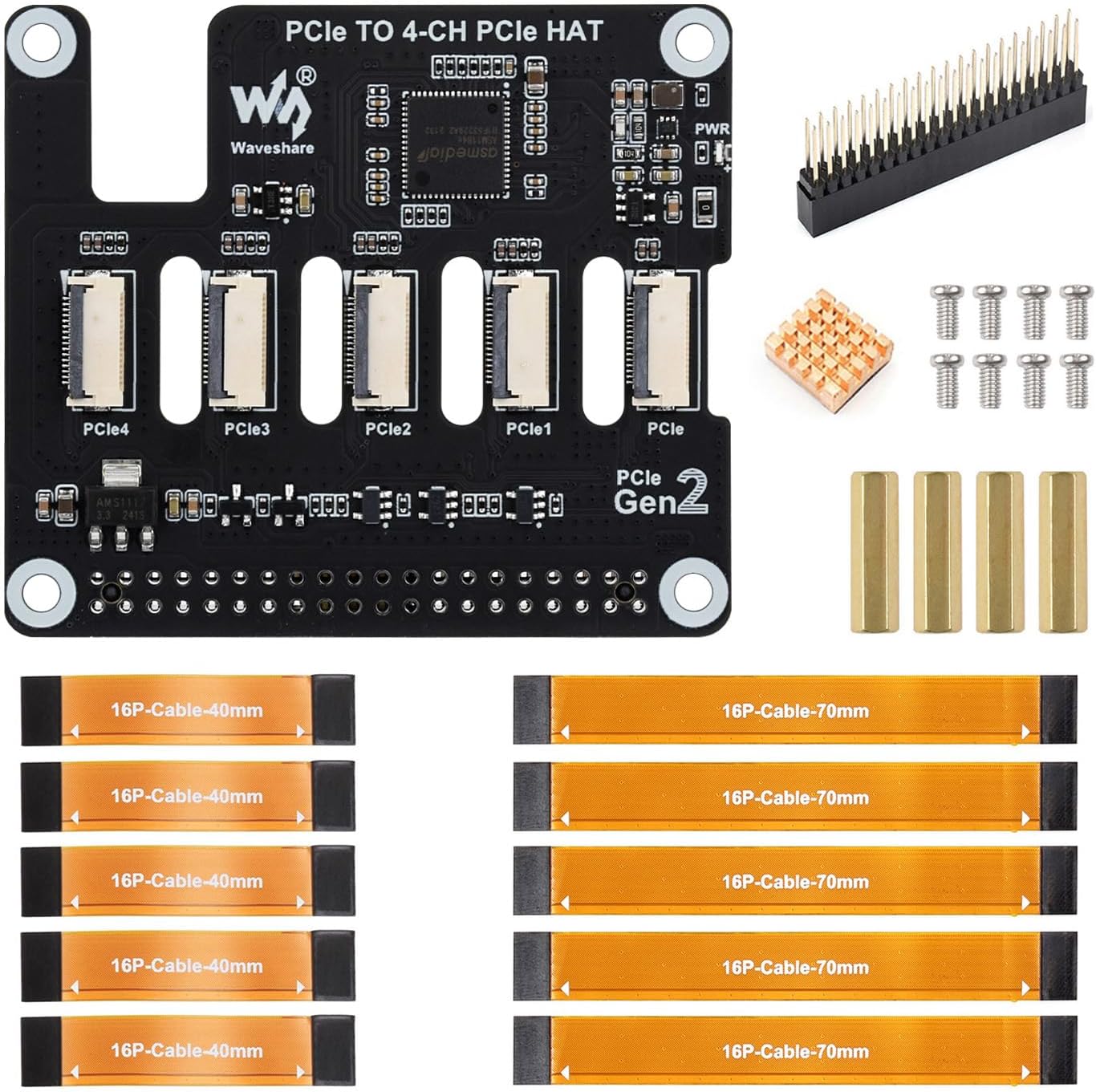
Image: The Waveshare Four-Channel PCIe FFC Expansion Board, showcasing its four PCIe FFC connectors and overall design.
2. د بسته محتويات
مهرباني وکړئ تصدیق کړئ چې لاندې ټول توکي ستاسو په کڅوړه کې شامل دي:
- PCIe TO 4-CH PCIe HAT (x1)
- 2*20 Pin header (x1)
- Heatsink (x1)
- Standoff pack (x1)
- 16P-Cable-40mm (x5)
- 16P-Cable-70mm (x5)

Image: A visual representation of all components included in the Waveshare Four-Channel PCIe FFC Expansion Board package.
3. ترتیب او نصب کول
3.1 Connecting to Raspberry Pi 5
The expansion board connects to the Raspberry Pi 5 via a 16PIN ribbon cable. Ensure the cable is connected correctly to avoid malfunction or damage.
- Locate the 16PIN PCIe interface on your Raspberry Pi 5.
- Carefully align the 16PIN ribbon cable with the connector on the Raspberry Pi 5 and the expansion board.
- Gently insert the cable, ensuring it is fully seated and oriented correctly. Refer to the diagram below for correct connection.

Image: A diagram illustrating the correct and incorrect ways to connect the 16PIN ribbon cable between the expansion board and Raspberry Pi 5.
3.2 Stacking Multiple PCIe HAT Modules
This board supports stacking multiple PCIe HAT modules for enhanced functionality. The flexible design allows for various configurations to suit your project needs.
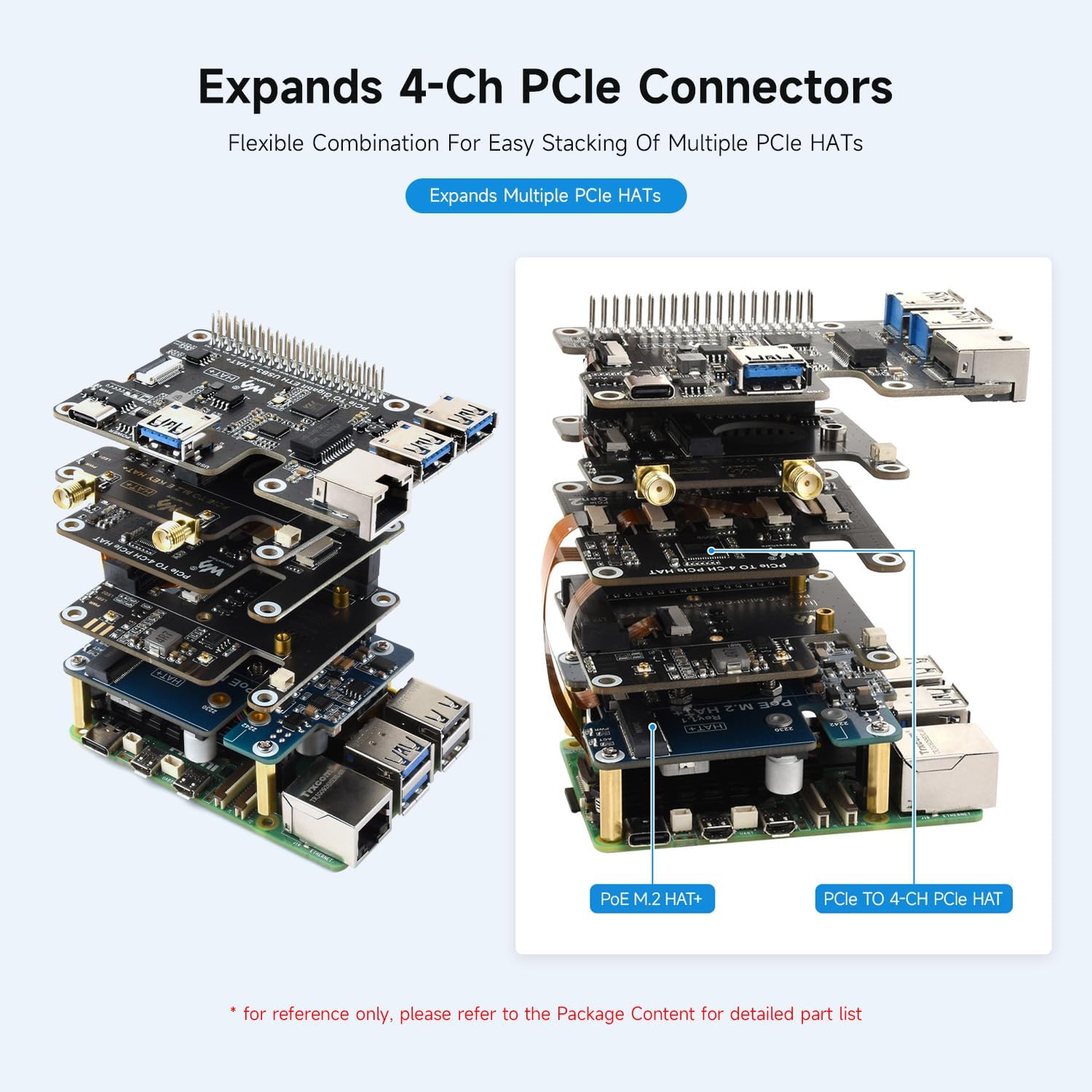
انځور: یو پخوانیample of multiple Waveshare PCIe HAT modules stacked on a Raspberry Pi 5, showcasing the modular expansion capability.
3.3 Heatsink Installation
A heatsink is included to help manage thermal performance. Remove the release paper from the heatsink and attach it to the designated chip on the expansion board.

انځور: یو مفصل view of the expansion board, indicating the location for heatsink installation and providing outline dimensions.
4. عملیاتي لارښوونې
Once connected, the Waveshare Four-Channel PCIe FFC Expansion Board provides four PCIe Gen2 interfaces for connecting various PCIe HAT modules. The board supports PCIe Gen2 (PCIe 2.0) speed, ensuring efficient data transfer for connected devices.

Image: The expansion board in operation with a Raspberry Pi 5, illustrating its PCIe Gen2 transmission speed capabilities.
The board is equipped with a power monitoring chip and EEPROM, allowing for real-time monitoring of power status and storing HAT ID and product information. Dual LED indicators (ACT Status and PWR) provide clear visual feedback on the device's working status.
۵.۴ د محصول رسمي ویډیو
Video: An official Waveshare video showcasing the PCIe TO Series expansion boards, including the Four-Channel PCIe FFC HAT, demonstrating their features, connectivity, and stacking capabilities with Raspberry Pi 5.
5. مشخصات
| فیچر | تفصیل |
|---|---|
| برانډ | ویوشییر |
| د ماډل نوم | PCIe TO 4-CH PCIe HAT |
| مطابقت | Raspberry Pi 5 |
| د PCIe انٹرفیس | 16PIN PCIe interface, supports PCIe Gen2 (PCIe 2.0) |
| Expansion Channels | 4-Channel FFC connectors |
| Stacking Support | Supports stacking multiple PCIe HAT modules |
| د بریښنا څارنه | Equipped with power monitoring chip |
| Product Information Storage | EEPROM for HAT ID and product information |
| د توکي وزن | 1.76 اونس |
| د کڅوړې ابعاد | 3.1 x 2.7 x 0.6 انچه |
6. ستونزه حل کول
- د پیوستون مسلې: Ensure the 16PIN ribbon cable is correctly and securely connected to both the Raspberry Pi 5 and the expansion board. Incorrect orientation can prevent functionality.
- ماډل ونه موندل شو: Verify that the PCIe HAT module is properly seated in its connector. Check for any physical obstructions or damage.
- د فعالیت مسلې: Confirm that your Raspberry Pi 5 firmware and operating system are up to date. Ensure that the connected PCIe modules are compatible with PCIe Gen2 speeds.
- د بریښنا شاخصونه: Observe the dual LED indicators (ACT Status and PWR) for diagnostic information. Refer to the Raspberry Pi 5 documentation for specific LED behavior.
7. تضمین او ملاتړ
Waveshare products are designed for reliability and performance. For technical support, troubleshooting assistance, or warranty inquiries, please visit the official Waveshare webسایټ ته مراجعه وکړئ یا مستقیم د دوی د پیرودونکو خدماتو سره اړیکه ونیسئ. د تضمین تصدیق لپاره خپل د پیرود رسید وساتئ.
For additional resources and community support, consider visiting Raspberry Pi forums and online communities where users often share solutions and experiences with expansion boards.


