1. پیژندنه
د HTC GT-288 برقي شیور غوره کولو لپاره مننه. دا لارښود ستاسو د نوي شیور د خوندي او مؤثره عملیاتو، ساتنې او پاملرنې لپاره اړین معلومات چمتو کوي. مهرباني وکړئ دا لارښوونې د لومړي کارولو دمخه په بشپړ ډول ولولئ او د راتلونکي حوالې لپاره یې وساتئ.
2. د خوندیتوب معلومات
د بریښنایی شاک، ټپي کیدو یا زیان د خطر کمولو لپاره، تل د خوندیتوب دا اساسي احتیاطي تدابیر تعقیب کړئ:
- د چارج کولو کیبل یا د بریښنا اډاپټر په اوبو یا نورو مایعاتو کې مه ډوبوئ.
- وسیله د ماشومانو څخه لرې وساتئ.
- ډاډ ترلاسه کړئ چې شیور په بشپړه توګه وچ دی مخکې له دې چې د چارج کولو کیبل سره وصل شي.
- که چیرې تیغ یا ورق زیانمن شوی وي نو د شیور څخه کار مه اخلئ، ځکه چې دا ممکن د ټپي کیدو لامل شي.
- یوازې چمتو شوي USB چارج کیبل وکاروئ.
- دا وسیله یوازې د شخصي استعمال لپاره ډیزاین شوې ده.
3. د بسته محتويات
مهرباني وکړئ د لاندې توکو لپاره په بسته کې وګورئ:
- ۱ x HTC GT-288 برقي شیور
- 1 x د USB چارج کیبل
- ۳ x دقیق کمبونه (۱ ملي میتر، ۳ ملي میتر، ۵ ملي میتر)
- 1 x د پاکولو برش
- ۱ x غوړونکی غوړ
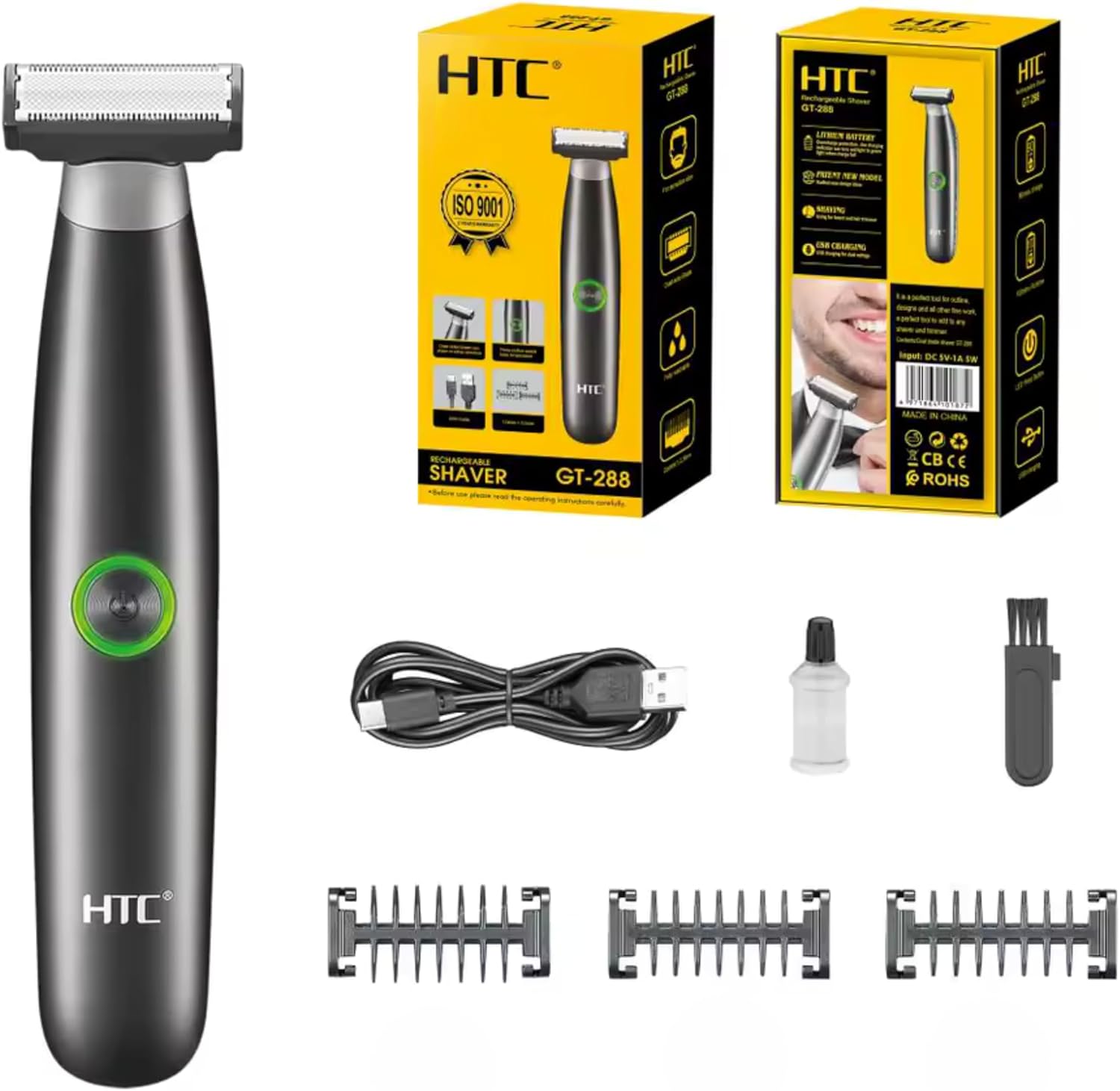
انځور ۳.۱: د HTC GT-288 برقي شیور کڅوړې محتويات، په شمول د شیور، USB کیبل، درې دقیق کنگھي، د پاکولو برش، او غوړولو غوړ.
4. محصول ختم شوview
د HTC GT-288 برقي شیور یو ښکلی ډیزاین لري چې د دوه اړخیزه تیغ سره د اغیزمنې تراشلو او ږیرې کولو لپاره دی. پدې کې د پریس بټن سویچ شامل دی چې په اسانۍ سره چلیږي او د اسانه پاکولو لپاره په بشپړ ډول د مینځلو وړ دی.
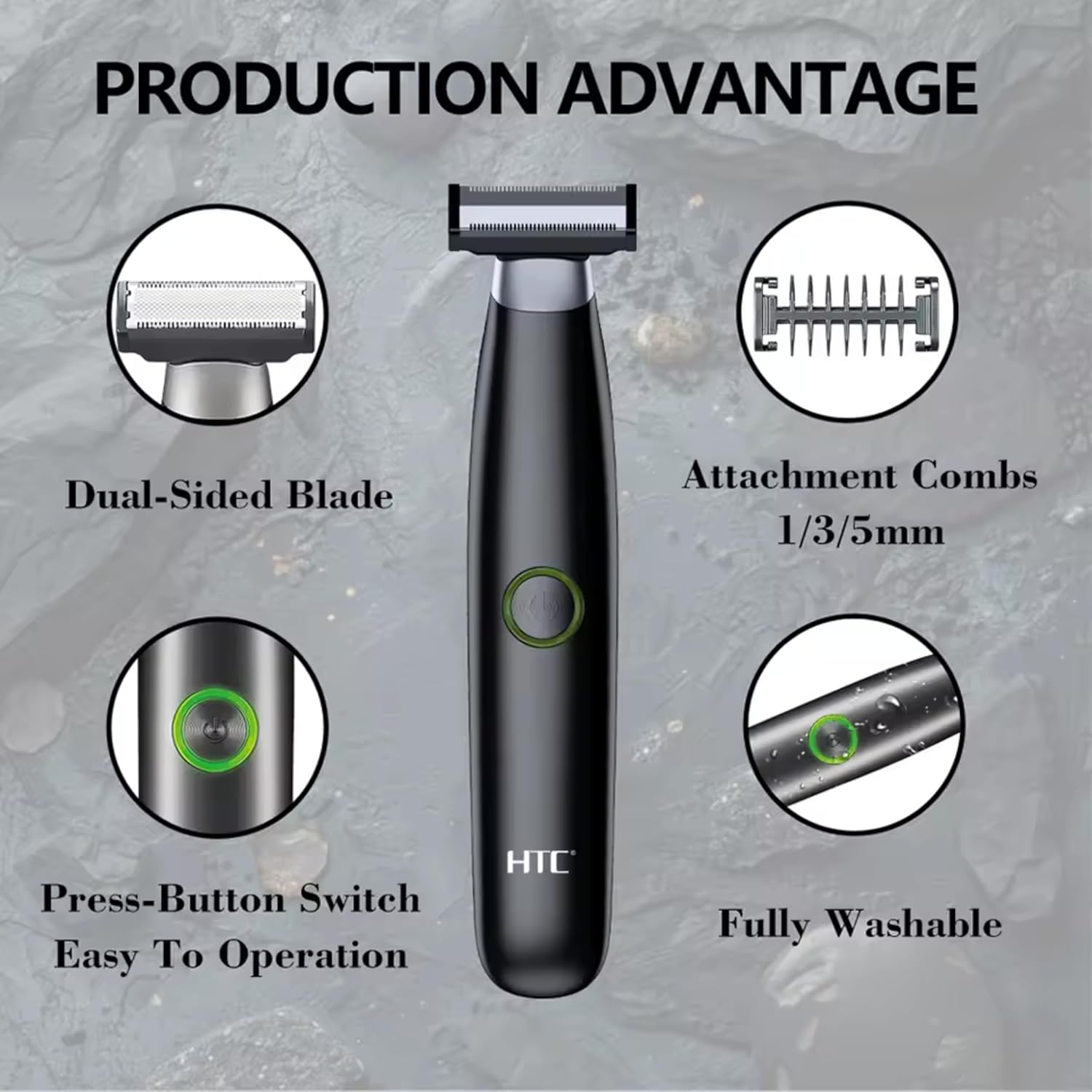
انځور 4.1: اوورview د HTC GT-288 برقي شیور له مهمو ځانګړتیاوو څخه، دوه اړخیزه تیغ، ضمیمه کنگهه (1/3/5mm)، د فشار تڼۍ سویچ، او په بشپړه توګه د مینځلو وړ ډیزاین روښانه کول.

انځور ۴.۲: د LED د فشار تڼۍ تفصیل، کوم چې د اسانه عملیاتو لپاره د آن/آف سویچ په توګه کار کوي.
5. ترتیب کول
- خلاص کړئ: په احتیاط سره د بسته بندۍ څخه ټولې برخې لرې کړئ.
- لومړنی لګښت: د لومړي ځل کارولو دمخه، شیور په بشپړه توګه چارج کړئ. د چارج کولو لارښوونو لپاره 6 برخې ته مراجعه وکړئ.
- کنگهه وصل کړئ (اختیاري): که وغواړئ، د دریو دقیقو ږیرو څخه یو غوره کړئ (۱ ملي میتر، ۳ ملي میتر، یا ۵ ملي میتر) او د شیور په سر یې وغورځوئ تر هغه چې ځای ته ورسیږي. ډاډ ترلاسه کړئ چې دا په خوندي ډول وصل دی.
6. چارج کول
د HTC GT-288 برقي شیور د بې تار عملیاتو لپاره د چارج وړ بیټرۍ سره سمبال دی.
- ډاډ ترلاسه کړئ چې شیور بند دی.
- د USB چارج کولو کیبل کوچنۍ پای د شیور چارج کولو پورټ سره وصل کړئ.
- د USB کیبل لویه پای د یو مناسب USB بریښنا سرچینې سره وصل کړئ (د مثال په توګه، کمپیوټر، د USB دیوال اډاپټر).
- په شیور کې د LED شاخص به روښانه شي ترڅو وښيي چې چارج کیږي.
- د شیور د لومړي ځل کارولو دمخه په بشپړه توګه چارج کولو ته اجازه ورکړئ. بشپړ چارج معمولا څو ساعته وخت نیسي.
- کله چې په بشپړه توګه چارج شي، د USB کیبل جلا کړئ.
7. عملیاتي لارښوونې
د HTC GT-288 شیور د لوند او وچ دواړو شیو کولو لپاره کارول کیدی شي.
- پاور آن: د شیور د چالانولو لپاره د LED تڼۍ فشار ورکړئ.
- وچ ویښته: د وچې خریلو لپاره، ډاډ ترلاسه کړئ چې ستاسو پوست پاک او وچ وي. په نرمۍ سره د خریلو ماشین ستاسو د پوستکي په وړاندې فشار ورکړئ او په ورو، حتی حرکت سره یې د ویښتانو د ودې په لور حرکت ورکړئ.
- لوند شیول: د لوند خریلو لپاره، په خپل پوستکي باندې د خریلو فوم یا جیل واچوئ. خریلوونکی د اوبو ضد دی، چې په شاور کې یا د اوبو سره د کارولو اجازه ورکوي. خریلوونکی په نرم او حتی حرکت سره حرکت ورکړئ.
- د دقیق کمبونو کارول: د ږیرې، د غاړې سوځیدنې، یا د مخ د نورو ویښتانو د پرې کولو لپاره مطلوب ۱ ملي میتر، ۳ ملي میتر، یا ۵ ملي میتر کنگھه په یو ځانګړي اوږدوالي سره وصل کړئ. د ویښتانو د ودې په لور د شیندونکي سره د شیندونکي حرکت وکړئ ترڅو یوشان کټ شي.
- بندول: د کارولو وروسته د شیور بندولو لپاره د LED تڼۍ بیا فشار ورکړئ.
8. ساتنه او پاکول
منظم پاکول غوره فعالیت تضمینوي او ستاسو د شیور عمر اوږدوي.
- بندول: تل د پاکولو دمخه د شیور بند کړئ.
- د سر مينځل: د شیور سر په بشپړه توګه د مینځلو وړ دی (د IPX6 درجه بندي). تاسو کولی شئ د شیور سر مستقیم د روانو اوبو لاندې ومینځئ ترڅو د ویښتو ټوټې لرې کړئ.
- د پاکولو برش استعمال کړئ: د لا بشپړ پاکولو لپاره، د چمتو شوي پاکولو برش څخه کار واخلئ ترڅو د تیغ او کنگهو ضمیمو څخه د ویښتو ضد ذرات لرې کړئ.
- غوړ شوي تیغونه: د پاکولو او وچولو وروسته، د چمتو شوي غوړونکي غوړ یوه کوچنۍ څاڅکي په تیغونو واچوئ. د څو ثانیو لپاره د شیور چالان کړئ ترڅو غوړ په مساوي ډول وویشئ. دا د تیغ فعالیت ساتلو کې مرسته کوي.
- وچه: د ذخیره کولو یا بیا چارج کولو دمخه د شیور ته اجازه ورکړئ چې په بشپړه توګه په هوا کې وچ شي.

انځور ۸.۱: د HTC GT-288 برقي شیور د نل لاندې مینځل کیږي، چې د اسانه پاکولو لپاره د دې IPX6 بشپړ مینځلو وړ ډیزاین ښیې.
9. ستونزه حل کول
| ستونزه | احتمالي لامل | د حل لاره |
|---|---|---|
| شیور نه چالانیږي. | بیټرۍ ختمه شوې. | د شیور بشپړ چارج کړئ. |
| د خراش ماشین په مؤثره توګه نه پرې کوي. | تیغونه یې د ویښتو سره تړلي یا تیاره دي. | د شیور سر په بشپړه توګه پاک کړئ. د غوړولو غوړ واچوئ. که ستونزه دوام ومومي، تیغونه ممکن بدلولو ته اړتیا ولري. |
| خراش ویښتان را ایستل. | بیټرۍ ټیټه ده یا تیغونه بند دي. | د ګنډلو ماشین چارج کړئ. د ګنډلو ماشین سر پاک کړئ. |
| د استعمال پر مهال شیور ودریږي. | بیټرۍ ختمه شوې. | د شیور چارج کړئ. |
10. مشخصات
- نښه: HTC
- د موډل نوم: GT-288
- د بریښنا سرچینه: د ریچارج وړ USB
- ځانګړي ځانګړتیاوې: USB کیبل، د تنظیم وړ کمبونه، د چارج وړ، د اوبو مقاومت، لوند او وچ کارول
- وړاندیز شوي استعمالونه: د مخ خریل، د ږیرې پرې کول، ورځنی استعمال، سفر
- شاملې برخې: برقي شیور، USB کیبل، ۳ دقیق کمبونه، د پاکولو برش، غوړونکی غوړ
- د محصول وزن: 250 ګرامه
- رنګ: تور
- د تیغ مواد: سټینلیس سټیل
- د سر ډول: دقیق ټریمر
11. تضمین او ملاتړ
دا محصول د HTC لخوا جوړ شوی دی. د هرې پوښتنې، تخنیکي ملاتړ، یا تضمین ادعاوو لپاره، مهرباني وکړئ د خپل پیرود پلیټ فارم له لارې مستقیم له پلورونکي یا تولیدونکي سره اړیکه ونیسئ. مهرباني وکړئ د تضمین موخو لپاره د پیرود ثبوت وساتئ.


