پیژندنه
د پیرودلو لپاره مننهasing the Matbip Multi-Platform Wireless Gaming Controller. This controller is designed to enhance your gaming experience across various platforms, including Nintendo Switch, Android, iOS, and PC. It features advanced functions such as TURBO burst, macro programming, customizable RGB lighting, and HD vibration, providing precise control and immersive feedback. Please read this manual carefully before use to ensure proper operation and to fully utilize all features.
محصول پای ته ورسیدview
Familiarize yourself with the various components and buttons of your Matbip controller.
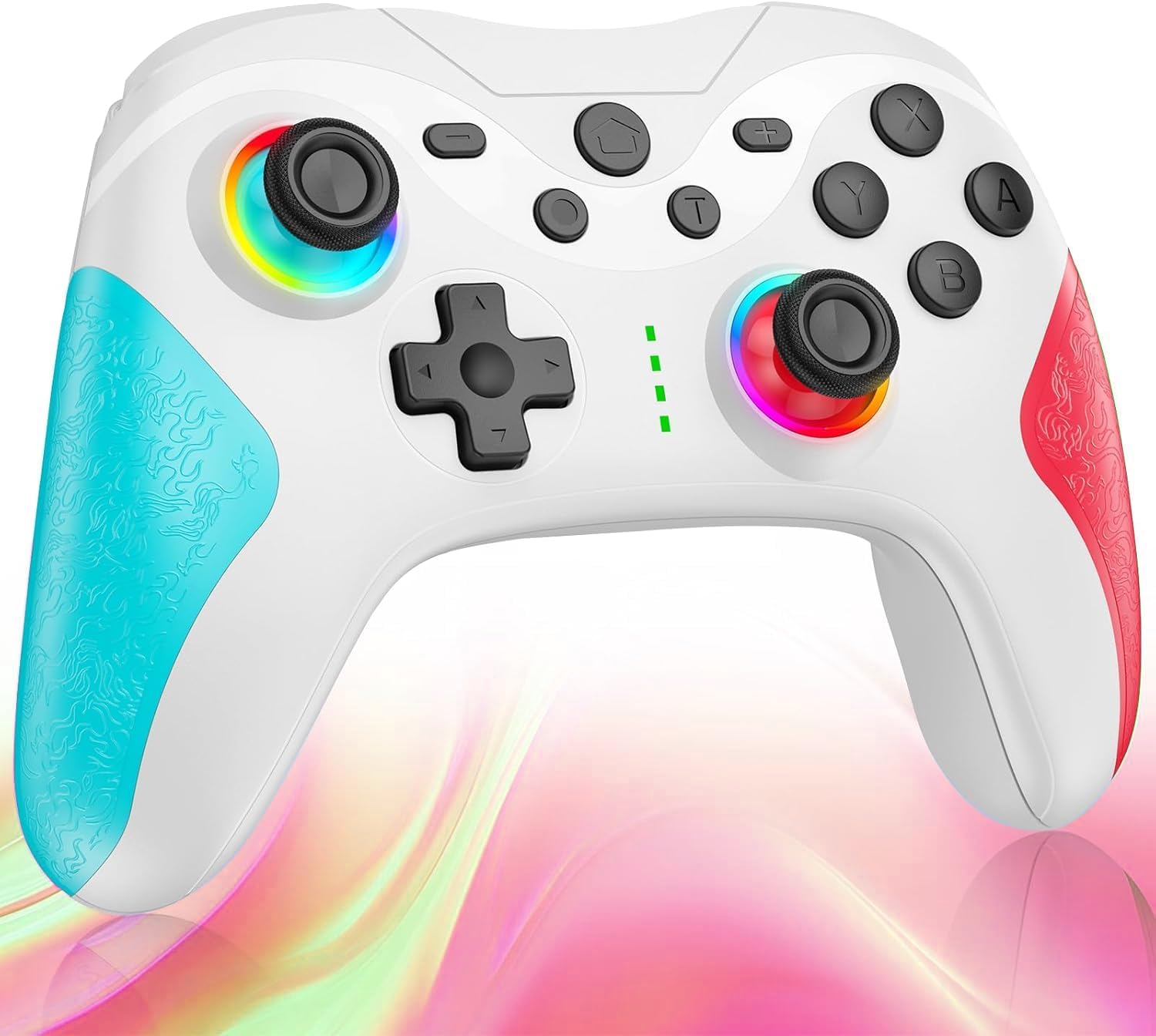
انځور: مخکی view of the Matbip Multi-Platform Wireless Gaming Controller. It features a white body with blue textured grips on the left and red textured grips on the right. The joysticks are illuminated with a rainbow RGB light. Standard buttons (A, B, X, Y), a D-pad, and central function buttons (Home, Plus, Minus, T) are visible.
مهمې برخې:
- چپ/ښي جوی سټیکونه: For directional control, with customizable RGB lighting.
- D-pad: د دقیق سمتي ان پټ لپاره.
- د عمل تڼۍ (A/B/X/Y): Standard gaming input buttons.
- Shoulder Buttons (L/R/ZL/ZR): Top-mounted trigger and bumper buttons.
- د شا تڼۍ: Additional programmable buttons on the rear for strategic gameplay.
- د کور تڼۍ: د سیسټم کور سکرین ته راستنیږي.
- جمع (+) / منفي (-) تڼۍ: System-specific function buttons.
- T Button (TURBO): Activates and manages the TURBO burst function.
- د چارج کولو بندر: د چارج کولو لپاره USB-C بندر.
- د شاخص څراغونه: د اتصال حالت او د بیټرۍ کچه ښکاره کړئ.
چمتو کول
1. د کنټرولر چارج کول
Before first use, fully charge the controller. Connect the provided USB-C cable to the controller's charging port and the other end to a USB power source (e.g., console, PC, or USB wall adapter). The indicator lights will show charging status and turn off when fully charged.
2. د وسایلو سره یوځای کول
The controller supports Bluetooth wireless connection across multiple platforms.
د نینټینډو سویچ لپاره:
- د سویچ کور مینو کې، غوره کړئ کنټرولونکي > گرفت / نظم بدل کړئ.
- فشار ورکړئ او ونیسئ د کور تڼۍ on the Matbip controller for 3-5 seconds until the indicator lights flash rapidly.
- Once paired, the indicator light(s) on the controller will remain solid.
د Android/iOS وسیلو لپاره:
- په خپل Android یا iOS وسیله کې بلوتوټ فعال کړئ.
- فشار ورکړئ او ونیسئ د کور تڼۍ on the Matbip controller for 3-5 seconds until the indicator lights flash rapidly.
- On your device's Bluetooth settings, select the controller (e.g., "Matbip Controller") from the list of available devices to pair.
د کمپیوټر لپاره (وینډوز):
- ډاډ ترلاسه کړئ چې ستاسو کمپیوټر بلوتوث فعال کړی دی. لاړ شه ترتیبات > وسایل > بلوتوث او نور وسایل.
- کلیک وکړئ بلوتوټ یا نور وسیله اضافه کړئ > بلوتوث.
- فشار ورکړئ او ونیسئ د کور تڼۍ on the Matbip controller for 3-5 seconds until the indicator lights flash rapidly.
- Select the controller from the list of devices to pair.
عملیاتي لارښوونې
TURBO Burst Function:
The TURBO function allows for rapid, automatic button presses, ideal for combat games.
- د ټربو فعالولو لپاره: فشار ورکړئ او ونیسئ د T تڼۍ, then press the desired action button (e.g., A, B, X, Y, L, R, ZL, ZR). The button will now continuously activate when held down.
- د ټربو سرعت تنظیمولو لپاره: د ساتلو په وخت کې د T تڼۍ، حرکت وکړئ right joystick up or down to cycle through 3 different burst speeds.
- د ټربو غیر فعالولو لپاره: فشار ورکړئ او ونیسئ د T تڼۍ, then press the same action button again.
میکرو فعالیت:
Program a sequence of button presses to a single back button for complex actions.
- Specific instructions for macro programming will be detailed in the full manual. Generally, this involves entering a programming mode, pressing the sequence, and assigning it to a back button.
د اصلاح وړ RGB رڼا:
The joysticks feature 9-color RGB lighting to enhance your gaming atmosphere.
- To change RGB color/mode: Press a specific button combination (e.g., T + Left Joystick click) to cycle through different colors and lighting effects.
HD Vibration Adjustment:
Adjust the intensity of the HD vibration feedback to your preference (4 levels).
- To adjust vibration: Press a specific button combination (e.g., T + D-Pad Up/Down) to cycle through the 4 vibration levels.
ګیرو سینسر:
The high-precision gyro sensor enables intuitive motion control in supported games.
- The gyro sensor is automatically active when connected to a compatible device (e.g., Nintendo Switch) and used in games that support motion controls.
Sleep Wake-up Function:
The controller supports waking up your Nintendo Switch console from sleep mode.
- When the Switch is in sleep mode, simply press the د کور تڼۍ on the controller to wake it up and reconnect.
ساتنه
مناسب ساتنه ستاسو د کنټرولر اوږد عمر او غوره فعالیت تضمینوي.
- پاکول: د کنټرولر د پاکولو لپاره نرم، وچ ټوکر وکاروئ. د سختې خاورې لپاره، لږ څهampټوکر د اوبو سره. سخت کیمیاوي توکي یا د کثافاتو پاکوونکي مه کاروئ.
- ذخیره کول: کنټرولر په یخ او وچ ځای کې د مستقیم لمر وړانګو، سختې تودوخې او رطوبت څخه لرې وساتئ.
- د بیټرۍ پاملرنه: Avoid fully discharging the battery frequently. If storing for a long period, charge the controller to about 50% every few months.
- له څاڅکو ډډه وکړئ: کنټرولر د څاڅکو او اغیزو څخه خوندي کړئ، کوم چې کولی شي داخلي برخو ته زیان ورسوي.
د ستونزو حل کول
که تاسو د خپل کنټرولر سره ستونزې سره مخ شئ، مهرباني وکړئ لاندې عام حلونو ته مراجعه وکړئ:
| ستونزه | احتمالي حل |
|---|---|
| کنټرولر نه چالانېږي. | ډاډ ترلاسه کړئ چې کنټرولر چارج شوی دی. د USB-C کیبل په کارولو سره یې د بریښنا سرچینې سره وصل کړئ. |
| Controller does not pair. | Ensure Bluetooth is enabled on your device. Make sure the controller is in pairing mode (flashing lights). Try restarting both the controller and the device. |
| د ننوتلو ځنډ یا قطع کیدل. | Ensure there are no strong wireless interferences nearby. Move closer to the device. Re-pair the controller. |
| تڼۍ یا جوی سټیکونه غیر ځواب ویونکي دي. | Try resetting the controller (refer to the full manual for reset instructions, usually a small pinhole button). Ensure no debris is obstructing the buttons. |
| وایبریشن کار نه کوي. | Check if vibration is enabled in the game or system settings. Adjust the vibration intensity on the controller. |
مشخصات
| فیچر | تفصیل |
|---|---|
| د محصول ابعاد | 10 x 15 x 6.5 سانتي متره |
| وزن | 300 ګرامه |
| ارتباط | بلوتوث بې سیم |
| مطابقت | Nintendo Switch, Android, iOS, PC (Windows) |
| ځانګړي ځانګړتیاوې | TURBO Burst, Macro Function, 9-Color RGB Lighting, 4-Level HD Vibration, Gyro Sensor, Back Buttons, Sleep Wake-up |
| ASIN | B0FHWRK7CQ |
| د خپریدو نیټه | د ۲۰۲۴ کال د جولای ۹ مه |
تضمین او ملاتړ
Matbip is committed to providing high-quality products and customer satisfaction. This product comes with a standard manufacturer's warranty. For detailed warranty information, please refer to the documentation included with your purchase or contact Matbip customer support.
If you require further assistance, have questions, or encounter issues not covered in this manual, please contact our customer support team. A Japanese instruction manual is included with the product to ensure ease of use for first-time users.
د اړیکو معلومات: Please refer to the packaging or the official Matbip webد پیرودونکو د ملاتړ د اړیکو د تازه معلوماتو لپاره سایټ.


