پیژندنه
This manual provides detailed instructions for the setup, operation, and maintenance of your HTC N15 Wireless Clip On Earbuds. Please read this manual thoroughly before using the product to ensure proper function and longevity.
د بسته محتويات
ډاډ ترلاسه کړئ چې ټول توکي ستاسو د محصول په کڅوړه کې شتون لري:
- 1 Pair HTC N15 Clip On Earbuds
- د چارج کولو قضیه
- 1 د USB-C چارج کیبل
- 1 Quick Start Guide (Basic Operations)
محصول پای ته ورسیدview
The HTC N15 Wireless Clip On Earbuds feature an open-ear design for situational awareness and a lightweight, secure fit. They come with a compact charging case for extended use.
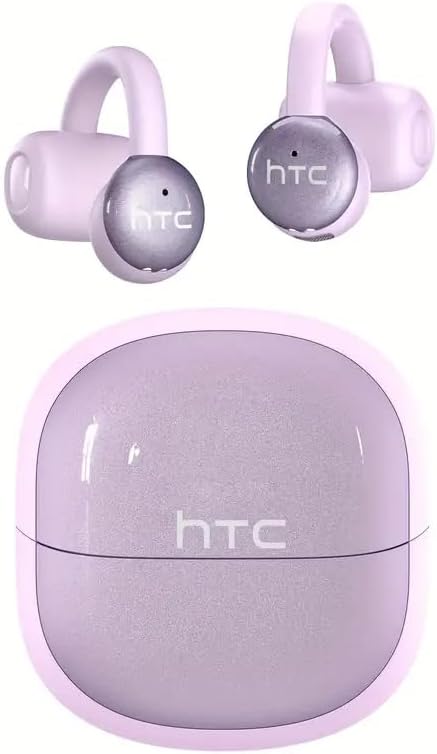
Image: HTC N15 Wireless Clip On Earbuds and Charging Case.

Image: The HTC N15 earbuds and charging case, highlighting battery life features such as 1.5 hours fast charging, 24 hours with the charge case, 8 hours on a single charge, and a Type-C charge port.
د Earbuds او قضیه چارج کول
Before first use, fully charge the earbuds and charging case. The charging case provides additional power for on-the-go charging.
- د قضیې چارج کول: Connect the provided USB-C cable to the charging port on the case and a power source. The indicator lights on the case will show the charging status.
- د ایربډ چارج کول: Place the earbuds into the charging case. Ensure they are correctly seated. The earbuds will begin charging automatically.
A single charge provides approximately 8 hours of playback. The charging case extends total playtime to about 22 hours. Fast charging allows for quick power replenishment.

Image: Visual representation of the HTC N15 earbuds' battery life: 8 hours on a single charge, 24 hours with the charging case, and 1.5 hours for fast charging.
تنظیم او جوړه کول
The HTC N15 earbuds utilize Bluetooth 6.0 technology for a stable and low-latency connection. They are compatible with iOS and Android devices.
- پاور آن: د چارج کولو کیس خلاص کړئ. د غوږ بډونه به په اتوماتيک ډول فعال شي او د جوړې کولو حالت ته به ننوځي.
- بلوتوث فعال کړئ: په خپل وسیله (سمارټ فون، ټابلیټ، لپ ټاپ) کې، بلوتوث فعال کړئ.
- وسیله غوره کړئ: In your device's Bluetooth settings, search for 'HTC NE15' and select it to pair.
- تایید: Once paired, a voice prompt will confirm the connection.

Image: A diagram illustrating the 'Upgraded Bluetooth 6.0 Technology' with a comparison to Bluetooth 5.3 and 5.4, emphasizing low latency and fast connection.

Image: The HTC N15 earbuds and charging case shown with various compatible devices including notebooks, TVs, desktops, watches, phones, and iPads, demonstrating flexible connectivity. A phone screen displays 'HTC NE15 Connected'.
Operating Instructions (Touch Control)
The HTC N15 earbuds feature smart touch controls on both earbuds for easy management of calls and music playback.
- ځواب / پای کال: Click either earbud once.
- زنګ رد کړئ: د 2 ثانیو لپاره هر یو ایربډ فشار ورکړئ او ونیسئ.
- میوزیک چلول / بندول: په هر یو ایربډ دوه ځله کلیک وکړئ.
- پخوانۍ سندره: په چپ غوږۍ کې درې ځله کلیک وکړئ.
- بله سندره: په ښي غوږۍ کې درې ځله کلیک وکړئ.
- حجم پورته کول: Click the right earbud once.
- کموالی: Click the left earbud once.
- د غږ همکار: کیڼ غوږ بډ د 2 ثانیو لپاره ونیسئ.
- د لوبې حالت: ښي غوږ بډ د 2 ثانیو لپاره ونیسئ.

Image: A diagram illustrating the touch control functions for the HTC N15 earbuds, showing actions for answering/ending calls, rejecting calls, playing/pausing music, skipping tracks, adjusting volume, activating voice assistant, and enabling game mode.
د اغوستلو لارښوونه
The HTC N15 earbuds feature an ergonomic open-ear clip design for a secure and comfortable fit, allowing you to remain aware of your surroundings.
- Identify L/R: Confirm the left (L) and right (R) earbuds.
- موقعیت: Confirm the direction of the earbud.
- کلیپ آن: Gently clip the earbud onto the thinnest part of your ear by sliding it down.
- سمون: Adjust the earbud tip to align with your ear canal for optimal sound and comfort.
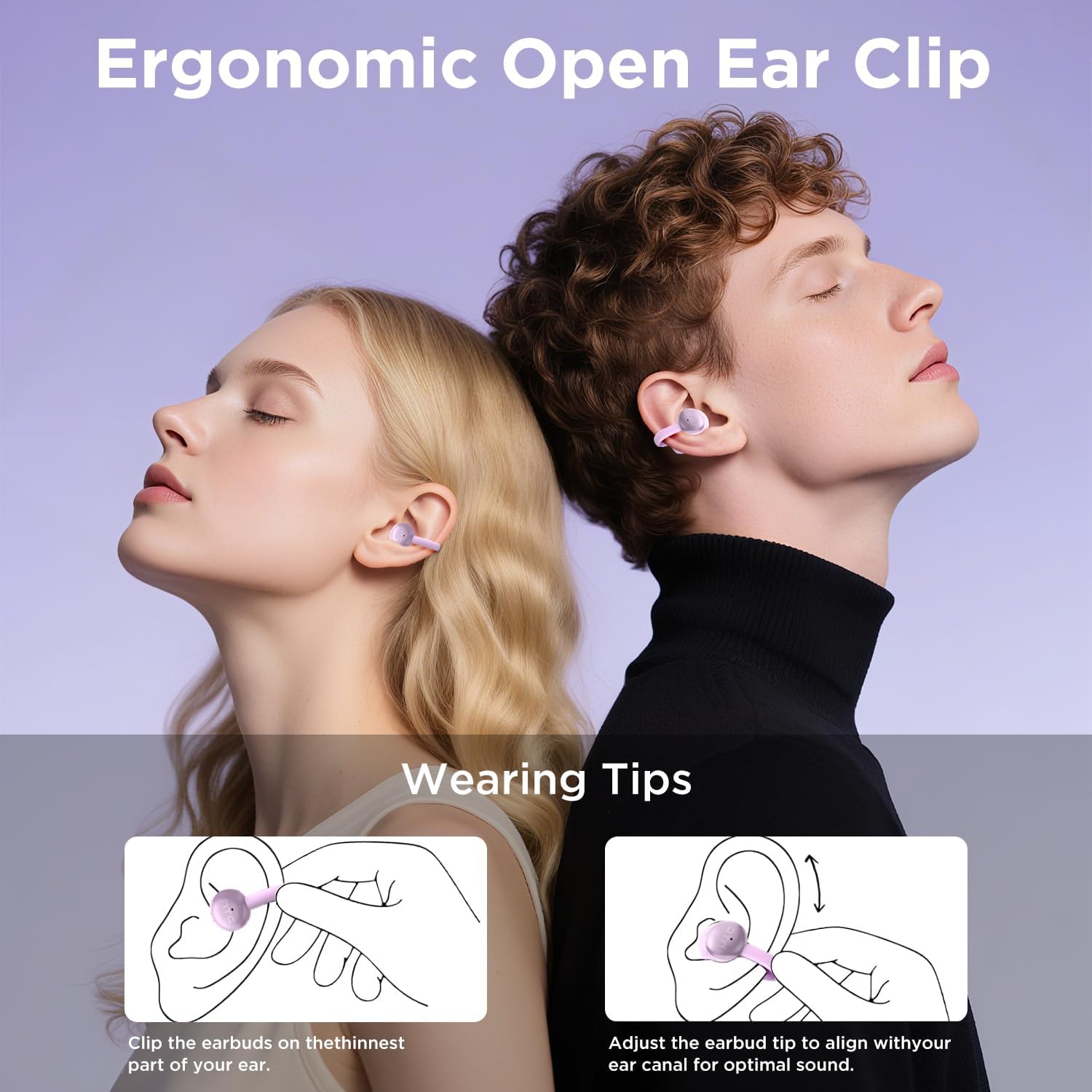
Image: A visual guide demonstrating the ergonomic open-ear clip design and wearing tips for the HTC N15 earbuds, showing how to clip them onto the ear and adjust for optimal sound.

Image: The HTC N15 earbuds emphasizing 'All-Day Comfort' with features like '4.7g Super Light' and a 'Flexible C-Bridge Design' for a secure fit.

Image: A four-step visual guide titled 'HOW TO WEAR?' showing how to correctly position and adjust the HTC N15 earbuds on the ear.
ساتنه
To ensure the longevity and optimal performance of your HTC N15 earbuds, follow these maintenance guidelines:
- پاکول: د غوږونو غوږوالۍ او د چارج کولو کیس په منظم ډول د نرم او وچ ټوکر سره پاک کړئ. د سختو کیمیاوي موادو یا کثافاتو کارولو څخه ډډه وکړئ.
- د اوبو مقاومت: The earbuds are IPX4 sweatproof, meaning they are resistant to splashes and sweat. Do not submerge them in water or expose them to heavy rain.
- ذخیره کول: کله چې په کارولو کې نه وي، د غوږ بډونه د چارج کولو په قضیه کې وساتئ ترڅو دوی د دوړو او زیان څخه خوندي کړي.
- دحرارت درجه: د اوږدې مودې لپاره د غوږ بډونه د سختې تودوخې (ګرمې یا سړې) یا مستقیم لمر وړانګو ته مه ښکاره کوئ.
د ستونزو حل کول
If you encounter issues with your HTC N15 earbuds, refer to the following common solutions:
- د غوږونو نه جوړېږي: Ensure both earbuds are charged and in pairing mode. Turn off and on your device's Bluetooth, then try pairing again.
- بې غږه یا ټیټ غږ: Check the volume levels on both your device and the earbuds. Ensure the earbuds are correctly positioned in your ears. Due to the open-ear design, you may need to increase the volume slightly in noisy environments.
- د غوږونو غورځېدل: Ensure you are wearing the earbuds correctly as per the wearing instructions. Adjust the clip and earbud tip for a snug fit.
- د لمس کنټرولونه بې ځوابه دي: Ensure your fingers are clean and dry. Try restarting the earbuds by placing them back in the case and taking them out again.
- د چارج کولو مسلې: Verify the USB-C cable and power source are working. Ensure the earbuds are properly seated in the charging case.
مشخصات
| فیچر | تفصیل |
|---|---|
| د ماډل نوم | د HTC NE15 |
| د ارتباط ټیکنالوژي | بېسیم (بلوتوث ۵.۳) |
| د غوږ شکل | خلاص غوږ |
| د کنټرول طریقه | لمس |
| د بیټرۍ ژوند (ایربډونه) | ۸ ساعته (یو ځل چارج) |
| د لوبې ټول وخت (د قضیې سره) | 22 ساعته |
| د اوبو د مقاومت کچه | IPX4 (د خولې په وړاندې مقاومت لرونکی) |
| مواد | پلاستیک، سیلیکون |
| د توکي وزن | 4.6 اونس |
| مطابقت لرونکې وسیلې | Cellphones, Tablets |
| UPC | 768649989703 |
د محصول ویډیو
ویډیو: د بکس خلاصول او پورته کولview of the HTC Wireless Clip On Earbuds N15 Bluetooth 6.0. This video demonstrates the product packaging, contents, and the physical appearance of the earbuds and charging case.
تضمین او ملاتړ
HTC provides customer support for its products. For any questions or assistance, please refer to the contact information provided with your purchase or visit the official HTC support webسایټ
د پیرودونکي ملاتړ: 7*24 Live Chat Support is available for assistance with your HTC N15 earbuds.
مهرباني وکړئ د تضمین ادعاګانو لپاره د پیرود ثبوت وساتئ.


