1. پیژندنه
This manual provides detailed instructions for the JTEMAN L41 Cell Phone Stand, which integrates a Bluetooth speaker and wireless charging functionality. Please read this manual thoroughly before use to ensure proper operation and to maximize the product's features.
2. د بسته محتويات
ډاډ ترلاسه کړئ چې لاندې ټول توکي ستاسو په بسته کې شامل دي:
- Audio Wireless Charger (Main Unit)
- USB-C Adapter (Power Adapter)
- USB-C ته USB-C کیبل
- د کارن لارښود
3. محصول ختم شوview
The JTEMAN L41 is a versatile 3-in-1 device designed to streamline your desktop. It combines a stable phone stand, a wireless charging station, and a Bluetooth speaker into one compact unit.
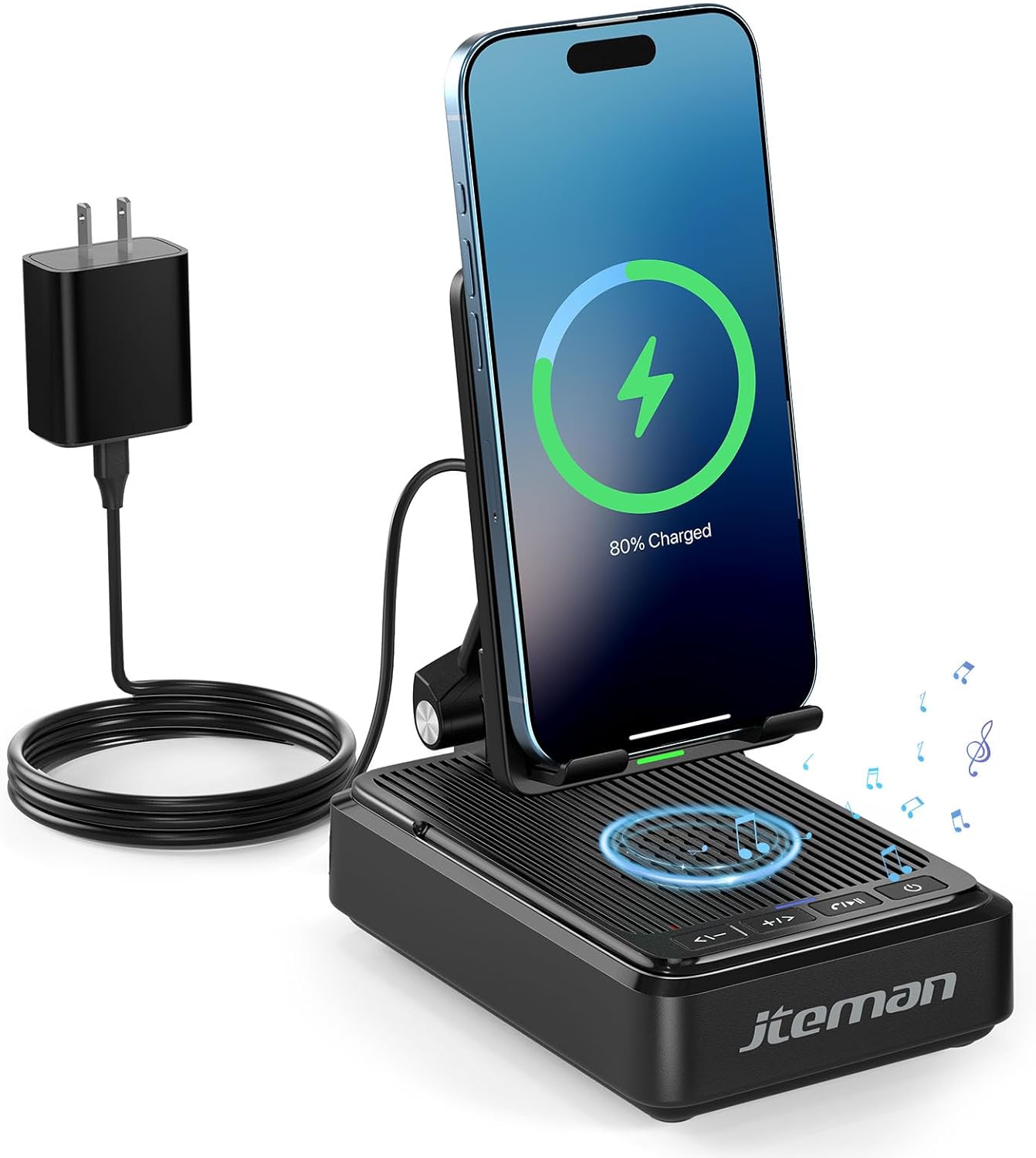
شکل 1: JTEMAN L41 Main Unit with Phone Charging
This image displays the JTEMAN L41 device in black, with a smartphone placed vertically on its stand, actively wirelessly charging. The device is connected to a power adapter via a USB-C cable. Musical notes are depicted around the speaker area, indicating its audio function.
کلیدي ځانګړتیاوې:
- 3-in-1 فعالیت: Integrates a phone stand, wireless charger, and Bluetooth speaker.
- د تنظیم وړ تلیفون لرونکی: Allows for optimal viewing angles and supports both horizontal and vertical phone placement.
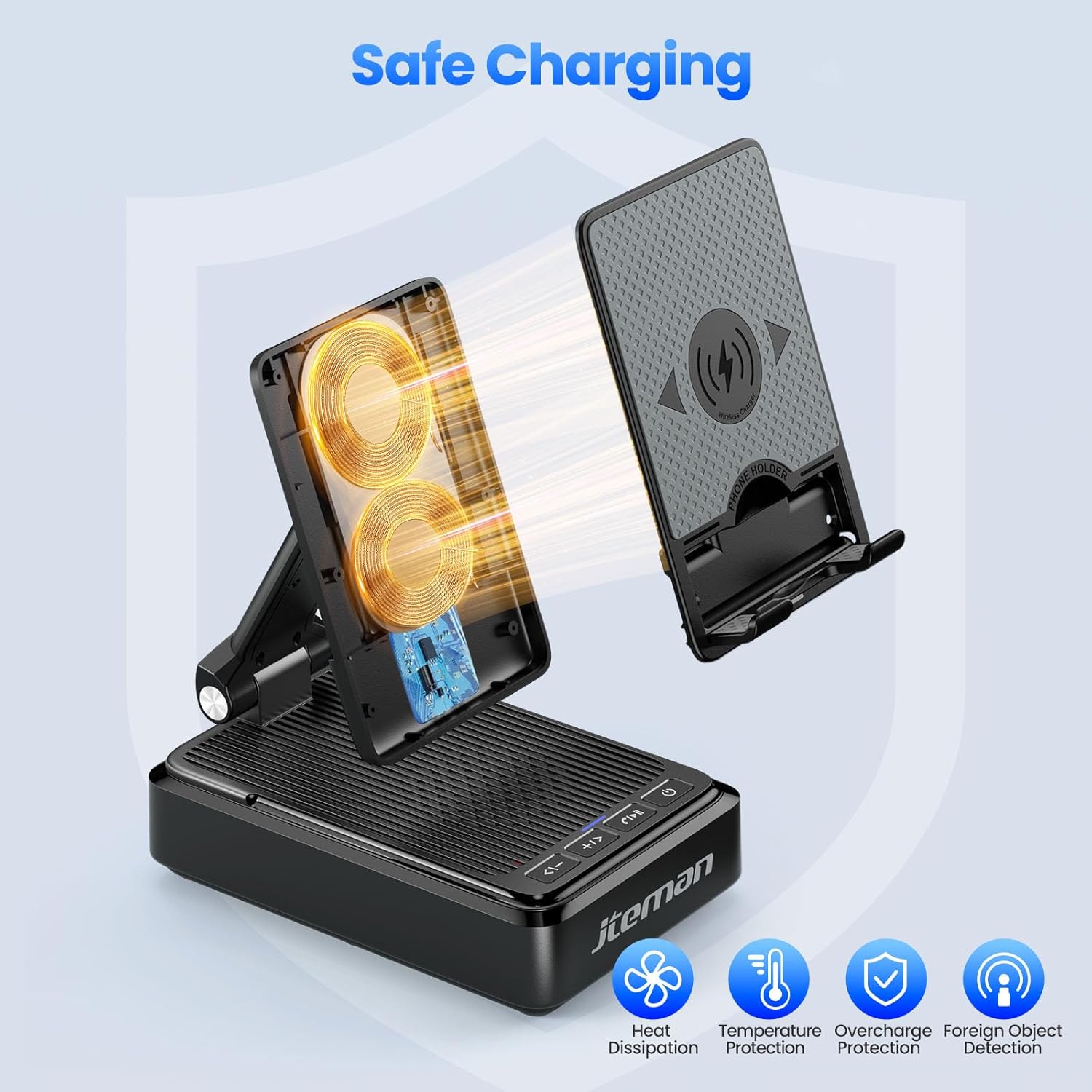
- Stable Wireless Charging: Features dual-coil design for flexible phone positioning and multiple safety protections.
- د بلوتوټ 5.3 سپیکر: Provides clear sound quality and stable connection for audio playback and hands-free calls.
- پوښي ډیزاین: Enhances portability and saves space.
۴. د تنظیم لارښوونې
- وسیله خلاص کړئ: په احتیاط سره د بسته بندۍ څخه ټولې برخې لرې کړئ.
- بریښنا وصل کړئ:
- Connect one end of the provided USB-C to USB-C cable to the USB-C port on the back of the JTEMAN L41 unit.
- Connect the other end of the USB-C cable to the provided USB-C power adapter.
- د بریښنا اډاپټر په معیاري دیوال کې ولګوئ.
یادونه: For optimal wireless charging performance, always use the included 9V2A adapter and USB-C cable.
- د تلیفون سټینډ تنظیم کړئ: Unfold the phone stand to your desired viewing angle. The stand is designed to be adjustable for comfortable viewing.
5. عملیاتي لارښوونې
5.1 بې سیم چارج کول
- Ensure the JTEMAN L41 is connected to a power source.
- Place your wireless charging-compatible smartphone onto the phone stand. The phone can be placed either horizontally or vertically.
- Align your phone's wireless charging coil with the charging area on the stand. Charging will begin automatically, indicated by a charging icon on your phone's screen.

شکل 2: د بې سیم چارج کولو مطابقت
This image illustrates the wireless charging function and its compatibility. It shows a smartphone in a case being wirelessly charged on the stand. Important notes indicate that cases should be ≤ 0.15 inches thick, and cases with metal rings, pockets, or magnets should be avoided for proper charging.
Important Notes for Wireless Charging:
- Supports phone cases with a thickness of ≤ 0.15 inches (approximately 3.8mm).
- Avoid using cases with metal rings, pop sockets, credit cards, or magnets, as these can interfere with wireless charging.
- The dual-coil design allows for flexible placement, but ensure proper alignment for efficient charging.
۵.۵ د بلوتوث سپیکر عملیات
- پاور آن: د بریښنا تڼۍ فشار او ونیسئ (🏻) on the front of the unit to turn on the speaker. A voice prompt or indicator light will confirm it's in pairing mode.
- جوړه کول:
- په خپل سمارټ فون یا بل بلوتوث فعال شوي وسیله کې، د بلوتوث ترتیباتو ته لاړ شئ.
- لټون available devices and select "JTEMAN41" (or similar name) from the list.
- Once connected, a confirmation sound will be heard.
- د آډیو پلې بیک: Play music or audio from your connected device. Use the volume controls on the JTEMAN L41 or your device to adjust the sound level.
- د لاسونو څخه وړیا تلیفون کول: When a call comes in, press the Play/Pause button (⏸) to answer. Press again to end the call.

شکل 3: Enjoying Music with the Bluetooth Speaker
This image shows a woman in a kitchen setting, holding a mug and smiling while a smartphone plays music on the JTEMAN L41 stand. Musical notes emanate from the speaker, highlighting its audio playback capability.
5.3 Phone Stand Functionality
The integrated phone stand is adjustable to provide optimal viewing angles for various activities.
- د تنظیم وړ زاویه: Gently pivot the phone rest up or down to achieve your preferred viewزاویه.
- لورينه: The stand supports both vertical and horizontal placement of your smartphone, ideal for video calls, watching movies, or browsing.
- ثبات: The stable, non-slip base and weighted structure prevent tipping, ensuring your device remains secure.
شکل 4: Adjustable Desktop Charging Stand
This image depicts a man sitting at a desk, interacting with a smartphone placed on the JTEMAN L41 stand. The stand is shown with an adjustable angle feature, and a diagram illustrates how the USB-C charging cable connects to the phone while on the stand.
5.4 د تڼۍ دندې
The control buttons are located on the front of the unit:
| د تڼۍ نښه | فعالیت |
|---|---|
| <— | حجم ښکته / مخکینی لار |
| + / > | حجم پورته / بل تعقیب |
| ⏸ | پلی / وقف / د ځواب زنګ / پای زنګ |
| 🏻 | پاور ON / OFF |
۱.۱. د خوندیتوب مهم معلومات
- وسیله د اوبو یا ډیر رطوبت سره مه مخ کوئ.
- د سختې تودوخې، مستقیم لمر وړانګو، یا د تودوخې سرچینو څخه ډډه وکړئ.
- وسیله مه جلا کوئ، ترمیم یې مه کوئ یا یې مه بدلوئ. دا به تضمین باطل کړي.
- د ماشومانو د لاسرسي څخه لرې وساتئ.
- Use only the provided power adapter and cable to prevent damage and ensure safe operation.
- د کارولو پرمهال د وسیلې شاوخوا مناسب هوا ورکول ډاډمن کړئ.
7. ساتنه
- پاکول: وسیله په نرم، وچ ټوکر سره پاک کړئ. د کثافاتو پاکوونکي یا محلولونه مه کاروئ.
- ذخیره کول: When not in use for extended periods, store the device in a cool, dry place. The foldable design allows for compact storage.
8. ستونزه حل کول
| ستونزه | احتمالي لامل | د حل لاره |
|---|---|---|
| وسیله نه چلیږي. | Not connected to power; Power button not pressed. | Ensure the power adapter is securely plugged into the unit and a working outlet. Press and hold the Power button. |
| بېسیم چارج کار نه کوي. | Phone not aligned; Case too thick; Foreign object; Phone not wireless charging compatible. | Re-align phone; Remove thick/metal cases; Remove foreign objects; Verify phone supports wireless charging. Use the included power adapter. |
| بلوتوث سپیکر نه وصل کیږي. | Speaker not in pairing mode; Bluetooth off on device; Device too far. | Ensure speaker is on and in pairing mode; Enable Bluetooth on your device; Move device closer to the speaker (within 10 meters). |
| د غږ ټیټ کیفیت. | Low battery; Device too far; Obstructions. | Ensure the unit is powered; Move device closer; Remove obstructions between device and speaker. |
9. مشخصات
| فیچر | تفصیل |
|---|---|
| د ماډل شمیره | L41 |
| د محصول ابعاد | 5.59 x 3.78 x 2.32 انچه |
| د توکي وزن | 14.9 اونس |
| ننوتۍ جلدtage | 9 ولټه |
| د محصول اوسنی | 2 Amps |
| د نښلونکي ډول | د USB ډول C |
| بلوتوث نسخه | 5.3 |
| مواد | اکریلونیتریل بوټایډین سټرینه |
| مطابقت لرونکې وسیلې | Smartphones, Tablets (with wireless charging capability) |
| Wireless Charging Case Thickness | ≤ 0.15 inches (3.8mm) |
10. تضمین او ملاتړ
JTEMAN provides the following support for this product:
- د ۱۲ میاشتو بدلول: The product is covered by a 12-month replacement policy from the date of purchase.
- ۲۴ ساعته ملاتړ: For any inquiries or assistance, please contact JTEMAN customer support.
To contact support, please refer to the contact information provided on the product packaging or the official JTEMAN webسایټ


